Notice. New forum software under development. It's going to miss a few functions and look a bit ugly for a while, but I'm working on it full time now as the old forum was too unstable. Couple days, all good. If you notice any issues, please contact me.
Turbo46 Guru Joined: 24/12/2017 Location: AustraliaPosts: 1693
Posted: 01:33am 03 Jan 2026
Copy link to clipboard
Print this post
I have a couple of projects where I would like to use a device to simulate a USB keyboard:
A joystick to input "A,S, W, Z, space" or similar.
An input device for a mini computer to drive a menu driven system (a simple HMI) using rugged buttons rather than a more fragile keyboard with many more buttons than are needed. This HMI would use MMBasic.
I would like to use MMBasic on the Pico because I'm familiar with it but that does not seem to support the Pico being used as an HID device. While Circuit Python will do it, that's not really the way want to go because I would find it easier to add extra bells and whistles using MMBasic.
Does anyone know how this could be done?
Thanks BillKeep safe. Live long and prosper.
TassyJim Guru Joined: 07/08/2011 Location: AustraliaPosts: 6538
Turbo46 Guru Joined: 24/12/2017 Location: AustraliaPosts: 1693
Posted: 03:12am 03 Jan 2026
Copy link to clipboard
Print this post
Thanks Jim, I did see that some time ago but was put off by the Chinese language on the config interface and was a bit suspicious that they wouldn't do what I want.
I would still need a Pico anyway and if it comes down to that I may as well use a Pico with Circuit Python with a little bit of help from AI.
Bill
PS I should have said that the HMI does use MMbasic.Keep safe. Live long and prosper.
Mixtel90 Guru Joined: 05/10/2019 Location: United KingdomPosts: 8904
Posted: 08:51am 03 Jan 2026
Copy link to clipboard
Print this post
I've used a RP2040-Zero as a HID using Circuit Python. It works very well and I didn't need AI to figure it out! I'm not sure where my code is now, unfortunately, as it was ages ago when I was experimenting with making game controllers that no-one seemed to be interested in! I found snippets on the web. I'm not aware of anyone managing to use MMBasic for an HID even though the USB port can be run as a master.Mick
Arne Regular Member Joined: 05/01/2025 Location: GermanyPosts: 49
Posted: 10:42am 03 Jan 2026
Copy link to clipboard
Print this post
Hello Bill,
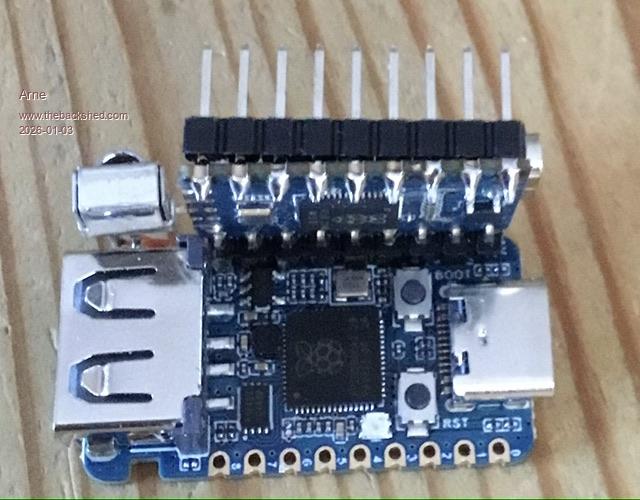
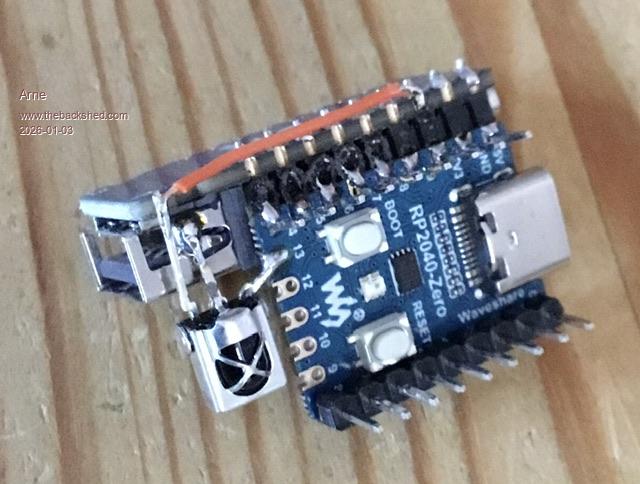
You can use HID-Remapper on a second pico. It could be adapted/configured to your needs via browser and controlled by MMBasic thru the GPIOs. Here fotos of my actual prototype as IR-Controller.
I actual made some tests to use it as a multi remote control. Without the second pico you can control the MMBasic editor e.g. with mouse or joystick etc.
See also my post „Picomite & HID-Remapper“.
Arne
Quazee137 Guru Joined: 07/08/2016 Location: United StatesPosts: 603
Posted: 12:50pm 03 Jan 2026
Copy link to clipboard
Print this post
I have been making keypads to help with my right hand not working much.
Here are two of my first runs at it. I have others but are more like adding custom key pad macros with mouse and game controller all in one.
Quazee137
sometimes finding board files for Arduino and get the tools config right or close enough to make code work "bites"
Turbo46 Guru Joined: 24/12/2017 Location: AustraliaPosts: 1693
Posted: 03:58am 04 Jan 2026
Copy link to clipboard
Print this post
Thank you all for the comments. It seems that I'm not the only one with a need or interest. Maybe a CSub for MMBasic would do it but that's probably beyond me.
I'll go with the Circuit Python and Pi Pico option. AI has given me a program which I will check out eventually. I have no desire to learn Python. The idea of using indentation as part of the program structure just seems so wrong to me.
Thanks BillKeep safe. Live long and prosper.
mozzie Guru Joined: 15/06/2020 Location: AustraliaPosts: 383
Posted: 04:22am 04 Jan 2026
Copy link to clipboard
Print this post
G'day,
Arne, Many thanks for the link to the "Remapper" github, hadn't seen this before but have loaded up a Pico and it works plugged into the PicoMite with no problems. Also a nice piggy back solution you have there
Turbo46, I too would love to see the ability to use a PicoMite as a USB I/O expander / keyboard or serial link plugged into another as a host, I believe this has been discussed in the past and is not as simple as it seems.
My own testing with CircuitPython plugged into a PicoMite USB host doesn't work, the CircuitPython shows up as multiple devices on Windows and MMbasic doesn't recognize it as a keyboard or mouse, other peoples experience may vary, I'm no expert by a long shot.
I would suggest trying the Remapper as suggested by Arne. The GPIO can be setup to send keystrokes / mouse functions or macros so should do as a simple keyboard no problems. Unless the Arduino IDE is an option
Regards, Lyle. Edited 2026-01-04 14:27 by mozzie
bigmik Guru Joined: 20/06/2011 Location: AustraliaPosts: 2981
Posted: 05:24am 04 Jan 2026
Copy link to clipboard
Print this post
Hi Bill,
My option is a `little different' than those proposed but still requires extra hardware (a bog standard USB-TTL) adapter.
There is a nice little program for a PC called DataSnip that intercepts a serial stream and patches the data into the PC' keyboard routine.
The program is free and will just parse the data through as is, however if you want to filter out keys or convert them to a string or other features then the program needs to be registered and a $10AU fee (about $6US).
All that would be needed is your Pico to transmit the ASCII codes of what keys you need to the USB-TTL adapter and set DataSnip up to intercept the relevant Com Port and away you go.
Turbo46 Guru Joined: 24/12/2017 Location: AustraliaPosts: 1693
Posted: 07:56am 04 Jan 2026
Copy link to clipboard
Print this post
Thanks Mick (The Big one), There are more options than I thought!
Being a pig headed old sod, I'll try the Circuit Python way first and if the problems Mozzie mentioned occur and can't be fixed I'll decide which option to try next.
Thanks all BillKeep safe. Live long and prosper.
dddns Guru Joined: 20/09/2024 Location: GermanyPosts: 841
Mixtel90 Guru Joined: 05/10/2019 Location: United KingdomPosts: 8904
Posted: 10:51am 04 Jan 2026
Copy link to clipboard
Print this post
There are a lot of web sites showing how to use Circuit Python for HID on the Pico. If you are happy with MMBasic then I doubt if you'll have much difficulty with Circuit Python - it's not a difficult language. Just a few:
mozzie Guru Joined: 15/06/2020 Location: AustraliaPosts: 383
Posted: 02:01pm 07 Jan 2026
Copy link to clipboard
Print this post
G'day, Not wanting to hijack this thread, however Bills (Turbo46) question has re-kindled my interest in this subject, will start another thread if needed.
Just to clarify, I believe the original question was for a programmable keyboard on a pico/picomite that can be plugged into a PICOMITE USB HOST running as HMI.
I have tried a few of the suggested programs with only a couple of them being seen by the PICOMITE USB HOST as a keyboard, has anyone else tried these setups with success? Basically they will work with a PC, but not with a PicoMite_USB in my testing so far.
Remapper as suggested by Arne does work well with both, thanks :)
If my interpretation of this is correct:
For the PicoMite USB Host a boot keyboard is required, despite what CircuitPython says, their usb_hid.keyboard device descriptor is not boot compatible, neither are most of the Arduino sketches. Also need to disable Serial / CDC / MIDI / MDC as these appear to interfere with the connection, although not always.
For CircuitPython you need to create/modify BOOT.PY as shown in the following: info for boot.py from: https://www.danielhankewycz.com/blog/2022/09/pi-pico-boot-warning-bypass/ For Arduino, the Adafruit_TinyUSB library needs to be used in place of the built in USB / keyboard / mouse librarys.
The good news is, after a LOT of swearing and wearing out of flash cycles I now have both CircuitPython code and an Arduino sketch that allow an RP2040 PICO / ZERO to send keypresses and strings to the PICO USB HOST :) These still require some cleaning up if anyone is interested, but hopefully the info above will help someone out.
This just confirms my belief that MMBasic has been sent to us from the gods, Python and Arduino are the spawn of the devil....
As usual I am probably making this harder than it really needs to be, any thoughts welcome.
Regards, Lyle.
phil99 Guru Joined: 11/02/2018 Location: AustraliaPosts: 3289
Posted: 08:43pm 07 Jan 2026
Copy link to clipboard
Print this post
A DIY hardware option could be to gut a keyboard for it's chip and cable. (Assuming the chips are not available on line.) Before dismembering it trace the tracks of keys you wish to use back to the chip and record the pin numbers. Your input device can then link its output to the required pins via optocouplers.
Turbo46 Guru Joined: 24/12/2017 Location: AustraliaPosts: 1693
Posted: 05:07am 08 Jan 2026
Copy link to clipboard
Print this post
My original question maybe wasn't clear enough. My main requirement is to use the device as:
1. A keyboard imitator that can be used with a switched joystick for games control on a PC.
2. A keyboard imitator that can be used with switches for control of a simple HMI written in MMBasic on a PC.
The ability to use it for a Pico, or Maximite would be a bonus if I/O on that device was limited or if you didn't want to use the I/O for some reason. A PC can use more than one keyboard at a time which would be handy for testing but I believe that is a problem for an HDMI Pico.
@Lyle, The AI's that I have asked about it all say it is possible and describe a similar method to that in your link. I'm working on other things at the moment and need to get some more Picos I would like to try your version, if you post, it when I can.
@Phil That was the first thing I tried some time ago. It worked well until I somehow let the smoke out. You can buy USB keyboards quite cheaply at some op shops - more cheaply than buying the encoder boards online. When I opened the keyboard it exploded into a million pieces and I could not hope to put it back together if I needed to. I decided to look for an alternative.
Arne Regular Member Joined: 05/01/2025 Location: GermanyPosts: 49
Posted: 11:21am 08 Jan 2026
Copy link to clipboard
Print this post
Hello Bill,
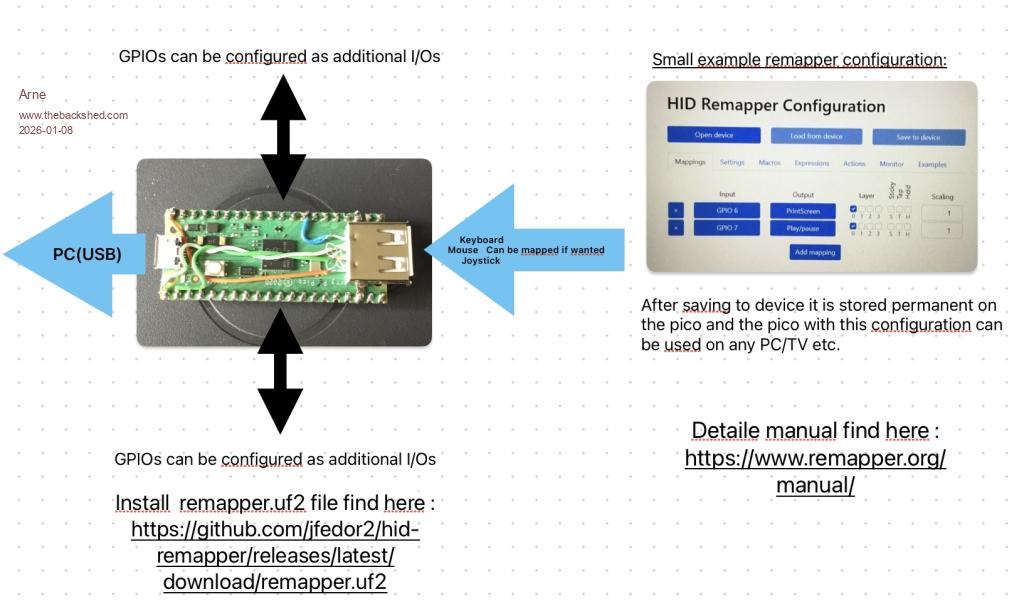
To do the things you wanted MMBasic is not needed. Do it directly with HID-remapper:
- solder 4 lines to the pico (see also manual/picture) - install remapper.uf2 on the pico (e.g. rp2040 version) - connect switches/LEDs etc. to the relevant GPIOs (e.g. to make your own controller) - configure via browser - save configuration permanent to pico
Thats it. The hardware can be used on PC/ Mac/Picomite etc.
Here a short overview to have an idea:
Have fun
Arne
mozzie Guru Joined: 15/06/2020 Location: AustraliaPosts: 383
Posted: 02:47pm 09 Jan 2026
Copy link to clipboard
Print this post
G'day, Looks like I had the tail wagging the dog, whilst barking up the wrong tree and holding the wrong end of the stick... possibly lighting the fuse with the dynamite so to speak, sorry for any confusion caused....
I had assumed the HMI was on a PICOMITE running MMBasic.... oops
As suggested, for interface with a PC running MMBasic pretty much any of the paths recommended will suit your needs, Remapper as suggested by Arne works very well and can do mouse / gamepad / joystick as well if set up correctly.
The attached ZIP is the CircuitPython files to turn an RP2040 Pico into a boot keyboard suitable for use with a PicoMite_USB host, there are likely better ways of doing this. Next step is trying to get a mouse working as well as the keyboard, more swearing required
Nimue Guru Joined: 06/08/2020 Location: United KingdomPosts: 427
Posted: 12:14pm 11 Jan 2026
Copy link to clipboard
Print this post
Hi all (long time no see etc)
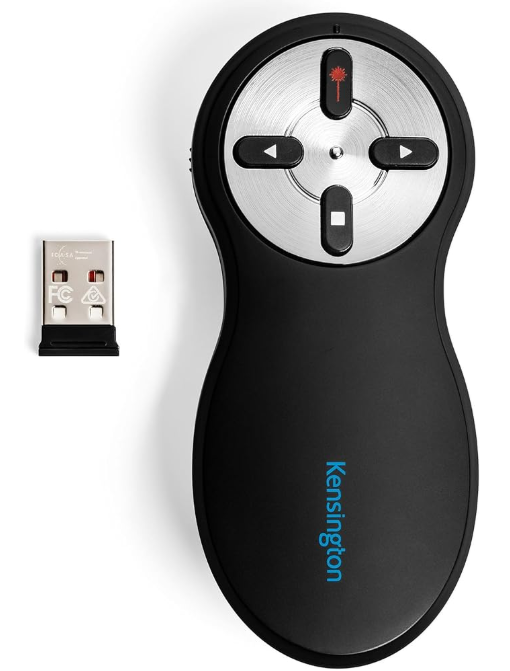
Followed this thread with interest as I'm currently working (and full disclosure - given up on) making one of those presentation clicker things.
Specifically I use these things for 4-5 hrs per day.
I have a edge case use, which is that I wanted to swap the "blank presentation" button from sending "B" to "W" as I want a white screen not black. So began my odyssey into all things Bluetooth, HID etc.
Customizable clickers are available which use a little app to customize the buttons - but this needs to run on the host pc, which the "IT GODS" in work wont let me install. So you need to customize the clicker itself. None like this were available for less that £60-£70 so I thought I'd have a bash at making one.
How hard could it be? Microcontroller, BLE stack and a few buttons / charging circuit etc. So it began.
First Thoughts PicoMite - no straight forward way to use the built in bluetooth on the PiPico to control BLE directly. No BLE "stack" directly accessible. OK, so what about the Pico itself with Circuit Python? Turns out there are "issues" (whatever that really means) with the BLE on the Pico and making a full fledged HID client that can pair with Windows and work reliably -- never really got to the bottom, it just doesnt work.
So I went looking for and settled on an ESP-32 S3.
ESP-32 S3 This led me to the Arduino IDE and what can only be called "library" hell. Transpires that there are a few libraries for BLE and HID - many are depreciated, many dont work with each other, many dont keep the connection to Windows persistent, many repair each time which confuses Windows. Plus the ESP-32 itself, the "kernel" has a few versions, each of which don't work with different libraries.
Plus, I hate the Arduino IDE - its so slow to compile and upload every time.
Three days on and off juggling libraries, rolling back versions, upgrading etc etc and I eventually got it working.
A tiny ESP-32 S3 that Windows can see as a presentation clicker and I can control what keys it sends.
The rest Factor in some push buttons, an 18650 and charging module, a DC-DC convertor (to run the ESP from the 18650) and 3hrs of 3D printing and I had a very hacky unit.
Yes, it works but its so hacky that I'm embarrassed to post a photo.
What I learned 1. I'm spoiled with MMBasic and the ecosystem - it just works and I can code on the device, not code, compile, upload 2. BLE HID is just too difficult 3. The ESP-32 S3 is great - but the BLE stack is so random, uncoordinated and changeable that I wont go near it for a long time.
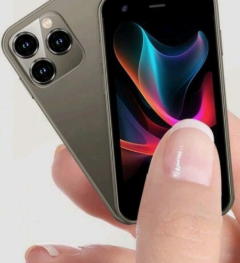
So, in the end I sort of succeeded and learned a lot. BUT I eventually bought a £30 "mini" Android smart phone from eBay. One of these:
And used free software from the PlayStore to make a far more functional part that I can customise exactly what it sends etc.
My "hacked together" version cost about £30, this phone £35 -- so I suppose I could have just bought an expensive clicker in the first place, but where's the fun in that.
Cheeky wish list If I could have used a PicoMite with the onboard BLE as a HID device from the get go (granted I would still have needed charging circuitry/DC-DC) I might have persisted with my hacky version. Maintaining the ESP ecosystem is bonkers.
I appreciate that a lot is crammed into the 'mites and that we have a proliferation of versions at the moment - VGA, HDMI etc -- but I wonder if there is scope for a cut back, vanilla 'mite with BLE/HID capability. (As I ask this, I appreciate the internals of these are far outside my ken, so it's just a naïve ask).
Perfect world -- the community can "roll there own" -- like building a Linux kernel. A tick list installer that builds the .UF2 with a tick list of functions:
Core Basic Functions - Selected VGA - Not Selected HDMI - Not Selected WiFi - Not Selected BLE - Selected HID - Selected Advanced Maths - Not Selected etc etc
The we compile and go.
Asking for fun as I fully acknowledge that this is well out of scope and even if possible would be massive input.
But to draw this to a close, this has made me so greatful for what I have, for the work, input and functionality of the whole 'mite ecosystem and finally for the fact this "it just works" and does what I want 90% of the time.
Happy New Year.Entropy is not what it used to be
Mixtel90 Guru Joined: 05/10/2019 Location: United KingdomPosts: 8904
Posted: 01:22pm 11 Jan 2026
Copy link to clipboard
Print this post
I learned not to load the Arduino IDE at all. Ever. For any reason. If I can't use something else then I'll use different hardware - it's simply not worth losing the little that remains of my sanity. :)
Geany and Circuit Python is a dream in comparison.
I'm not certain that the WiFi/BT on the Pico 2 has been fully "right" since it's release.
Of course, if you'd used IR for the clicker you could have used a Zero or a MX170 with very little else. :) . Edited 2026-01-11 23:27 by Mixtel90Mick

 Notice. New forum software under development. It's going to miss a few functions and look a bit ugly for a while, but I'm working on it full time now as the old forum was too unstable. Couple days, all good. If you notice any issues, please contact me.


 Print this post