Notice. New forum software under development. It's going to miss a few functions and look a bit ugly for a while, but I'm working on it full time now as the old forum was too unstable. Couple days, all good. If you notice any issues, please contact me.
stanleyella Guru Joined: 25/06/2022 Location: United KingdomPosts: 2807
Posted: 11:05pm 15 Feb 2026
Copy link to clipboard
Print this post
Lot of linux fans. I broke windows, screen went black but cursor and bleeps. Turn on of and it says welcome then black screen when it should show the desktop.... so install Linux mint 22.3 cinnamon first to usb stick then alter bios to boot from stick and when it settles down install it to pc, got usb with linux boot just got to try booting on a pc... that had windows but doubt I'll fix windows and my experience with rpi 400 has been better than I thought
hitsware2 Guru Joined: 03/08/2019 Location: United StatesPosts: 738
stanleyella Guru Joined: 25/06/2022 Location: United KingdomPosts: 2807
Posted: 06:21pm 16 Feb 2026
Copy link to clipboard
Print this post
I think I tried Fydeos and didn't work on rpi. I tried Twisteros 64 bit and it's not like Twisteros 32 bit, well not yet. Rpi Trixie is pretty good. Now I got to install mint on a win pc from usb. let you know if it works.
stanleyella Guru Joined: 25/06/2022 Location: United KingdomPosts: 2807
Posted: 12:11am 17 Feb 2026
Copy link to clipboard
Print this post
installing linux on pc. ie get linux image and use belana etcher to flash to usb but it doesn't, etcher gives an error. nothing easy. not building linux.
JohnS Guru Joined: 18/11/2011 Location: United KingdomPosts: 4335
Posted: 08:19am 17 Feb 2026
Copy link to clipboard
Print this post
How about posting exactly what you did and where it didn't work? A 1-line post is pointless.
John
Mixtel90 Guru Joined: 05/10/2019 Location: United KingdomPosts: 8904
Posted: 08:36am 17 Feb 2026
Copy link to clipboard
Print this post
The problem probably isn't with Linux, it's in understanding Etcher. Once you have the iso file on the USB stick it's just like installing from disk except that you have to boot from the stick. That's the bit that can get interesting on some machines.
I had a problem with one of the later versions of Etcher. I couldn't find out how to get it to do what I wanted. Help via the internet always referred to a different version.
In the end I used Rufus. It's far easier to use than Etcher IMHO. The end result is the same.Mick
Grogster Admin Group Joined: 31/12/2012 Location: New ZealandPosts: 9975
Posted: 08:40am 17 Feb 2026
Copy link to clipboard
Print this post
Indeed.
That's like saying: "It did not work, so Linux now sucks..."
I've been running LMDE6(Linux Mint Debian Edition v6) since October last year when the W10 updates ended. I had ZERO issue installing and running LMDE6, so you are not doing something right, and as JohnS said.......Smoke makes things work. When the smoke gets out, it stops!
Volhout Guru Joined: 05/03/2018 Location: NetherlandsPosts: 5927
Posted: 09:25am 17 Feb 2026
Copy link to clipboard
Print this post
It may depend on the linux distro you want to install on the USB stick. I think Rufus and Balena Etcher both assume UEFI installations. Some older distro's (i.e. Puppy) may not work when using Balena. For older Puppies I needed to use Unetbootin.
stanleyella Guru Joined: 25/06/2022 Location: United KingdomPosts: 2807
Posted: 09:31pm 17 Feb 2026
Copy link to clipboard
Print this post
I was not criticising linux just getting it to install. In the end I got Rufus to flash the Linux image but the duff pc and usb inserted and press F12 on boot.. it's a Dell. choose boot usb but don't work. Think pc hardware fault.
Godoh Guru Joined: 26/09/2020 Location: AustraliaPosts: 658
Posted: 05:08am 18 Feb 2026
Copy link to clipboard
Print this post
From memory you have to change the boot system to 'legacy boot' there is some windows boot that stops any other system being put on the computer. pete
Mixtel90 Guru Joined: 05/10/2019 Location: United KingdomPosts: 8904
Posted: 08:03am 18 Feb 2026
Copy link to clipboard
Print this post
This is the bit where the fun starts, isn't it Pete? :)
I have a little fanless PC that originally came with Win10 installed. I tried for ages to install several flavours of linux but none of them would work. Eventually I gave up, putting it down to a hardware incompatibility somewhere, and kept it on Windows. Not long ago I retired that machine as its 56GB drive C: is too small for just about anything, even for Windows updates if there are any programs or data on there. It took quite a bit of playing with the BIOS but eventually I got a Linux onto it. Microsoft do NOT want you to use any of "their" machines for Linux just in case you realize how much better it is. :)
Obviously this machine is running the BIOS so the CPU and RAM are running fine. I strongly suspect that the problem is a BIOS setting. Try to find the key that's used to get into the BIOS without the boot menu, if there is one. It might be an idea to change the boot order to look at the USB first, turn off Secure Boot if that setting is there. . Edited 2026-02-18 18:04 by Mixtel90Mick
JohnS Guru Joined: 18/11/2011 Location: United KingdomPosts: 4335
Posted: 08:18am 18 Feb 2026
Copy link to clipboard
Print this post
If you can get into Windows, in an Admin shell (command line) use powercfg /h off
You may need to turn bitlocker off (if on and you want to access the Windows data from Linux).
In the BIOS if it has it turn fastboot off
and yes, change the boot order.
The idea is to stop Windows booting (and especially to stop it hibernating/fastbooting) as it may also overwrite the boot info that lets Linux start.
If the BIOS has a Legacy boot it's worth trying.
With the above you may even be able to dual boot if the HDD is big enough. If that's what you do want then use Windows Shrink Volume to get an empty area for Linux.
edit: overall you just have to get the BIOS to let you use your own computer and Windows to get out of the way
John Edited 2026-02-18 20:50 by JohnS
stanleyella Guru Joined: 25/06/2022 Location: United KingdomPosts: 2807
Posted: 06:51pm 18 Feb 2026
Copy link to clipboard
Print this post
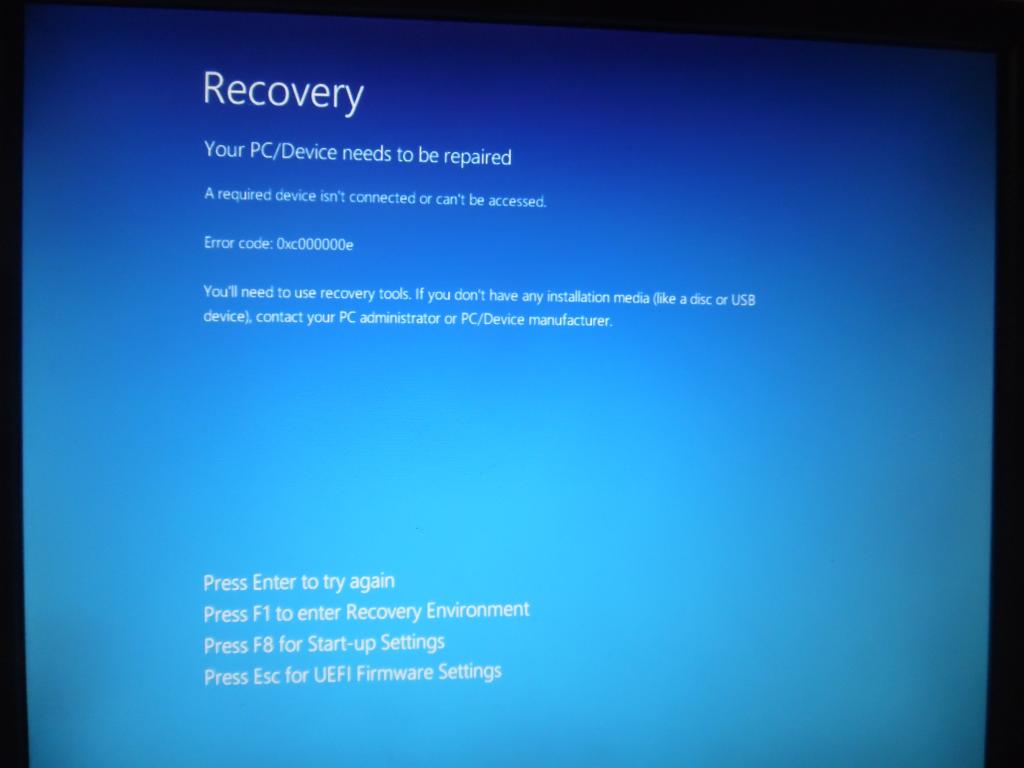
When trying to boot from usb bootable using power tapping F2 or F12 get this each time. life's too short. pc duff. only £70 dell inspirion small desktop pc. can't boot Hiren win 11 boot usb Edited 2026-02-19 04:53 by stanleyella
Mixtel90 Guru Joined: 05/10/2019 Location: United KingdomPosts: 8904
Posted: 07:22pm 18 Feb 2026
Copy link to clipboard
Print this post
So are you getting into the BIOS? That screen isn't it. Tapping F2 or F12 while booting should do that. You can also try Fn+F2 and Fn+F12. It's almost always just F2 for Dell.
Once in the BIOS you can start to make the changes that you need to prevent Windows from taking over during boot.
Here's some useful info from Dell's site. Edited 2026-02-19 05:26 by Mixtel90Mick
ville56 Guru Joined: 08/06/2022 Location: AustriaPosts: 531
Posted: 07:30pm 18 Feb 2026
Copy link to clipboard
Print this post
my guess would be press ESC as the UEFI firmware should be what we used to call BIOS 73 de OE1HGA, Gerald
Mixtel90 Guru Joined: 05/10/2019 Location: United KingdomPosts: 8904
Posted: 07:48pm 18 Feb 2026
Copy link to clipboard
Print this post
That's likely. It's certainly worth trying. An error like that makes me think that the HDD might be disconnected or even missing! It's what you get when Windows is corrupted and can't start. . Edited 2026-02-19 05:50 by Mixtel90Mick
JohnS Guru Joined: 18/11/2011 Location: United KingdomPosts: 4335
Posted: 09:07pm 18 Feb 2026
Copy link to clipboard
Print this post
F1 is probably a DOS/PowerShell, I'd avoid it except I might use powercfg /h off if it'll let you.
F8 might be useful
Esc looks most useful, I'd try that and then try to set your USB to boot first so you can boot Linux from a USB stick.
And turn off fastboot if it has it.
John
stanleyella Guru Joined: 25/06/2022 Location: United KingdomPosts: 2807
Posted: 09:11pm 18 Feb 2026
Copy link to clipboard
Print this post
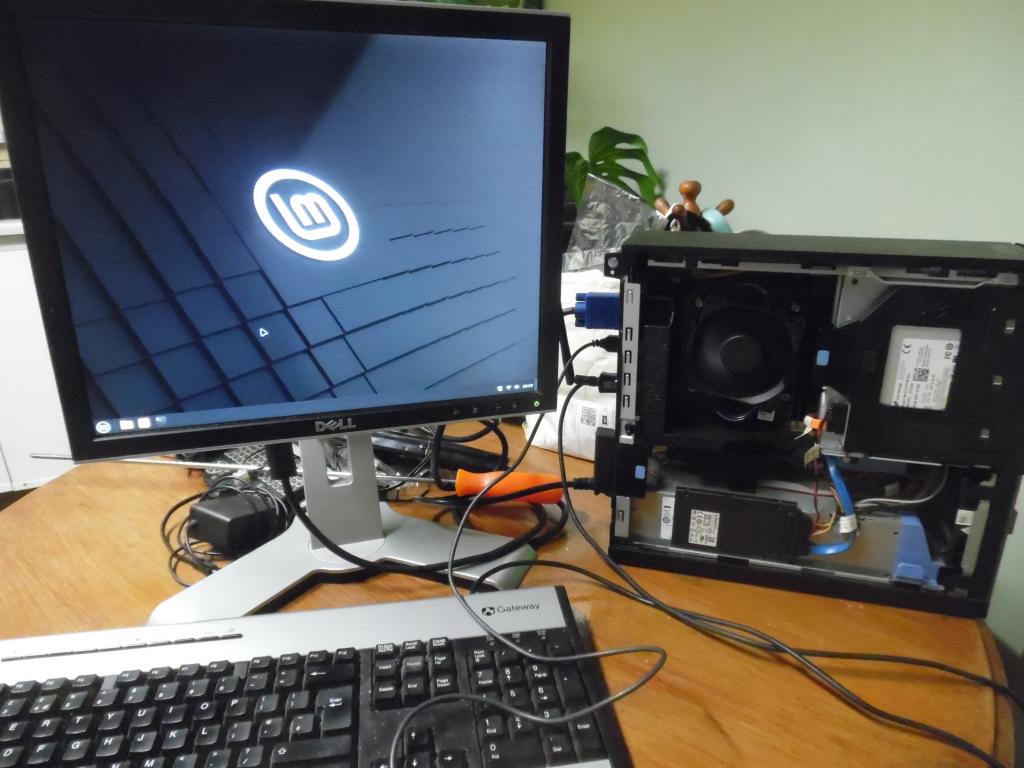
I got it to load. The idea was make the usb bootable with etcher or rufus then press F12 on boot and should boot from usb not internal C: ssd. F12 worked eventually with boot from usb option.
Mixtel90 Guru Joined: 05/10/2019 Location: United KingdomPosts: 8904
Posted: 09:32pm 18 Feb 2026
Copy link to clipboard
Print this post
Excellent! With it booted you have the option of installing it, of course. :)Mick

 Notice. New forum software under development. It's going to miss a few functions and look a bit ugly for a while, but I'm working on it full time now as the old forum was too unstable. Couple days, all good. If you notice any issues, please contact me.


 Print this post