tenij000
Senior Member

Joined: 30/05/2025
Location: NetherlandsPosts: 107 |
| Posted: 07:10am 17 Feb 2026 |
 Copy link to clipboard Copy link to clipboard |
 Print this post |
|
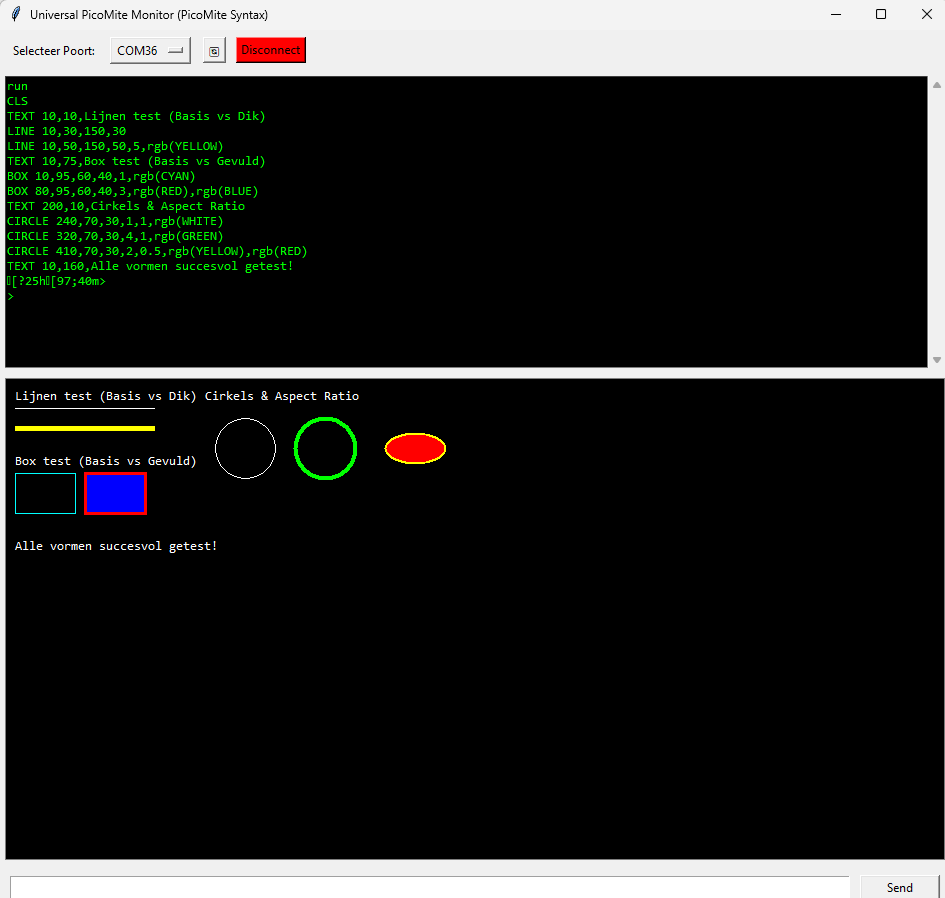
now can make some basic graphics whit stock picomite firmware if dont have a display
python code
import serial
import tkinter as tk
from tkinter import scrolledtext, messagebox
import re
import serial.tools.list_ports
# --- CONFIGURATIE ---
BAUD_RATE = 115200
class UniversalPicoMonitor:
def __init__(self, master):
self.master = master
self.master.title("Universal PicoMite Monitor (PicoMite Syntax)")
self.master.geometry("950x950")
self.ser = None
# --- GUI ELEMENTEN ---
self.top_frame = tk.Frame(master)
self.top_frame.pack(side='top', fill='x', padx=5, pady=5)
tk.Label(self.top_frame, text="Selecteer Poort:").pack(side='left', padx=5)
self.port_var = tk.StringVar(master)
self.port_menu = None
self.update_port_list()
tk.Button(self.top_frame, text="🔄", command=self.update_port_list).pack(side='left', padx=5)
self.connect_button = tk.Button(self.top_frame, text="Connect", command=self.toggle_connection, bg="lightgray")
self.connect_button.pack(side='left', padx=5)
self.input_frame = tk.Frame(master)
self.input_frame.pack(side='bottom', fill='x', padx=5, pady=10)
self.entry = tk.Entry(self.input_frame, font=("Consolas", 12))
self.entry.pack(side='left', expand=True, fill='x', padx=5)
self.entry.bind("<Return>", self.send_command)
tk.Button(self.input_frame, text="Send", command=self.send_command, width=10).pack(side='right', padx=5)
self.canvas = tk.Canvas(master, width=800, height=480, bg="black", highlightthickness=1, highlightbackground="gray")
self.canvas.pack(side='bottom', fill='both', padx=5, pady=5)
self.text_area = scrolledtext.ScrolledText(master, bg="black", fg="#00FF00", font=("Consolas", 10))
self.text_area.pack(side='top', expand=True, fill='both', padx=5, pady=5)
self.poll_serial()
def update_port_list(self):
ports = [p.device for p in serial.tools.list_ports.comports()]
if self.port_menu: self.port_menu.destroy()
if not ports: ports = ["Geen poorten gevonden"]
self.port_var.set(ports[0])
self.port_menu = tk.OptionMenu(self.top_frame, self.port_var, *ports)
self.port_menu.pack(side='left', padx=5)
def toggle_connection(self):
if self.ser and self.ser.is_open:
self.ser.close()
self.ser = None
self.connect_button.config(text="Connect", bg="lightgray")
else:
try:
self.ser = serial.Serial(self.port_var.get(), BAUD_RATE, timeout=0.05)
self.connect_button.config(text="Disconnect", bg="red")
except Exception as e: messagebox.showerror("Fout", f"Fout: {e}")
def m_color(self, val):
"""Ondersteunt nu ook rgb(RED) of rgb(255,0,0) syntax."""
if not val: return "white"
val = str(val).upper().strip()
# Verwijder rgb(...) wrapper als die eromheen staat
rgb_match = re.search(r'RGB\((.*)\)', val)
if rgb_match:
val = rgb_match.group(1).strip()
colors = {
"WHITE": "#FFFFFF", "BLACK": "#000000", "RED": "#FF0000",
"GREEN": "#00FF00", "BLUE": "#0000FF", "YELLOW": "#FFFF00",
"CYAN": "#00FFFF", "MAGENTA": "#FF00FF", "GRAY": "#808080"
}
if val in colors: return colors[val]
# Check voor numerieke waarden (bijv rgb(255, 128, 0))
if "," in val:
try:
r, g, b = map(int, val.split(","))
return f'#{r:02x}{g:02x}{b:02x}'
except: pass
try: return f'#{int(val) & 0xFFFFFF:06x}'
except: return "white"
def parse_draw_command(self, cmd):
"""Parser die nu ook de lijndikte (width) toepast op het canvas."""
cmd = cmd.strip()
if not cmd: return
# Haal tekst tussen aanhalingstekens eruit
text_match = re.search(r'"([^"]*)"', cmd)
text_content = text_match.group(1) if text_match else ""
# Splits op komma's (haakjes-veilig voor RGB)
parts = []
current = ""
depth = 0
for char in cmd + ",":
if char == "(": depth += 1
elif char == ")": depth -= 1
if char == "," and depth == 0:
parts.append(current.strip())
current = ""
else:
current += char
first_part = parts[0].split(maxsplit=1)
if not first_part: return
instr = first_part[0].upper()
args = [first_part[1]] + parts[1:] if len(first_part) > 1 else parts[1:]
try:
# --- LINE x1, y1, x2, y2, [dikte], [kleur] ---
if instr == "LINE" and len(args) >= 4:
x1, y1, x2, y2 = int(args[0]), int(args[1]), int(args[2]), int(args[3])
w = int(args[4]) if len(args) >= 5 and args[4].isdigit() else 1
color = self.m_color(args[5]) if len(args) >= 6 else self.m_color(args[4]) if len(args) >= 5 and not args[4].isdigit() else "white"
self.canvas.create_line(x1, y1, x2, y2, fill=color, width=w)
# --- BOX x, y, w, h, [dikte], [kleur], [vulling] ---
elif instr == "BOX" and len(args) >= 4:
x, y, w, h = int(args[0]), int(args[1]), int(args[2]), int(args[3])
lw = int(args[4]) if len(args) >= 5 and args[4].isdigit() else 1
color = self.m_color(args[5]) if len(args) >= 6 else "white"
fill_c = self.m_color(args[6]) if len(args) >= 7 else ""
# Let op: bij een dikke lijn in Tkinter moet je outline=color en width=lw gebruiken
self.canvas.create_rectangle(x, y, x+w, y+h, outline=color, fill=fill_c, width=lw)
# --- CIRCLE x, y, r, [dikte], [aspect], [kleur], [vulling] ---
elif instr == "CIRCLE" and len(args) >= 3:
x, y, r = int(args[0]), int(args[1]), int(args[2])
lw = int(args[3]) if len(args) >= 4 and args[3].isdigit() else 1
aspect = float(args[4]) if len(args) >= 5 and args[4] else 1.0
color = self.m_color(args[5]) if len(args) >= 6 else "white"
fill_c = self.m_color(args[6]) if len(args) >= 7 else ""
self.canvas.create_oval(x-r, y-(r*aspect), x+r, y+(r*aspect), outline=color, fill=fill_c, width=lw)
# --- TEXT (Houdt geen rekening met dikte, wel kleur) ---
elif instr == "TEXT" and len(args) >= 2:
x, y = int(args[0]), int(args[1])
txt = text_content if text_content else (args[2] if len(args) >= 3 else "")
color = self.m_color(args[6]) if len(args) >= 7 else "white"
self.canvas.create_text(x, y, text=txt, fill=color, anchor="nw", font=("Consolas", 10))
elif instr == "CLS":
self.canvas.delete("all")
except Exception as e:
pass # Foutje in parsing negeren
def send_command(self, event=None):
cmd = self.entry.get()
if not cmd: return
self.parse_draw_command(cmd)
if self.ser and self.ser.is_open:
self.ser.write((cmd + '\r\n').encode('utf-8'))
self.entry.delete(0, tk.END)
def poll_serial(self):
if self.ser and self.ser.is_open:
try:
if self.ser.in_waiting > 0:
data = self.ser.read(self.ser.in_waiting).decode('utf-8', errors='ignore')
self.text_area.insert(tk.END, data)
for line in data.splitlines():
self.parse_draw_command(line)
self.text_area.see(tk.END)
except: self.ser = None
self.master.after(10, self.poll_serial)
if __name__ == "__main__":
root = tk.Tk()
app = UniversalPicoMonitor(root)
root.mainloop()
|
tenij000
Senior Member
Joined: 30/05/2025
Location: NetherlandsPosts: 107 |
| Posted: 10:03am 17 Feb 2026 |
Copy link to clipboard |
Print this post |
|
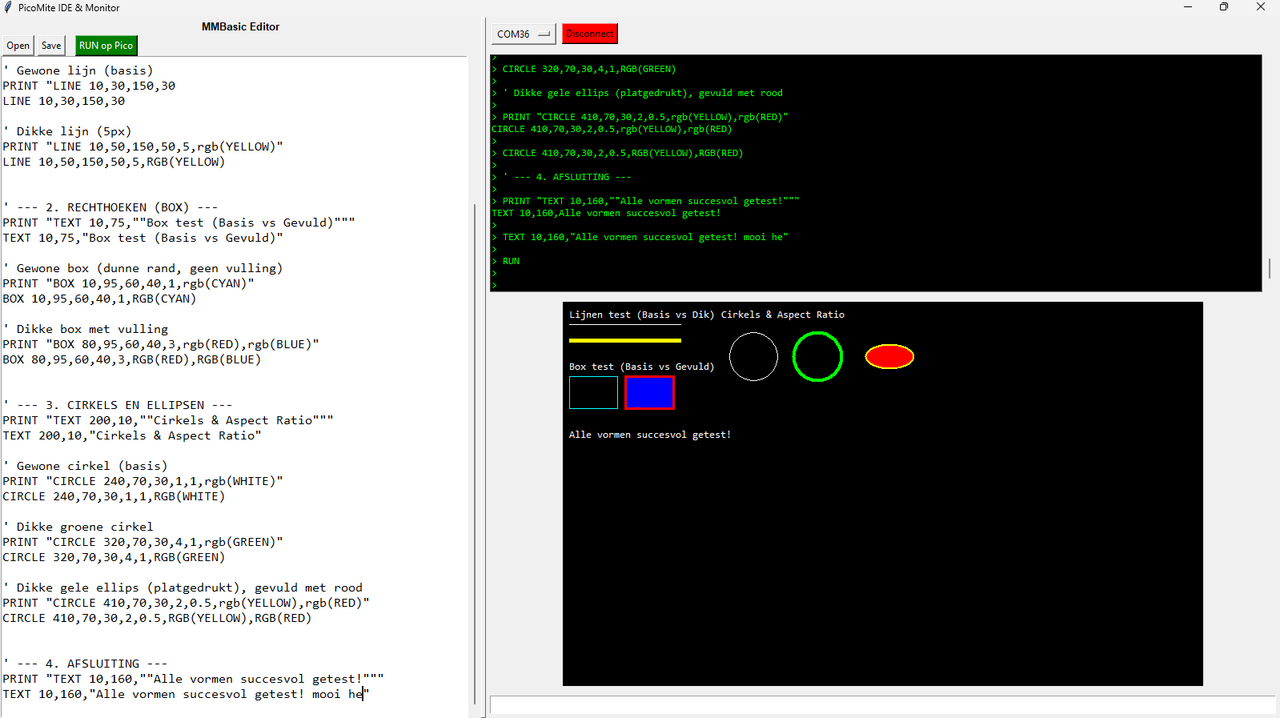
now you can
import serial
import tkinter as tk
from tkinter import scrolledtext, messagebox, filedialog
import re
import serial.tools.list_ports
class PicoMiteIDE:
def __init__(self, master):
self.master = master
self.master.title("PicoMite IDE & Monitor")
self.master.geometry("1400x900")
self.ser = None
# --- HOOFD LAYOUT (Splitter) ---
self.paned = tk.PanedWindow(master, orient=tk.HORIZONTAL, sashrelief=tk.RAISED, sashwidth=6)
self.paned.pack(fill='both', expand=True)
# --- LINKER KANT: EDITOR ---
self.editor_frame = tk.Frame(self.paned)
self.paned.add(self.editor_frame, width=600)
self.edit_label = tk.Label(self.editor_frame, text="MMBasic Editor", font=("Arial", 10, "bold"))
self.edit_label.pack(fill='x')
self.btn_frame = tk.Frame(self.editor_frame)
self.btn_frame.pack(fill='x')
tk.Button(self.btn_frame, text="Open", command=self.load_file).pack(side='left', padx=2)
tk.Button(self.btn_frame, text="Save", command=self.save_file).pack(side='left', padx=2)
tk.Button(self.btn_frame, text="RUN op Pico", command=self.run_code, bg="green", fg="white").pack(side='left', padx=10)
self.editor = scrolledtext.ScrolledText(self.editor_frame, font=("Consolas", 12), undo=True)
self.editor.pack(fill='both', expand=True)
# --- RECHTER KANT: MONITOR (Bestaande code) ---
self.monitor_frame = tk.Frame(self.paned)
self.paned.add(self.monitor_frame, width=800)
# Port Selectie Balk
self.top_bar = tk.Frame(self.monitor_frame)
self.top_bar.pack(side='top', fill='x', padx=5, pady=5)
self.port_var = tk.StringVar()
self.update_ports()
self.port_menu = tk.OptionMenu(self.top_bar, self.port_var, *self.ports)
self.port_menu.pack(side='left')
self.conn_btn = tk.Button(self.top_bar, text="Connect", command=self.toggle_serial)
self.conn_btn.pack(side='left', padx=5)
# Tekst Output (Terminal)
self.terminal = scrolledtext.ScrolledText(self.monitor_frame, bg="black", fg="#00FF00", font=("Consolas", 10), height=15)
self.terminal.pack(fill='both', expand=True, padx=5, pady=5)
# Canvas (Grafisch)
self.canvas = tk.Canvas(self.monitor_frame, width=800, height=480, bg="black")
self.canvas.pack(fill='none', padx=5, pady=5)
# Commando Input
self.input_entry = tk.Entry(self.monitor_frame, font=("Consolas", 12))
self.input_entry.pack(fill='x', padx=5, pady=5)
self.input_entry.bind("<Return>", lambda e: self.send_cmd())
self.poll_serial()
# --- EDITOR FUNCTIES ---
def load_file(self):
path = filedialog.askopenfilename(filetypes=[("Basic files", "*.bas"), ("All files", "*.*")])
if path:
with open(path, 'r') as f:
self.editor.delete(1.0, tk.END)
self.editor.insert(tk.END, f.read())
def save_file(self):
path = filedialog.asksaveasfilename(defaultextension=".bas")
if path:
with open(path, 'w') as f:
f.write(self.editor.get(1.0, tk.END))
def run_code(self):
"""Stuurt de code in de editor regel voor regel naar de Pico."""
if not self.ser or not self.ser.is_open:
messagebox.showwarning("Fout", "Maak eerst verbinding met de Pico!")
return
code = self.editor.get(1.0, tk.END).splitlines()
self.ser.write(b'\x03') # CTRL-C om lopend programma te stoppen
self.ser.write(b'NEW\r\n')
for line in code:
if line.strip():
self.ser.write((line + '\r\n').encode('utf-8'))
self.ser.write(b'RUN\r\n')
self.terminal.insert(tk.END, "\n>>> Programma verzonden en gestart...\n")
# --- SERIAL & PARSER (Gecorrigeerd op jouw Draw.c) ---
def update_ports(self):
self.ports = [p.device for p in serial.tools.list_ports.comports()] or ["Geen poorten"]
self.port_var.set(self.ports[0])
def toggle_serial(self):
if self.ser and self.ser.is_open:
self.ser.close()
self.conn_btn.config(text="Connect", bg="SystemButtonFace")
else:
try:
self.ser = serial.Serial(self.port_var.get(), 115200, timeout=0.05)
self.conn_btn.config(text="Disconnect", bg="red")
except Exception as e: messagebox.showerror("Error", str(e))
def m_color(self, val):
val = str(val).upper().strip()
rgb_match = re.search(r'RGB\((.*)\)', val)
if rgb_match: val = rgb_match.group(1).strip()
colors = {"WHITE":"#FFFFFF", "BLACK":"#000000", "RED":"#FF0000", "GREEN":"#00FF00", "BLUE":"#0000FF", "YELLOW":"#FFFF00", "CYAN":"#00FFFF", "MAGENTA":"#FF00FF"}
if val in colors: return colors[val]
try: return f'#{int(val) & 0xFFFFFF:06x}'
except: return "white"
def parse_draw_command(self, cmd):
# Dezelfde robuuste parser als voorheen
parts = []
current, depth = "", 0
for char in cmd.strip() + ",":
if char == "(": depth += 1
elif char == ")": depth -= 1
if char == "," and depth == 0:
parts.append(current.strip()); current = ""
else: current += char
if not parts or not parts[0]: return
f_split = parts[0].split(maxsplit=1)
instr = f_split[0].upper()
args = [f_split[1]] + parts[1:] if len(f_split) > 1 else parts[1:]
try:
if instr == "CLS": self.canvas.delete("all")
elif instr == "LINE" and len(args) >= 4:
x1, y1, x2, y2 = int(args[0]), int(args[1]), int(args[2]), int(args[3])
w = int(args[4]) if len(args) >= 5 and args[4].isdigit() else 1
c = self.m_color(args[5]) if len(args) >= 6 else self.m_color(args[4]) if len(args) >= 5 else "white"
self.canvas.create_line(x1, y1, x2, y2, fill=c, width=w)
elif instr == "BOX" and len(args) >= 4:
x, y, w, h = int(args[0]), int(args[1]), int(args[2]), int(args[3])
lw = int(args[4]) if len(args) >= 5 and args[4].isdigit() else 1
c = self.m_color(args[5]) if len(args) >= 6 else "white"
f = self.m_color(args[6]) if len(args) >= 7 else ""
self.canvas.create_rectangle(x, y, x+w, y+h, outline=c, fill=f, width=lw)
elif instr == "CIRCLE" and len(args) >= 3:
x, y, r = int(args[0]), int(args[1]), int(args[2])
lw = int(args[3]) if len(args) >= 4 and args[3].isdigit() else 1
asp = float(args[4]) if len(args) >= 5 and args[4] else 1.0
c = self.m_color(args[5]) if len(args) >= 6 else "white"
f = self.m_color(args[6]) if len(args) >= 7 else ""
self.canvas.create_oval(x-r, y-(r*asp), x+r, y+(r*asp), outline=c, fill=f, width=lw)
elif instr == "TEXT" and len(args) >= 2:
x, y = int(args[0]), int(args[1])
t = re.search(r'"([^"]*)"', cmd).group(1) if '"' in cmd else args[2]
c = self.m_color(args[6]) if len(args) >= 7 else "white"
self.canvas.create_text(x, y, text=t, fill=c, anchor="nw", font=("Consolas", 10))
except: pass
def send_cmd(self):
cmd = self.input_entry.get()
if cmd and self.ser:
self.ser.write((cmd + '\r\n').encode('utf-8'))
self.parse_draw_command(cmd)
self.input_entry.delete(0, tk.END)
def poll_serial(self):
if self.ser and self.ser.is_open:
try:
if self.ser.in_waiting > 0:
raw = self.ser.read(self.ser.in_waiting).decode('utf-8', errors='ignore')
clean = re.sub(r'\x1b\[[0-9;?]*[a-zA-Z]', '', raw)
self.terminal.insert(tk.END, clean)
self.terminal.see(tk.END)
for line in clean.splitlines(): self.parse_draw_command(line)
except: self.ser = None
self.master.after(10, self.poll_serial)
if __name__ == "__main__":
root = tk.Tk()
app = PicoMiteIDE(root)
root.mainloop()
|

 Notice. New forum software under development. It's going to miss a few functions and look a bit ugly for a while, but I'm working on it full time now as the old forum was too unstable. Couple days, all good. If you notice any issues, please contact me.
