Notice. New forum software under development. It's going to miss a few functions and look a bit ugly for a while, but I'm working on it full time now as the old forum was too unstable. Couple days, all good. If you notice any issues, please contact me.
Print "Benchmark 6" Timer = 0 j = 0 Dim rayx(5) BM6: j = j+1 m = j/2*3+4-5 GoSub 4000 For q = 1 To 5 Next q If j < 10000 GoTo BM6 j=Timer Print j / 10000 Print " "
Print "Benchmark 7" Timer = 0 j = 0 Dim ray2(5) BM7: j = j+1 m = j/2*3+4-5 GoSub 4000 For q = 1 To 5 ray2(q) = m Next q If j < 10000 GoTo BM7 j=Timer Print j / 10000 Print " "
Print "Benchmark 8" Timer = 0 j = 0 BM8: j = j+1 m = j^2 blog = Log(j) csin = Sin(j) If j < 10000 GoTo BM8 j=Timer Print j / 10000 Do Loop While Inkey$="" End
4000 Return
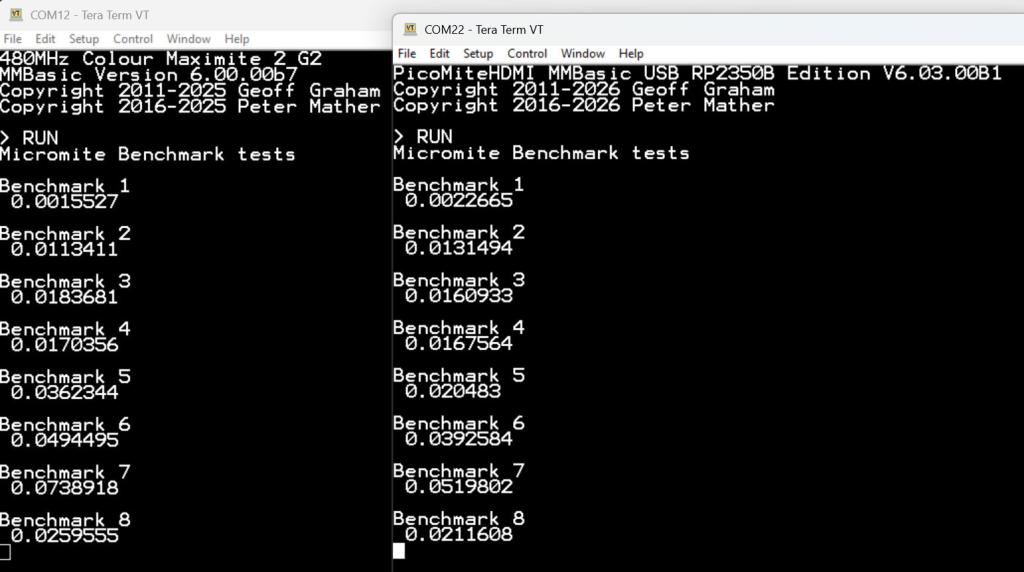
Here is the result with the PicoMite without the bytecode optimiser
PhenixRising Guru Joined: 07/11/2023 Location: United KingdomPosts: 1954
Posted: 01:12pm 24 Apr 2026
Copy link to clipboard
Print this post
It's about time 🤣😂
(I'll see myself out)
Not to mention that we can link two devices with memory share 👍😎👍
Bleep Guru Joined: 09/01/2022 Location: United KingdomPosts: 806
Posted: 01:27pm 24 Apr 2026
Copy link to clipboard
Print this post
yes it's remarkably fast now :-) I'm attempting to modify a Basic Mandelbrot plotter to divide & plot in ever decreasing squares, such that when all the edges of a square are the same colour, the rest of the square can be filled that colour, or there is nothing left to subdivide. Unfortunately it's looking like the extra processing will eliminate any gains, definitely won't be as fast as your Easter Egg :-( My Starfeild program is almost double speed with the most recent update. :-) Regards Kevin.
matherp Guru Joined: 11/12/2012 Location: United KingdomPosts: 11499
Posted: 02:16pm 24 Apr 2026
Copy link to clipboard
Print this post
53 mSec with B1 just posted (HDMIUSB @ 378MHz)
Bleep Guru Joined: 09/01/2022 Location: United KingdomPosts: 806
Posted: 03:08pm 24 Apr 2026
Copy link to clipboard
Print this post
Ok, I'd missed that, I'll go and find the latest & give them a spin on some of my units. :-)
Bleep Guru Joined: 09/01/2022 Location: United KingdomPosts: 806
Posted: 05:01pm 24 Apr 2026
Copy link to clipboard
Print this post
Hi Peter, I couldn't get my copy of Starfield down to 53mS, it was hovering around 58mS. So on a whim, I removed a block of 10 lines of commented out code, the section I had changed from a Case block to a If, ElseIf and the code suddenly ran at 50mS, so I tried putting back 5 of those commented out lines and it went back up to about 53mS, about half? That seems like quite a hit for commented out code? it is in the most critical path. My copy attached so we're looking at the same thing. Regards Kevin.
'Starfield by Juri Fossaroli 'PicomiteVGA version Martin Herhaus 'set mode here if appropriate 'Option Profiling On Option TraceCache On 20 'Option Cache Debug On MODE 3 'change maxst for more or fewer stars Dim Integer maxst=1250,h=MM.VRES,w=MM.HRES,x,y,st,c Dim Float f,stx(maxst),stxx(maxst),sty(maxst),styy(maxst),stz(maxst) Dim Integer ox(maxst),oy(maxst),oxl(maxst),oyl(maxst),cl(maxst),s(maxst) 'FRAMEBUFFER create 'FRAMEBUFFER write f CLS 'initialise the stars For st=0 To maxst stxx(st)=(Rnd*w>>1)-(w>>2):styy(st)=(Rnd*h>>1)-(h>>2) stz(st)=Int(Rnd*5+5)/10 cl(st)=RGB(White) Next 'initialise array for box size Math Set 2,s()
Do 'move stars forward Math Add stz(),-0.025,stz() 'do the calculation (stx/stz)+half width Math C_div stxx(),stz(),stx():Math Add stx(),w>>1,stx() 'do the calculation (sty/stz)+half height Math C_div styy(),stz(),sty():Math Add sty(),h>>1,sty() 'reset rouge stars 'Inc c:c=c*(c<=maxst) Inc c:If c>maxst Then c=0 'stx(c)=stx(c)*(stz(c)>0.1) If stz(c)<0 Then stx(c)=0 'loop for all stars 'set star colour and check for star off screen For st=0 To maxst x=stx(st):y=sty(st) ' Select Case stz(st) ' Case < 0.2 ' cl(st)=&HFFFF00'RGB(Yellow) ' Case < 0.6 ' cl(st)=&HFFFFFF'RGB(White) ' Case < 0.8 ' cl(st)=&HFFFF'RGB(Cyan) ' Case Else ' cl(st)=&HFF'RGB(Blue) ' End Select If stz(st) < 0.2 Then cl(st)=&HFFFF00'RGB(Yellow) ElseIf stz(st) < 0.6 Then cl(st)=&HFFFFFF'RGB(White) ElseIf stz(st) < 0.8 Then cl(st)=&HFFFF'RGB(Cyan) Else 'If stz(st) >= 0.8 Then cl(st)=&HFF'RGB(Blue) EndIf
If (x>0 And x<w And y>0 And y<h)Then ox(st)=x:oy(st)=y Else Inc f,0.025:If f>0.09 Then f=0 stxx(st)=(Rnd*w>>1)-(w>>2) styy(st)=(Rnd*h>>1)-(h>>2) stz(st)=Int(Rnd*5+5)/10+f EndIf Next 'blank out last times stars, replace with new stars Pixel oxl(),oyl(),0:Pixel ox(),oy(),cl() ' Box oxl(),oyl(),s(),s(),0,,0:Box ox(),oy(),s(),s(),0,,cl() 'copy this times stars, to last times stars array Math Add ox(),0,oxl():Math add oy(),0,oyl() ' FRAMEBUFFER copy f,n,b Print Timer:Timer =0 Loop Until Inkey$ <> "" End
Edited 2026-04-25 03:06 by Bleep
Mixtel90 Guru Joined: 05/10/2019 Location: United KingdomPosts: 8904
Posted: 05:09pm 24 Apr 2026
Copy link to clipboard
Print this post
I'm pretty sure Raspberry Pi had no real idea about what the RP2040 and RP2350 are really capable of when they designed them. :)Mick
matherp Guru Joined: 11/12/2012 Location: United KingdomPosts: 11499
Posted: 05:50pm 24 Apr 2026
Copy link to clipboard
Print this post
It's an interpreter, It has to read the fact it is a comment, then scan for the next newline and repeat. All takes time and affects the caching. For maximum speed, AUTOSAVE C
Volhout Guru Joined: 05/03/2018 Location: NetherlandsPosts: 5927
Posted: 06:40pm 24 Apr 2026
Copy link to clipboard
Print this post
Peter,
The first post shows cmm2 and non optimized pico results. What are pico optimized results.
WhiteWizzard Guru Joined: 05/04/2013 Location: United KingdomPosts: 2991
Posted: 08:30pm 24 Apr 2026
Copy link to clipboard
Print this post
Right hand screenshot is the optimised timings (as I read it!)
matherp Guru Joined: 11/12/2012 Location: United KingdomPosts: 11499
Posted: 11:47am 26 Apr 2026
Copy link to clipboard
Print this post
Bleep Try this with B2 just posted
Option TraceCache On 32 MODE 3 Dim Integer maxst=1250,h=MM.VRES,w=MM.HRES,x,y,st,c Dim Float f,stx(maxst),stxx(maxst),sty(maxst),styy(maxst),stz(maxst) Dim Integer ox(maxst),oy(maxst),oxl(maxst),oyl(maxst),cl(maxst),s(maxst) CLS For st=0 To maxst stxx(st)=(Rnd*w>>1)-(w>>2):styy(st)=(Rnd*h>>1)-(h>>2) stz(st)=Int(Rnd*5+5)/10 cl(st)=RGB(White) Next Math Set 2,s() Do Math Add stz(),-0.025,stz() Math C_div stxx(),stz(),stx():Math Add stx(),w>>1,stx() Math C_div styy(),stz(),sty():Math Add sty(),h>>1,sty() Inc c:If c>maxst Then c=0 If stz(c)<0 Then stx(c)=0 For st=0 To maxst x=stx(st):y=sty(st) Select Case stz(st) Case < 0.2 cl(st)=&HFFFF00'RGB(Yellow) Case < 0.6 cl(st)=&HFFFFFF'RGB(White) Case < 0.8 cl(st)=&HFFFF'RGB(Cyan) Case Else cl(st)=&HFF'RGB(Blue) End Select If (x>0 And x<w And y>0 And y<h)Then ox(st)=x:oy(st)=y Else Inc f,0.025:If f>0.09 Then f=0 stxx(st)=(Rnd*w>>1)-(w>>2) styy(st)=(Rnd*h>>1)-(h>>2) stz(st)=Int(Rnd*5+5)/10+f EndIf Next Pixel oxl(),oyl(),0:Pixel ox(),oy(),cl() Math Add ox(),0,oxl():Math add oy(),0,oyl() Print @(0,0)Timer:Timer =0 Loop Until Inkey$ <> "" End
mclout999 Guru Joined: 05/07/2020 Location: United StatesPosts: 509
Posted: 08:47pm 26 Apr 2026
Copy link to clipboard
Print this post
I'm assuming when the CMM2 gets updated with the features of the picomite, this will change and has anyone heard about the current state of the CMM2 updates?They call me Shai-Hulud (The maker)
LeoNicolas Guru Joined: 07/10/2020 Location: CanadaPosts: 582
Posted: 03:43am 27 Apr 2026
Copy link to clipboard
Print this post
I have the same thoughts, but right now it looks the CMM2 firmware is way behind the pico
matherp Guru Joined: 11/12/2012 Location: United KingdomPosts: 11499
Posted: 07:07am 27 Apr 2026
Copy link to clipboard
Print this post
The CMM2 is still way faster for most tasks. Typical application would take 65% of the time to run on a CMM2 compared to a 378MHz RP2350. The changes to the Pico can't cover up for things like raw FP speed and better instruction set.
Bleep Guru Joined: 09/01/2022 Location: United KingdomPosts: 806
Posted: 08:48am 27 Apr 2026
Copy link to clipboard
Print this post
Wow Peter, I make that a whole 10mS per update of 1250 stars faster to now use a Case statment rather than an If, ElseIf, is this likely to be a general improvement of Case over If, ElseIF ? For the record, I get, per screen update of 1250 stars:- Using a 2350 at resolution 640,378000.
Without Trace Cach enabled. using If, ElseIF... 109mS approx 9Hz update using Case statment 91mS approx 11Hz update
With TraceCache On 32 using If, ElseIF... 49mS approx 20Hz update using Case statment 37mS approx 27Hz update.
Very Impressive, that's 67500 screen points calculated and updated every second, (I blank them as well as draw them) in Basic! Bubble Universe now manages 95ms to plot 6600 points and that includes two cos and two sin calculations, along with other FP maths, so 69300 points calculated and drawn per second!!! I'll have to slow it down :-( or plot more points, :-) if I've got the memory space. OK I couldn't resist, 9900 points calculated & drawn in 143mS so at about 7Hz at a rate of 69300 Per second. Thanks :-) Kevin.
Bubble Attached, it looks really quite amazing now....
'Bubble Universe 'Option Profiling on Option Tracecache on 32 'Option Cache debug on MODE 2 Font 8 FRAMEBUFFER create FRAMEBUFFER write f
Dim Float u(99),w(99),p,q,t,v=0,x=0,b Dim Integer n(99),m(49,98),nn,dd,xc,yc,xs,ys',c(99),d(99) Dim Integer a,g,i,j,cc',y,z,f(24,65),l(24,65) 'Dim Integer e(99):Math Set 2,e() Const r=(2*Pi)/235,k=255,s=50 CLS RGB(black) t=Rnd*10 't=1 nn=Peek(varaddr n()) 'dd=Peek(varaddr d()) 'cc=Peek(varaddr c()) 'calculate centre and scale factor xc=MM.HRES\2:yc=MM.VRES\2 xs=MM.HRES/4.2:ys=MM.VRES/4.2 'Oval 'xs=MM.HRes/6:ys=MM.VRes/4 'Circular
For a=0 To 98 For g=0 To 99 If a<25 And g<38 Then If a<15 Then:n(g)=65280:Else :n(g)=16776960:EndIf Else n(g)=RGB(a*2.6,g*2.575,128*(a+g<65)) EndIf Next 'g Memory pack nn, Peek(varaddr m(0,a)),100,32 'pack pixel colours Next 'a Do CLS Inc t,0.015:g=0:Print @(10,10)Timer,MM.Info(heap):Timer =0 For i=59To 255Step 2 b=r*i+t For j=0To 99:u(j)=Sin(i+v)+Sin(x):v=Cos(i+v)+Cos(x):x=u(j)+b:w(j)=v:Next Math Scale u(),xs,u():Math Scale w(),ys,w():Math add u(),xc,u():Math Add w(),yc,w() Memory unpack Peek(varaddr m(0,g)),nn,100,32 'unpack pixel colours Pixel u(),w(),n()'Box c(),d(),e(),e(),0,,n() Inc g Next 'i FRAMEBUFFER copy f,n',b Loop Until Inkey$ <> "" End
Edited 2026-04-27 19:30 by Bleep
Bleep Guru Joined: 09/01/2022 Location: United KingdomPosts: 806
Posted: 10:51am 27 Apr 2026
Copy link to clipboard
Print this post
I also note that there is a speed up from using If ElseIf to Case on the 2040VGA. For 1240 stars using If ElseIf 197mS For 1240 stars using Case statment 173mS So an improvement of about 14% just by replacing a If, ElseIf... with a Case statment.
Volhout Guru Joined: 05/03/2018 Location: NetherlandsPosts: 5927
Posted: 03:25pm 27 Apr 2026
Copy link to clipboard
Print this post
Peter,
Is this how you made the last 2040MIN version so much faster?
matherp Guru Joined: 11/12/2012 Location: United KingdomPosts: 11499
Posted: 05:54pm 27 Apr 2026
Copy link to clipboard
Print this post
There are all sorts of tweaks which depending on the application will kick in or not.
If all goes to plan B3 will be the biggy and also probably as far as I can take it. If B3 works it will massively reduce/eliminate scanning the through the code that currently absorbs quite a lot of CPU cycles.
PhenixRising Guru Joined: 07/11/2023 Location: United KingdomPosts: 1954

 Notice. New forum software under development. It's going to miss a few functions and look a bit ugly for a while, but I'm working on it full time now as the old forum was too unstable. Couple days, all good. If you notice any issues, please contact me.

 Print this post