Menu
JAQForum Ver 19.10.27

Forum Index : Other Stuff : Flightradar24 - resource gobbler to the extreme now....

Posted: 07:03am
24 Dec 2025
Copy link to clipboard
Grogster
Admin Group


I still enjoy the odd visit to this site, especially when someone I know, is flying somewhere, cos I can then follow that flight.

I understand that they have overheads to keep this site online, but MY GOD.....has this site got greedy for resources of late.

Loading it up, and checking on a flight, FR24 itself, as a single website, gobbles 6GB of RAM, and 80% of an 8-core CPU.  MOST of these resources are gobbled up, supporting the advertising content, and NOT the actual flight data plotting etc.

CLOSE the site, and I get roughly 6GB of RAM returned to the pool, and the CPU drops back to around 15%, even with my other apps running.

Disappointing that they would seem to have become infested with ads, more then the content.
Windoze 11 would be proud of the direction they have taken.

I,on the other hand, have decided I probably will just stop using this site.
I don't mind a site using some resources, but 6-gigs of RAM and 80% of an 8-core CPU, when it is IDLE - just monitoring the flights......

I'm following a flight in New Zealand, which is only a handful of flights, so it's not like I am trying to plot the thousands of flights that might be going on in USA for example.
Smoke makes things work. When the smoke gets out, it stops!
 
Posted: 01:01pm
25 Dec 2025
Copy link to clipboard
Chopperp
Guru


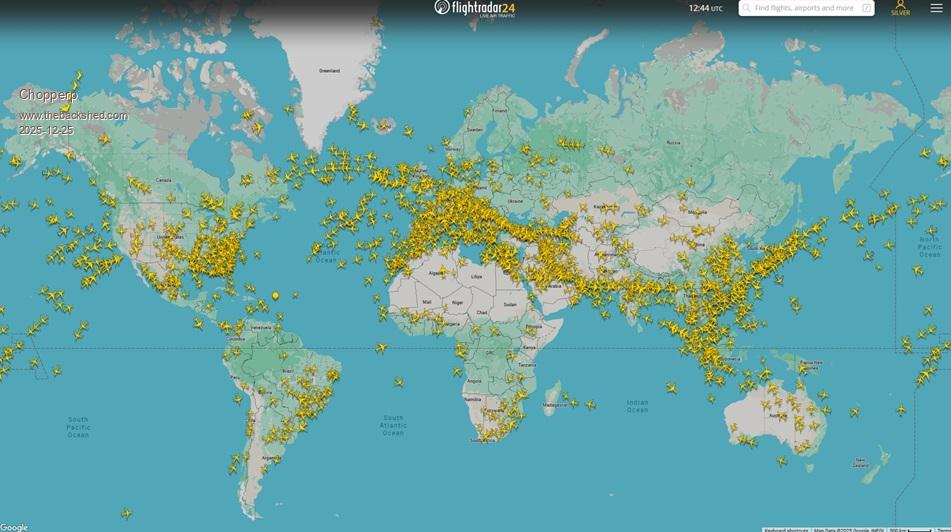
Opened FR24 in Chrome. Seems OK. Google hogs alot anyway.
I do have a Silver membership
Lots of planes in the air ATM. 2245 QLD time.

 
Posted: 02:55am
27 Dec 2025
Copy link to clipboard
TassyJim
Guru


Windows11, Firefox.
FR24 uses an additional 0.3GB when one window is open and a few % of CPU. Nothing like what you are seeing.

I used to upload to FR24 but they decided that my receiver was not up to their standards.

I still use FR24 when I want to know where someone is.
I use my own data + planeplotter for local flights.

Jim
 
Posted: 12:34pm
27 Dec 2025
Copy link to clipboard
MaryB_MN
Newbie

  Grogster said  I still enjoy the odd visit to this site, especially when someone I know, is flying somewhere, cos I can then follow that flight.

I understand that they have overheads to keep this site online, but MY GOD.....has this site got greedy for resources of late.

Loading it up, and checking on a flight, FR24 itself, as a single website, gobbles 6GB of RAM, and 80% of an 8-core CPU.  MOST of these resources are gobbled up, supporting the advertising content, and NOT the actual flight data plotting etc.

CLOSE the site, and I get roughly 6GB of RAM returned to the pool, and the CPU drops back to around 15%, even with my other apps running.

Disappointing that they would seem to have become infested with ads, more then the content.
Windoze 11 would be proud of the direction they have taken.

I,on the other hand, have decided I probably will just stop using this site.
I don't mind a site using some resources, but 6-gigs of RAM and 80% of an 8-core CPU, when it is IDLE - just monitoring the flights......

I'm following a flight in New Zealand, which is only a handful of flights, so it's not like I am trying to plot the thousands of flights that might be going on in USA for example.


You may have a virus or adware on your system... I can open it on my ancient 2 core AMD A8 GPU system with 4GB ram... using 20% CPU 40% ram
 
Posted: 03:43am
28 Dec 2025
Copy link to clipboard
Grogster
Admin Group


Perhaps it simply does not like Linux.
Anyone on Linux used FR24?

I re-enabled all the ads, cos the tracking did not want to work unless I did that.
I just tried it again now, same thing.  Almost maxes out the CPU(8-core Intel i3 1215U), and gobbled RAM like there is no tomorrow when you try to zoom in or scroll the map around - about 5GB of RAM during this test.  RAM use increases the more you zoom in or move the map around, but you never get it back - it just keeps taking more and more RAM, the more you move around.  That doesn't seem right either.

Close FR24, all the RAM is released, and the CPU calms down to idle again.

I wonder if this really could be an incompatibility with Linux situation?
Perhaps FR24 expects every computer to use it's website, to be a Windows machine, although, I find that hard to believe cos websites GENERALLY don't CARE what system you are on.

Opera browser, but I don't have any issues like that with anything else on Opera.
I could install another browser like Chrome etc and try it out on that, but for all the times I ever use FR24, it's probably not worth worrying too much about it.
Edited 2025-12-28 13:46 by Grogster
 
Posted: 04:30am
28 Dec 2025
Copy link to clipboard
phil99
Guru


Some suggest Brave Browser works efficiently on Linux, others disagree.
For Debian, Ubuntu, Mint:-
sudo apt install curl

sudo curl -fsSLo /usr/share/keyrings/brave-browser-archive-keyring.gpg https://brave-browser-apt-release.s3.brave.com/brave-browser-archive-keyring.gpg

sudo curl -fsSLo /etc/apt/sources.list.d/brave-browser-release.sources https://brave-browser-apt-release.s3.brave.com/brave-browser.sources

sudo apt update

sudo apt install brave-browser
 
Posted: 04:47am
28 Dec 2025
Copy link to clipboard
TassyJim
Guru


I agree that the Linux version of Firefox uses more resources when tracking a flight but my old Linux clanker manages OK

Jim
 
Posted: 12:10pm
29 Dec 2025
Copy link to clipboard
MaryB_MN
Newbie

My ancient AMD A8 only runs at 20ish% CPU, memory use barely bumps up from other web pages...

I would look for adware slowing your system...


To reply to this topic, you need to log in.

The Back Shed's forum code is written, and hosted, in Australia.
© JAQ Software 2026