
| Menu | JAQForum Ver 26.09 |
| Menu | JAQForum Ver 26.09 |
Forum Index : Microcontroller and PC projects : ArmmiteF407 V5.07.02 betas - Library - No Battery and more.
  Page 7 of 7 Page 7 of 7 |
||||||
I have something like six of these lying around but they're a dog of a performer so never even powered one up. H7 totally rocks though  |
||||||
Armmite F407 5.07.02 Beta 4 The manual and binary linked below are on GitHub. These point to the latest versions. A copy will be place on TBS when any minor errors are identified so there is a permanent copy of beta4 on TBS. Armmite F4 manual -Latest Manual Currently 5.07.02 Beta 4 ArmmiteF407 binary Latest default binary Currently 5.07.02 Beta 4 ArmmiteF407PC13Reset binary Latest alternate binary Currently 5.07.02 Beta 4 The testing for an MMBasic Reset is now restricted to a Power Up Restart. This is an attempt to guard against a false triggering of an MMBasic Reset on a running (powered) system. See Armite F4 loosing program The alternate firmware ARMmiteF407PC13Reset.bin is provided to move the testing for an MMBasic Reset off PE3 (K1) and also the testing for Option Serial Console off PE4(K0). Pin PC13 is now used to trigger these events. This allows PE4 and PE3 to be used without risking an unintended MMBasic Reset or switch to Serial Console. 3.3V on PC13 will trigger an MMBasic Reset GND on PC13 will trigger a switch to the Serial Console. !!! MMBasic Reset !!! Now printed on console after an MMBasic Reset is forced. MM.INFO(BOOT) will return the reason for the last MMBasic Restart. “Power On”, ”Reset Switch”, “MMBasic Reset”, ”CPU RESTART”, “Watchdog”, “EXECUTE Timout” or “HEAP Restart”. These could be written to a log file to see the history of an unattended device. LCDPANEL ILI9341_I removed. OPTION LCDPANEL accepts [,INVERT] to invert colours on ILI9341 and ILI9488 In the commandline editor the automatic OVR mode on right arrow removed to lineup with the Picomites. Comments are no longer tokenised as per Picomites. MATH V_PRINT array() [,HEX] outputs the contents in hex LONGSTRING PRINT allows ; to suppress CRLF CAN OPEN syntax adjusted slightly Function INKEY$ changed so it automatically resolves Function and special keys as per picomites and CMM2. SHIFT F3-F8 Added as per picomite 6.00.02B0 //NB: SHIFT F1, F2, F9, F10, F11, and F12 don't appear to generate anything AUTOSAVE APPEND added. MEMORY PACK/UNPACK removed to recover flash. Footnote added 2025-02-09 11:23 by disco4now Update 09/02/2025 with fix to LINE PLOT command. |
||||||
disco4now I have been testing the latest beta on the test bench but I am still not out of the woods. Here is a screenshot of the error that is occurring: 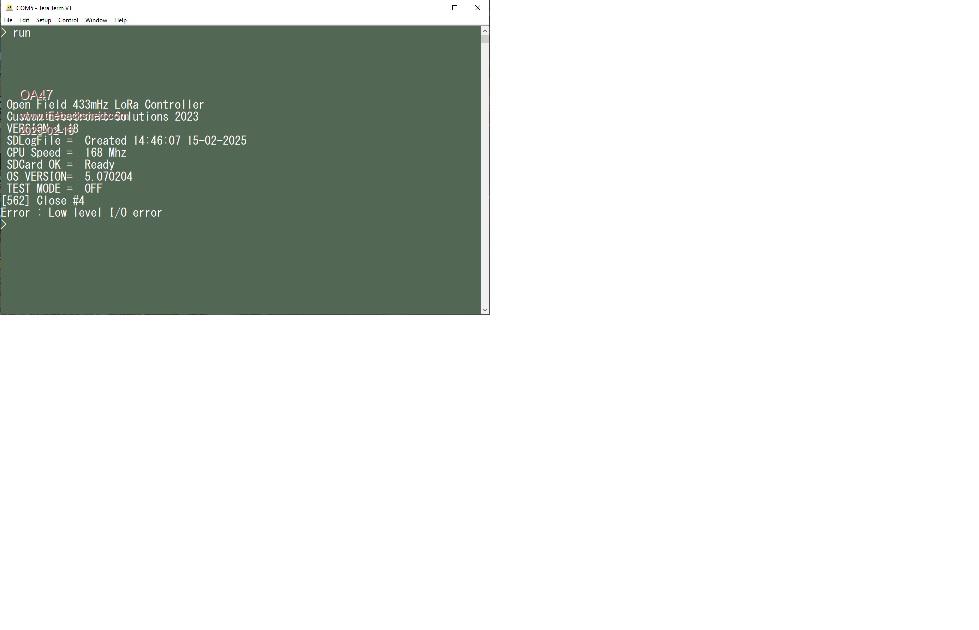 Here is the offending code that I have unsuccessfully modified to try and get round the issue. Sub DbPrnt DbClock$=Left$(Date$,2)+Mid$(Date$,4,2)+Mid$(Date$,9,2)+" " DbClock$=DbClock$+Left$(Time$,2)+Mid$(Time$,4,2)+Mid$(Time$,7,2) NewScrnMsg$ = DbClock$ + " " + DbMsg$ If Len(DbMsg$)>0 Then Print #2, NewScrnMsg$ If NewScrnMsg$ <> OldScrnMsg$ Then ScrnMsg$ = NewScrnMsg$ For Y=12 To 1 Step -1 DisplayLog$(Y)=DisplayLog$(Y-1) Next Y DisplayLog$(Y)=ScrnMsg$ For X = 1 To 12 CtrlVal(70+X)=DisplayLog$(X) Next X ' SEND PORT SCANS TO SCREEN AND NOT SD FILE If Left$(DbMsg$,1)<>"." AND Left$(DbMsg$,1)<>"0" Then If MM.Info(SDCARD)="Ready" Then Pin(PA6)=0 On Error Skip Close #4 Open CFN$ For Append As #4 Print #4, ScrnMsg$ Close #4 <<<<<<<<<<< LINE 563 Pin(PA6)=1 Else GUI DELETE SVE GUI BUTTON SVE, "SD ERROR",230, 20,80,20,RGB(RED), RGB(yellow) EndIf EndIf EndIf EndIf OldScrnMsg$ = ScrnMsg$ End Sub Unfortunately this latest event resulted in the program failing to a prompt but the mmbasic code was still in memory. I do have this sub. SUB MM.STARTUP OPTION AUTORUN ON END SUB OA47 Edited 2025-02-16 15:04 by OA47 |
||||||
What is the point of the watermark. So often, posts are illegible. |
||||||
Sorry about that. 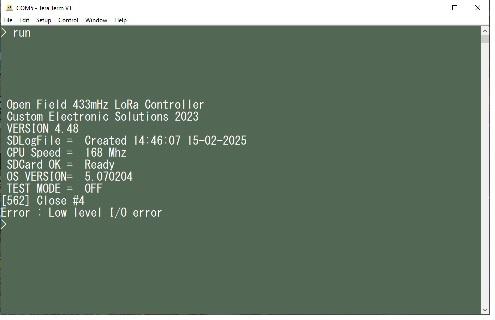 I have just thought of introducing a delay between the SD card operations, that may help things. OA47 |
||||||
I think you need the ON ERROR SKIP before the line If MM.Info(SDCARD)="Ready" Then The test for the MM.info(SDCARD) tries to access the SDCARD so this would be where it fails. Also ON ERROR SKIP only skips an error on the next line. i.e. ON ERROR SKIP nn ON ERROR SKIP will ignore an error in a number of commands (specified by the number 'nn') executed following this command. 'nn' is optional, the default if not specified is one. After the number of commands has completed (with an error or not) the behaviour of MMBasic will revert to ON ERROR ABORT. You may need to specify the number of lines you want to skip errors on. Maybe something like this. If Left$(DbMsg$,1)<>"." AND Left$(DbMsg$,1)<>"0" Then SDCARDStatus="Failed at MM.INFO" ON ERROR SKIP 1 SDCARDStatus=MM.Info(SDCARD) If SDCARDStatus="Ready" Then Pin(PA6)=0 ON ERROR SKIP 4 Close #4 Open CFN$ For Append As #4 Print #4, ScrnMsg$ Close #4 <<<<<<<<<<< LINE 563 Pin(PA6)=1 Else GUI DELETE SVE GUI BUTTON SVE, "SD ERROR",230, 20,80,20,RGB(RED), RGB(yellow) EndIf EndIf |
||||||
Ok disco4now, I will implement your suggestions. Any thoughts on the "ERROR : Low level I/O error" dropping to a prompt ? OA47 |
||||||
Its an error from the SDCARD for some reason. I think its dropping to the prompt because the current ON ERROR SKIP is not being applied when it occurs as it applies only to the first CLOSE #4. I think the error is on the subsequent one, so the ON ERROR SKIP 4 should cover that. A further look at the code seems to indicate that the MM.INFO(SDCARD) should not cause an error, it would just return 'Not Present' instead, so the ON ERROR SKIP around the MM.INFO is not required. |
||||||
disco4now, thankyou for the feedback, I was a bit suspicious about the ON ERROR SKIP for the SD CARD check. I will keep monitoring. OA47 |
||||||
OA47, Are you using any interrupts in the code?. e.g TIMER, SETPIN xx,INT on any pins or interrupts from the COM ports. Do any of these call Sub DbPrnt? Just checking because calling any SUB from both the main code and also from an interrupt is a big don't do it. Gerry |
||||||
Gerry, the only interaction with the Sub DbPrnt and any interrupts is when it scans the 16 ports: Dim ScanPortTime = 500 SetTick ScanPortTime,ScanPorts Sub ScanPorts 'Interupt timed with ScanPortTime SetTick 0,ScanPorts 'Turn off Interupt Com2Chk 'Check for message from PC to remote Pulse PA7,2.5 'Pulse LED on F4 to indicate operation RCMsg$=Input$(80,#1) 'Look for any Messages from REMOTES LkForMsg 'Look for message from any remote LoRa unit If Right$(Time$,1)="0" Then '10 second interval CntlrScn 'Scan controller outputs for any change VChange 'Identify output change from controller EndIf Status$=Valve$ If Right$(Time$,2)="19" Then '60 second interval CTime=CTime+1 DbMsg$= "CTime="+Str$(CTime)+" Valves="+Str$(ValveCount):DbPrnt If ValveCount > 0 Then 'At least one valve is in operation If Ctime>3 Then PresChk 'Check Pressures of all enabled valves Else If Ctime>20 Then PresChk 'Check Pressures of all enabled valves EndIf EndIf If Right$(Time$,5)="00:50" Then SDI_Chk '60 minute interval ' If Right$(Time$,2)="50" Then SDI_Chk 'TEST 1 minute interval Valve$="" SetTick ScanPortTime,ScanPorts End Sub Not sure if there is a "don't do it" in there OA47 |
||||||
This looks like a 'don't do it' especially if DbPrnt is called anywhere in the main DO:LOOP The code above is all executing inside the interrupt. So think in terms that its possible that all the above code could insert itself at any time and at any point within the main DO:LOOP. This becomes a bit hard to think about. Its easily fixed by following the guideline, keep interrupts short,set a flag and do the work in the main DO:LOOP Something like this. 'Main Loop DO if ScanPortFlag=1 then ActionScanPorts SetTick ScanPortTime,ScanPorts ScanPortFlag=0 end if LOOP 'Keep It Short, Set a flag Sub ScanPorts 'Interupt timed with ScanPortTime SetTick 0,ScanPorts 'Turn off Interupt ScanPortFlag=1 ' Set Flag End Sub Sub ActionScanPorts 'Interupt timed with ScanPortTime '''''SetTick 0,ScanPorts 'Turn off Interupt Com2Chk 'Check for message from PC to remote Pulse PA7,2.5 'Pulse LED on F4 to indicate operation RCMsg$=Input$(80,#1) 'Look for any Messages from REMOTES LkForMsg 'Look for message from any remote LoRa unit If Right$(Time$,1)="0" Then '10 second interval CntlrScn 'Scan controller outputs for any change VChange 'Identify output change from controller EndIf Status$=Valve$ If Right$(Time$,2)="19" Then '60 second interval CTime=CTime+1 DbMsg$= "CTime="+Str$(CTime)+" Valves="+Str$(ValveCount):DbPrnt If ValveCount > 0 Then 'At least one valve is in operation If Ctime>3 Then PresChk 'Check Pressures of all enabled valves Else If Ctime>20 Then PresChk 'Check Pressures of all enabled valves EndIf EndIf If Right$(Time$,5)="00:50" Then SDI_Chk '60 minute interval ' If Right$(Time$,2)="50" Then SDI_Chk 'TEST 1 minute interval Valve$="" ''''''SetTick ScanPortTime,ScanPorts End Sub |
||||||
Armmite F407 5.07.02 Beta 6 The manual and binary linked below are on GitHub. These point to the latest versions. A copy will be place on TBS when any minor errors are identified so there is a permanent copy of beta4 on TBS. Armmite F4 manual -Latest Manual Currently 5.07.02 Beta 6 ArmmiteF407 binary Latest default binary Currently 5.07.02 Beta 6 ArmmiteF407PC13Reset binary Latest alternate binary Currently 5.07.02 Beta 6 Conversion of existing programs OPTION AUTORUN ON is now cancelled after any restart other than a Power On occurs. You should change it as below to keep the original functionality. OPTION AUTORUN ON,NORESET OPTION AUTORUN ON [,NORESET] implemented. Any issue causing a return to the command prompt will cancel OPTION AUTORUN ON unless the NORESET parameter is set. MM.INFO(DTR) and MM.INFO(DTS) return CDC Status (experimental) 4K flash recovered by: a)Comments /* */ command is fully removed. b)Consolidating error strings into static constant. static const char *errorstring[]={.... Fixes Font7 % character being displayed mirrored. MM.VER now returns a value to show release candidates as for latest Picomite. i.e. V6.00.00.xx where xx is 00-49 for Beta releases. xx is 50-99 for RC releases. Armmite F407 5.07.02 Beta 5 PWM will set output pin to OC(Open Collector/Drain) if frequency given as -ve number. PWM fixed issue where a frequency change was not recorded, so returning to the original frequency did not result in an update. LIBRARY SAVE future proofed for 0xFF token 16bit tokens. OPTION LCDPANEL accepts [,INVERT] to invert colours on ILI9341 and ILI9488 BEZIER drawing command removed. Support for LCD Display ST7796S 480*320 SPI LINE command enhanced. LW given as -LW will set LW in all directions ON ERROR RESTART implemented MM.INFO$(BOOT) shows reason for last restart. Returns the reason for the last MMBasic restart. i.e. “Power On”, ”Reset Switch”, “MMBasic Reset”, ”CPU RESTART”, “Watchdog”, “Command Timout”, “HardFault Restart” or "Error Restart" MM.INFO(BOOTLINE) returns line at which boot was initiated is applicable. 65000 indicates the library. 0 is the command prompt or not applicable. AUTOSAVE N implemented for fast loading CONST strings < 10 chars now don't use HEAP. Stored in VARTBL MM.INFO(HEAP) added. A hardware error will now cause a restart. ERROR HARDFAULT can be used generate a Hard Fault for testing recovery/restarts. WATCHDOG command enhanced.(Line number at time of timeout recorded) A message is printed to the console at restart. Watchdog timeout Line:123 The WATCHDOG is now cancelled when an issue causes a return to the command prompt. i.e. There is no longer a WATCHDOG error after an un-handled error stops the program. A line number of 65000 indicated it timed out while executing Library code. A line number between 1 and 65000 indicates the line in the code that was executing when the time out occurred. |
||||||
Thanks Gerry, starting to test old programs on it now. |
||||||
| Page 7 of 7 |
||||||
 |
The Back Shed's forum code is written, and hosted, in Australia. |


