
| Menu | JAQForum Ver 19.10.27 |
| Menu | JAQForum Ver 19.10.27 |
Forum Index : Microcontroller and PC projects : RP2350-Touch-LCD-2.8
  Page 2 of 2 Page 2 of 2 |
||||||
The issue may not only be writing the year to the RTC but also reading it back with RTC GETTIME if it is using different registers to the regular RTCs. I guess there are a number of ways forward. 1) As the months and days appear ok the easiest and crudest method is to substitute the correct year at bootup with something like:- Sub MM.STARTUP So to avoid the year being overwritten don't use OPTION RTC AUTO ENABLE.RTC GETTIME Date$ = Left$(Date$,6) + "2025" End Sub 2) The Waveshare example programs presumably manage to set the PCF85063A RTC correctly so see if you can convert that section to MMBasic Subs for writing and reading the chip. 3) From the PCF85063A datasheet create your own RTC Subs. 4) If enough people use this chip perhaps it can be added to the firmware. Edit. Haven't got a PCF85063A but have been having a play with a DS3231 to see if there is a simple way to set and read the year. This might work for the PCF85063A RTC SetReg &H0A, &H25 'first nibble is BCD decade, second is BCD year Sub MM.STARTUP Local year% RTC GETTIME RTC GetReg &H0A, year% 'read the year register year% = (year%>>4)*10 + (year% and 7) 'convert BCD nibbles to decimal Date$ = Left$(Date$,8) + Str$(year%) 'add the year to the date. End Sub The DS3231 test. change the register address from &h06 to &h0A to try on the PCF85063A > Dim year%, newYear% > newYear%=&h42 : RTC SetReg &H06, newYear% 'set year to 2042 > RTC GetReg &H06, year% : year% = (year%>>4)*10 + (year% and 7) : date$ = Left$(Date$,8) + Str$(year%) > ? date$ 24-10-2042 > Edited 2025-10-24 12:55 by phil99 Footnote added 2025-10-26 17:46 by phil99 Red Face Time! Did not test long enough, replace BCD to decimal converter with this. year% = (year%>>4)*10 + (year% and 15) 'convert BCD nibbles to decimal |
||||||
It wouldn't be so bad if there was a good reason to use that particular RTC chip other than cost. :( It's not as if you can rely on its accuracy. Setting the year seems to be a bit superfluous on a chip that will need to be corrected monthly (if you're lucky). |
||||||
In case the RTC SetReg and RTC GetReg method of setting/getting the year doesn't work here are two RTC Subs to do the job. Not tested on a PCF85063A but with appropriate adjustments work on a DS1307, DS2321 and simulated PCF85063A in a EEPROM (was too wet to go out to play yesterday). Sub PCF85063A.Get 'Load Date$ and Time$ with values from the RTC Local integer dt(6), n Local D.o.W$(7)=("Day-of-Week not set. ","Sun ","Mon ","Tue ","Wed ","Thu ","Fri ","Sat ") I2C WRITE &H51,0,1,4 : I2C READ &h51,0,7,dt() 'set register address pointer to 4 then read registers For n=0 To 6 : dt(n)=(dt(n)>>4)*10+(dt(n)And 15) : Next 'convert BCD byte to integer Time$ = Str$(dt(2),2,0,"0")+":"+Str$(dt(1),2,0,"0")+":"+Str$(dt(0),2,0,"0") 'assemble time Date$ = Str$(dt(3),2,0,"0")+"-"+Str$(dt(5),2,0,"0")+"-20"+Str$(dt(6),2,0,"0") 'assemble date Print "Date$ and Time$ have been updated from the RTC to "+T$+" "+D.o.W$(dt(4)) ' : Math v_print dt() End Sub 'To update the Day-of-Week after setting the RTC run this at the command prompt:- 'I2C write &h51,0,2,7,DoW 'DoW = 1 for Sunday to 7 for Saturday Sub PCF85063A.Set 'Set Date$ and Time$ first then call PCF85063A.Set to set the RTC Local T$=Time$+" "+Date$ ' "hh:mm:ss dd-mm-20yy" Local integer dt(7), n dt(0)=0 : dt(1)=Val(Mid$(T$,7,2)) : dt(2)=Val(Mid$(T$,4,2)) : dt(3)=Val(Left$(T$,2)) dt(4)=Val(Mid$(T$,10,2)) : dt(5)=0 : dt(6)=Val(Mid$(T$,13,2)) : dt(7)=Val(Right$(T$,2)) 'Start at register address 4, seconds, minutes, hours, day, DoW=0, month, year (2 digit) For n = 2 To 7 : dt(n) = (dt(n)\10 << 4)+(dt(n) Mod 10) : Next 'convert integer byte to BCD I2C WRITE &H51,0,9,dt() 'send data to RTC Print "PCF85063A RTC time and date have been set to "+T$ ' : Math v_print dt() End Sub As most people have no use for these Subs (see Mick's comment), except those who have bought a module with one on it, they are quite rudimentary and there is no error detection built in. To minimize operator error they don't accept any parameters. Sub PCF85063A.Set Just takes the values from Time$ and Date$ and loads them into the RTC. Sub PCF85063A.Get Does the reverse. You can manually set the Day-of-Week register if you wish but it isn't needed as MMBasic has the DAY$() Function. Edited 2025-10-28 21:27 by phil99 Footnote added 2025-10-29 21:37 by phil99 Spotted an error in Sub PCF85063A.Set This line:- dt(0)=0 : dt(1)=Val(Mid$(T$,7,2)) : dt(2)=Val(Mid$(T$,4,2)) : dt(3)=Val(Left$(T$,2)) Should be:- dt(0)=4 : dt(1)=Val(Mid$(T$,7,2)) : dt(2)=Val(Mid$(T$,4,2)) : dt(3)=Val(Left$(T$,2)) dt(0)=4 is the correct register address to start loading the data.The EEPROM simulation needed a 2 byte register address "dt(0)=0 : dt(1)=4 + data" and I deleted the wrong one for the final version. Footnote added 2025-10-29 22:12 by phil99 Yet more corrections related to the EEPROM simulation. For n = 1 To 7 : dt(n) = (dt(n)\10 << 4)+(dt(n) Mod 10) : Next 'convert integer byte to BCD I2C WRITE &H51,0,8,dt() 'send data to RTC So here is the whole Sub again. Sub PCF85063A.Set 'Set Date$ and Time$ first then call PCF85063A.Set to set the RTC Local T$=Time$+" "+Date$ ' "hh:mm:ss dd-mm-20yy" Local integer dt(7), n dt(0)=4 : dt(1)=Val(Mid$(T$,7,2)) : dt(2)=Val(Mid$(T$,4,2)) : dt(3)=Val(Left$(T$,2)) dt(4)=Val(Mid$(T$,10,2)) : dt(5)=0 : dt(6)=Val(Mid$(T$,13,2)) : dt(7)=Val(Right$(T$,2)) 'Start at register address 4, seconds, minutes, hours, day, DoW=0, month, year (2 digit) For n = 1 To 7 : dt(n) = (dt(n)\10 << 4)+(dt(n) Mod 10) : Next 'convert integer bytes to BCD I2C WRITE &H51,0,8,dt() 'send data to RTC Print "PCF85063A RTC time and date have been set to "+T$ ' : Math v_print dt() End Sub |
||||||
just a question  i just see that i have one of this board available and dont know if it's ok for a keyboard in OTG. so, what is the firmware to use to connect a KB in OTG ? I have try : PicoMiteRP2350V6.01.00RC6.uf2 and PicoMiteRP2350USBV6.01.00RC6.uf2 without success ... I have everything else working  Cheers  |
||||||
When you install PicoMiteRP2350USBV6.01.00RCx firmware the USB port can no longer be used for the console so GP8 and GP9 become the serial console (via a TTL serial to USB adapter). However the schematic for the RP2350-Touch-LCD-2.8 shows GPIO08 and GPIO09 being used for the QMI8658 Inertial Measurement Unit so it will be difficult to set up. The serial console can be changed to other pins but to do that you need access to GP8 and GP9. You might need to temporarily cut the tracks to the QMI8658 to do that. |
||||||
Thanks phil99 , Next time i start with the schematic I asked first because OTG is working on the Machikania basic compiler. I also see that in the some pins available for external I/O there are RXD , TXD in it Cheers |
||||||
In this case I would try to connect an USB keyboard and blind type to change the serial setting |
||||||
Hello phil99, Thank you for your all your hints and routines.Based on it and your remarks I have prepared and tested - a routine to set date and time on the RDC - a routine to transfer RDC data during start up to MMBasic in addition I also adapted the startup routine to cover RTC failure and battery operation tasks. RTC_SET&GET.zip Have a nice day |
||||||
Hello Again, a lot of help from this forum. I bought 2 WaveShare RP2350-Touch-LCD-3.5 units for a project. https://docs.waveshare.com/RP2350-Touch-LCD-3.5 I discovered that the RTC chip was PCF85063A, which didn't work with PicoMite's built-in RTC functions. 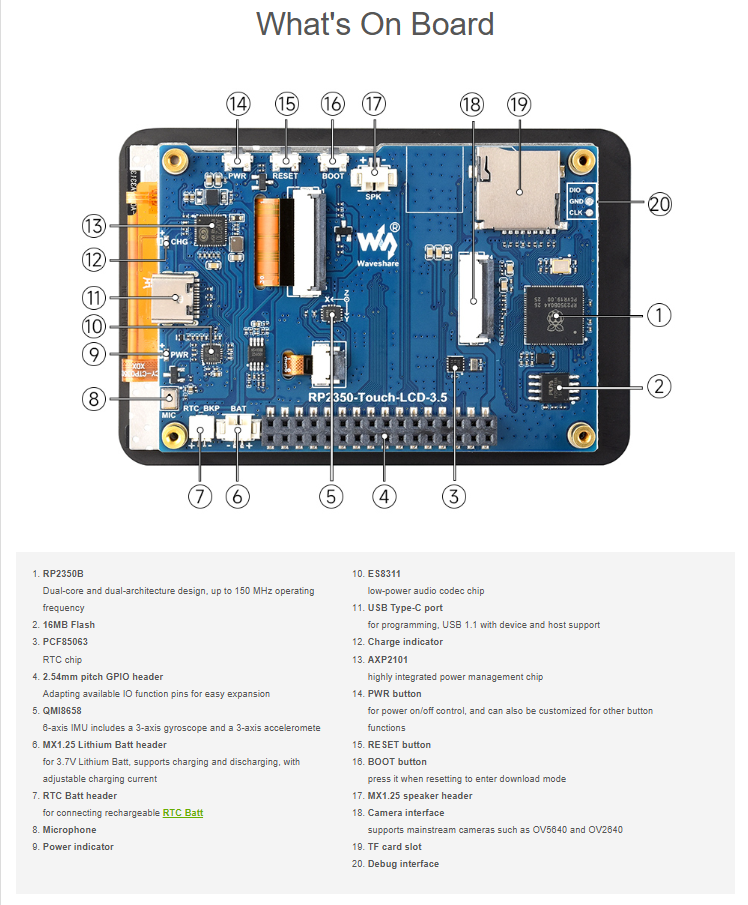 I searched for PCF85063A on this forum and found a solution. I might especially have to thank phil99 and Arne for this, of course everyone else who helped as well. I use the "RTC_SET&GET.zip" from Arne. I used RTC_SET as it was. On RTC_GET I removed the BAT thing and the demo at the end. /Peter63 Edited 2026-09-13 15:26 by Peter63 |
||||||
Don't expect great things from that RTC even when it's working. The frequency standard in it isn't temperature compensated like it is on the DS3231 and will drift. You really need some sort of time correction from an external time source now and again. It's cheap though, which is why it gets used. I've read that, by tweaking it's register values, you can usually improve on a stock chip but you may need some precision frequency measuring gear and patience to do it. |
||||||
| Page 2 of 2 |
||||||
 |
The Back Shed's forum code is written, and hosted, in Australia. |


