
| Menu | JAQForum Ver 19.10.27 |
| Menu | JAQForum Ver 19.10.27 |
Forum Index : Microcontroller and PC projects : MMEdit V5.4.0
MMEdit V5.4.0 has been uploaded. There are changes to cater for STRUCTUREs also YMODEM I took the opportunity to update much of the syntax code. This should reduce the number of times that MMEdit gets it wrong. I also updated the XMODEM code to better handle fast connections. Transfer speeds are noticeably faster. I have made some progress on updating the syntax files. Still more work to do but I think I have captured most of the new commands. Lastly, I found a couple of places that 'may' cause a crash. There may still be more but I have had a few weeks without any problems. Jim VK7JH MMedit |
||||||
Hi Jim, In the Linux version of MMEdit, you have pre-set the line to open MMB4L (files/preferences/external programs). This pre-set is incorrect (it has been wrong long before, but I never gave this feedback to you). For MMB4L V0.6 and newer it should be: -e %q%mmbasic -i %bas%%q% &disown Thank you for your continued support on MMedit. A great way to work with MMBasic. Volhout P.S. The "-i" can be omitted once you have debugged the program, which in my case virtually never happens. The "-i" keeps the terminal open so you can see the error message. Edited 2026-01-26 17:54 by Volhout |
||||||
Thank you Jim!  |
||||||
I have uploaded a new copy of V5.4.0 at 0500UTC 27/1/26 Hopefully it has fixed the problem with XMODEM on Linux. To save downloading the full ZIP, I have attached the MMCC exe file. You may have to set permissions after replacing the old MMCC MMCC.zip Technical info: MMCC looks for the XMODEM SEND xxx command being echoed (looking for error messages). The Linux version does not always see the echoed command. I have yet to find out why so I assume it has been sent OK and send the starting <NAC> anyway. Jim |
||||||
@Jim, The new MMCC works. It tries Y-modem first I guess. Not sure what the non-ASCII characters are at the end (before the prompt). 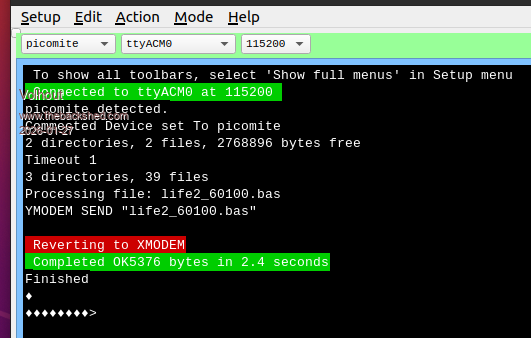 Volhout Edited 2026-01-27 17:00 by Volhout |
||||||
Hi Jim, I just noticed that "int" is coloured blue as if it is a keyword. I couldn't find it in any manual but it happens in all versions of the syntax I tried. I can't find it in any manual. Is it correct? The program runs without error. offset = INT(visibleCount / 2) Bill |
||||||
INT has been there since the dawn of time, or at least the birth of MMBasic 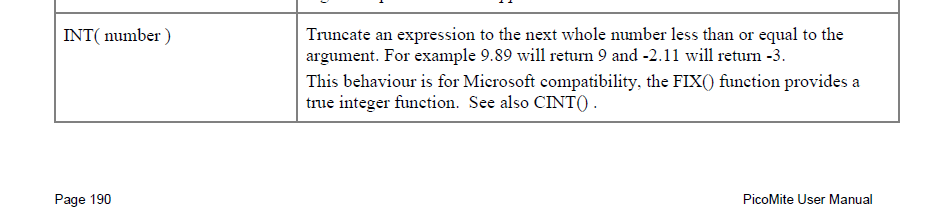 Jim |
||||||
Thanks Jim, Now I can find it everywhere and that's what it's used for in the program. Sorry to waste your time. DOH! Bill |
||||||
Hi Jim, I use MMBasic for DOS and MMB4W in conjunction with MMedit often to develop programs because the write code and test turnaround is so quick. Because the 'Run in DOS' button is so convenient, I was wondering if we could have one for MMB4W? Failing that, would it be possible to have the DOS button's function governed by the syntax selection? Bill |
||||||
Jim, I am not sure about others, but I myself (running MMEDit/MMCC under ubuntu, have converted back to 5.37. 5.37 was absolutely stable in all kind of file transfers, loading from pico to MMEdit, filemanager, etc. Also with the pico 6.02.01b4 version. 5.40 (also with updated MMCC) still occasionally makes mistakes, and once, using the filemanager, I even lost a file. Not a big deal, since plenty of copies. But the mechanism in 5.37 worked better for the pico's I use. When others are happy with 5.40, do not change anything. I am completely happy with how 5.37 is today, and have no problem with that. It works great. And I do not need token coloring for the new commands I am not going to use (structures etc..). Volhout Edited 2026-03-02 04:16 by Volhout |
||||||
Not easy and I am trying to limit the number of buttons. There are too many. I will think about it. I don't use Linux very often. I can't properly test serial problems with a VM but I will try and give it some more attention. I now have a laptop dedicated to Linux. I have to work on the text sizes so it fits the buttons etc and improve compatibility with the different versions of Linux. Jim |
||||||
 |
The Back Shed's forum code is written, and hosted, in Australia. |


