
| Menu | JAQForum Ver 19.10.27 |
| Menu | JAQForum Ver 19.10.27 |
Forum Index : Microcontroller and PC projects : PicoMiteVGA: Framework for ray casting using the DDA method
DDA method (Digital Differential Analyser).Much faster than my previous attempts. ' Raycaster 2 in MMBasic, DDA method (Digital Differential Analyser) mmb4w=0 CLS If mmb4w Then MODE -7 :CLS RGB(cyan) PAGE WRITE 1 Else MODE 2: CLS RGB(cyan) FRAMEBUFFER create:FRAMEBUFFER write f End If CLS mapS=64:mapy=24:mapx=24 ' --- Labyrinth Definition --- Dim mapW = 57 Dim mapH = 51 Dim m(mapW, mapH) Restore MapData1 For y = 0 To mapH-1 :Read k$:k$=k$+"1" For x=0 To Len(k$):m(x, y)=Val(Mid$(k$,x+1,1)):Next :Next 'For y = 0 To mapH-1 : For x = 0 To mapW-1 : Read m(x, y) : Next x : Next y ' --- Player Setup --- px = 26.5 : py = 45.5 dx = 1.0 : dy = 0.5 planeX = 0.0 : planeY = 0.66 moveSpeed = 0.2 rotSpeed = 0.1 buffer = 0.2 ' --- Grafic Setup --- resStep = 2 scrW = MM.HRES*.75 scrH = MM.VRES*.75 ' Flag to force the first frame needsRedraw = 1 Do ' Only paint when something has changed If needsRedraw = 1 Then ' Ceiling and floor Box 0, 0, scrW, scrH/2, 0, RGB(0,128,255), RGB(0,128,255) Box 0, scrH/2, scrW, scrH/2, 0, RGB(255,128,0), RGB(255,128,0) 'DDA For x = 0 To scrW - 1 Step resStep cameraX = 2 * x / scrW - 1 rayDx = dx + planeX * cameraX rayDy = dy + planeY * cameraX mx = Int(px) : my = Int(py) If rayDx = 0 Then dDx = 1e30 Else dDx = Abs(1 / rayDx) If rayDy = 0 Then dDy = 1e30 Else dDy = Abs(1 / rayDy) If rayDx < 0 Then stepX = -1 : sdX = (px - mx) * dDx Else stepX = 1 : sdX = (mx + 1.0 - px) * dDx End If If rayDy < 0 Then stepY = -1 : sdY = (py - my) * dDy Else stepY = 1 : sdY = (my + 1.0 - py) * dDy End If hit = 0 Do While hit = 0 If sdX < sdY Then sdX = sdX + dDx : mx = mx + stepX : side = 0 Else sdY = sdY + dDy : my = my + stepY : side = 1 EndIf If m(mx, my) > 0 Then hit = 1 Loop If side = 0 Then pDist = (sdX - dDx) Else pDist = (sdY - dDy) If pDist < 0.1 Then pDist = 0.1 lH = Int(scrH / pDist) yS = (scrH / 2) - (lH / 2) wallCol = RGB(GREEN) If side = 1 Then wallCol = RGB(0, 128, 0) Box x, yS, resStep, lH, , wallCol Next x If mmb4w Then PAGE WRITE 0:Blit 0,0,0,0,scrW,scrH,1:PAGE WRITE 1 Else FRAMEBUFFER write n Text 290,0,"X="+Str$(Int(px))+" " Text 290,12,"Y="+Str$(Int(py))+" " FRAMEBUFFER write f Blit framebuffer F,N,0,0,0,0,scrW,scrH End If needsRedraw = 0 ' Reset Redraw Flag End If ' Wait for button (does not block, but checks efficiently) k$ = UCase$(Inkey$) If k$ <> "" Then ' Enable redraw when a movement key is pressed If Instr("WASD", k$) > 0 Then needsRedraw = 1 Select Case k$ Case "W" If m(Int(px + dx * buffer), Int(py)) = 0 Then px = px + dx * moveSpeed If m(Int(px), Int(py + dy * buffer)) = 0 Then py = py + dy * moveSpeed Case "S" If m(Int(px - dx * buffer), Int(py)) = 0 Then px = px - dx * moveSpeed If m(Int(px), Int(py - dy * buffer)) = 0 Then py = py - dy * moveSpeed Case "D" oldDx = dx : dx = dx * Cos(rotSpeed) - dy * Sin(rotSpeed) dy = oldDx * Sin(rotSpeed) + dy * Cos(rotSpeed) oldPx = planeX : planeX = planeX * Cos(rotSpeed) - planeY * Sin(rotSpeed) planeY = oldPx * Sin(rotSpeed) + planeY * Cos(rotSpeed) Case "A" oldDx = dx : dx = dx * Cos(-rotSpeed) - dy * Sin(-rotSpeed) dy = oldDx * Sin(-rotSpeed) + dy * Cos(-rotSpeed) oldPx = planeX : planeX = planeX * Cos(-rotSpeed) - planeY * Sin(-rotSpeed) planeY = oldPx * Sin(-rotSpeed) + planeY * Cos(-rotSpeed) End Select End If Loop Until k$ = Chr$(27) If mmb4w Then PAGE WRITE 0 MapData1: ' Data "11111111111111111111111111111111111111111111111111111111" Data "11111111111111111111111110000000000111111111111111111111" Data "11111000011111111010111110000000000111111111111111111111" Data "11111000011111100000000000000000000100111111111111111111" Data "11111000011111100000000010000000000100111111111111111111" Data "11111011111111110011111110000000000111111111111111111111" Data "11111000000000110011111110000000000111111111111111111111" Data "11111000000001110010111111111001111111111111111111111111" Data "11111000000000000000111111111001111111111111111111111111" Data "11111000000000000000111111111001111111111111111111111111" Data "10000000000001000000111111111001111111111111111111111111" Data "11111000000001111111111111111001111111111111111111111111" Data "10000011111101111111111111111001111111111111111111111111" Data "10011111001111111111111100000000011111111111111111111111" Data "10111111001111111111111100111001111111111111111111111111" Data "10011111001111111111111100111001111111111111111111111111" Data "10000001001111111111111100111001111111111111111111111111" Data "10000011001111111111111111111001111111111111111111111111" Data "10010101111011111111111111111001010100111111101111110111" Data "10011000000001111111111101110000111011111111101000000011" Data "10010000000001111111111100000000000010010001001000000000" Data "10011000000001111111111000000000000001111111101000000011" Data "10001000000000111111111000000000000000000000001000000000" Data "10001000000001111111111000000000000000000000000000000001" Data "10001000000001111111111000000000000001000000001000000000" Data "10011000000001111111111000000000000000111001111000000001" Data "10011000000001111111111111010000101111110000101000000011" Data "10011111011011111111111111111101110100110001001011110101" Data "10001111001111111111111111111000111111111000100110010001" Data "10011111001111111111111111110000111111110001001000100100" Data "10010001001111111111111111111000111111111000111111111111" Data "10000001001111111111111111110001111111110001001000010111" Data "10011111001111101111111111111001111111111000000000000111" Data "10001010001111011110101111110001011111110000000000001111" Data "10000000000000000000011111111000111111111011001010110111" Data "10000000000000000000000111110000111111111111111111111111" Data "10000000000000010000011111110001111111111111111111111111" Data "11101110111101111111111111111000111111111111111111111111" Data "11111111110010000111111111101101111011111111111111111111" Data "11111111110000011111111100000000000011111111111111111111" Data "11111111111011111111111100001001000001111111111111111111" Data "11111111111001111111111000000000000011111111111111111111" Data "11111111111001111111111111111001111111111111111111111111" Data "11111111111111111111111100001001000011111111111111111111" Data "11111111111111111111111100000000000001111111111111111111" Data "11111111111111111111111100001001000011111111111111111111" Data "11111111111111111111111111111001111111111111111111111111" Data "11111111111111111111111100000000000011111111111111111111" Data "11111111111111111111111100000000000011111111111111111111" Data "11111111111111111111111100101010001011111111111111111111" Data "11111111111111111111111111111111111111111111111111111111" This is just a basic framework. Feel free to change and expand it. Cheers Martin |
||||||
Nice job Martin For anyone that wants to know more about DDA and ray casting https://www.youtube.com/watch?v=NbSee-XM7WA |
||||||
I forgot to mention, the keys are ‘AD WS’ and ESC to quit. |
||||||
Hello Martin  I tried it on PicoMiteHDMIUSB V6.02.00RC6 and it works perfectly. /Peter63 |
||||||
Hi Peter, Thanks for the feedback. I also tried it on Pico2 with HDMI (Try MODE 3). It should also run on CMM2 and MMBasic for Windows if you set mmb4w=1 at the start of the Programm. Cheers Martin Edited 2026-02-09 16:49 by Martin H. |
||||||
Hi Martin, Works nice (RP2040 VGA), but requires quite a lot of math. So it is somewhat slow. Maybe a lot better on 2350. Now I look at what you are planning to do, could you not make use of the 3D DRAW commands in MMBasic. I am not sure the 3D DRAW routines Peter implemented can handle the whole map, but they certainly could handle the visible part of the map (they also can rotate a multiface football). If you place your camera inside the football (inside your maze) this could work ? Regards, Volhout EDIT: Martin, I tried to speed things up by changing "resStep" from 2 to 5, but that corrupts the drawing. Change line 78 into adding "wallCol" as fill color. Edited 2026-02-09 18:42 by Volhout |
||||||
Volhout, You can speed it up by increasing resStep = 2 to resStep = 4 and changing the box command before NEXT X to ‘Box x, yS, resStep, lH, , wallCol, wallCol’. This halves the number of calculations required, but also the x resolution. It could be, of course, possible to use the 3D DRAW routines, but this is a completely different approach to ray casting. To do this, the field of view would have to be vectorised and converted into 3D models. This is certainly possible, but I'm not sure if it would be faster in the end. The initial aim here was to limit the raycast calculations to simple/fast calculations(certainly still room for improvement). I have no experience with the 3D DRAW routines, but I am open to being convinced. Cheers Martin Edited 2026-02-09 19:02 by Martin H. |
||||||
A screenshot for those who are interested, but not enough to crank up the 'Mite: 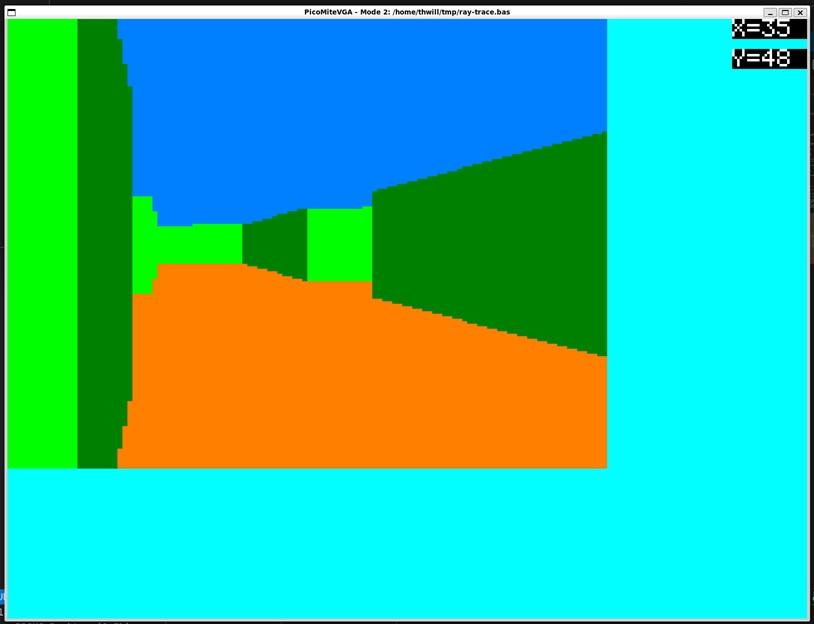 Generated by MMB4L running under WSL2 on Windows whilst simulating a PicoMite  . .Best wishes, Tom Edited 2026-02-09 20:49 by thwill |
||||||
Yes, that sounds reasonable.  |
||||||
How about this ? - -worth including in the RP2350 firmware? Manual: Raycaster_User_Manual.pdf Example code: |
||||||
Hi Peter, It's technically impressive, but in my view it's unnecessary "bloat", a piece of functionality that perhaps one person might used to write a Wolfenstein knock-off. IMO it would be better not to include it and let that one person "show their chops" and get the achievement of doing it in MMBasic alone (might not be possible on the PicoMite) or writing some CSUBs. YMMV, Tom Edited 2026-02-10 03:27 by thwill |
||||||
 |
The Back Shed's forum code is written, and hosted, in Australia. |


