
| Menu | JAQForum Ver 19.10.27 |
| Menu | JAQForum Ver 19.10.27 |
Forum Index : Microcontroller and PC projects : MMEdit V5.4.1
I have uploaded V5.4.1 to Geoff's website. Most of the changes were described earlier. MMEdit The "Find" dialog now has an option "Next after replace" to automatically move to the next occurrence of the search term. Holding <ctrl> while clicking the "action" button (3rd from right) will run option "0". (Run in DOS by default) Preferences now has an option "zoom" Allowable range is 100 to 200 percent The toolbar should now scale better on high DPI screens. This was done mainly for Linux installations. There are 3 new options in MMEdit5.inf around line 113 allowing users to change the format of some styles ; 0 = none,1 = bold, 2 = italics Commands style = 1 Comments style = 2 User Functions style = 1 New tool in 'Program" menu - 'Align comments'. Shift click menu to set the column number to align to Comments that are on a line of their own are not aligned MMCC Bug fix in XMODEM There is a "zoom" setting similar to the one in MMEdit which sizes the buttons. The "'nap" directive in the command files now works "' nap x " at the start of a line will run the remainder of the line then wait x seconds before continuing. You don't have any opportunity to cancel the line. Example test.mmc file: 'target s\command 'settime 'nap 0 print mm.device$ 'nap 1 print mm.ver 'nap 10 files 'nap 1 memory Just for Linux users: The number pad numbers and enter key now work in the console. It ignores the numpad setting and always acts as it is set to numbers. Different versions of Linux act differently so if I have got it wrong, There is an option in the MMCC.inf file doCR = 0 or 1 If you get double <CR>, set doCR = 0 If you don't get any <CR>, set doCR = 1 No doubt there are more bugs in the file transfer code. I will keep looking for them. Jim edit: MMEDit might show V5.4.0 still. Edited 2026-07-28 18:17 by TassyJim VK7JH MMedit |
||||||
Many thanks Jim. Love this thing  |
||||||
Hi Jim! Thanks a lot for your work. I’m glad your editor exists and use it almost every day. Just a heads-up: it still shows "Version 5.4.0". |
||||||
Hi Jim A little feedback from me. I've installed the new version, on a Windows 11 computer. Works OK /Peter63 |
||||||
Thanks Jim, Thanks for this great tool. I use it regularly, which is why I’ve dedicated a whole chapter to it in my MMBasic tutorial . 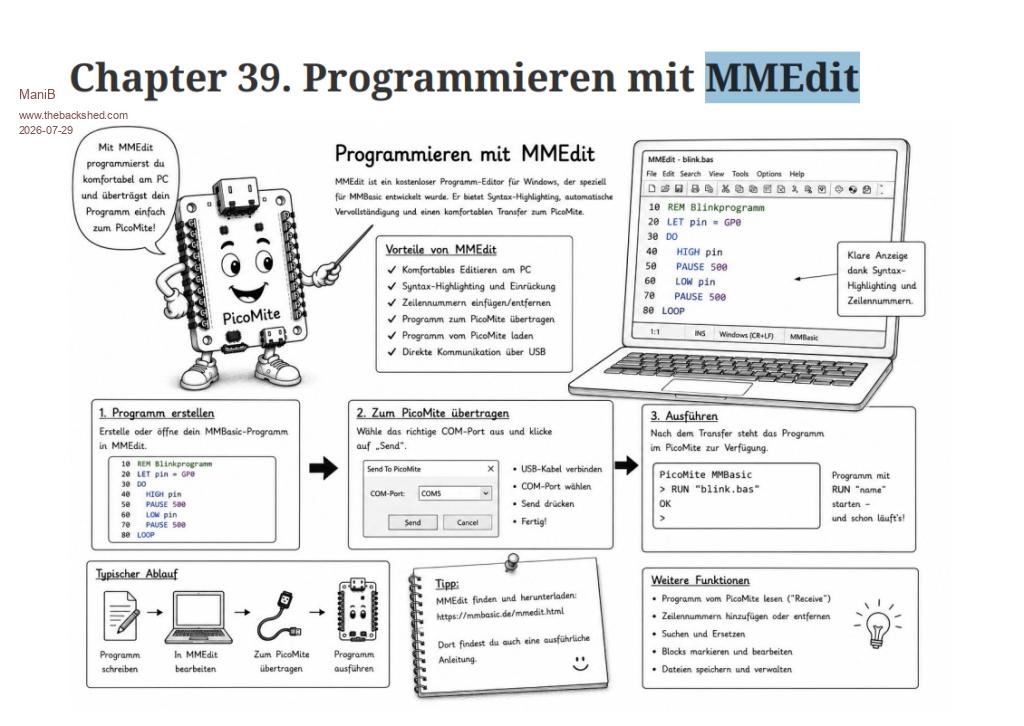 Unfortunately, I have to admit that I’m still using a very old version: MMEdit V5.2.9 from June 2024. But your post has motivated me to finally update it. That way, the information in my chapter will also be up to date  Best regards, Manfred Edited 2026-07-29 18:09 by ManiB |
||||||
Jim, many thanks for "adjust comments" !!! Saves me a lot of time to beautify my comments, as I usually do, to improve readabiltity. Even though MMbasic is self contained, the efficiency one gets with MMEdit and MMCC for programming is really unbeatable. Incredible tool. Gerald |
||||||
Hi Jim, I think there is an issue with MMCC FileManager when downloading from Picomite/ArmiteF4/F7 to the PC. I discovered when trying to copy this screenshot back to the PC.(Windows 11) screenshot0.zip MMCC V537 2025/12/14 Download to PC OK MMCC V540 2026/01/26 Download Fails MMCC V541 2026/07/27 Download Fails ----------------------------------------------- MMCC V537 2025/12/14 Upload OK Processing file: screenshot0.BMP > Completed OK Finished --------------------------------------------- MMCC V540 2026/01/26 Upload Fails **ArmMiteF4** Processing file: screenshot0.BMP > Reverting to XMODEM Short Block in #10 Long Block in #10 Short Block in #10 Long Block in #10 Long Block in #10 Long Block in #10 Long Block in #10 Long Block in #10 Long Block in #10 Long Block in #10 Long Block in #10 File transfer failed Finished ☺ ¼`ⁿ ** Picomite *** > Reverting to XMODEM Reverting to XMODEM Short Block in #1 Short Block in #1 Short Block in #1 Short Block in #1 Short Block in #1 Short Block in #1 File transfer failed Finished ---------------------------------------- Gerry |
||||||
Jim, You made some improvements in 5.4.0, but did not roll them out in a new release, only a patched MMCC was released, much improved, but not perfect (I still use 537). Volhout |
||||||
My apologies to all. Gerry, I will try with your file later. For my testing I used Windows 11, a picomite geek with V6.3.0 firmware and copied files including 1.4MB BMP images to/from B:/. There definitely was a bug in MMCC V540 copying to the picomite which I thought I fixed in the latest MMCC. The BMP files copy both ways for me using xmodem or ymodem. I obviously have a lot more work to do. Edit: Gerry, your file copied both way to the picomite. The nearest I have to the F4 available for testing is a CMM2. Jim Edited 2026-07-30 08:04 by TassyJim |
||||||
Hi Jim, I upgraded my Pico2 HDMIUSB to the released 6.03.00 and the download to the PC still fails. I will investigate a bit more. All the testing I have done so far is with a Serial Console. (HMIUSB uses a Serial Console, H7 is a serial console and I am using Serial Console on the F4) I will have to get a Pico with at CDC console going and see what happens. Gerry |
||||||
Thanks for testing Gerry. It looks like a timing problem. The CMM2 I use runs at 460800 baud. I will drop it back down to 115200 and do some more timing tests. Jim |
||||||
Gerry, Assuming you are using Windows, could you try this MMCC ? I have extended the timing which should handle most baud rates. MMCC.zip If it works for you, I will tidy up the mess a bit and release a full update. Thanks, Jim |
||||||
Hi Jim, I have tested on the pico2 HDMIUSB with serial console and F4/F7 with serial at 115200 and transfers are OK both ways. The Download to the PC does not give any progress updates in the little popup box in MMCC like it does on an Upload, so you are not sure its progressing, so an indication it is progressing would be good. One issue I see in the H7 where there are 78 files in the first directory. If you do a files command at the console you get 3 pages. The filemanager lists these OK initially, however if you navigate to a subdirectory and then navigate back to the root directory it does not show the files in the root and there is an out of memory error on the console. If you play with OPTION DISPLAY 30,80 and increase the number of lines so its only two pages then it all works OK. The H7 and F4 currently don't release the memory if you do a CTRL+C when its asking for any key to continue when doing a files command. That is something I will look at. Is there any chance the filemanager is sending a CTRL+C if it sees more that 2 pages when returning from a subdirectory. Gerry |
||||||
Done I have added a ^C after any "chdir" and before the "files" command. Hopefully that will do the job without causing any grief on any system. MMCC.zip One thing on the to-do list is to transfer the file to a temp file first and then if the transfer has succeeded, rename it. This will stop the annoying habit of writing over a good file and deleting it with a failed transfer. Jim |
||||||
Hi Jim, The progress indicator on the down load is good. There is a bit of confusion about the ^C. I was not asking for these. A ^C at the wrong time was the only way I could see that an out of memory could be triggered, so was inquiring whether MMCC did send any. I have gone back to the previous version and used a man in the middle monitor and it does seem to send ^C [0x03] after the third PRESS ANY KEY ... prompt. It is OK when the root directory is initially selected at start up, but after you navigate to a sub directory and then return to the root it fails to finish the refresh if it is required to answer three PRESS ANY KEY ... prompts to get the full file list. A LF is the response to the first two but the third is the ^C [0x03]. Gerry Edited 2026-07-31 22:45 by disco4now |
||||||
Gerry, The main problem was I had duplicated a bit of code which resulted in the file listing was being triggered twice. That was confusing things. The normal character I use after PRESS ANY KEY is <space> I think I have that sorted out now but I have been distracted sorting out a clean exit when aborting a transfer. I should have something for you to test tomorrow. Jim |
||||||
Hello, working good. In the header and in About still shows version 5.4.0. G@bor |
||||||
 |
The Back Shed's forum code is written, and hosted, in Australia. |


