
| Menu | JAQForum Ver 19.10.27 |
| Menu | JAQForum Ver 19.10.27 |
Forum Index : Microcontroller and PC projects : PicoMite V6.03.01 release
  Page 3 of 3 Page 3 of 3 |
||||||
I think this has been mentioned in the past and the verdict was OPTION SYSTEM SPI is only available on LCD versions. However with HDMI + resistive touch screens now in use it could be useful for sharing with the SD card. Edited 2026-08-10 10:57 by phil99 |
||||||
G'day, Phil, you hit the nail on the head  looking back through all the saved option lists for HDMIUSB versions and non are showing OPTION SYSTEM SPI, my head says otherwise but in the light of a new day I am mistaken. Sadly we cannot have SPI touch with HDMI so SYSTEM SPI is not really relevant. looking back through all the saved option lists for HDMIUSB versions and non are showing OPTION SYSTEM SPI, my head says otherwise but in the light of a new day I am mistaken. Sadly we cannot have SPI touch with HDMI so SYSTEM SPI is not really relevant.Also thanks for the Ascii table, very easy to use  Peter, my apologies, another red herring  Perhaps a note in a future version of the manual would be useful to avoid confusion. 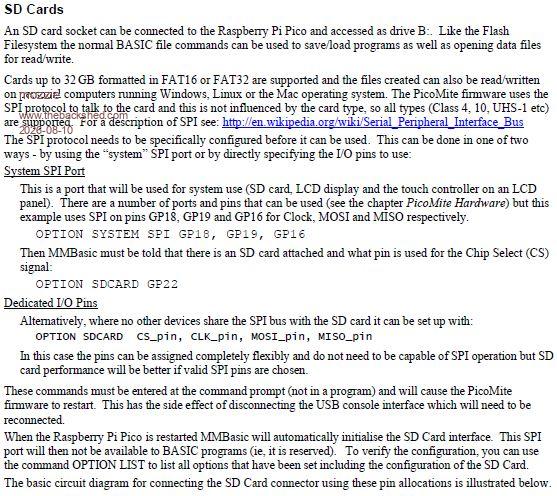 Regards, Lyle. |
||||||
Homa has written a MMBasic program that produces a much neater version than my untidy Paint effort. Follow with SAVE IMAGE for a permanent copy. Font #1 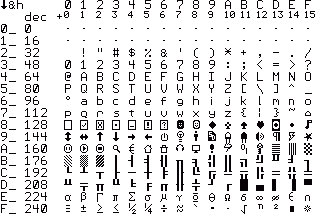 Font #4 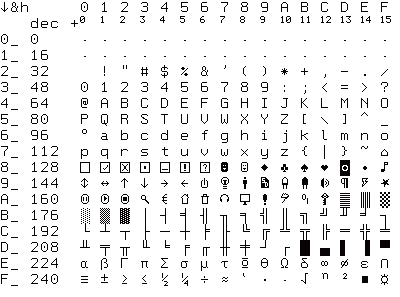 Edited 2026-08-10 22:46 by phil99 |
||||||
I am not sure where to post this but I have been following Peter's updates on MMBasic and also the Fuzix thread where you can compile some MMBasic programs. I usuallly try an ASCII Mandelbrot program to checkout any changes in performance on the various versions of MMBasic. Since Peter introduced Micropython and Fuzix I have added a Sudoku solver in MMBasic similar to that which Peter demo'ed in Micropython(I used Gemma 4 locally) that I used for benchmarking. In the included zip I have the 2 basic programs and a sample puzzle that I ran against a number of different boards that I have (RP2040 and RP2350(AorB)). In general each successive version is faster due to firmware changes or hardware(RP2040 to RP2350). As noted in the PDF file there is one test for a Picomite RP2040 V1.0 that goes against this trend. I am not sure why there is this anomaly but I am posting the files for general information. The huge increase in performance for Fuzix is quite apparent. Because of the different clock speeds on the various boards/versions I "normalized" these to 200 MHz. Benchtests.zip |
||||||
G'day, Can anyone please confirm that I am not just having one of those days  Pico Computer 1 & Pico Computer 3 both work fine with V6.03.00 but when upgraded to V6.03.01 I get the following when trying to run a file or exit file manager: *** FAULT PC=100B2030 LR=100AB7A3 SP=200806A0 CFSR=00000000 HFSR=80000000 > option list PicoMiteHDMI MMBasic USB RP2350A Edition V6.03.01 OPTION SERIAL CONSOLE COM2,GP8,GP9 OPTION FLASH SIZE 4194304 OPTION COLOURCODE ON OPTION KEYBOARD US OPTION RESOLUTION 640x480 @ 315000KHz > This does seem to be confined to the HDMIUSB variant. The HDMI output also loses sync when changing drives. Tried downloading the file twice from GitHub and checked the CRC SHA and they match. Neither of these boards are fitted with PSRAM, however I would hope the basic functionality can work without it. Regards, Lyle. |
||||||
Replicated, seems to be just the HDMIUSB build, HDMI is fine as is HDMIWEB and HDMIUSB launches OK from the command prompt so looks like a resource issue - will inverstigate Edited 2026-08-13 02:58 by matherp |
||||||
G'day Peter, Thanks for the reply, tried option reset as suggested but same outcome as above. Had also tried different resolutions and with / without SDCard installed but no change. Error message is only printed to console. Regards, Lyle. |
||||||
Some further info: May not be PSRAM related, just tried on PICO-2350-DIL with PSRAM, same result. *** FAULT PC=100B2030 LR=100AB7A3 SP=200806A0 CFSR=00000000 HFSR=80000000 > option list PicoMiteHDMI MMBasic USB RP2350B Edition V6.03.01 OPTION SERIAL CONSOLE COM2,GP8,GP9 OPTION FLASH SIZE 16777216 OPTION COLOURCODE ON OPTION KEYBOARD US OPTION PICO OFF OPTION RESOLUTION 640x480 @ 315000KHz OPTION PSRAM PIN GP0 > Regards, Lyle. |
||||||
Try reloading from github - should be fixed now |
||||||
Peter, Happy to report normal service has resumed Thanks again for all you do Regards, Lyle. |
||||||
G'day, Once again I seem to be in trouble. This may be confined to HDMI builds (VGA?) with no PSRAM fitted? Trying to play WAV files (MP3 is OK) from the File Manager causes either a full reset (all options reset) or the system to lock up until a reset. WAV files are 44.1ksps stereo. Playing same file from prompt is OK. Using a Pico2 and PWM audio (Pico Computer 1) it starts to play at 1/2 speed and then: *** FAULT PC=10025A84 LR=200083C3 SP=2007E650 CFSR=00040000 HFSR=40000000 also: *** PANIC *** > option list PicoMiteHDMI MMBasic USB RP2350A Edition V6.03.01 OPTION SERIAL CONSOLE COM2,GP8,GP9 OPTION SYSTEM I2C GP20,GP21 OPTION FLASH SIZE 4194304 OPTION COLOURCODE ON OPTION KEYBOARD US OPTION RESOLUTION 640x480 @ 315000KHz OPTION SDCARD GP22, GP26, GP27, GP28 OPTION AUDIO GP10,GP11', ON PWM CHANNEL 5 OPTION RTC AUTO ENABLE OPTION MODBUFF ENABLE 192 OPTION PLATFORM HDMIUSB > Using Pico Computer 3: *** FAULT PC=10025A80 LR=200083C3 SP=2007E650 CFSR=00040000 HFSR=40000000 (most common) also: *** FAULT PC=10025BFC LR=00000001 SP=2007E648 CFSR=00020000 HFSR=40000000 *** FAULT PC=100AAEE8 LR=100AAEE3 SP=200733A0 CFSR=00008200 HFSR=40000000 *** FAULT PC=20008306 LR=20008817 SP=2007E5D0 CFSR=00008200 HFSR=40000000 > option list | PicoMiteHDMI MMBasic RP2350B Edition V6.03.01 OPTION SYSTEM I2C GP20,GP21 | OPTION FLASH SIZE 16777216 | OPTION COLOURCODE ON | OPTION KEYBOARD US | OPTION PICO OFF | OPTION RESOLUTION 640x480 @ 315000KHz | OPTION HDMI PINS 1, 3, 5, 7 | OPTION SDCARD GP33, GP30, GP31, GP28 | OPTION AUDIO I2S GP10,GP22', ON PWM CHANNEL 11 OPTION RTC AUTO ENABLE | OPTION COUNT GP34,GP35,GP36,GP37 | OPTION MODBUFF ENABLE 512 | OPTION PLATFORM PICO COMPUTER 3 | OPTION HEARTBEAT PIN GP25 | > On RP2350B standard it all works fine: > option list PicoMite MMBasic RP2350B V6.03.01 OPTION SYSTEM I2C GP20,GP21 OPTION FLASH SIZE 16777216 OPTION COLOURCODE ON OPTION PICO OFF OPTION CPUSPEED (KHz) 200000 OPTION SDCARD GP33, GP30, GP31, GP28 OPTION AUDIO I2S GP10,GP22', ON PWM CHANNEL 11 OPTION RTC AUTO ENABLE OPTION COUNT GP34,GP35,GP36,GP37 OPTION MODBUFF ENABLE 512 OPTION PLATFORM PICO COMPUTER 3 OPTION HEARTBEAT PIN GP25 > At one point deleting .fm from the A: drive made a difference but I cannot replicate now. Not a problem if this is not possible but having the PicoMite reset all options is a bit of a PITA  Regards, Lyle. Edit: I normally disable the MODBUFF when setting up as I don't play games, not sure if this makes any difference. Edited 2026-08-15 18:46 by mozzie |
||||||
Don't worry Lyle as I am having plenty of fun road testing this micro-python out MP.3's won't play and my music folder still refuse to open so left that behind. Now out of the 5 boards I have here 3 are penciled in for the car club, one for my sisters son and the last one will get MMBasic on so I can get around to doing the CNC where my CNC board can talk thru MMBasic to a micro-pyhon interface using the last board. Now with my 3D Model Editor will get Claude to set up gcode instead of STL and that is next weeks project after I sell my idea of club.py to the car club. Although this mico-python has been fun I am soon finding out just how limited it really is. Getting Claude to communicate with the boards just won't work although he can get in so I am upto 50 swaps of the sdcards a day. Now I did ask the AI on core electronics the next stepup board where 2 sdcards can be used so the sdcard with the firmware can be protected and a second one can be used and the PI4 was suggested for $85. Now Claude did say the PI4 is a full linux/python build and putting club.py will be a big job where I said well thats your job  Tomorrow I'm picking up the 4 3D printed cases and my foot is going down until I buy a #D printer Sam your getting the work so a one day turn around please. I do guess this younger age work on a different time line to us oldies so time to get them put in line when I send a STL get it printed. Regards Bryan |
||||||
Hi Peter! Since the new firmware supports the OV5640 camera, I tried connecting it to the WeAct-RP2350B. Unfortunately, without success. The following error message appears: [39] Camera open ov5640 gp40,gp41,gp42,gp43,gp44,daten Error : I2C failure "daten" stands for the value "GP16". I connected the data lines D0–D7 to GP16–GP23. The I2C interface uses GP38 and GP39 (both are from I2C2. Is this the reason?). The OV2640 works perfectly with these settings—though only at BMP resolution, as I had I2C issues there too. I am also testing the OV5640 using only BMP resolution. I have also tried various CPU clock speeds without success. Before I start dismantling my setup to try different GPIOs for the I2C interface, I would like to know which pins (GPs) you used to connect your camera—specifically, which GPs you used for the I2C interface. Thanks in advance for any tips! Pullups for SDA an SCL: 2K7 Ohm '> option list 'PicoMite MMBasic RP2350B V6.03.01 'OPTION SYSTEM SPI GP6,GP3,GP4 'OPTION SYSTEM I2C GP38,GP39 'OPTION AUTORUN ON 'OPTION FLASH SIZE 16777216 'OPTION COLOURCODE ON 'OPTION PICO OFF 'OPTION CPUSPEED (KHz) 200000 'OPTION LCDPANEL ILI9341, LANDSCAPE,GP7,GP2,GP5 'OPTION TOUCH GP14,GP15 'GUI CALIBRATE 0, 155, 169, 901, 640 'OPTION SDCARD GP8 'OPTION PSRAM PIN GP47 'GP16 21 DIN: Reserved for function 'GP17 22 DIN: Reserved for function 'GP18 24 DIN: Reserved for function 'GP19 25 DIN: Reserved for function 'GP20 26 DIN: Reserved for function 'GP21 27 DIN: Reserved for function 'GP22 29 DIN: Reserved for function 'GP23 41 DIN: Reserved for function 'GP38 53 Boot Reserved: SYSTEM I2C SDA 'GP39 54 Boot Reserved: SYSTEM I2C SCL 'GP40 55 DOUT: Reserved for function 'GP41 56 DIN: Reserved for function 'GP42 57 DIN: Reserved for function 'GP43 58 DIN: Reserved for function 'GP44 59 DOUT: Reserved for function Edited 2026-08-16 05:06 by v.lenzer |
||||||
How is daten specified? For example, daten=MM.Info(pinno "GP16") > ?MM.Info(pinno "gp16") 21 ~ Edited 2026-08-16 09:42 by lizby |
||||||
G'day, As usual this was found by mistake, hit enter on the WAV file and crashed the system the fact that it resets all options is really the problem.If WAV files cannot be played from FM then thats ok, but a more elegant exit would be preferred. Is a lack of PSRAM a contributing factor? Bryan, Have been following your other projects with interest, you and Claude are making headway in all directions. I plan to get back to the CNC project when time allows but it will all be written in MMBasic, I find Python a PITA. However, we should continue this on other threads rather than clutter this one. Regards, Lyle. |
||||||
Hi lizby! "Daten" is defined as a string and contains the value "GP16". I ran some more tests today, and it finally worked!!!!!!!!!!!! The OV2640 camera worked even with a 30 cm ribbon cable, but the OV5640 didn't. I’ve now shortened the connection length to 3 cm, and the OV5640 is working too. It would be great if I could use the higher image resolution as well, but I still need to experiment with that. PS: With the short cable connection, I can achieve VGA and XGA resolutions. However, SXGA triggers the following error: [33] Camera change imag%(),ch' initialise the change image Error : Camera timeout - no HREF after frame start That’s not a problem, though; this resolution is sufficient for my purposes. That said, I do notice a significant difference in quality between the OV2640 and the OV5640. Edited 2026-08-16 18:44 by v.lenzer |
||||||
| Page 3 of 3 |
||||||
 |
The Back Shed's forum code is written, and hosted, in Australia. |


