Menu
JAQForum Ver 26.09

Forum Index : Microcontroller and PC projects : Colour Maximite 2 (CMM2): Version 7.00.00 betas

   Page 2 of 2    
Posted: 04:25pm
24 Oct 2026
Copy link to clipboard
homa
Guru


Peter,

On the CMM2 the Enter key gives CR+LF (13 10) in INKEY$, on the USB keyboard and on the serial terminal. On the PicoMite my program never sees the LF, so on the CMM2 the stray LF stops my "any key = stop" check.


> option list
480MHz Colour Maximite 2 G2
MMBasic 7.00.00b3
CURRENT VGA mode 640x480 ARGB8888
CURRENT DISPLAY 50,100
OPTION PICOMITE PicoMiteHDMIUSB RP2350B, 640x480
OPTION USBKEYBOARD DE
OPTION COMPILE ON


Test, pressing only Enter:

> DO : DO : k$ = INKEY$ : LOOP UNTIL k$ <> "" : PRINT ASC(k$); : LOOP
10 13 10 13 10


The first 10 is left over from the Enter that started the line.
Is the LF intended?

Matthias
 
Posted: 04:31pm
24 Oct 2026
Copy link to clipboard
matherp
Guru

Manual page 101

OPTION CRLF CR | LF | CRLF
Defines what the USB keyboard will send when the Enter key is pressed:
CR (a carriage return), LF (a line feed) or CRLF (both, the default).
This command can only be used in a program. The setting returns to
CRLF when a program is loaded and when it ends.

Assuming it is benign I will change OPTION PICOMITE to automatically set OPTION CRLF CR in the next beta
Edited 2026-10-25 02:42 by matherp
 
Posted: 05:37pm
24 Oct 2026
Copy link to clipboard
Volhout
Guru


Take care, this could impact the communication with MMCC.

Volhout
 
Posted: 08:48pm
24 Oct 2026
Copy link to clipboard
hhtg1968
Senior Member

I updated my cmm2 and use it with option picomite hdmi.

inkey$ is never "".

but I am testing further wether it is true.
 
Posted: 09:48pm
24 Oct 2026
Copy link to clipboard
matherp
Guru

OPTION PICOMITE HDMI
dim k$
option crlf cr
do:do:k$=inkey$:loop while k$="": print asc(k$);:loop

Edited 2026-10-25 07:52 by matherp
 
Posted: 10:45pm
24 Oct 2026
Copy link to clipboard
homa
Guru


I’m continuing to test it… I came across another oddity: RUN throws an error from the loaded programme saying “Cannot open file”. The same programme runs when launched via FM. The active folder was the same… I’ll keep an eye on this!

The FW7 on the cmm2 is brilliant!

Matthias
 
Posted: 07:38am
25 Oct 2026
Copy link to clipboard
hhtg1968
Senior Member

  matherp said  OPTION PICOMITE HDMI
dim k$
option crlf cr
do:do:k$=inkey$:loop while k$="": print asc(k$);:loop


your test
runs correctly at my cmm2.

in my program I added 2 lines to clear key buffer

do
loop until inkey$=""


and there is no problem any longer.

on my pico3 computer it runs without cleaning buffer correctly.

I will test it more exactly.
 
Posted: 08:13am
25 Oct 2026
Copy link to clipboard
hhtg1968
Senior Member

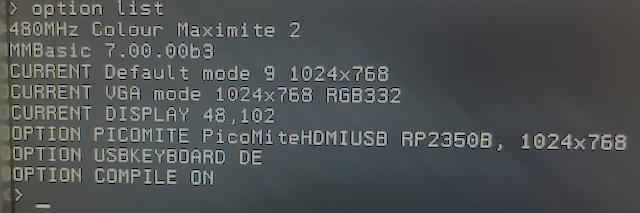
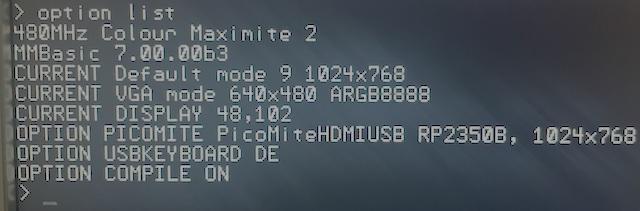
I am confused about screen resolutions, modes and so on. I think I do not understand the system.

I use my cmm2 on a vga monitor with resolution 1024,768.

so I entered "option default mode 9" because I want to "use" the pixels 1:1.

I also entered "option picomite hdmi, 1024x768.

option list:


When I now start a program without any command like resolution, mode etc...

(1 liner : Print "Hello")

the computer switches to 640x480. and it stays so in the command line.


the "current vga" changed to 640x480

if I enter now "edit" the editor opens in 1024x768 and it stays so after esc.

is "option default mode 9" incompatible with "option picomite"?
Edited 2026-10-26 19:59 by hhtg1968
 
Posted: 12:00am
27 Oct 2026
Copy link to clipboard
disco4now
Guru


Peter,
There seems to be issue in both the CMM2 and Picomite latest code where an error in an interrupt triggered by SETTICK leaves something behind that prevents the first SETTICK interrupt when the program is run again from triggering. A second one is triggered OK. A CPU RESTART will allow both to be triggered on the next run.


> CPU RESTART

> run
===============
INT1 TRIGGERED
0
1      INTERRUPT CALLED OK
16     foo
===============
INT1 TRIGGERED
0
1      INTERRUPT CALLED OK
16     foo
===============
INT6 TRIGGERED
Error in line 46: foo

> run
===============
0      INTERRUPT NOT CALLED
16     foo
===============
INT1 TRIGGERED
0
1      INTERRUPT CALLED OK
16     foo
===============
INT6 TRIGGERED
Error in line 46: foo


This code produced the above output

'
OPTION EXPLICIT
OPTION DEFAULT NONE
Dim INTEGER INTERRUPT_CALLED
? "==============="
test_error_normal
? "==============="
test_error_normal
? "==============="
test_interrupt_not_inherit

Sub test_error_normal() 'test error in main not seen in interrupt
 local i%,eline$
 interrupt_called% = 0
 On Error Skip 1
 Error "foo"
 SetTick 10, interrupt1
 Pause 100
 if interrupt_called%  then
   ? interrupt_called% , "INTERRUPT CALLED OK"
 ELSE  
   ? interrupt_called% , "INTERRUPT NOT CALLED"
 END IF
 ? Mm.ErrNo, MM.ERRMSG$
 
End Sub

Sub interrupt1()
 SetTick 0, interrupt1
 ? "INT1 TRIGGERED"
 interrupt_called% = 1
 ? MM.ERRNO, MM.ERRMSG$
 
End Sub

' Test that an ON ERROR RESTART is not passed to an interrupt

Sub test_interrupt_not_inherit() 'test_interrupt_does_not_inherit RESTART
 interrupt_called% = 0
 On Error RESTart
 SetTick 10, interrupt6
 Pause 100
 if interrupt_called%  then
   ? interrupt_called% , "INTERRUPT CALLED OK"
 ELSE  
   ? interrupt_called% , "INTERRUPT NOT CALLED"
 END IF
 ? Mm.ErrNo, MM.ERRMSG$
 
End Sub

Sub interrupt6()
 SetTick 0, interrupt6
 ? "INT6 TRIGGERED"
 interrupt_called% = 1
 Error "foo"
 ? Mm.ErrNo ,MM.ERRMSG$
 
End Sub


   Page 2 of 2    


To reply to this topic, you need to log in.

The Back Shed's forum code is written, and hosted, in Australia.
© JAQ Software 2026