
| Menu | JAQForum Ver 26.09 |
| Menu | JAQForum Ver 26.09 |
Forum Index : Microcontroller and PC projects : Cheap touchscreen monitor with both hdmi and vga
Found this , currently a great price in the UK, Tested on PC3 and also VGAUSBRP2350 code |
||||||
Ordered. :) Thanks, I was looking for something like that. |
||||||
What about the price? I can't see that from Germany. |
||||||
|
||||||
https://www.amazon.de/Kenowa-Touchscreen-Sichtschutz-Lautsprecher-Bildschirm/dp/B0DC5Z32X8/ref=sr_1_7? 109 € - 15 € Coupon Edited 2026-10-27 22:24 by twofingers |
||||||
thx @all |
||||||
How does it actually work. Does it completely replace a mouse (on the Picomite)? I never had such a device at all. How is it connected? |
||||||
Plugs into a usb host port on the Picomite (and soon the CMM2) and then can be read with the touch function. It can also be used for GUI controla and there is an on screen keyboard available ' tt.bas - USB touch screen test: touch the screen; the program stops after 5 minutes or Ctrl-C. The screen shows the ' touch on three fixed lines and a dot under each finger; PRINT goes to the serial console only (the log). Option Explicit Dim integer s, p, r, d, was, x, y, n, lastn Dim g$, last$ Dim float t0 = Timer Option Console Serial CLS Do While Timer - t0 < 295000 d = Touch(Down) : x = Touch(X) : y = Touch(Y) : n = Touch(XN 0) Text 0, 0, "X " + Str$(x, 5) + " Y " + Str$(y, 5) + " DOWN " + Str$(d) + " contacts " + Str$(n) + " ", "LT" If n >= 2 Then Text 0, 14, "2nd contact X " + Str$(Touch(X2), 5) + " Y " + Str$(Touch(Y2), 5) + " ", "LT" Else Text 0, 14, Space$(40), "LT" EndIf If d Then Circle x, y, 3, , , RGB(yellow), RGB(yellow) If n >= 2 Then Circle Touch(X2), Touch(Y2), 3, , , RGB(cyan), RGB(cyan) If d And Not was Then Print "down"; x; y; " contacts"; n If was And Not d Then Print "up" If n <> lastn And n >= 2 Then Print " contacts"; n; " 2nd at"; Touch(X2); Touch(Y2) lastn = n : was = d g$ = "" s = Touch(Swipe) : If s Then g$ = g$ + "swipe " + Choice(s = 1, "left ", Choice(s = 2, "right ", Choice(s = 3, "up ", "down "))) If Touch(Tap) Then g$ = g$ + "tap " If Touch(DTap) Then g$ = g$ + "double-tap " If Touch(Hold) Then g$ = g$ + "hold " p = Touch(Pinch) : If p Then g$ = g$ + Choice(p = 1, "expand ", "contract ") r = Touch(Rotate) : If r Then g$ = g$ + Choice(r = 1, "clockwise ", "anticlockwise ") If Touch(TTap) Then g$ = g$ + "two-finger-tap " If g$ <> "" Then last$ = g$ : Print "gesture: "; g$ Text 0, 28, Left$("last gesture: " + last$ + Space$(50), 60), "LT" Pause 10 Loop Option Console Both Print "done" |
||||||
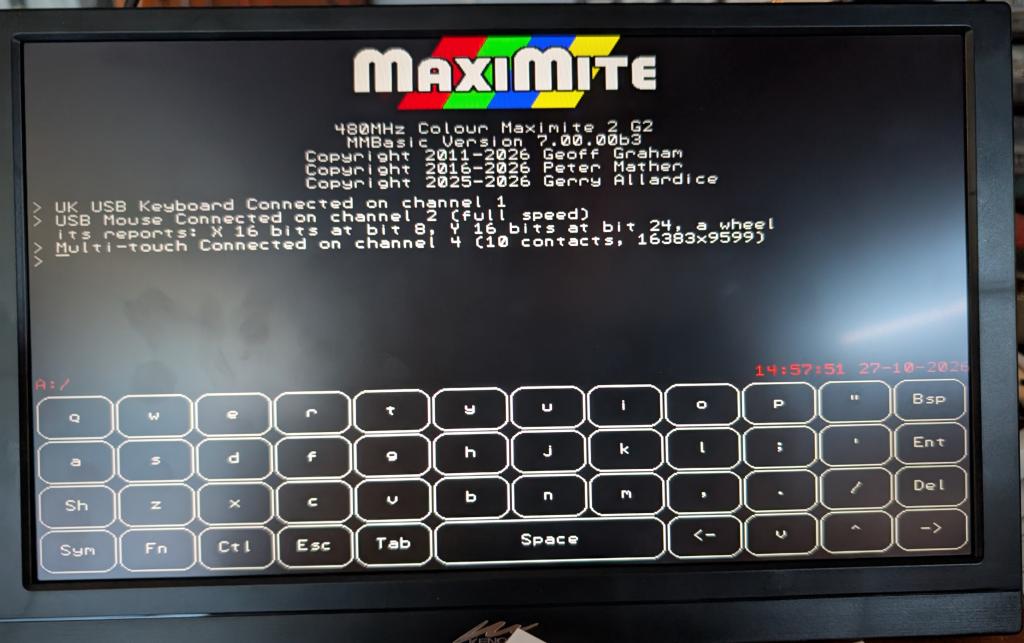 |
||||||
 Fandabidozi Fandabidozi   |
||||||
Thanks for showing! Something to keep in mind for the next steps down the line.  |
||||||
 |
The Back Shed's forum code is written, and hosted, in Australia. |


