
| Menu | JAQForum Ver 19.10.27 |
| Menu | JAQForum Ver 19.10.27 |
Forum Index : Microcontroller and PC projects : CMM2: 3D Maze
Continuing with my maze fixation, here is a first go at a 3d view moving around inside a maze. It is amazing just how powerful this little computer is! Less than 200 lines of BASIC and an image file and it can generate '3D' views in around 10ms. Wow!  Use the arrow keys to move forward/backward/turn 90 left/right. Press 's' to save current view (and overwrite previous saved view!) At this point, there isn't much of a goal to the 'game'. You can get to the exit but you can only stand in the exit and gaze longingly out at the green fields and blue skies beyond - sort of fitting in these times of Covid19. Also, the view when you are standing at and facing the end of a wall is less than ideal at the moment. I have to think about that one for a while yet. Two background triangles might fix that. Some possible improvements: - an actual goal - a Wumpus to hunt - add my maze generator - mapping feature on side of screen - ...??? Let me know what you think. Have fun maze3d.zip Visit Vegipete's *Mite Library for cool programs. |
||||||
Very good example of the speed of this beast. I have enjoyed doing things that make use of the performance. Jim |
||||||
I don't get the same graphical result. I have tried it on a WS-based board(blue) and an all-in-one board - both produce the same result. Current final firmware release. 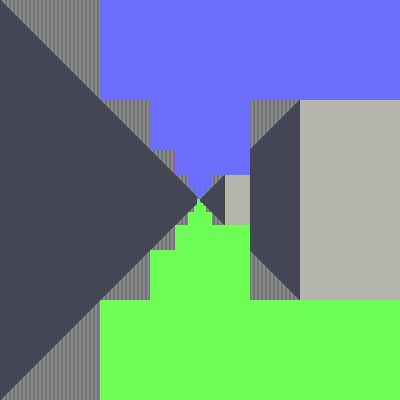 |
||||||
I get the same as Grogs. The previous mazes were OK. Wrong settings somewhere? Brian |
||||||
It DID work for me yesterday but today I saw the same corruption. I am reasonably sure it is artifacts left over form a memory check that is done on startup. I solved it by putting a few CLS statements in Starting at about line 36, a CLS for each page used ' load the side wall images PAGE WRITE 2 CLS LOAD PNG "side0123456.png",0,0,15 PAGE WRITE 1 CLS ' draw starting view Jim |
||||||
Well spotted, Jim. "Cls" immediately after the first use of "page write n" for a particular n fixes the corruption. I could force the corruption by loading a bmp to page 2 using the command prompt and then running Maze3D. I don't know if the mode change contributes to the problem but "cls" is you friend! For reference, the images used in Maze3D include transparency. When the png graphic file is loaded to page 2, I presume the firmware only paints those portions of the image that are not transparent, leaving whatever was there before unchanged. When these bits of image are then blitted into view, the previous "background" visible in what was the transparent parts comes along for the ride, wrecking the image. Using cls before loading the graphic file prepares the background with a "colour" that blit recognizes as being transparent. |
||||||
Works for me now. Thanks all. Brian |
||||||
 |
The Back Shed's forum code is written, and hosted, in Australia. |


