
| Menu | JAQForum Ver 19.10.27 |
| Menu | JAQForum Ver 19.10.27 |
Forum Index : Microcontroller and PC projects : Graphic commands in XOR...
I try to code a simple paint-like program on my cmm2g2 (thanx to ManiB i got one). i found in the manual the command "box xor_pixels". i do not find a similar command "line xor_pixels". is there a possibility to use line in XOR-mode? |
||||||
I can confirm its not there. There are currently no plans to add it. How are you using the BOX XOR_PIXELS command? Edited 2025-12-13 12:32 by disco4now |
||||||
If you only want horizontal or vertical lines with a width of at least 2 pixels a work-around might be:- > box 33,44,2,200 > box 33,44,200,2 |
||||||
In a kind of paint programm i usually program that you can click the firstpoint of a line and then you can hold the button to go to the end point during the line is drawed continously. the backgroung should not be destroyed so i use xor to show the recent line and xor again to show the original backgroung (my english is not so good). I want to draw a graphic line (or a box or a circle...) with live display, without permanently painting over or damaging the background. otherwise i had to cache the background. |
||||||
In the example image, I've circled it in red. The line with the cross isn't final yet. You can see the inversion at the intersection... 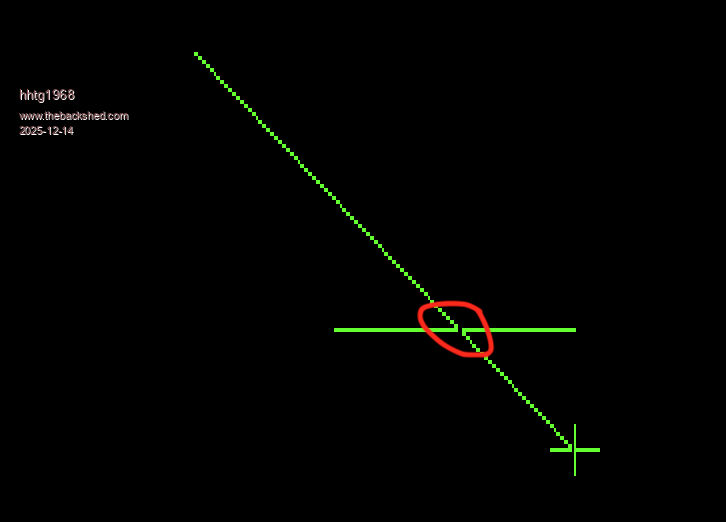 because of the inversion by XOR the background is not destroyey if i draw with XOR again... this example is on my z80 computer. |
||||||
For a different solution, play with the following quick test: Use the arrow keys to move one end of the line around. Hold [SHIFT] to move faster. Press [RETURN] to draw line, [ESC] to quit. The program uses 12 bit mode to get a second visible page. The main image is drawn on page 0, the lower page, and animated line is drawn on page 1. Not quite the same effect as XOR but the underlying image is unaffected. You could blink or otherwise animate the object as it is being drawn for better visibility. mode 1,12 pause 1000 ' wait for mode change cls page write 0 ' draw some random stuff for i = 1 to 10 circle 100+600*rnd,100+400*rnd,25+150*rnd,2,,rgb(green) next i t$ = chr$(149)+chr$(146)+chr$(147)+chr$(148) text 400,285,t$+" to move, [SHIFT] for bigger step",CM,,,rgb(white) text 400,300,"Press [ENTER] to draw line",CM,,,rgb(white) text 400,315,"Press [ESC] to quit",CM,,,rgb(white) x1 = 750 : y1 = 75 x2 = 100 : y2 = 200 page write 1 redraw do k = asc(inkey$) s = 1 if (keydown(7) and 136) <> 0 then s = 10 ' move faster if SHIFT pressed ' on my keyboard, SHIFT-DOWN ARROW gives ASCII 161 and ' SHIFT-RIGHT ARROW gives ASCII 163 so make correction if k = 163 then k = 131 if k = 161 then k = 129 end if select case k case 13 : paintline case 27 : exit do ' escape to quit case 128 : y2 = y2 - s * (y2 > 10) : redraw ' cursor up case 129 : y2 = y2 + s * (y2 < 590) : redraw ' cursor down case 130 : x2 = x2 - s * (x2 > 10) : redraw ' cursor left case 131 : x2 = x2 + s * (x2 < 790) : redraw ' cursor right end select loop end sub redraw cls line x1,y1,x2,y2,,rgb(yellow) end sub sub paintline page write 0 line x1,y1,x2,y2,,rgb(blue) page write 1 end sub My keyboard returns unexpected ascii codes for SHIFTed right and down arrows so there is some extra code starting on line 25 to handle the weirdness. |
||||||
@vegipede: cool idea. i will try it. thanx a lot. p.s.: is there a special sense that the commando "box" has a xor mode and line not? |
||||||
@vegipede: runs cool. i think i will try to change my programm to 12bit mode... |
||||||
i have a perhaps silly question for gui programming. i code: rem Menu Test1 rem option explicit mode 8,12 ' dim integer r 'menu defs const mframe=1 ' gui cursor on 0,mm.hres/2,mm.vres/2 'menu display gui frame mframe,"mTest",16,16,608,448,rgb(white) ' do loop until inkey$<>"" or mouse(l,0)=1 r=msgbox("good bye!","ok") end ... i can click the left button to end the loop. mouse cursor appears but i cannot move the mouse, so i cannot click ok in the message box. is it necessary to code a interrupt routine to change x and y coordinates? |
||||||
Assuming a PS2 mouse then somewhere on a regular basis you need to call GUI CURSOR MOUSE(X,0),MOUSE(Y,0) a settick interrupt is a good way of doing this Edited 2025-12-16 19:58 by matherp |
||||||
thank you. i will try it soon. |
||||||
On PicoMite (VGA/HDMI) in mode 2 Attached will allow you to test your mouse in a program. Assuming you have used OPTION MOUSE to enable the mouse. It reads the coordinates from the mouse, and creates the cursor (rectangle) in MMBasic. Use the mouse to navigate to a lemming, then click left mouse to change the walking direction of that lemming. It is not flawless (yet) but helps you to test the mouse. lem_core2.zip Volhout Edited 2025-12-17 05:07 by Volhout |
||||||
 |
The Back Shed's forum code is written, and hosted, in Australia. |


