
| Menu | JAQForum Ver 19.10.27 |
| Menu | JAQForum Ver 19.10.27 |
Forum Index : Microcontroller and PC projects : CH32V003 TinyBasRV
Hi I'm a completely useless programmer and therefore not really qualified to pass comment but I thought it might be of interest to some members of the forum. I came across a tiny basic computer on GitHub .It uses a single CH32V003 running basic, generating monochrome V.G.A and reads a PS2 keyboard, with storage via up to two eeproms. It was suggested by the designer that it would be suitable for a beginner, there is a workbook with exercises and possible solutions I rather liked. I have not tried it out yet but as soon as I get the bits I will have a go, I do not expect great performance but I think it will be a bit of fun. https://github.com/Stan6314/TinyBasRV/tree/main |
||||||
Hi Spock, I think you can have a lot of fun with this mini computer. Tinybasic is very simple (although it uses line numbers). I am not sure if this had an editor, possibly you have to retype lines when you want to change anything. Tiny basic however can not be compared to MMBasic, that is favorite on this forum. MMBasic is more powerfull. But honestly, I have done quite a lot of simple programs in Tinybasic. So have fun... enjoy, and when you are up to a step-up, try MMBasic on RP pico (PicoMite). The simplest MMBasic computer can also work with the same VGA monitor and PS2 keyboard. So it is "plug and play" for you. Volhout Edited 2026-01-04 05:52 by Volhout |
||||||
I agree completely Volhout.I have been on the steep side of the learning curve with MM basic since the monochrome maximite, the Picomite is amazing, but for some of my blinky flashy things it's overkill. I like to screw the last bit out of every device I use ( I used to play with regen receivers a lot). Its a pity the designer did not produce a version without the PS2 and VGA it would be cheap enough for embedded projects and cheap enough to be expendable. I know this is mainly a forum for MM Basic, I find a lot of other forums are very partisan I'm not even sure if risk V even has a user group yet. P.s I would still be using NE555's but I can't be bothered with the extra bits anymore (grin) |
||||||
What do you use that is less overkill than, say, the RP2040-zero for $2.19USD? 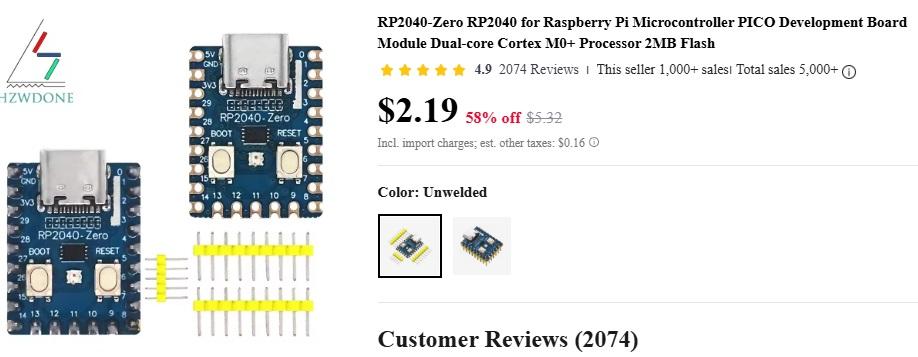 Several people have produced PCBs for this module. |
||||||
CH32V003 0.15 UK pounds bare chip, same chip on basic dev board 0.6 UK pounds I could not fill 2K of ram and 16k of flash in my whole life. The Picromite is great but I feel sort of guilty having so much processing power for fiddling small projects such as mine. My last project ran in 256 bytes of eeprom and was only 4 bit, just for the hell of it I built it, played with it, scrapped it. I'm pushing 70 but have the intellectual capacity and curiosity of a 10 year old, the link below illustrates the point. There must be other nutters like me out here which is why I posted to the forum in the first place https://elektronik-labor.de/Projekte/TPS9.html#t24 |
||||||
By all means try one and let us know how you manage with it. :) However, Tiny Basic is very restrictive and usually (depending on the version) inefficient in memory use. You will find it pretty easy to fill 2K of RAM. As you get better at programming you'll almost certainly want more than Tiny Basic can provide. MMBasic on the RP2040-Zero would need the following additional parts: For the keyboard: PS2 socket Two resistors Two Schottky diodes. For the display: VGA socket (or a soldered lead made by cutting a VGA lead Four resistors. To connect to a PC: A USB-C lead With some soldering skills this can be built on stripboard (I have an experimental layout if you are interested but I've not actually built it yet as I need to dig out a VGA lead to cut up!). The layout also includes a micro SD card socket and, if you have a splitter cable, the facility to use a PS2 mouse. It's also possible to do it with a proper level shifter for the PS2. There is stereo audio output and a I2C port for expansion. All in 51mm x 72mm. I've not considered a PCB design for it at the moment as it's intended for people that want to build without one. This would give you a keyboard interface and a colour VGA text and graphics display. You could load and save programs to the PC, which would also supply power to the board. You may be able to use the monitor for both the setup and as your VGA display. You can use the BOOT button as a user button input and there is a programmable LED to play with too. :) MMBasic has no line numbers - you get a proper full screen editor built in. LET is optional. Apart from GOTO <line number> and GOSUB <line number> you can program in MMBasic very much as you would in Tiny Basic. MMBasic uses labels instead of line numbers if you want to usee GOTO and GOSUB. You have two (or three) "flash slots" that you can use for program storage and the "A:" drive where you can store programs and data. Your current program remains in memory even when power is removed - no need to reload it. Yes, it costs more, but it won't leave you thinking that you've wasted you money on a very low powered system. You also have to bear in mind that the RP2040-Zero includes a voltage regulator and USB interface to your PC. There is no need for special hardware or software programming tools. Having said all that (which was rather a lot!) I'm not going to knock mini chip programming. It's great fun and I used to do it at one time. If that's the route you'd prefer then that's no problem. :) I just don't want you to be disappointed, thinking that you can learn general or game programming on systems like that. They are only really intended for small embedded projects. It doesn't cost a lot more to get a big increase in capabilities and IMHO that's worth it. |
||||||
Although almost no one uses line numbers MMBasic retains compatibility with basic Basic. > LIST 10 Timer = 0 100 Print "Hello" 200 Pause 1000 300 If Timer < 3000 Then GoTo 100 400 End > > RUN Hello Hello Hello > Edited 2026-01-11 19:51 by phil99 |
||||||
Lol! Shows how much I use them, doesn't it? :) Thanks, Phil. The first Tiny Basic I used had a single array called @(). It didn't need a DIM statement and was automatically sized to use all unused user RAM. IIRC that version didn't support string variables. LET and line numbers were mandatory. |
||||||
it would be interesting to find out what the current consumption of the CH32V003 + EEPROM is. my bet it would be a fraction of what an RP2040 et al draws. it also makes me wonder what could be achieved with an MX170 and an external EEPROM, with the user's tokenized BASIC program residing on (and run from) said external EEPROM. this would free up an additional 50k or so of onboard flash in which to add double-precision (8-byte) floats and building in support for SD cards. NOT that i'm suggesting that anyone should (or asking anyone to) actually do this, it is just a though experiment. personally, the MX170 as it stands is the prefect fit for most of the things i want to do. now if only Microchip would release a PDIP PIC32MX190  cheers, rob :-) |
||||||
@Robert, It is driving VGA and powering a PS2 keyboard. That (even in PICO) is the bulk of the power needed. The bare chip may be only 1-3 mA. I2C pullups add 1 mA. Volhout Edited 2026-01-11 21:12 by Volhout |
||||||
There's all sorts of ways to get low power computing power. Unfortunately reducing power consumption means that the total system is also less capable. You can't run the user's tokenized program from external EEPROM unless you can put it there. That will take routines in the onboard flash and space in it's RAM as you can only write to EEPROM in blocks, which have to be buffered. You'll still need the editor as well. The end result will also run slower as external EEPROM is far slower than flash on the internal bus of the chip. I don't think you'll gain anything but complexity. |
||||||
Overcoming the limitations is the fun bit, It's more about the journey not the destination. My current location is up the creek without a paddle! I'm using the WCH-linkE programmer and the WCH Link utility to burn the hex file, what has got me foxed is I downloaded the hex file from GitHub the damn thing appears to load and verify but the chip stays very dead. I compiled the blink L.E.D sketch from the Arduino IDE and exported the hex file to the WCH utility it programs fine works a treat. I have tried a few other HEX files for the CH32V003 on GitHub they also bombed. STUMPED! Oh by the way not very scientific but running the blink led sketch @48mHz/5v the chip draws about 5.5 mA without the L.E.D. |
||||||
I don't bother about the power consumption unless the thing is going to be running headless. If the board is hooked onto a PC monitor it can get 5V from somewhere locally, say the PC. :) The official Pico is pretty good for battery operation as the on-board switcher supply is perfectly happy down to about 2V7 input. It will run nicely from a couple of AA cells. Actually, a battery harvested from a thrown away disposable vape will power a RP2040-Zero for ages as it's regulator drop-out voltage is only about 30-40mV without additional GPIO loads. You need to sort out a charger though. [RANT] And don't get me started on what I think of the Arduino IDE... [/RANT] |
||||||
Just thought I would rattle the cage (grin). I can appreciate the value of using C and its derivatives by professionals, but for amateurs such as myself it's a bit of grind. It is hard enough getting program syntax right without having to worry about case sensitivity and white space, I will not touch any language that is case sensitive or has mandatory use of 'camel case' it is just too much (that rules out Forth and python also). What is so great about using case sensitivity? For students entering a computer science career I think the Arduino approach was the not a bad idea BUT....THATS WITH SUPERVISION!! The defenders of Arduino say it's not really that bad, I have tried to get used to it off and on for near enough 20 years it really is that bad! I mess with picaxe quite a bit I used one to fix the lights for the Christmas tree this year, picaxe is not that fast (well compared to my old TRS80 it is) speed was no problem, the code was probably bloated but I had enough memory, it just worked. As for the Ch32V003 I think I will leave it well alone until there is a basic compiler, (something like GREAT COW?) at least it did not cost much to fail (1 weeks entertainment for approx 5 quid) it's all experience. |
||||||
If you want another weeks amusement try TinyBasic for the ATTiny85. Basic on a single 8-pin micro. I think the last version of the firmware is on page 2 of the thread |
||||||
I loved GCBASIC on PIC chips. I had great fun with 8-pins. :) I tried to get one of those just after you released that version, Peter, but my usual source was out of stock for ages. I never did get around to it. |
||||||
Nice !!!  I must have missed something... Something relevant just occurred to me: Microchip also makes serial SRAMs, right? I knew they had (Q)SPI versions, but I wondered if they also had I2C versions? I googled it: Yes! https://www.microchip.com/en-us/product/47C16 https://ww1.microchip.com/downloads/aemDocuments/documents/MPD/ProductDocuments/DataSheets/47L04-47C04-47L16-47C16-4-Kbit-16-Kbit-I2C-Serial-EERAM-20005371E.pdf "47L04/47C04/47L16/47C16 4-Kbit/16-Kbit I2C Serial EERAM" The e.g. 47C16 is a 5V 2kByte SRAM with automatic backup to EEPROM on power-down. And the 47L16 is the same chip for 3V systems. And they are cheap: Less than 1€ in single quantities!  That would allow you to run significantly larger programs directly from the I2C SRAM. It would be slower, of course. |
||||||
I have tried tiny basic for Attiny 85 I really liked it, and support in MM Edit to boot I used it as an interface between two very different very primitive the single chip computers it's surprising what you can squeeze into a few bytes. I should probably grow up and do something useful with MM Basic but to be honest I worked on medical electronics (NHS) for a few years (cockups KILL!!) I think I have earned some time for frivolity. |
||||||
 |
The Back Shed's forum code is written, and hosted, in Australia. |


