
| Menu | JAQForum Ver 19.10.27 |
| Menu | JAQForum Ver 19.10.27 |
Forum Index : Microcontroller and PC projects : Pico Navigatto. Another File Manager.
I present to you my 'Pico Navigatto'. A File Manager in MMBasic for PicoMite. I have tested it on PicoCalc and on my PicoMite RP2350 VGA. Please make a backup before you start testing it. Features: ---------------- Maximum of 300 files. Maximum filename length: 105 characters. Maximum extension length: 12 characters. Although only 3 are displayed. If any of these specifications are not met, the program will crash. In this case, you can try changing the initial parameters. You can try lowering the number of files and increasing the filename length, or vice versa. Keyboards: ---------- Up/Down Arrow: Moves up and down in the table. Left/Right Arrow + Tab: Changes columns. Up/Down Arrow + Shift: Page Up/Page Down. Home/End: Start/End of column. Space: Selects/Deselects an item. A/B: Selects the column unit. Enter: Enters the directory/Executes BAS/Displays BMP. Backspace: Exits the current directory. C: Copies a file or a selection of files. R: Renames a single file or directory. D: Deletes a file/directory or a selection of them. K: Creates a directory. Z: Displays the size of the file, directory, or selection. S: Changes the Screen font. Q: Exits the program immediately. H: Displays a brief help message. Comments: --------- The bottom line of the screen displays: Size, date, and time, or whatever fits. I tried to make it display more or less information depending on the number of characters on the screen. But when I added the date and time fields, the program became too slow. This is my fault because the program reads from the disk very frequently to update itself. The same thing happens when the number of files increases considerably. I have a folder with more than 100 files, and it's starting to become very noticeable. I appreciate comments and suggestions, and please don't be too critical.  I apologize for the bugs you're sure to encounter. Best regards. 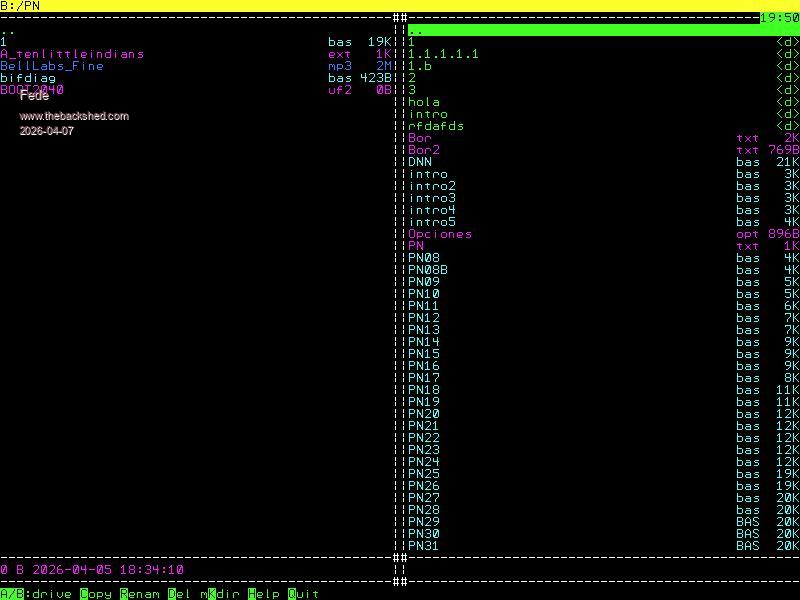 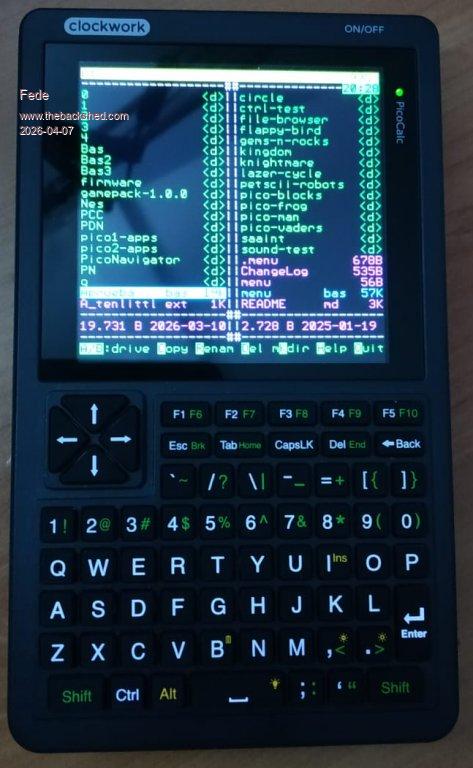 PN.zip |
||||||
A really nice file manager. Runs flawlessly on my PicoCalc. I’ve placed it in drive A: and assigned it to the F1 function key. That way, it’s always right at your fingertips. The different text sizes are also great. It would be even better if it included a .txt viewer and an MP3/WAV player. Well done!  |
||||||
LIST "file.txt" |
||||||
Agreed, Phil. Do one job and do it well - that's a good policy. We can already play sound files and view pictures from the command line too. |
||||||
Thank you so much. I loved your comment. The MP3 player will take some time, as I don't see it in a file manager. But I've done two out of three.  Best regards. ------------------ New version. 1.01 beta. Some bugs fixed. Added: Move. Added: View. -------------------- View: Displays a file in text mode. The maximum file size is limited by available memory. Does not check for errors. Can attempt to view binary files. Adjusts to the current font size. Keys: Up, Down, Page Up, Page Down, Home, End. Esc: Close. Best regards. PN1_01_11-04-26.zip |
||||||
Playing mp3 files can only be done using a VS1053 module if you are using a RP2040. Only the RP2350 can play them otherwise. And if you can play mp3 someone will want wav and flac as well. I personally would much rather see some / better error checking rather than including any additional functions at all. A rock solid file manager with a small footprint is the thing to aim for IMHO. That could even be included in firmware, but one that throws errors couldn't. |
||||||
Mick, most people will run the Fm from a flash slot. So size is not of major importance. Volhout |
||||||
I realize that. However a compact file manager *could* be in the firmware, in which case using a precious flash slot wouldn't be necessary. There are only three. If the file manager can run from the Library that would help, of course. You still don't want it throwing errors. It's handy to know that no error checking is done, it would be much better to get error messages and not a crash (especially if running from a flash slot or Library). ;) I'd be perfectly happy to swap all other facilities other than file managing for that. . Edited 2026-04-13 05:51 by Mixtel90 |
||||||
The function view is great! Thx |
||||||
Thank you very much. I will continue working.  |
||||||
 |
The Back Shed's forum code is written, and hosted, in Australia. |


