
| Menu | JAQForum Ver 19.10.27 |
| Menu | JAQForum Ver 19.10.27 |
Forum Index : Microcontroller and PC projects : Unix on the Pico Computer 3
Page 1 of 3   |
||||||
|
||||||
I haven't even got the hang of Python yet! ;-) but I do at least understanf Unix/Linux/Fuzix :-) |
||||||
You finished that ARM port just within hours?..Alan Cox will love it  What would be the preferred programming language for applications on this OS? Regards Edited 2026-07-26 21:57 by dddns |
||||||
Lol! This is too cool. :) CP/M next week... ;) |
||||||
Geos first  |
||||||
And when I asked Perplexity about, say, openWrt on the Pico Computer 3, it cast shade on the idea of any linux running well. As my mother would say, "Will wonders never cease?". I may have to buy another round of Pico Computer 3s just for myself. Edited 2026-07-26 23:57 by lizby |
||||||
The limitation of Fuzix is that any program only has a 64kb space available. So, for example, you can't run nano as an editor |
||||||
I discovered Fuzix quite some time ago and find it rather interesting — especially since it runs on many 8-bit architectures. However, the 64K limitation (which is presumably linked to its 8-bit heritage or the segmentation on the 8086/88) is certainly a drawback.  Another very interesting "Un*x clone" for microcontrollers is NuttX: https://nuttx.apache.org/ There is also a ready-made port for the RP2040 and RP2350 (including PSRAM support for the latter): https://nuttx.apache.org/docs/latest/platforms/arm/rp23xx/index.html NuttX claims strict POSIX compliance and supports loadable executables (even directly from program memory) using various memory models. I also recall seeing somewhere that Samsung created a fork of NuttX many years ago, which served as the software foundation for their smart TVs for quite some time. Samsung is apparently still among the sponsors, alongside Espressif and several other well-known companies. It is essentially a competitor to Zephyr OS and also supports networking (Ethernet, Wi-Fi, Bluetooth, etc.). Unfortunately, I haven't yet had the time to set up a build environment (though ready-made containers are available), and pre-built .uf2 files for the Pico are not offered. Regards, bfwolf Edited 2026-07-27 02:52 by bfwolf |
||||||
Fixed. USB keyboard and HDMI screen working so now has full "stand-alone" status. Next is to check/add applications - target is to have BBC Basic runnable Edited 2026-07-27 03:13 by matherp |
||||||
There's been a solid CP/M emulator for RP2040 for some time: ExtremeElectronics/RC2040: Z80 CP/M80 emulation of an RC2014 using the RP2040 (PI PICO) processor Implementing it (and a video terminal emulator) on Pico Computer 3 is left to the reader |
||||||
I looked at the photo on that Github page and dived for my drawer of past projects. Sure enough, I built that design on padboard. :) My layout is a bit different because I had to take liberties to make it fit. |
||||||
In case you're referring to the CP/M emulator: A "hobbyist" has also created a nice port for the Pico(2): https://github.com/guidol70/RunCPM_RPi_Pico  There is also an Amstrad CPC emulator; CP/M Plus ought to run on that as well...  https://blog.adafruit.com/2026/06/11/an-amstrad-cpc-464-664-6128-emulator-for-the-raspberry-pi-pico-2/ bfwolf |
||||||
"This is a Unix system......I know this....." - Jurassic Park |
||||||
Strangely enough, my brain went into "REJECT" mode the minute I saw the words "Arduino IDE", btwolf. That IDE and myself have a mutual hatred for each other. :) |
||||||
So, you're allergic to Arduino? I’m not a huge fan of the Arduino IDE either, as it is quite limited. However, the Arduino framework is often the "shortest route to the goal" when a task needs to be solved. Besides, guidol70 provides ready-made .uf2 files for the Pico and Pico2. You really only need to recompile it yourself if the GPIO configuration doesn't suit your needs. What I quite like about RunCPM is that AFAIK it apparently executes the BIOS and BDOS in native ARM mode (or x86/x64 on a PC), making the maximum possible TPA available — and the speed is naturally better, too. There are also Win32 and Win64 versions you can play around with to get a feel for the system.bfwolf |
||||||
Here is the first release. Will run on the Pico Computer 3 or the Pico Computer 2 (HDMIUSBI2S) fuzix.zip FUZIX-PC3-MANUAL.pdf Full blown Unix V7 on your rp2350 with lots of apps including BBC Basic 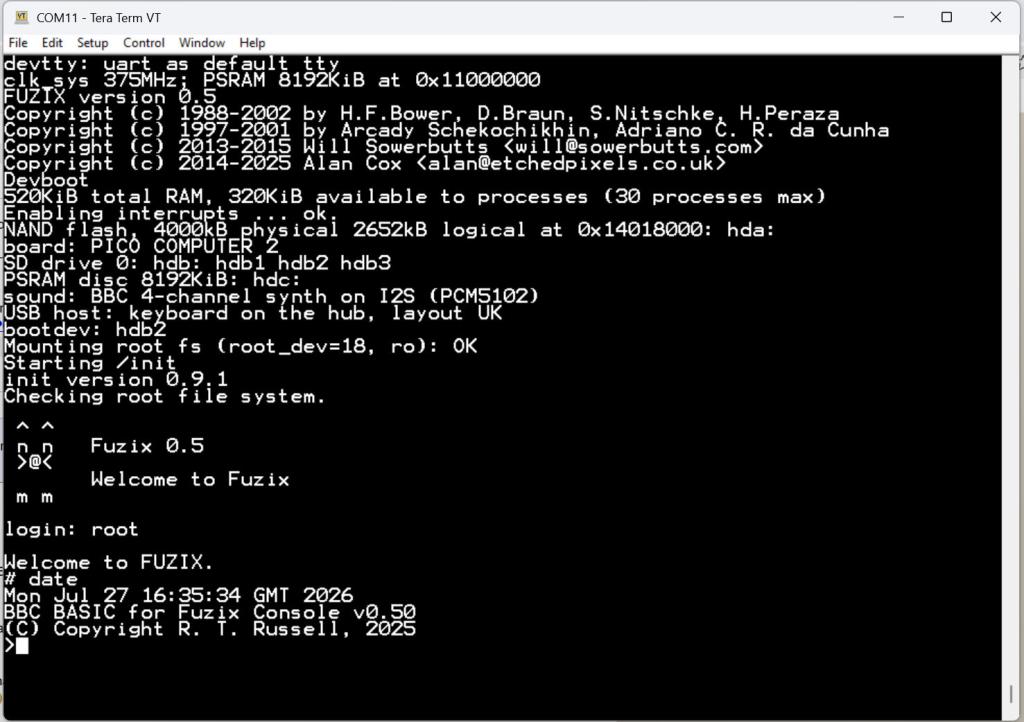 |
||||||
I was surprised when perplexity advised me that Linux wouldn't run well on a RP2350 with 8MB PSRAM. 10 years ago, the openWrt version of Linux would run on a 4MB box, supporting a fair number of packages. 8MB is now considered the minimum. The 4MB versions didn't have nano, and I hate vi, so I was happy to see that nano is available on the 8MB boxes. Does nano now run on the RP2350 unix? What was the reason for selecting FUZIX rather than openWrt with its huge repository? Of course, all the openWrt devices I use are headless. I've read that there are 16MB PSRAMs with the same footprint as the 8MB ones. Have you looked into those for the Pico Computer 3? No apk/apt/opkg package installer? ~ Edited 2026-07-28 02:04 by lizby |
||||||
No nano, uses ncurses and is therefore HUGE. Haven't looked further at the 16Mb PSRAM after I saw the price Edited 2026-07-28 02:16 by matherp |
||||||
The editor is levee. Screen editor based on vi, I believe. |
||||||
How are loadable executables implemented there? Are they compiled as position-independent code, or is there a loader that adjusts absolute addresses using relocation tables? Do you plan to make the PSRAM area available to processes (tasks)?  One thing that surprises me a bit: I took a look at the RP2350's QMI, and it has 8 address translation registers (4 each for Flash and RAM) that allow virtual address ranges to be translated into physical ones. In principle, one ought to be able to use them like an MMU, yet I haven't seen a practical implementation anywhere. bfwolf |
||||||
| Page 1 of 3 |
||||||
 |
The Back Shed's forum code is written, and hosted, in Australia. |


