Posted: 04:55pm 02 Sep 2026 Copy link to clipboard
PhenixRising Guru
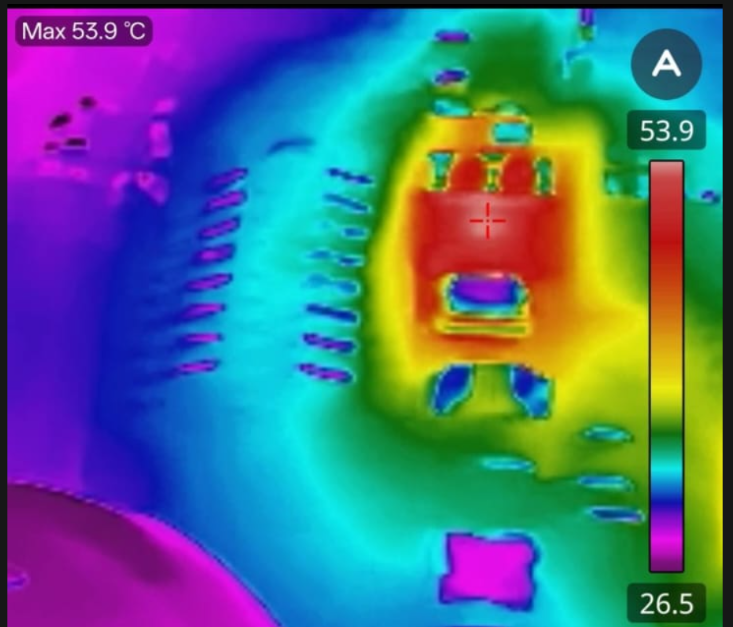
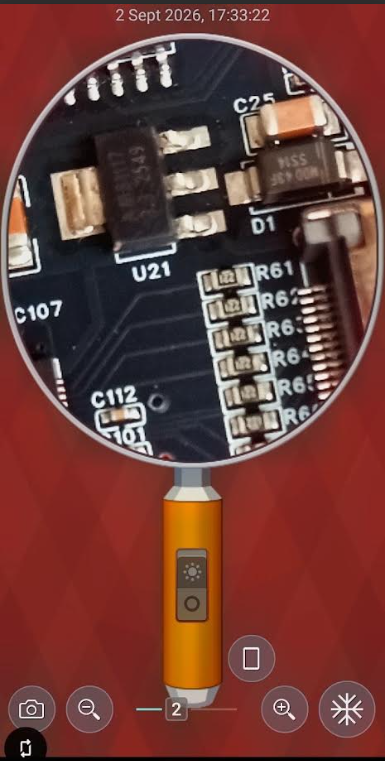
I only have a mouse connected. Does this look reasonable?
Posted: 05:32pm 02 Sep 2026 Copy link to clipboard
matherp Guru
Have you done the usb hub mod?
Posted: 05:47pm 02 Sep 2026 Copy link to clipboard
PhenixRising Guru
No. As it came but I seem to remember reading about something getting too hot?
Posted: 05:50pm 02 Sep 2026 Copy link to clipboard
matherp Guru
Without the mode the hub 3.3V regulator and the lm1117 fight each other.
Posted: 05:59pm 02 Sep 2026 Copy link to clipboard
PhenixRising Guru
They were built 21st August and I believe that I uploaded the latest files. Does it still need the mod?
Edited 2026-09-03 04:05 by PhenixRising
Posted: 07:43pm 02 Sep 2026 Copy link to clipboard
PhenixRising Guru
Update. Not sure I trust this thermal imaging camera. This U21 is not what I would call hot-to-the-touch
Posted: 09:52pm 02 Sep 2026 Copy link to clipboard
phil99 Guru
The temperature scale at the right indicates a maximum of 54°C, which isn't hot to a fingertip. That is why testing the temperature of a baby's bathwater is done with the elbow.
The pic. nicely shows the problem with thermal cameras. The shiny heatsink tab shows up as just above ambient temperature but is actually the hottest part. The slightly cooler black body of the regulator will have a thermal emissivity close to the value the camera is calibrated for so will be fairly accurate.
Posted: 10:36pm 02 Sep 2026 Copy link to clipboard
Bryan1 Guru
Phenix After I had used one of my pico3's for over 8 hours straight I got my IR temp gauge which has 2 laser pointers and focused right in to the reg and pico now both showed 2C over ambient and what really surprised me was the USB hub chip which hasn't had that mod done was even cooler than the pico.
From what I read about the USB chip and it's fault is when both USB cables are used so my method have the pico in the off condition turn off the hub using the switch insert the mircoUSB while holding down the boot button and the pico is shown straight away on my computer. Now if I leave that programming cable on it will boot the pico so once the pico icon disappears from the file list on the computer the microUSB is disconnected the hub switch turned on and boot as normal.
This ensures there is no fighting of voltages so nothing gets hot
Regards Bryan
Posted: 04:53am 03 Sep 2026 Copy link to clipboard
Volhout Guru
If this is powering the pico running at 370Mhz, the wifi chip, the hub, the audio, the psram and flash, the current can easilly exceed 200mA. At 1.7V drop that is near 400mW. A temp rise of 30 degrees is normal.
Volhout Edited 2026-09-03 14:54 by Volhout
Posted: 07:42am 03 Sep 2026 Copy link to clipboard
Mixtel90 Guru
We used to say that if you spit on it and it boils off it's too hot. It's not totally inaccurate as a silicon device will almost always be ok at 100C. It makes a bit of allowance for the die temperature being quite a bit hotter than the encapsulation.
If the manufacturers logo is burned into your fingertip when you touch a hot device you may have a problem. :)
Posted: 02:33pm 03 Sep 2026 Copy link to clipboard
JohnS Guru
I thought it was if you spit at it and it spits back then it's too hot.
John
Posted: 02:52pm 03 Sep 2026 Copy link to clipboard
Mixtel90 Guru
hehe... I like it when the plastic has been so hot that it's cracked. Easy overheating problem to spot. :)