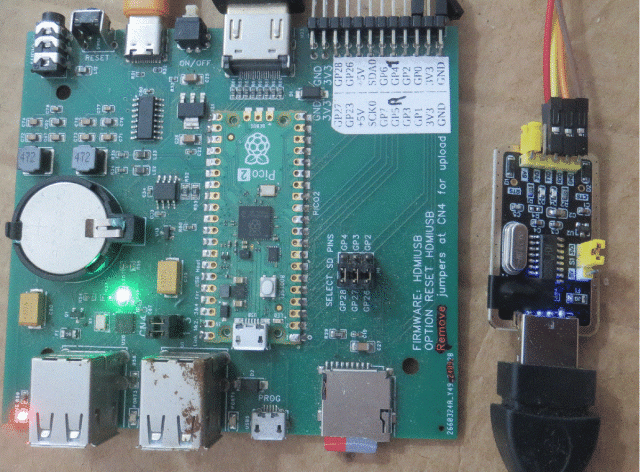
USB versions Support as host for up to 4 CDC devices allowing a USB PicoMite to connect directly over USB to a non-USB PicoMite
Easter Egg - all versions
' MandelbrotTest.bas ' Demonstrates all features of the MANDELBROT command ' ' Requires a configured display (SPI LCD, VGA, etc.) ' Press Ctrl-C at any time to abort a draw in progres s
' --- 3. Bare command (no subcommand, 64 iters) --- CLS Print "Bare MANDELBROT command..." Mandelbrot Reset Timer = 0 Mandelbrot 64 Print "Done in " Str$(Timer) "ms" Pause 2000
' --- 4. Centre on a point of interest --- ' Re-centre on approx (3/4 width, 1/2 height) - nea r the ' boundary of the main cardioid, then zoom in CLS Print "Centre on interesting region..." Mandelbrot Reset Mandelbrot Draw Pause 1000 Mandelbrot Centre MM.HRES*3\4, MM.VRES\2 Print "Centred and redrawn" Pause 2000
' --- 5. Zoom in sequence --- CLS Print "Zooming in x2, x2, x2..." Mandelbrot Reset Mandelbrot Draw Pause 1000
' --- 6. Zoom out --- CLS Print "Zooming back out..." Mandelbrot Zoom 0.5 Print "Zoom x2 total (zoomed out x4)" Pause 2000
' --- 7. Pan around --- CLS Print "Panning right 50 pixels..." Mandelbrot Reset Mandelbrot Draw Pause 1000
Mandelbrot Pan 50, 0 Print "Panned right" Pause 1000
Print "Panning down 30 pixels..." Mandelbrot Pan 0, 30 Print "Panned down" Pause 1000
Print "Panning left and up..." Mandelbrot Pan -80, -30 Print "Panned left+up" Pause 2000
' --- 8. Combined: centre, zoom, pan workflow --- CLS Print "Interactive-style exploration..." Mandelbrot Reset Mandelbrot Draw Pause 1000
' Centre on the seahorse valley (approx left-centre o f set) Mandelbrot Centre MM.HRES\4, MM.VRES\2 Pause 1000
' Zoom in deep Mandelbrot Zoom 4 Pause 1000 Mandelbrot Zoom 4 Pause 1000 Mandelbrot Zoom 2 Pause 1000 Mandelbrot Zoom 2 Print "Deep zoom into seahorse valley" Pause 2000
' Increase iterations for detail at this depth Mandelbrot Draw 256 Print "Re-rendered with 256 iterations" Pause 2000
' --- 9. Reset back to default --- CLS Print "Resetting to default view..." Mandelbrot Reset Mandelbrot Draw Print "Back to default" Pause 2000
CLS Print "Mandelbrot demo complete!" End
Edited 2026-04-05 00:45 by matherp
Posted: 04:09pm 04 Apr 2026 Copy link to clipboard
lizby Guru
This looks terrific if I understand correctly.
Does this mean I can plug a powered 4-port USB hub into Picomite1's USB_C port, and plug Picomite2-5 into the hub, and Picomite1 can talk to all as if talking to their consoles?
What provides console on Picomite1?
And I can plug a usb-serial module into the hub and connect the serial to any device which outputs serial and have a link to PicoMite1?
And at the same time have another Picomite connected with 4-pin parallel?
~ Edited 2026-04-05 02:10 by lizby
Posted: 04:34pm 04 Apr 2026 Copy link to clipboard
matherp Guru
The USB CDC host capability applies to the USB variants of the firmware. For these the console by default is standard UART serial on GP8/GP9. This is how it has been forever. The code is tested connecting my HDMIUSB reference design to a VGARP2350. You can have up to 4 connections simultaneously. I theory it could connect to a USB-serial module but untested. and in theory this can run at the same time as the parallel link - untested.
Posted: 09:10pm 04 Apr 2026 Copy link to clipboard
bfwolf Senior Member
Great that you took my suggestion about 4 bits into account! Just in case that was the reason? Otherwise, anyway fantastic!
First of all: Brilliant! Super! Thanks again!
Question: Isn't the baud parameter passed trough to USB-to-serial converters (like the FT232)? How do USB-to-RS232 adapter cables then determine the baud rate, nbits, and parity?
Regards
Posted: 09:30pm 04 Apr 2026 Copy link to clipboard
dddns Guru
Thank you for the enhancements! Would it be possible to use Xmodem with a custom com port?
Posted: 11:34pm 04 Apr 2026 Copy link to clipboard
toml_12953 Guru
I'm trying the beta. When I exit the editor with Esc, the prompt disappears except for a tiny dot in the upper left corner. Before you blame it on the PicoCalc, the final version of 6.02.01 runs fine.
Posted: 12:05am 05 Apr 2026 Copy link to clipboard
lizby Guru
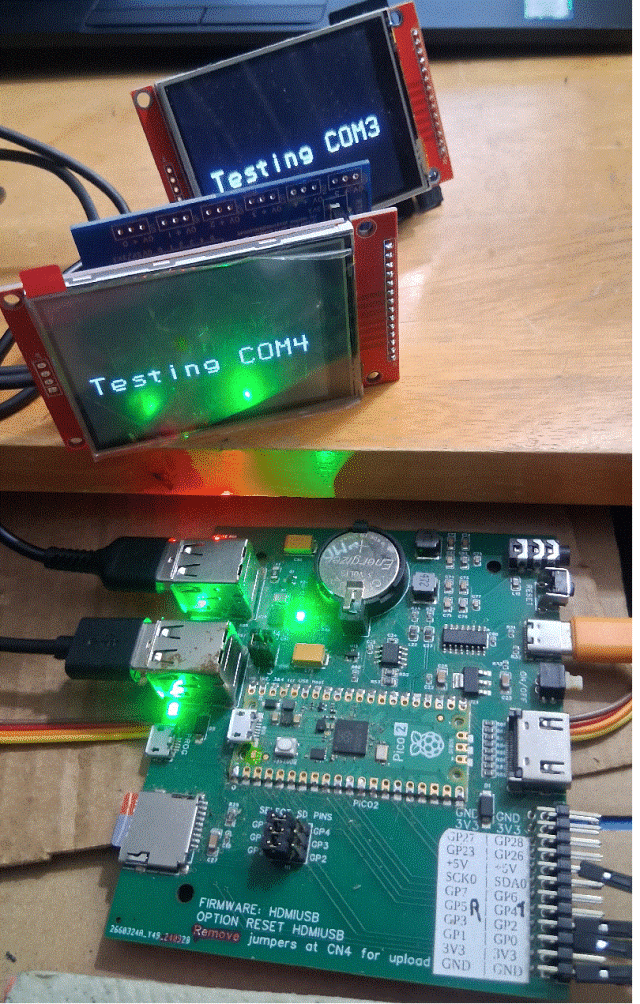
I got it to work with this module (Peter's):
I plugged a RP2350A-Zero pcb with ILI9341 LCD directly into one of the board's USB connectors, got recognition, did OPEN "COM3:9600" as #1 and then PRINT #1, "CLS RGB(BLUE)" and got a blue screen. But the PCB didn't supply enough power to do much more--it would restart.
So now I'm looking for a USB-A to USB-A cable for my powered hub. I'm pretty sure I used one back in December for something.
Found one--right in front of me, connecting to my USB-3 HDMI recorder. But it's not working with the powered hub, which has switchable USB ports. I switch one on, and nothing happens on the host.
I tried another powered hub--no joy. Is this an issue of a hub being plugged into another hub (on the HDMI PCB)?
Ok, I plugged the two into the HDMI PCB. Then:
Pretty nifty. So how do you power locally?
~ Edited 2026-04-05 11:20 by lizby
Posted: 02:00am 05 Apr 2026 Copy link to clipboard
phil99 Guru
Perhaps connect VSYS and ⏚ of all 3 Picos together.
Posted: 04:44am 05 Apr 2026 Copy link to clipboard
mozzie Senior Member
G'day, From memory (could be faulty) you cannot connect more than 1 USB hub, either in series or parallel, to the PicoMite USB host, maybe try a bare PicoMite with just the powered hub, and USB to serial for console.
YMMV
Regards, Lyle.
Posted: 07:39am 05 Apr 2026 Copy link to clipboard
matherp Guru
One line fix for editor bug for TFT versions - no version change
The PicoMite supports 2 hubs. This allows a Raspberry Pi keyboard with its in-built hub to be plugged into the HDMIUSB reference board hub Edited 2026-04-05 17:42 by matherp
Posted: 01:23pm 05 Apr 2026 Copy link to clipboard
lizby Guru
Does that mean that in theory, my plugging a powered hub into a USB port on the HDMIUSB reference board should work?
Posted: 02:48pm 05 Apr 2026 Copy link to clipboard
matherp Guru
Try it and tell us. From the manual
Posted: 04:04pm 05 Apr 2026 Copy link to clipboard
These are I haven’t found in documentation. How to use them? Thx!
Posted: 04:06pm 05 Apr 2026 Copy link to clipboard
matherp Guru
For info only
Posted: 04:07pm 05 Apr 2026 Copy link to clipboard
terekgabor Newbie
Thanks!
Posted: 04:33pm 05 Apr 2026 Copy link to clipboard
toml_12953 Guru
What versions run the MANDELBROT command? Only the VGA and HDMI versions? The LCD version doesn't seem to understand it.
Posted: 04:43pm 05 Apr 2026 Copy link to clipboard
matherp Guru
Does for me.
Posted: 07:42pm 05 Apr 2026 Copy link to clipboard
toml_12953 Guru
Yup, it does. I don't know what I was donig wrong before. Oh, now I see it in the previous sentence.
Posted: 01:31pm 06 Apr 2026 Copy link to clipboard
mozzie Senior Member
G'day,
Oops, I learn a new thing every day
Have tested many variations of Picomite over USB-CDC and so far very impressed, this opens up many possibilities
Also plugged in several kinds of USB-Serial converters, no joy so far with any although some do show up as a CDC device. Is this because the baud rate etc needs to be set from the host device unless it defaults to a known value. More testing to follow.
Further to this, would there be a possibility of adding support for the Microbridge? this is built into many MMite projects and would make communicating with these a breeze as well.
I realize there are 1000's of different USB-Serial devices out there, however the MicroBridge is a known entity.
Thanks again.
Regards, Lyle.
Posted: 02:38pm 06 Apr 2026 Copy link to clipboard
Mixtel90 Guru
The baud rate from the PicoMite USB port is that of the USB (probably 1.5 Mbps, but 12 Mbps is also a standard for USB 1.1 if you reduce the cable from 9m to 3m).
The COM ports don't support handshaking (unless you write your own).
Therefore any USB-serial converter will have to buffer the data and slow it down to a known baud rate to be useful. That means that they will have to be "intelligent" devices, not simple "converters".
COM3-6 aren't really conventional COM ports, they are a bridge to USB.
I think the ESP32 sometimes has USB CDC ACM built in. If so, that opens up the possibility of high speed links directly to those.
. Edited 2026-04-07 00:51 by Mixtel90
Page 1 of 4
The Back Shed's forum code is written, and hosted, in Australia.




 Just in case that was the reason? Otherwise, anyway fantastic!