
| Menu | JAQForum Ver 19.10.27 |
| Menu | JAQForum Ver 19.10.27 |
Forum Index : Microcontroller and PC projects : V6.03.00 Draft user manual for review
Page 1 of 2   |
||||||
Attached is the draft of a user manual for the upcoming V6.03.00 firmware. This has been significantly updated and new sections added. Please review and let me know if any issues you have previously raised have gone missing PicoMite_User_Manual.pdf |
||||||
Page 115: For RP2350B chips the heartbeat is not enabled. On a PicoCalc with a Pimoroni Pico 2 W (RP2350B) installed, heartbeat is enabled by default and turning it off isn't saved in the options so it returns at next reboot. |
||||||
Commands, MODE, VGA, p167 |
||||||
p125 A: or B: should be: A:, B: or C: and Shortcut for DRIVE “A:”, “B:” or "C:" at the command prompt |
||||||
It returns with any alarm for me. G@bor |
||||||
|
||||||
Some requests: In Appendix B, I2C Communications, include the command list system i2c (plus any variations thereof)Include OPTION LCDPANEL DISABLE in the Display Panels chapter, not just deep in the Options list,OPTION LCD SPI DISABLE A clearer description of PWM channels and pin assignments with an example or two in the Pulse Width Modulation paragraph (page 59) with mention of the PWMn,OFF command. (It took me a rather long time recently to figure out how to generate PWM on a hi GP number pin on a 2350B, with much flipping between many different pages in the manual and puzzling error messages.)In the Load Image section, (page 85) could mention be made of IMAGE types that are recognized, and supported resolutions and colour depths? For example, could an 888 colour 50x25 pixel PNG be shown on an LCD display? (Minor detail) In the Naming Conventions section, page 103, could mention be made that defining the type of a variable in a DIM statement still allows using the matching !$% modifier. Ie Dim s as string is valid.s$ = "Some text" Page 12, the LED will blink slowly indicating that MMBasic is running - depends on board type. Testing the SD Card interface after installing an LCD panel (page 78) - don't you need a "B:" before "FILES"? ================= Interesting that the RP2040 allows more array dimensions than the RP2350 (6 v 5) Thank you for your amazing work on MMBasic and a great manual so I have a chance of using these great features. |
||||||
Hi Peter, +1 to Vegipete's comment: Plus, when I reconfigured an LCD after "OPTION LCDPANEL DISABLE" it was inverted (upside down). Is that intended? Andrew |
||||||
Some LCD module manufacturers appear to wire the panels differently, requiring use of the Reverse ORientation parameters. |
||||||
Thanks Phil, but this was a panel I have been using for some time (a nice 4" one). In fact, I got into all-sorts because I saved the options, including 'GUI calibrate' etc, and I just cut and pasted them from a text file. It took me a while to work out that not only did I have to invert it but I had to do a new calibration because the coordinates were inverted too. Cheers, Andrew |
||||||
I didn't see Is it a thing? 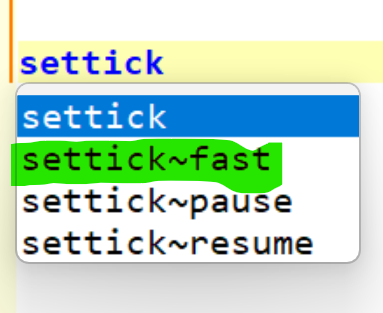 |
||||||
Hello Peter, base$ I didn't find in the manual. But works fine anyway. G@bor |
||||||
base$ is a sort of pseudo command that is used to process hex$, bin$ and oct$. As it happens it will do wacky bases as well but isn't really a standard function. There is no such thing as settick fast |
||||||
Only on the CMM2 |
||||||
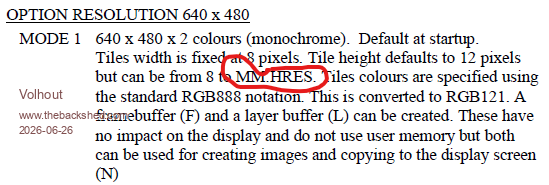 Should be MM.VRES (multiple locations) Volhout . |
||||||
A rather cosmetic issue: the descriptions on page 109 are misaligned. |
||||||
On page 13 it says, The PicoMite firmware will ignore the baud rate setting so it can be set to any speed (other than 1200 baud which puts the Pico into firmware upgrade mode). On my system I have OPTION BAUDRATE 19200. Setting TeraTerm (version 5.6.0) to anything other than 19200 causes errors such as printing a question mark in a box for all typed characters. |
||||||
Not seeing that with TeraTerm version 5.2 and PicoMiteVGA MMBasic RP2350A Edition V6.03.00RC25. Tested various speeds up to 900k with console over USB, all ok. I imagine Peter will want more details of your system, including whether using USB or serial for the console. If serial, are both ends set to the same speed? Edited 2026-06-28 15:04 by phil99 |
||||||
The baudrate is irrelevant for picomites that use the USB as the console port. If your configuration uses GPxx pins and a USB to TTL adapter, the baudrate DOES matter. Jim |
||||||
I'd like to see minimum and maximum FLASH and PSRAM size supported for each configuration. |
||||||
| Page 1 of 2 |
||||||
 |
The Back Shed's forum code is written, and hosted, in Australia. |


