
| Menu | JAQForum Ver 26.09 |
| Menu | JAQForum Ver 26.09 |
Forum Index : Microcontroller and PC projects : New CMM2 FW - Game controllers supported....
Page 1 of 2   |
||||||
Hello.  I assume the standard NunChuk controllers are still supported, but with the new USB stack that is in the new FM for the CMM2, are USB type game controllers now supported too? Such as the Playstation USB controller etc? Can anyone link to anything USB-based that is supported? I need a game controller, so I can start playing my old Atari games on the CMM2 again!  Smoke makes things work. When the smoke gets out, it stops! |
||||||
Hi Grogster,  Volhout |
||||||
I would recommend a second hand original Sony dualshock PS4. Works perfectly including, if you want to code for it, the vibration and lights |
||||||
Hi everyone, I’m still trying to get my head around all the new possibilities here.  How are the emulators coming along? If I’ve understood correctly, the CMM2 can now run Amiga and C64 games. Which joysticks or gamepads can I use with it? |
||||||
The cmm2 does not support low speed usb devices over a hub. The cheap gamepads are typically low speed. Therefore you are recommended to use a genuine PS3 or PS4 which are both fully supported. Xbox controller may work, the firmware code is there but is untested as I don't have one. The CMM2 can now load "apps". These are native CMM2 programs that load from Sdcard but use the firmwares system services. They currently include the following: Computer emulators App Emulates Based on Status amiga Amiga (PAL, disk menu, saves to .adf, DF1) pico-amiga RC5 apple2 Apple //e frank-apple (MII) RC5 atari800 Atari 8-bit computers and the 5200 atari800 7.2.1 RC4 c64 Commodore 64 (1541, SID, 1351 mouse) frank-c64 (Frodo 4) RC3 zip cpc Amstrad CPC frank-cpc RC2 zip nes NES frank-nes (QuickNES) in the zip pc386 386 PC: MS-DOS, Windows 3.1, Windows 95 tiny386 in the zip spectrum ZX Spectrum pico-spec RC2 zip trs80 TRS-80 Model I, III, 4, 4P sdltrs (xtrs) new, not committed Games App What it is doom Doom heretic Heretic, on the Doom front end, with the shareware quake Quake, G2 only, with the shareware scummvm ScummVM (in the zip under quest/) Languages and tools App What it is cc C compiler (Fuzix port). mmbrun.app and bcrun.app come with it. micropython MicroPython, built in WSL from your ~/src/micropython (branch cmm2). It has no folder under apps/. zeptoforth zeptoforth 1.17.2, with a separate zeptoforth_g1.app for the G1 vt100 VT100 terminal (libvterm) |
||||||
I couldn't get the gamepads to work on the front of the CMM2 with Amiga. But it works fine via a USB hub and a wired Xbox controller! All you need is a keyboard with high-speed USB. My MS Funkset worked for me. Matthias |
||||||
Thanks, chums.  I'll look for a PS3 or PS4 USB game controller then. With the new USB stack in the latest FW, are the NunChuk controllers kinda now out of fashion then? |
||||||
Do you plan to support the Logitech F310 Gamepad? https://www.pcgamingwiki.com/wiki/Controller:Logitech_Gamepad_F310 This gamepad is very popular because it very durable and works with XBox and Windows machines (with the switch set to X) and Macs (switch set to D), it’s very inexpensive ($20 new) and has been in continuous production for 16 years. If my XBox controller runs out of power in the middle of a game, the Logitech F310 can be swapped in and the game continued. |
||||||
I think matherp has answered that above. As he hasn't got an XBox controller he can't test the code which is already there. :) A genuine one *might* work and, if it does, there's a good chance that the Logitech F310 will providing it is exactly mimicking the genuine one. Perhaps if he had a XBox controller to work with the answer may be more definite. :) Your problem is in knowing whether any of your controllers are using slow USB. If they are then, from what I understand, they will never be supported via a hub because of the silicon error on the STM chip used in the CMM2 family. They *may* work if they are directly connected as the only USB device. . Edited 2026-11-12 18:30 by Mixtel90 |
||||||
That's a BIG maybe.... How is anyone to know if the controller is fast or slow speed? I think the answer to that is - essentially - you DON'T. You have to try it to find out. Perhaps it would be a good idea, if those of us who are trying out game controllers, can report if they work or not, then we could compile a list of known to work ones that we can point people to, and a list of ones we know DON'T work, so we can make sure people DON'T buy those.  |
||||||
I looked for used Sony DualShock PS4 controllers, and they all seem to be wireless. Xbox One controllers have been wireless for years. So only wireless controllers work? The Logitech F310 Gamepad I mentioned above is wired. |
||||||
I have a couple of USB(wired) controllers that say they are PS3 compatible, on order, so once they arrive, I will test them, and if they work, I will post results and links on this thread. I encourage others to do the same. I can build a spreadsheet file with links, for controllers that work, and those that don't. Might take a while and quite a few tests, but...... |
||||||
Edited 2026-11-13 18:14 by matherp |
||||||
The only ones I can find that ARE genuine, are all Bluetooth or WiFi connected - none of them are USB cable type any more, and they are all upwards of $100 or more each, which is way too expensive just for a game controller for the CMM2, IMHO. 2nd hand USB ones are probably the way to go. I will look. Wireless USB types would probably work OK, as they are still USB at the end of the day, but as I say - pretty much 95% of all NEW PS3 or PS4 controllers I have been able to find, are BT now, which are totally incompatible with the CMM2 - even though they are GENUINE PS3/PS4 controllers. You can't win!  |
||||||
This looks interesting: Build your own USB joystick kit thing..... Can get them locally, so I might grab one. If it does not work or want to talk to the CMM2 at all, I can return it for a store credit, as I have a business account at my local Jaycar store.  EDIT: One-page "Manual" PDF... XC9046_manualMain_82371.pdf Edited 2026-11-14 12:21 by Grogster |
||||||
Isn't that more expensive than a controller? Fine if you want a custom box, but perhaps a bit pricey otherwise. |
||||||
I have the joystick unit with the microswitches, and a whole bin of arcade type buttons, so in MY case, not really that expensive, as all I need is the USB interface thing - I have everything else on the shelf. Including a choice of box to put it in, if I get that far. Granted, if you had to buy the joystick module, the arcade buttons and the box - yeah, that would be getting up to and probably well above the $100 controllers. |
||||||
UPDATE: My first test game controller arrived from AliExpress, and the CMM2 DOES see it, but does not recognize it. "USB device (vid &H2563, pid &H575) connected: not supported" It works BOTH plugged DIRECTLY into the USB port, and it ALSO works happily via a USB HUB with a KB and Mouse also plugged in. So, that would indicate it is a high-speed device, cos it works via a hub. LINK... Obviously, this won't work, as the CMM2 does not recognise it as a game controller, but with the aid of the VERY USEFUL vid and pid reporting, perhaps that means that Peter can tell the FW that this is a game controller?.....or is it not quite a simple as that. 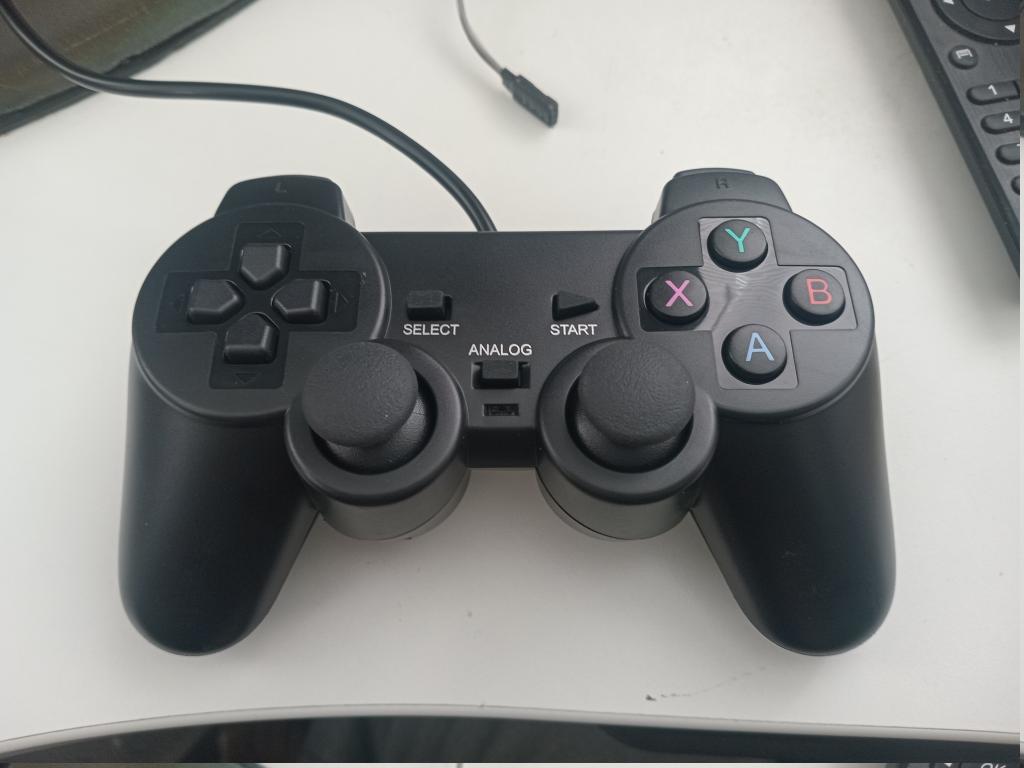 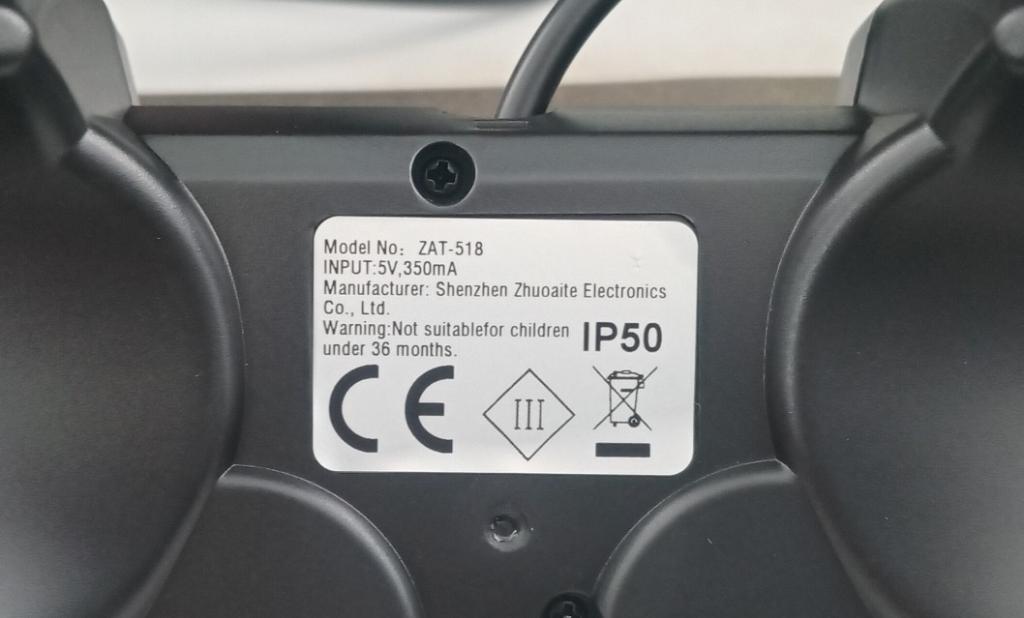 |
||||||
If you plug it into a Linux PC does it report the VID & PID? Try dmesg or journalctl -b Hopefully will also say its speed etc There's also lsusb which can be verbose with -v or more verbose -vv etc John Edited 2026-11-19 22:19 by JohnS |
||||||
|
||||||
| Page 1 of 2 |
||||||
 |
The Back Shed's forum code is written, and hosted, in Australia. |


