
| Menu | JAQForum Ver 19.10.27 |
| Menu | JAQForum Ver 19.10.27 |
Forum Index : Microcontroller and PC projects : MINT: STCube Programmer in Linux....
  Page 2 of 4 Page 2 of 4   |
||||||
Yes, Linux Mint's System Information tool shows it as in the image above, so Mint knows it's there with the correct matching VID and PID and it even shows it as being in DFU mode, but Cube Programmer flatly refuses to see it at all. All I ever get from Cube, is "No DFU detected", despite the VID and PID being exactly correct, and Mint seeing the module with those exact settings. Bit of a head scratcher, this one! |
||||||
I got curious and loaded cubeprogrammer on my Linux Mint The blackPill is detected in bootloader mode [ 793.513894] usb 3-1: new full-speed USB device number 3 using ohci-pci [ 793.710767] usb 3-1: New USB device found, idVendor=0483, idProduct=df11, bcdDevice=22.00 [ 793.710778] usb 3-1: New USB device strings: Mfr=1, Product=2, SerialNumber=3 [ 793.710784] usb 3-1: Product: STM32 BOOTLOADER [ 793.710790] usb 3-1: Manufacturer: STMicroelectronics [ 793.710795] usb 3-1: SerialNumber: 337E38923430 and the system report gives the same info as yours. My results are the same - no joy. As far as I can determine, the actual application has the right permissions but with Java, who knows. Sorry I couldn't help solve the riddle. Jim |
||||||
I spoke too soon. navigate to Graeme/STMicroelectronics/STMcube/STM32CubeProgrammer/bin 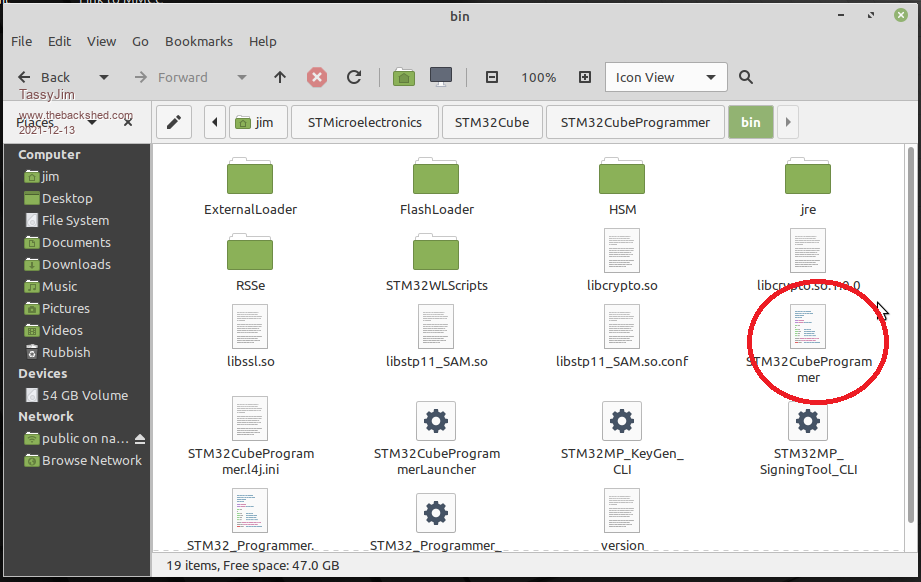 right click on STMCubeProgrammer and "run as administrator" bingo!!! 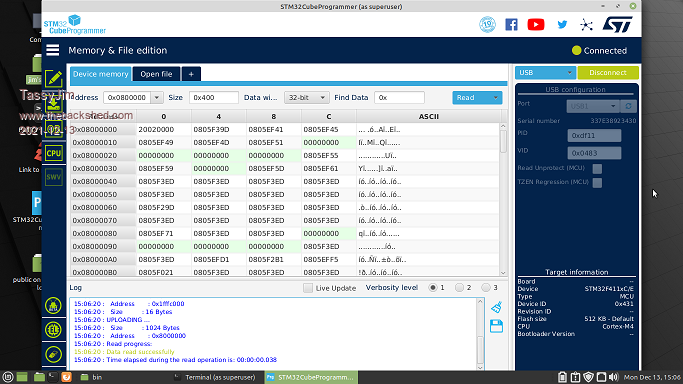 And No, you can't just right-click on the desktop icon ans select "run as administrator". That would be too easy. And the fact that you are in the administrators group probably doesn't make any difference. |
||||||
Won't work for me.  Still says no DFU detected if I right-click run that file. You say run as administrator - but there is no option to do that if I right-click that file. I can only open it normally. There simply is no menu entry saying "Run as administrator" when I right-click that file. Have I missed something? EDIT: Here is a photo of what I am seeing.... 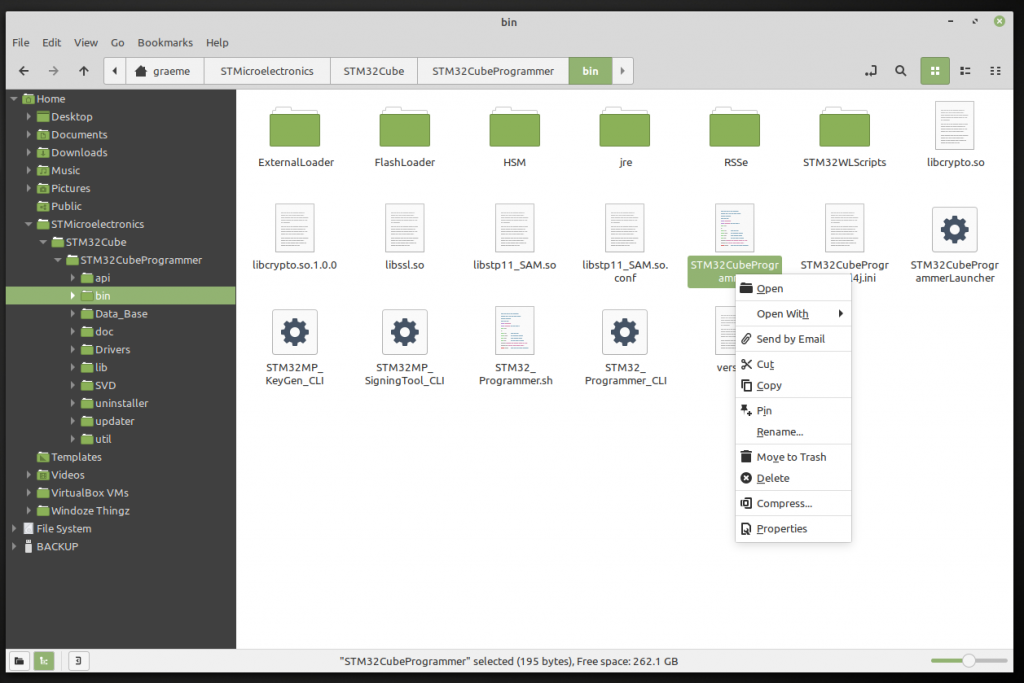 Edited 2021-12-13 16:14 by Grogster |
||||||
That's two differences between our installations of Linux Mint 20.2 My version is codename "Uma" It might be because you are an administrator but I have really run out of ideas now. And they say Windows is unfriendly... Jim |
||||||
What happens if you select the bottom one, Properties? Can you set the permissions there? Still on Mint19 so may be different. Edited 2021-12-13 17:10 by phil99 |
||||||
Yeah..... Starting to rethink the move to Mint now. DON'T GET ME WRONG - Mint is EXCELLENT for basic common stuff - web-browsing, playing music or movies etc. But it seems overly complex to get stuff like USB working if it is NOT a standard flash-drive, and the permissions hurdles you have to jump through in Linux seems almost absurd. I get it. Linux is super-secure because of that, and Windoze is not. But there is something to be said for being able to install a program in Windoze, and it just works 90% of the time. Mint has shown me that most apps work, but any that DON'T - you have to fight the system permissions in a HUGE way to make things - SIMPLE things like USB VCP's work. Sigh. So in YOUR Mint Jim, you have a "Run as administrator" option in the right-click menu, correct? |
||||||
NO. I did look at that, but there is nothing in there that allows me to tell Mint to run the file as administrator. |
||||||
Yes |
||||||
apt install pluma might be the answer according to this. https://forums.linuxmint.com/viewtopic.php?t=274497 |
||||||
As you have two screens side by side, one with the Windows VM replace the VM with a Real M. Getting Win10 to network with linux (or anything else, even older Windows) can be tricky. I side stepped that by plugging a USB drive into the modem. they can both see that. Not quite as bad as "sneaker net". |
||||||
@ Mixtel90: Ta, I will try that. @ Phil99: XP VM NOT running during all this testing, but a good point you make. However, there is no VM running, so there is no chance of the VM trying to grab the VCP. |
||||||
try: sudo adduser $USER plugdev i can see what the problem is, and it seems quite common. am just trying to find a generic fix. cheers, rob :-) |
||||||
IIRC he's already in plugdev At least we now know it's a permissions issue. John |
||||||
it seems that there are 'udev rules' that can be added for specific devices via their VID:PID, but hard to find anything that allows access to all DFU devices - which would seem to be the best solution. one can also sudo <application>, but that is always a dodgy approach - in particular with your application creating files with 'root' as the owner and/or in unobvious places. cheers, rob :-) for one particular arduino device: #!/bin/bash # if [ "$(id -u)" != "0" ]; then echo "This script must be run as root" exit fi NAME=99-arduino-101.rules echo >/etc/udev/rules.d/$NAME echo \# Arduino 101 in DFU Mode >>/etc/udev/rules.d/$NAME echo SUBSYSTEM==\"tty\", ENV{ID_REVISION}==\"8087\", ENV{ID_MODEL_ID}==\"0ab6\", MODE=\"0666\", ENV{ID_MM_DEVICE_IGNORE}=\"1\", ENV{ID_MM_CANDIDATE}=\"0\" >>/etc/udev/rules.d/$NAME echo SUBSYSTEM==\"usb\", ATTR{idVendor}==\"8087\", ATTR{idProduct}==\"0aba\", MODE=\"0666\", ENV{ID_MM_DEVICE_IGNORE}=\"1\" >>/etc/udev/rules.d/$NAME udevadm control --reload-rules udevadm trigger from: https://github.com/arduino/ArduinoCore-arc32/blob/master/scripts/create_dfu_udev_rule Edited 2021-12-13 19:56 by robert.rozee |
||||||
see here: https://cleanflight.readthedocs.io/en/latest/USB%20Flashing/ where this is suggested: echo 'SUBSYSTEM=="usb", ATTRS{idVendor}=="0483", ATTRS{idProduct}=="df11", MODE="0664", GROUP="plugdev"' | sudo tee /etc/udev/rules.d/45-stdfu-permissions.rules > /dev/null along with "sudo adduser $USER plugdev this should fix the problem (after logging out and/or rebooting). but am still not happy that it is specific to the one VID:PID pair. cheers, rob :-) Edited 2021-12-13 20:21 by robert.rozee |
||||||
Re: Not happy - you and me both, Rob. I'm sick of all the hoop jumping. Just to see what happens, I booted up the old Windoze ten machine, plugged in the Black Pill, and Cube picked it up IMMEDIATELY. Have lost quite a bit of my enthusiasm for Mint and Linux due to the amount of hoop-jumping you have to do to get simple things working. I read the Mint forums thread, and it would seem that even people there are annoyed with how convoluted things seem to be. Windoze has it's problems, but Linux ain't no perfect replacement by ANY interpretation as far as this latest exploration by me is concerned. Sigh.  |
||||||
It boils down to that old question of security vs convenience. There is no answer that suits everyone. Almost no-one will ever plug in and want to use a black pill kind of device so having a lax security setting as the default looks impossible to justify. John |
||||||
Linux applications usually run extremely well on linux - often even better than windows apps on Windows. The problem comes when you want to run windows apps on linux. Unfortunately there isn't a huge pool of really high grade linux apps. A lot of the problem would be resolved if companies would compile stuff for both windows and linux, but unfortunately they don't - and they don't release the source code either. :( . |
||||||
@ John - Yes, I hear you. And you are quite correct. Mint would seem to be a perfect choice if all you ever do is internet and email, play some music or watch some movies and perhaps do a few office documents etc. I had no issues with any of that under Mint, only the more specific stuff. I have not given up on Linux, I was just venting a little frustration.  @ Mixtel90 - Yes, you are also correct. I think it is more ME wanting to be "Unconventional" in terms of what I want to do with Mint, that is perhaps causing me these issues.  |
||||||
| Page 2 of 4 |
||||||
 |
The Back Shed's forum code is written, and hosted, in Australia. |


