
| Menu | JAQForum Ver 19.10.27 |
| Menu | JAQForum Ver 19.10.27 |
Forum Index : Microcontroller and PC projects : PicoMiteWeb firmware for the Pico W - now making real progress
  Page 2 of 8 Page 2 of 8   |
||||||
Oops, here's the attachment: g1html.zip Browser is chrome. This is what I have when I "view page source". <html> <title>Solar Greenhouse System</title> <meta http-equiv='refresh' content='120' > <head></head> <BODY bgcolor='#d0d0d0'> <form name='f1' method='get' action='G'>
<link href='data:image/x-icon;base64,iVBORw0KGgoAAAANSUhEUgAAABAAAAAQEAYAAABPYyMiAAAABmJLR0T///////8JWPfcAAAACXBIWXMAAABIAAAASABGyWs+AAAAF0lEQVRIx2NgGAWjYBSMglEwCkbBSAcACBAAAeaR9cIAAAAASUVORK5CYII=' rel='icon' type='image/x-icon' /> Solar Greenhouse System Status</font> <font size='4'>Sat, Feb 6, 2023 22:19</font> </td></tr> <tr><td> </font></P> <table border=1 rules=none><font size='5'> <tr><td></td> <td> <input onChange='this.form.submit();' type='radio' name='Y' value='0' checked> OFF <input onChange='this.form.submit();' type='radio' name='Y' value='1' > AUTO <input onChange='this.form.submit();' type='radio' name='Y' value='2' > MANUAL </td></font> <td> </td></tr> <tr><td> </td> <td> </td> <td> </td></tr> <tr><td><input size=13 value='CIRCULATOR' style='background-color:#ff0000' readonly> <input type='checkbox' name='W' value='1' .......></td> <td><font size='5'> <td> <input size=10 value='FAN OUT' style='background-color:#ff0000' readonly> <input type='checkbox' name='W' value='4' .......> </td></tr> <tr><td></td> <td><font size='5'> <td> </td></tr> <tr><td><input size=13 value='LOUVER VENT' style='background-color:#ff0000' readonly> <input type='checkbox' name='W' value='2' .......></td> <td><font size='5'> <td> <input size=10 value='FAN IN' style='background-color:#7fff00' readonly> <input type='checkbox' name='W' value='5' checked> </td></tr> <tr><td></td> <td><font size='5'> <tr><td><input size=13 value='MISTER' style='background-color:#ff0000' readonly> <input type='checkbox' name='W' value='3' .......></td> <td><font size='5'> <td> <input size=10 value='HEATER' style='background-color:#ff0000' readonly> <input type='checkbox' name='W' value='6' .......> </td></tr> <tr><td></td><td><font size='5'> </font></table> <table rules=none> <tr><td><font size='5' color='red'> </table> <table border=1 rules=none><font size='4'> <tr><td>Outside Temp</td><td><input size=5 name='A' value=''></td> <td> Inside Temp </td><td><input size=5 name='B' value=''></td></tr> <tr><td>Outside Humidity</td><td><input size=5 name='C' value=''></td> <td> Inside Humidity</td><td><input size=5 name='D' value=''></td></tr> <tr><td>Circulator Supply</td><td><input size=5 name='E' value=''></td> <td> Circulator Return</td><td><input size=5 name='F' value=''></td></tr> </font> </table> To submit new values, click 'Simulate' <input type='submit' value='Simulate'></font> </form> </BODY> </html> Same happens with edge browser. Edited 2023-02-08 07:12 by lizby |
||||||
Hi Peter You mentioned that CtrlVal and Gui commands and CtrlVal function are deprecated. In the Commands List GUI is still present "list commands" and WEB command is new. In the Functions List, CtrlVal(, MM.HPos, MM.VPos, MsgBox( are deprecated and JSON$( is new. Jan |
||||||
MM.INFO(HPOS) and MM.INFO(VPOS) supply the loss of MM.HPos and MM.VPos. |
||||||
GUI test lcdpanel + GUI reset lcdpanel + gui test touch + gui calibrate + gui bitmaop that's all |
||||||
Lizby and Peter, Thank you for the explanation. Those are things I hadn't even thought of. Jan |
||||||
Is there a way to determine if the WEB NTP command has timed out while the program is still running? IE; ERROR: NTP TIMEOUT causes the program to end. I want to just have it try again. as 99% of the time, the first attempt times out but subsequent tries succeed. I tried using mm.errno... but no luck. I mean, also there is no way to deal with OPTION WIFI ssid,pass not succeeding... my program is just hung waiting Edited 2023-02-08 11:45 by pwillard |
||||||
@lizby It looks like the length of the html file has to be below the tcpip packet length - usually 1460 bytes. I stripped your gh1 file down and it does work with most removed. The good news is, the 'submit' button works and you can retrieve the submitted data OK. Just need short html files (for now) Edit: On my system and my network, a html file of length 1460 bytes does at it should. The same file with one extra byte (= 1461 bytes) fails to progress past the "sending page" stage. The page IS sent. Any trailing zero bytes appended by XMODEM do not cause any issues and are dropped before sending. @pwillard, you need to get creative for now. DATE$ = "01-04-2000" ON ERROR SKIP WEB ntp 11 IF DATE$ = "01-04-2000" THEN PRINT "OOPS!" PRINT DATE$ RUN OOPS! 01-04-2000 [21] WEB tcp read a%,buff%() Error : WIFI not connected You can decide what to do after "OOPS!" but at this stage the only way to reconnect is to power down. I am sure these issues will get addressed once the main system settles down. Jim Edited 2023-02-08 13:41 by TassyJim |
||||||
Jim - thanks for the diagnosis - should be able to fix that |
||||||
Version 5.07.07a5 PicoMiteWebV5.07.07a5.zip Now allows pages > 1460 bytes. Tested with lizby's examople |
||||||
It was a rainy day today! Jim |
||||||
LOL.. If you are talking about blighty.. Yesterday I was looking out and this very strange yellow ball was in the sky.. |
||||||
Hi @matherp How to ask PicoMiteW(via COM)what IP was assigned to it? Michal |
||||||
mm.info(ip address) |
||||||
Thanks, Jim, for the analysis and diagnosis, and thanks, Peter, for the fix. I'm now working on what to do with the values the program is getting back after the [Simulate] button press: /G?Y=0&W=2&W=5&A=&B=&C=74&D=&E=&F= Fun, fun, fun. |
||||||
Here is an example of what I do Option explicit Option default integer Dim buff%(512) Const maxargs=20 Const ds18B20pin = 4 Const relaypin = 2 Const stemp=17 'setting for lowest temperature on radio buttons Const heatingoff$=" BGCOLOR='#00ff00'>Off" Const heatingon$=" BGCOLOR='#ff0000'>On " Const check$="checked='checked' " Const hysteresis=0.5 ' Dim checked$(11) Dim integer setpointb=4 'setting for default temperature Dim integer setpointt=stemp+setpointb-1 Dim notstarted=1,notended=0 Dim float currenttemp,readtemp Dim float maxtemp, mintemp Dim heating$=heatingon$ checked$(setpointb)=check$ SetPin relaypin,dout currenttemp=TEMPR(ds18b20pin) maxtemp=currenttemp mintemp=currenttemp updateheater WEB ntp Do If Right$(Time$,1)="0" And notstarted=1 Then TEMPR START ds18b20pin,3 notstarted=0 notended=1 EndIf If Right$(Time$,1)="2" And notended=1 Then readtemp=TEMPR(ds18b20pin) If readtemp<1000 Then currenttemp=readtemp notstarted=1 notended=0 maxmin updateheater EndIf poll Loop Sub poll Local a%,s$,page$,i,nparams% Local arg$(1,maxargs-1) For a%=1 To MM.Info(max connections) ' LongString clear buff%() WEB tcp read a%,buff%() If LLen(buff%()) Then Print "Received ",LLen(buff%())," bytes on PCB ",a%-1 LongString print buff%() page$=parsehtmldata$(nparams%,buff%(), arg$()) Print page$ For i=0 To nparams% Print arg$(0,i),"=",arg$(1,i) If arg$(0,i)="RB" Then ' setting for radio button checked$(setpointb)="" Print Val(Right$(arg$(1,i),Len(arg$(1,i))-1)) setpointb=Val(Right$(arg$(1,i),Len(arg$(1,i))-1)) setpointt=setpointb+stemp-1 checked$(setpointb)=check$ updateheater EndIf If arg$(0,i)="RESET" And arg$(1,i)="YES" Then 'Reset maxmin maxtemp=currenttemp mintemp=currenttemp EndIf Next If page$="INDEX" Then Print "sending page" WEB transmit page a%,"test6.html" ElseIf page$="small.jpg" Then Print "Sending picture" WEB transmit file a%,"small.jpg","image/jpeg" ElseIf page$="favicon.ico" Then Print "sending favicon" WEB Transmit FILE a%,"favicon.ico","image/vnd.microsoft.icon" Else WEB transmit code a%, 404 EndIf EndIf Next a% End Sub ' Function parsehtmldata$(paramcount As integer, inbuf() As integer, arg$()) Const starttext$="HTTP" Local a$,b$ Local integer buf(Bound(inbuf())) Local integer inpos,startparam,processargs paramcount=0 inpos=LInStr(inbuf(),"GET /",1) If inpos=0 Then parsehtmldata$="" Else LongString MId buf(),inbuf(),inpos+5 inpos=LInStr(buf(),starttext$,1) If inpos>2 Then 'page request found inpos=inpos-2 a$=LGetStr$(buf(),1,inPos) inpos=Instr(a$,"?") If inpos<>0 Then 'parameters found processargs=1 parsehtmldata$=Left$(a$,inpos-1) a$=Mid$(a$,inpos+1) Do arg$(0,paramcount)="" arg$(1,paramcount)="" inpos=Instr(a$,"=") startparam=1 arg$(0,paramcount)=Mid$(a$,startparam,inpos-startparam) startparam=inpos+1 inpos=Instr(a$,"&") If inpos<>0 Then arg$(1,paramcount)=Mid$(a$,startparam,inpos-startparam) a$=Mid$(a$,inpos+1) paramcount=paramcount+1 Else arg$(1,paramcount)=Mid$(a$,startparam) paramcount=paramcount+1 processargs=0 EndIf Loop While processargs Else parsehtmldata$=a$ EndIf Else ' no page requested parsehtmldata$="INDEX" EndIf EndIf End Function Sub maxmin If currenttemp>maxtemp Then maxtemp=currenttemp EndIf If currenttemp<mintemp Then mintemp=currenttemp EndIf End Sub Sub updateheater ' Print "current setpoint is ",setpointt ' Print "current temperature is ",currenttemp Local float hcalc If setpointt=stemp+11 Then Pin(relaypin)=1 heating$=heatingon$ ElseIf setpointt=stemp Then Pin(relaypin)=0 heating$=heatingoff$ Else hcalc = setpointt + hysteresis If currenttemp>=hcalc Then 'turn heating off Pin(relaypin)=0 heating$=heatingoff$ EndIf hcalc = setpointt - hysteresis If currenttemp<=hcalc Then 'turn heating on Pin(relaypin)=1 heating$=heatingon$ EndIf EndIf End Sub |
||||||
Thanks. I've done this before, so I know which way I'm going. My approach is somewhat different from yours so I'm going to follow that path before I do what you're doing with the MMBasic variable names embedded in the HTML code with {}. I started on this method with PICAXE, hence the single-character names I use for HTML entities. To me, this is a big step for the Picomite. |
||||||
ALL PLEASE NOTE There is currently a conflict between any commands or functions that disable interrupts e.g. TEMPR and web activity. This can be seen both as misreads on the DS18B20 and crashes or incorrect responses in the web transactions. This is something I'm working on. I'm also trying to tidy up program startup and shutdown so that it is more reliable to rerun a web program |
||||||
 It's all good... it's fun to play with even as it is... It's all good... it's fun to play with even as it is... |
||||||
After a depressing number of errors on my part, I have my program accepting inputs from the web page and making appropriate changes to the output web page: 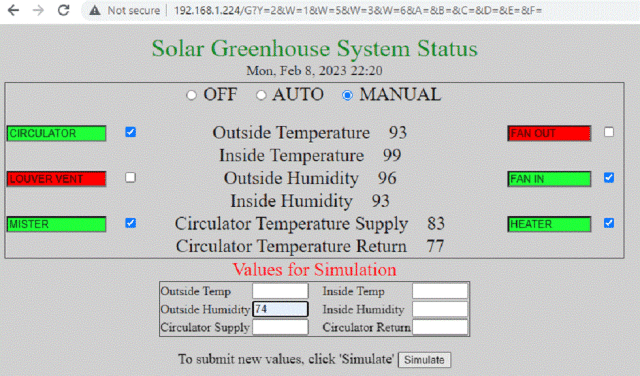 I can change the mode: Off, Automatic, Manual; I can change which outputs are to be on and off: CIRCULATOR, FAN_OUT, LOUVER_VENT, FAN_IN, MISTER, and HEATER; and I can specify simulated temperatures for running the program in AUTO mode. Next I have to write the code to actually turn the pins on and off based on actual or simulated sensor readings for temperature and humidity. I started this project in 2017, planning to use a 28-pin Micromite and I don't remember which serial TCP/IP module. I wrote about 500 lines of code, but never did the hardware, so didn't get much testing done. The program is far from ready for prime time. I'm very happy to be able to pick this up now with the Picomite. In 2017, I didn't have a solar greenhouse. I still don't, but I do have a solar "shedlet" that I built last year which has two used 270W panels. This program will enable me to get some practice in integrating everything. (I had to power-cycle many times. I hope in his tidying up Peter will smooth out some of those glitches. I also hope that DS18B20s can be made to work reliably--otherwise, I may need to use a co-processor. There's also a problem with getting Day of the Week from the Epoch date which I have to track down.) ~ Edited 2023-02-09 13:47 by lizby |
||||||
You definitely need a reset button fitted! For 'day of week" try ' DIM INTEGER ed, dow DIM dy$ DATE$ = "01-04-2000" ON ERROR SKIP WEB ntp 11 IF DATE$ = "01-04-2000" THEN PRINT "OOPS!" PRINT DATE$ PRINT EPOCH(now) ed = EPOCH(now)/86400 dow = (ed + 3) MOD 7 dy$=MID$("SunMonTueWedThuFriSatSun",dow*3+1,3) PRINT ed, dow,dy$ |
||||||
| Page 2 of 8 |
||||||
 |
The Back Shed's forum code is written, and hosted, in Australia. |


