
| Menu | JAQForum Ver 26.09 |
| Menu | JAQForum Ver 26.09 |
Forum Index : Microcontroller and PC projects : ArmmiteF407 V5.07.02 betas - Library - No Battery and more.
  Page 2 of 7 Page 2 of 7   |
||||||
For me, it comes up in Chrome (W11), I clicked the Printer icon in the top RH corner (Not the Download arrow): In Destination, I selected Save as PDF. Then clicked the save button, Selected the file name in the Downloads Box then select Save. Comes up OK in Acrobat whereas a normal download doesn't Brian Edited 2023-08-23 02:21 by Chopperp |
||||||
That worked for me to display all pages, thanks, but it lost the bookmarks. |
||||||
It's better I get 144 pages now. I tried clicking 'print save as PDF' but still the same result. |
||||||
Oops, I didn't check that. Still goes to the correct page if you type the page no into the page number box. I just downloaded it using the latest link with my Samsung tablet & it came up OK including the indexing with a PDF reader. Bit strange. Great manual though. |
||||||
Seeing if this works Nope, it didn't I transferred the Samsung download to the PC & that worked in Acrobat but uploading it to TBS & back down again didn't Edited 2023-08-23 08:13 by Chopperp |
||||||
I was still having problems but found (accidentally) that if I opened the file using the 'PDF X' app in W11 it opens OK. |
||||||
The one I posted last night seems OK to me.The links are OK with the exception of going to the main heading of Commands and Functions (they seem to go a page too far but individual command link are ok). Maybe I should just post as a zip, seems like there could be some differences with way various browsers view and download the links. I am using FoxitPDF reader. |
||||||
All perfect when downloaded in Opera and viewed in Foxit. |
||||||
The problem seems to be with Acrobat which was mentioned above, it opens OK in Firefox and Chrome. As long as I can read it I'm happy. |
||||||
This is better--pages and bookmarks ok through page 144--but then the problem recurs in Acrobat: 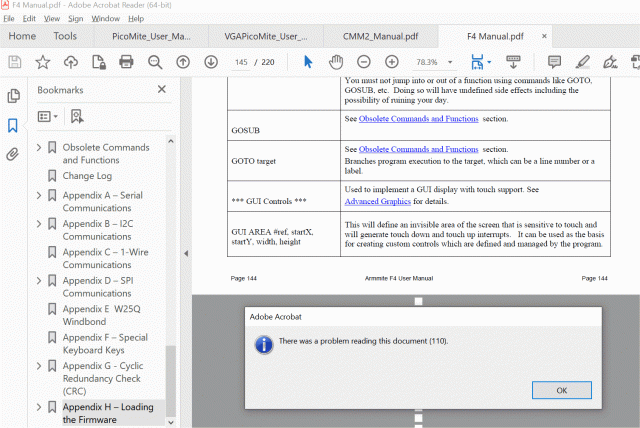 |
||||||
Hi PalCal, I gave up on Acrobat a few years ago, try Sumatra reader . It is pretty damn good. Regards, Mick |
||||||
Thanks Mick I'll give it a go. Edit....It works well I'll uninstal Acrobat and use Sumatra Edited 2023-08-23 14:55 by palcal |
||||||
I download Acrobat reader and see what you mean. I cleaned up a few things around where it was stopping and now seems OK with acrobat. (Acrobat reader is a bit noisy, wants you to use its new stuff and upgrade, as well I could not immediately see how return to where you come from when you click a link, also installed McAFee security scan, did not see an option not to.) I use Foxit PDF Reader - has a button to go back so really good to test all the hyper-links. All the links should be good now. Armmite F4 Manual.zip |
||||||
All good here. I agree with Acrobats noise. I hated the 'new' format and was glad I could downgrade to something I was used to. I dusted off my F4 and loaded the firmware OK. I need a bigger desk! Thanks for all the work Jim |
||||||
PDF working well now also (on Acrobat). Many thanks to you for the updates. Also thanks to Peter. Updating several boards now. Tony M |
||||||
All looks good now to me in Acrobat. Thanks for running this down, and thanks for all of your work on the F4--terrific MMBasic platform getting a significant upgrade. |
||||||
@disco4now, Thank you for including the 'Appendix G - Cyclic Redundancy Check (CRC)' section. Could I please suggest that you change the font used for the sections of code to Courier New as used in the other sections of code in the manual. It does look better. The manual works in Acrobat reader for me now but like others I have decided to try other readers. Thank you for your work on the F4 and the manual. Bill |
||||||
In the manual, MM.Device$ is missing the WEBmite from the list of devices MM.INFO(EXISTS DIR dir$) is followed by MM.INFO(EXISTS DIR file$) The second one should be MM.INFO(EXISTS FILE file$) Jim |
||||||
I have a strange one here. I have tried programming 4 times and always the same. Everything seems to work ok until I make the lcd panel as console. Now every time I try to edit , I get "not enough memory" error. Turn off lcd panel console and it works fine. Is this a bug? |
||||||
OK, I can see a small problem with EDIT with but not the out of memory error. The error I see is lines are double spaced initially.(arrowing down to second page and backup overcomes it). Do you have a program loaded? Was it entered from scratch after the firmware update? Have you tried resetting MMBasic i.e. K1 button down while applying power. I will have a look at the issue I am seeing tonight. Gerry |
||||||
| Page 2 of 7 |
||||||
 |
The Back Shed's forum code is written, and hosted, in Australia. |


