
| Menu | JAQForum Ver 19.10.27 |
| Menu | JAQForum Ver 19.10.27 |
Forum Index : Microcontroller and PC projects : RP2350 HDMI with 720P goodness
  Page 2 of 4 Page 2 of 4   |
||||||
er, why's it say 2040? is it forum guys made it work for pico2 hdmi? |
||||||
Another outstanding achievement Mr. Mather.  I am not aware of anyone who has done anywhere near as much with the RPi Pico. |
||||||
I did. £16.90 with postage. someone say "yoool beee sorrry" |
||||||
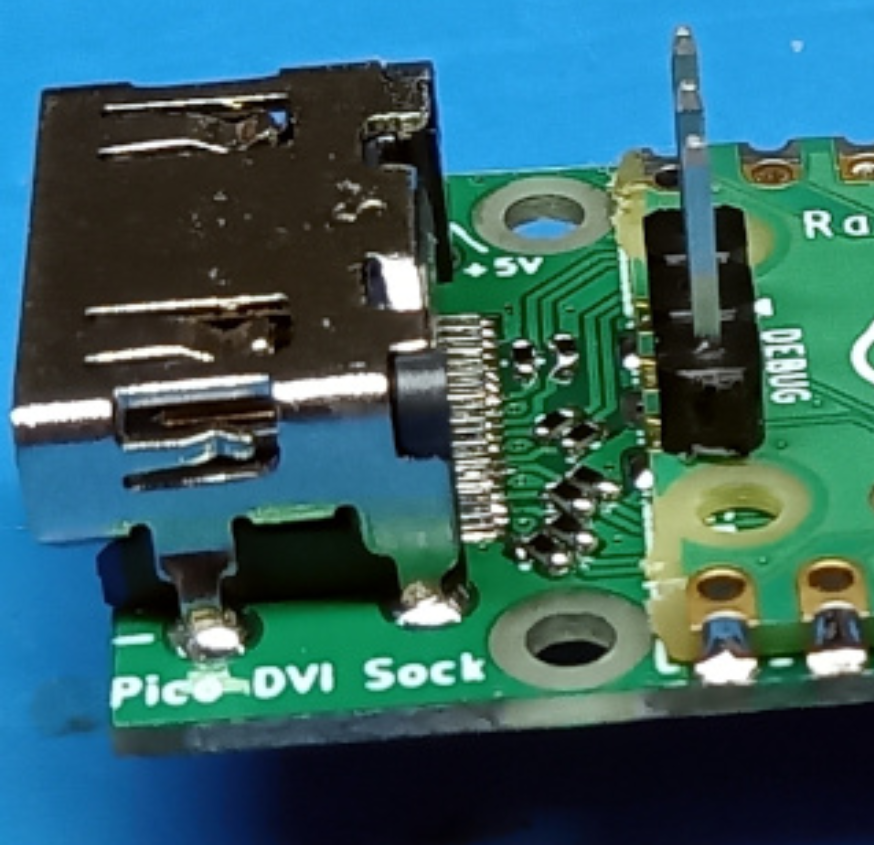
Hi Jan, I do not know. I bought it from a German distributor, I took adafruit as an example because of its internationality. https://www.reichelt.de/raspberry-pi-dvi-sock-fuer-pico-rpi-pico-dvi-p306670.html?search=pico+dvi Now I see in the second link that the original developer Luke Wren uses the board labeled "Pico DVI Sock" on his photo. https://picockpit.com/raspberry-pi/raspberry-pi-pico-video-output/ I happen to have this one as well. But I will also get the one from adafruit. And as I wrote above, I'm waiting for the board (from Peter) in the collective order and an Olimex is also on the way. There is still a lot of room for testing! Hopefully we will find the cause. Matthias |
||||||
micropython take that back others have used micromite for years but me it's picomite for 2 years.... and it's all change. 2040 to pico2 differences. sure there's lots Edited 2024-09-07 06:16 by stanleyella |
||||||
 |
||||||
An interesting challenge is to get sound through the hdmi cable and remove the need for a separate audio connector. It is definitely possible, the pico based Sinclair ZX81 and ZX Spectrum emulators do it (at lower video resolutions) even with the the RP2040. picozx81 pico-zxspectrum The challenge is working out how to embed the audio islands when hstx is being used to generate the video stream |
||||||
I'm using 220R terminating resistors for the DVI connection and it's fine. They were all I had at the time so I used them. I mentioned on the other thread that this monitor doesn't sync properly with the Pico 2 DVI signal. That's not the fault of the signal, I don't think, because a TV is rock solid. More likely that this monitor is marginal at the particular frequencies being used. Windows doesn't offer me a choice greater than 60Hz for refresh but the monitor manual shows a better range. [miniRANT] I really can't understand why anyone would want audio over HDMI. It's purely a convenience thing and does absolutely nothing for sound quality. TV speakers are almost always unbearably rubbish and easily bettered by cheap Chinese passive computer speakers in plastic boxes. Once you've got the audio to the monitor someone will want it quieter or you want bangs and crashes for games, which are immensely unsatisfying with nothing below 300Hz, so you end up having to plug headphones (and possibly an extension lead) into the monitor. Why not just plug them straight into the Pico and forget the complexity of putting audio over HDMI? :) [/miniRANT] . Edited 2024-09-07 06:36 by Mixtel90 |
||||||
doh. dvi is hdmi without audio. sort video first sound it better boombox |
||||||
Not a chance. I've been making a living out of BASIC since 1988 and kicked some serious butt. There's lots of big-dollar industrial controllers on the market with an interpreter on the front end. Where is µpython? Nowhere. They all use BASIC. Go figure  Edited 2024-09-07 07:36 by PhenixRising |
||||||
yeah, audio over hdmi. I use headphone socket to 2 spkr and sub but the iight thingy to adaptor to stereo amp and wharfdale diamond iv but not for pico |
||||||
So, just to understand, this 720p currently needs the RP2350 that will o/c to 375MHz? My Tiny2350 achieves this but not my Pico-2+ and nor my PGA. It's all good and really darned exciting  Edited 2024-09-07 21:12 by PhenixRising |
||||||
372MHz actually but near enough |
||||||
A Question: Olimex says the HDMI-Board is for the pico. I understand you this way: it is possible to use the pico2 at this board because the picos are pin compatible, is this right? |
||||||
If 372MHz is too high for some Pico2s, is there a possibility to use CVT-RB or CVT-RBv2 timings instead? That would pull the clock rate back to either 320MHz or 300MHz Video Timings 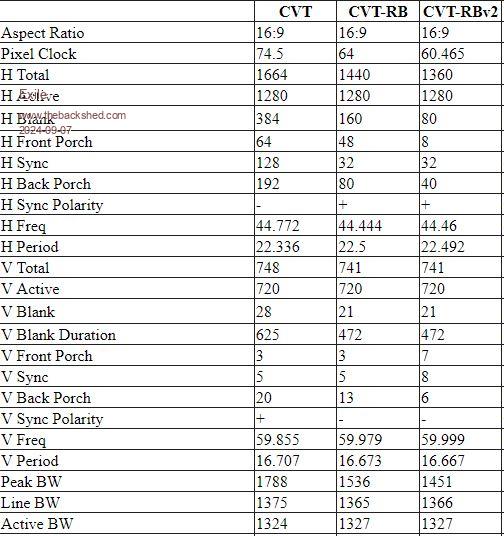 |
||||||
Yes: Just plug in a Pico2 and load the HDMI firmware. Then set the option. This is essential because Olimex use a non standard DVI pinout I'll have a play and see if it works - thanks for the info |
||||||
in anticipation of olimex arriving searched my tv's with hdmi and this was wide screen but analogue , no freeview digital but hdmi. in the mean time connected usb vga pico2. vga looks better than the vga monitor but then it's bigger. no 3.5 stereo input for vga sound but loads of other option so I used a stereo rechargeable £14 blaster with 3.5 aux in as well as guitar sockets, usb playback, and fm radio... and the sound in asteroids is proper.. not the bleeps from the vga monitor so I don't think sound through hdmi is important. 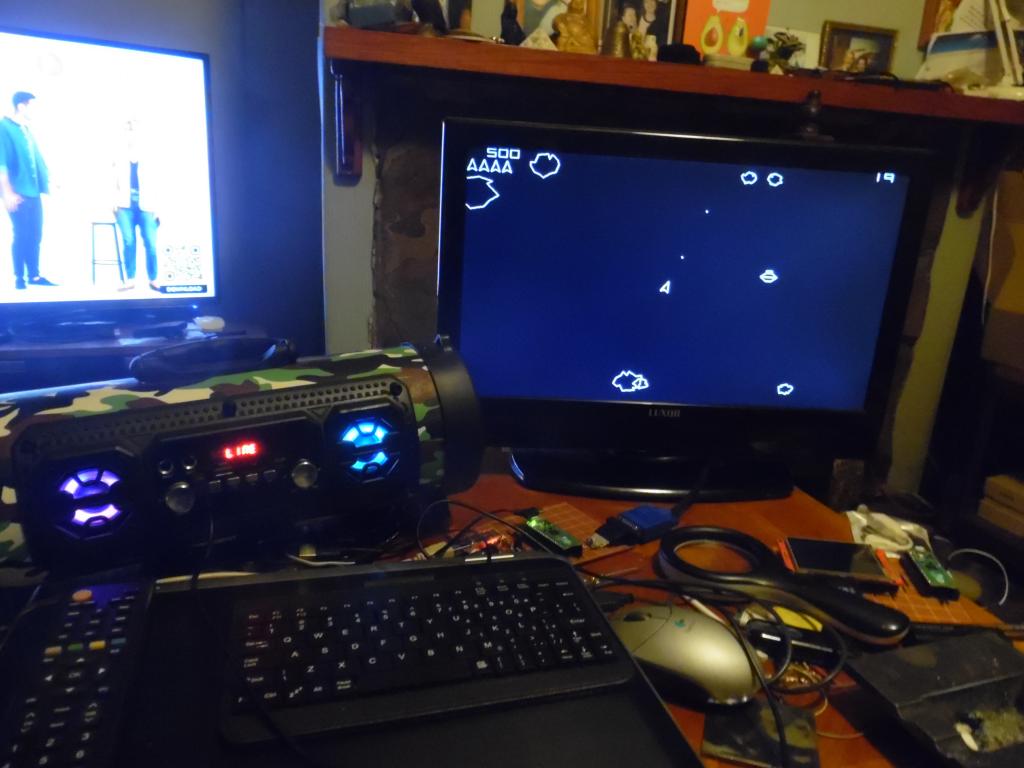 |
||||||
My pico2 work at 378000 so is that ok for hdmi? |
||||||
Yup. Clock it down to 372000 |
||||||
I think i have to connect first via vt100 to set the options to olimex. after that it will be possible to connect a hdmi screen... i will try it. |
||||||
| Page 2 of 4 |
||||||
 |
The Back Shed's forum code is written, and hosted, in Australia. |


