Posted: 09:09am 21 May 2026 Copy link to clipboard
Peter63 Senior Member
GotIt! /Peter63
Posted: 11:32am 21 May 2026 Copy link to clipboard
phil99 Guru
As Jim's test program seems to work, further down the thread linked to by @dddns there is a more compact Function based on Jim's program.
Function DS18x20(PinNbr As INTEGER) As FLOAT ' Extracted from DS18x20 test code by TassyJim ' Run that program and find the values that get your device to work. ' Copy those values into this Function Local INTEGER t, T1, T2, done Local FLOAT Value=0
t = Timer Do 'There should be a result in less than 1000mS If Timer - t > 1000 Then Value = 1000 'standard error code Print "*** Timeout ***", Exit Do EndIf
OneWire READ PinNbr, 4 , 1 , done ' conversion done? Loop Until done ' Print Timer - t;" mS conversion time", 'un-comment this to see how long it took If Value = 0 Then ' we have not timed out yet, so assume data is valid OneWire WRITE PinNbr, 1, 2, &hcc, &hbe ' command read data OneWire READ PinNbr, 2, 2, T1, T2 ' get the data
OneWire RESET PinNbr If T2 And &b1000 Then 'negative temp 'make 2s complement (1s complement+1) T2 = (T2 Xor &hFF) T1 = (T1 Xor &hFF)+1
If T1=1 Then T2=T2+1 'add the carry if required Value = -((T2 And &b111) * 256 + T1) / 16 'adjust this if the temp. is wrong Else 'positive temp Value = ((T2 And &b111) * 256 + T1) / 16 'adjust this if the temp. is wrong EndIf EndIf DS18x20 = Value End Function
Edited 2026-05-21 21:36 by phil99
Posted: 12:54pm 21 May 2026 Copy link to clipboard
Peter63 Senior Member
Oh thanks, I will check further...
/Peter63
Posted: 09:02am 25 May 2026 Copy link to clipboard
phil99 Guru
A DS18S20 Function for Picomite v6.03.00 derived from Tassy Jim's test program.
Not tested on a real DS18S20 as I don't have one but returns the same numbers as Tassy Jim's test program (modified to always process as if connected to a DS18S20) on a DS18B20, so there is a reasonable chance it will work on a DS18S20.
Usage:- Print DS18S20(mm.info(pinno GPxx))
Function DS18S20(PinNbr As INTEGER) As FLOAT ' Extracted from DS18x20 test code by TassyJim Local INTEGER t, T1, T2, done, a,b,c,d,e,f,g Local FLOAT Value=0
OneWire RESET PinNbr ' reset before command OneWire WRITE PinNbr, 8, 2, &hcc, &h44 ' start conversion t = Timer Do 'There should be a result in less than 1000mS If Timer - t > 1000 Then Value = 1000 'standard error code Print "*** Timeout ***", Exit Do EndIf
OneWire READ PinNbr, 4 , 1 , done ' conversion done? Loop Until done ' Print Timer - t;" mS conversion time", 'un-comment this to see how long it took If Value = 0 Then ' we have not timed out yet, so assume data is valid OneWire WRITE PinNbr, 1, 2, &hcc, &hbe ' command read data OneWire READ PinNbr, 2, 2, T1, T2 ' get the data OneWire RESET PinNbr OneWire WRITE PinNbr, 2, 2, &hcc, &hbe ' command read data OneWire READ PinNbr,0,7, a,b,c,d,e,f,g
If T2 And &h80 Then 'if MSB of T2=1 then negative 'Read 12bit resolution and adjust T1 = (T1 And &hFE) << 3 'make whole degrees T1 = T1 -4 +(16 - g) 'add 12 bit value T1 = (T1 Xor &hFF) + 1 'take 2s complement Value = -T1/16 'make decimal value in degrees Else 'positive temp Value = T1 / 2 '9bit value 'Read 12bit resolution and adjust T1 = T1 And &hFE 'truncate 0.5deg(or use integer division \) Value = T1/2- 0.25 + (16 - g) /16 '12 bit value EndIf EndIf DS18S20 = Value End Function
Edited 2026-05-25 19:04 by phil99
Posted: 02:31pm 25 May 2026 Copy link to clipboard
Peter63 Senior Member
Hello, Phil99 Have connected a DS18S20 (Power mode parasitic)
I have about: 25 degrees in the room, but get 69.8125 from the routine. Do you have any ideas why?
/Peter63
Posted: 03:30pm 25 May 2026 Copy link to clipboard
robert.rozee Guru
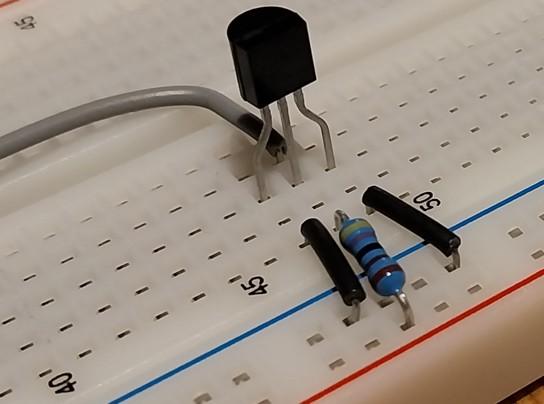
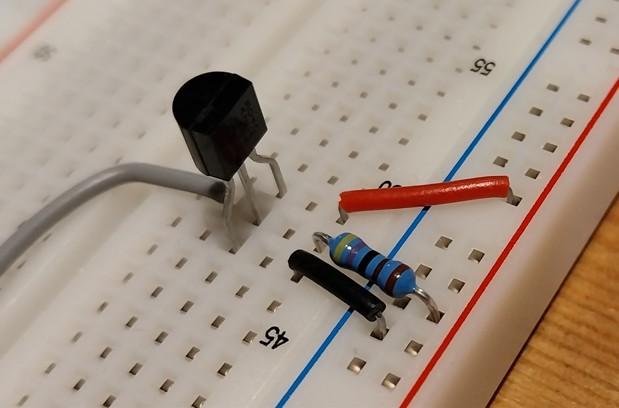
try not using parasitic/phantom power; connect the Vdd pin to 3v3. also, are you sure that resistor you are using is not 470 ohms? the fourth band should be brown, while in your photo it looks closer to black.
cheers, rob :-)
Posted: 05:25pm 25 May 2026 Copy link to clipboard
Peter63 Senior Member
I have connected the DS18S20 with external power supply.
But I also had to change a little in the program code to make it work.
Attaching the new version here...
' --- test-loop --- Do Print DS18S20(MM.Info(pinno GP7)) Pause 2000 Loop End
Function DS18S20(PinNbr As INTEGER) As FLOAT ' Extracted from DS18x20 test code by TassyJim Local INTEGER t, T1, T2, done, a,b,c,d,e,f,g Local FLOAT Value=0
OneWire RESET PinNbr ' reset before command OneWire WRITE PinNbr, 8, 2, &hcc, &h44 ' start conversion t = Timer done=0 Do 'There should be a result in less than 1000mS If Timer - t > 1000 Then Value = 1000 'standard error code Print "*** Timeout ***", Exit Do EndIf
OneWire READ PinNbr, 4 , 1 , done ' conversion done? Loop Until done ' Print Timer - t;" mS conversion time", 'un-comment this to see how long it took If Value = 0 Then ' we have not timed out yet, so assume data is valid OneWire WRITE PinNbr, 1, 2, &hcc, &hbe ' command read data OneWire READ PinNbr, 2, 2, T1, T2 ' get the data OneWire RESET PinNbr OneWire WRITE PinNbr,1,2,&hcc,&hbe OneWire READ PinNbr,0,7,a,b,c,d,e,f,g If T2 And &h80 Then 'if MSB of T2=1 then negative 'Read 12bit resolution and adjust 'truncate 0.5deg value (or use integer division \) T1 = T1 And &hFE T1=T1 / 2 'make whole degrees 'add compensation values read from scratchpad T1=T1*16 'make lsb 1/16 degree T1 = T1 -4 +(16 - g) 'add 12 bit value 'take 2s complement T1 = (T1 Xor &hFF) + 1 Value = -T1/16 'make decimal value in degrees Else 'positive temp Value = T1 / 2 '9bit value 'Read 12bit resolution and adjust T1 = T1 And &hFE 'truncate 0.5deg(or use integer division \) Value = T1/2- 0.25 + (16 - g) /16 '12 bit value EndIf
EndIf DS18S20 = Value End Function
Jepp, 4.7Kohms
/Peter63 Edited 2026-05-26 03:27 by Peter63
Posted: 06:10am 26 May 2026 Copy link to clipboard
phil99 Guru
Glad you got the function working. I forgot to mention parasitic powering was omitted to keep it simple, my apologies.
I see you had to revert to Jim's "Case 16" code to get the right result. I attempted to reduce the number of lines but will have to rethink that.
Posted: 02:19pm 26 May 2026 Copy link to clipboard
Peter63 Senior Member
phil99, thanks anyway for the tip about the function. Now there is one that works with this temperature sensor. /Peter63
Posted: 06:42am 28 May 2026 Copy link to clipboard
phil99 Guru
A dreary day, so playing indoors. Had a go at condensing the Function. Using the example data in the datasheet I am reasonably confident this will give 0.5°C resolution correctly with a real DS18S20, but the method for extending the resolution to 1/16° shown in the datasheet looks strange to me and there is no example data given for that.
If you have the time and inclination could you test this? At the end of the Function there are 7 decoding versions. 1) 1/2 degree resolution - this should work 2) 1/16 degree resolution - using the equation in the data sheet, might work. 3) Same as above for positive temps. but if negative temps are wrong it might be better.
The test is:- does the part after the decimal point increment / decrement smoothly with a slowly changing temperature? If it jumps about I have got it wrong again. A check below zero would also be good. Something from the freezer touching the sensor perhaps.
4) to 7) If that doesn't work try these.
Function DS18S20test(PinNbr As INTEGER) As FLOAT ' derived from DS18x20 test code by TassyJim Local INTEGER T1,T2,c,d,e,f,T3
OneWire RESET PinNbr ' reset before command OneWire WRITE PinNbr, 8, 2, &hCC, &h44 ' start conversion Pause 750 'mS = maximum conversion time OneWire RESET PinNbr OneWire WRITE PinNbr, 1, 2, &hCC, &hBE ' command read data OneWire READ PinNbr,0,7,T1,T2,c,d,e,f,T3 ' get the data ' Print "Data Output - T1";T1,"T2";T2,"T3";T3
DS18S20test = Str2bin(int16,Chr$(T2)+Chr$(T1))/2 '0.5`C resolution - correct with sample data from datasheet ' one of the next 2 should give 1/16`C resolution acording to datasheet, one may be wrong with negative temps, try both ' DS18S20test = Str2bin(int16,Chr$(T2)+Chr$(T1))\2 -1/4 + (16 - Str2bin(int8,Chr$(T3)))/16 ' DS18S20test = Str2bin(int16,Chr$(T2)+Chr$(T1))\2 -1/4 + (16 - T3)/16 ' ' If those don't give smoothly changing fractions for a slowly changing temperature try these ' DS18S20test = Str2bin(int16,Chr$(T2)+Chr$(T1))\2 -1/16 + (16 - Str2bin(int8,Chr$(T3)))/16 ' DS18S20test = Str2bin(int16,Chr$(T2)+Chr$(T1))/2 -1/16 + (16 - Str2bin(int8,Chr$(T3)))/16 ' DS18S20test = Str2bin(int16,Chr$(T2)+Chr$(T1))\2 -1/16 + (16 - T3)/16 ' DS18S20test = Str2bin(int16,Chr$(T2)+Chr$(T1))/2 -1/16 + (16 - T3)/16 End Function
If none of those are accurate could you get some sample data for me? After the "OneWire READ PinNbr,0,7,a,b,c,d,e,f,g" line there is a debug Print. Edited 2026-05-28 16:47 by phil99
Posted: 01:52pm 28 May 2026 Copy link to clipboard
Peter63 Senior Member
I have tested the new version, this is what comes back as a response.
> run Data Output - T1 48 T2 0 T3 15 6144 Data Output - T1 48 T2 0 T3 14 6144 Data Output - T1 48 T2 0 T3 14 6144 Data Output - T1 48 T2 0 T3 14 6144 Data Output - T1 48 T2 0 T3 14 6144 Data Output - T1 48 T2 0 T3 14 6144 Data Output - T1 48 T2 0 T3 14 6144 Data Output - T1 48 T2 0 T3 13 6144 Data Output - T1 48 T2 0 T3 14 6144
At the time of testing, I have 24 degrees in the room. /Peter63
Posted: 02:15pm 28 May 2026 Copy link to clipboard
Peter63 Senior Member
Tested all variants:
' --- test loop --- Do Print DS18S20test(MM.Info(pinno GP7)) Pause 2000 Loop End
Function DS18S20test(PinNbr As INTEGER) As FLOAT ' derived from DS18x20 test code by TassyJim Local INTEGER T1,T2,c,d,e,f,T3
OneWire RESET PinNbr ' reset before command OneWire WRITE PinNbr, 8, 2, &hCC, &h44 ' start conversion Pause 750 'mS = maximum conversion time OneWire RESET PinNbr OneWire WRITE PinNbr, 1, 2, &hCC, &hBE ' command read data OneWire READ PinNbr,0,7,T1,T2,c,d,e,f,T3 ' get the data Print "Data Output - T1";T1,"T2";T2,"T3";T3
' test1 DS18S20test = Str2bin(int16,Chr$(T2)+Chr$(T1))/2 '0.5`C resolution - correct with sample data from datasheet ' one of the next 2 should give 1/16`C resolution acording to datasheet, one may be wrong with negative temps, try both ' test2 ' DS18S20test = Str2bin(int16,Chr$(T2)+Chr$(T1))\2 -1/4 + (16 - Str2bin(int8,Chr$(T3)))/16 ' test3 ' DS18S20test = Str2bin(int16,Chr$(T2)+Chr$(T1))\2 -1/4 + (16 - T3)/16 ' ' If those don't give smoothly changing fractions for a slowly changing temperature try these ' test4 ' DS18S20test = Str2bin(int16,Chr$(T2)+Chr$(T1))\2 -1/16 + (16 - Str2bin(int8,Chr$(T3)))/16 ' test5 ' DS18S20test = Str2bin(int16,Chr$(T2)+Chr$(T1))/2 -1/16 + (16 - Str2bin(int8,Chr$(T3)))/16 ' test6 ' DS18S20test = Str2bin(int16,Chr$(T2)+Chr$(T1))\2 -1/16 + (16 - T3)/16 ' test7 ' DS18S20test = Str2bin(int16,Chr$(T2)+Chr$(T1))/2 -1/16 + (16 - T3)/16 End Function
At the time of testing, I have 24 degrees in the room. Values in parentheses are variation at reading. /Peter63
Posted: 06:03pm 28 May 2026 Copy link to clipboard
Peter63 Senior Member
Have also tested DS18B20, works OK. (Got 2 in the mail yesterday.) Print tempr(GP2) gave answer 24.75, which matches the temperature in the room.
Using: PicoMiteHDMI MMBasic USB RP2350A Edition V6.03.00RC12
/Peter63
Posted: 09:27pm 28 May 2026 Copy link to clipboard
phil99 Guru
Thank you for taking the time to do those tests. The results are a surprise. More thinking to do, but now with your real data should be able to find what I have done wrong.
Edit. Found the main problem, I misinterpreted the order of the bytes. Swap T1 and T2, so:-
Then the output with your data (Data Output - T1 48 T2 0 T3 15) is:- Temp = 23.9375
Now I just have to make sure the decimal part is correct.
Edit 2. Output from all 7 tests with same input data:- 24 23.9375 23.9375 24.125 24.125 24.125 24.125 More testing to do. Edited 2026-05-29 08:19 by phil99
Posted: 12:49am 29 May 2026 Copy link to clipboard
Peter63 Senior Member
Sure, when I switched T1 and T2, then the temperature shows correctly. Is this what they call 'team-work' or... /Peter63
Posted: 01:46am 29 May 2026 Copy link to clipboard
phil99 Guru
Here is a working function with 0.5°C resolution.
Function DS18S20(PinNbr As INTEGER) As FLOAT ' derived from DS18x20 test code by TassyJim Local INTEGER T1,T2
OneWire RESET PinNbr ' reset before command OneWire WRITE PinNbr, 8, 2, &hCC, &h44 ' start conversion Pause 750 ' maximum conversion time OneWire RESET PinNbr ' reset before command OneWire WRITE PinNbr, 1, 2, &hCC, &hBE ' command read data OneWire READ PinNbr, 0, 2, T1, T2 ' get the data
DS18S20 = Str2bin(int16,Chr$(T1)+Chr$(T2))/2 '0.5`C resolution End Function
Another test version, from your data was able to eliminate 2 versions of getting the decimal part. Removed the unnecessary variables by recycling T3.
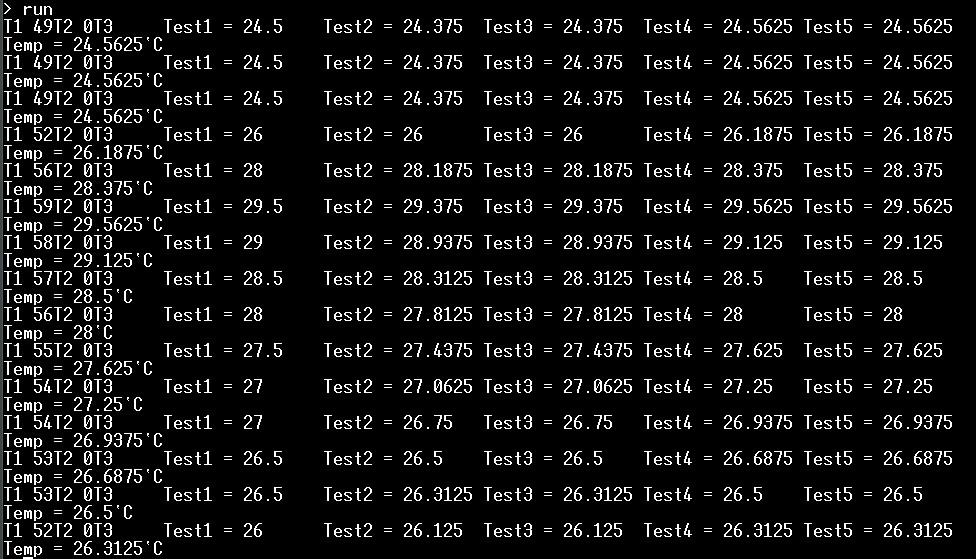
This one prints the tests of all 5 versions in each run to save time. Could you please run it while touching the top of the DS18S20 so it's temperature rises slowly by about 2°C. From that I should be able to eliminate a few more versions. After that it only remains to see if it behaves properly below 0°C.
Function DS18S20t(PinNbr As INTEGER) As FLOAT ' derived from DS18x20 test code by TassyJim Local INTEGER T1,T2,T3
OneWire RESET PinNbr ' reset before command OneWire WRITE PinNbr, 8, 2, &hCC, &h44 ' start conversion Pause 750 ' maximum conversion time OneWire RESET PinNbr ' reset before command OneWire WRITE PinNbr, 1, 2, &hCC, &hBE ' command read data OneWire READ PinNbr,0,7,T1,T2,T3,T3,T3,T3,T3 ' get the data
Print "T1";T1;"T2";T2;"T3", DS18S20t = Str2bin(int16,Chr$(T1)+Chr$(T2))/2 '0.5`C resolution Print "Test1 ="; DS18S20t, ' one of the next 2 should give 1/16`C resolution according to datasheet DS18S20t = Str2bin(int16,Chr$(T1)+Chr$(T2))\2 -1/4 + (16 - Str2bin(int8,Chr$(T3)))/16 Print "Test2 ="; DS18S20t, DS18S20t = Str2bin(int16,Chr$(T1)+Chr$(T2))\2 -1/4 + (16 - T3)/16 Print "Test3 ="; DS18S20t, DS18S20t = Str2bin(int16,Chr$(T1)+Chr$(T2))\2 -1/16 + (16 - Str2bin(int8,Chr$(T3)))/16 Print "Test4 ="; DS18S20t, DS18S20t = Str2bin(int16,Chr$(T1)+Chr$(T2))\2 -1/16 + (16 - T3)/16 Print "Test5 ="; DS18S20t End Function
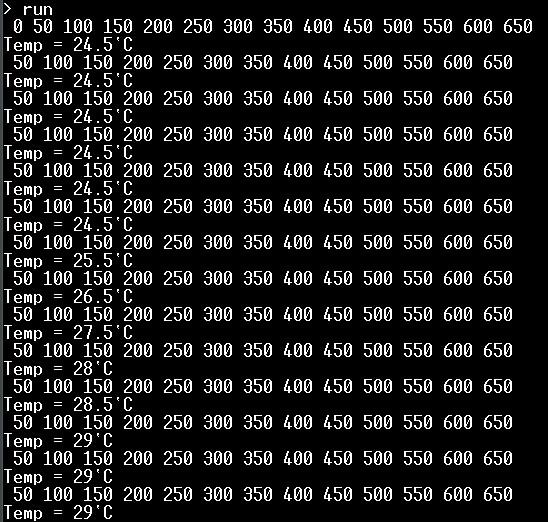
Edit. Yet another version of the program. Rather than blocking the Main Loop while doing a conversion, this starts a new conversion after reading out the result of the previous conversion. If a conversion is already in progress it immediately returns to the main loop, letting it get on with other stuff (in this case just reading the timer).
PinNbr = MM.Info(pinno GP7) Dim n = 0 Dim DStemp = DS18S20(PinNbr) 'purge old data and start new conversion
Do 'Main Loop t = timer Print n; DStemp = DS18S20(PinNbr) 'get Temp, if ready If DStemp <> 1000 Then Print Print "Temp =";DStemp;"`C" n = 0 EndIf Do : Loop until Timer - t > 49.9 Inc n,50 Loop
Function DS18S20(PinNbr As INTEGER) As FLOAT ' Adapted from DS18x20 test code by TassyJim Local INTEGER done, T1, T2 DS18S20 = 1000 'standard error code OneWire READ PinNbr, 4, 1, done ' is conversion finished? If done = 0 Then Exit Function ' if not return to program 'Get the data OneWire RESET PinNbr ' reset before command OneWire WRITE PinNbr, 1, 2, &hCC, &hBE ' command read data OneWire READ PinNbr, 2, 2, T1, T2 ' get the data
Value = Str2bin(int16,Chr$(T1)+Chr$(T2)) /2 'process the data DS18S20 = Cint(Value * 10) / 10 'round to 1/10ths (not needed for 0.5 res but will be for 1/16 res)
'Start conversion, ready for next read OneWire RESET PinNbr ' reset before command OneWire WRITE PinNbr, 8, 2, &hCC, &h44 ' start conversion End Function
End
Testing of this was done with a DS18B20 function, hopefully I haven't messed anything up while converting it to DS18S20. Edited 2026-05-29 18:39 by phil99
Posted: 11:14am 29 May 2026 Copy link to clipboard
Peter63 Senior Member
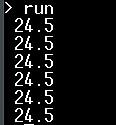
Tested the new function, it gave this out:
Then I tested the other program:
And finally I tested the last program:
Seems like it works...
/Peter63
Posted: 11:46am 29 May 2026 Copy link to clipboard
phil99 Guru
Excellent! Now to study the data from the test program to choose the right high res. processing.
Edit. Another "seniors moment", the crucial T3 values are missing. This line:- Print "T1";T1;"T2";T2;"T3",
Is missing the last T3, it should be:- Print "T1";T1;" T2";T2;" T3";T3,
Maybe I can figure it out just from the Test values. Edited 2026-05-29 21:58 by phil99
Posted: 01:52pm 29 May 2026 Copy link to clipboard
phil99 Guru
There are a lot of gaps in the test data, a slower rate if increase or decrease would be needed to fill them. Plus the T3 values. However I think this is the most likely high res. output line for the first program:-
Value = Str2bin(int16,Chr$(T1)+Chr$(T2))\2 -0.25 + (16 - T3)/16
After all that this is as per the datasheet. I had imagined the high res data would simply add the fractional part to the low res value. But instead it appears the high res goes from 1/2° below the low res value to 1/2° above the low res value, with T3 going backwards from 20 to 4.
Posted: 03:46pm 29 May 2026 Copy link to clipboard
Peter63 Senior Member
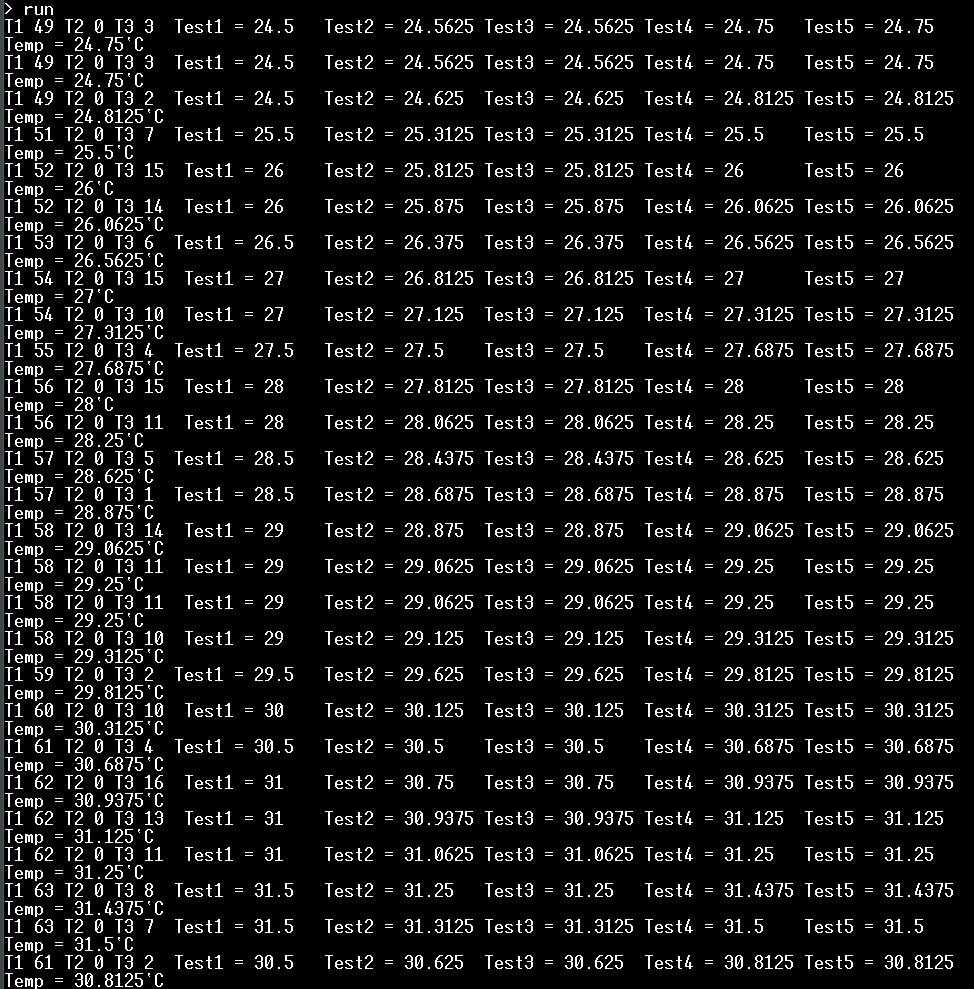
here comes a new run with T3 values...
/Peter63
Page 2 of 4
The Back Shed's forum code is written, and hosted, in Australia.




 /Peter63