
| Menu | JAQForum Ver 19.10.27 |
| Menu | JAQForum Ver 19.10.27 |
Forum Index : Microcontroller and PC projects : Unix on the Pico Computer 3
  Page 2 of 3 Page 2 of 3   |
||||||
Cortex-M chips doesn't have the memory management features required to run Linux. That's what Cortex-A is for. |
||||||
Required? Nicer to have, yes. John |
||||||
Thought I'd give a quick update - lots of progress but now tackling a fun one. A full blown C compiler running on the RP2350B. This is mostly working and I'm now in the process of getting doubles and long long types working. It is based on a framework that was in Fuzix but was very limited and only really supported the z80 and assumed 16-bit addressing. The current approach is to compile to byte code and then that will be used to generate the ARM assembler code. The beauty of the byte-code approach is that it provides an intermediate layer which, later, might just support a native RP2350B Basic compiler (and Pascal?) Definitely having fun  Edited 2026-07-29 17:28 by matherp |
||||||
Again, mind blowing....so many firsts  1) Needs some serious recognition 3) Pico-3 needs to be in every school (not to mention process control) |
||||||
Release v0.2 now available on https://github.com/UKTailwind/FUZIX/releases/tag/pc3-v0.2 Lots of bugs fixed and reliability now seems good. Fully working C89 C compiler running on the RP2350B + BBC Basic + Forth + all the usual Unix commands. Will run on the Pico Computer 3 or the previous Pico Computer 2 (HDMIUSBI2S) boards. Do have a play and let me know your experiences. Currently working on a MMBasic compiler Edited 2026-07-30 20:12 by matherp |
||||||
That sounds very interesting .... Edited 2026-07-30 20:35 by ville56 |
||||||
And the prize for Understatement Of The Month goes to.... |
||||||
I tried to flash my Pico 3 woth FUZIX. It had been running MMBasic with no problem. The flash seemed to continue to the end and I waited a few more seconds to be sure. When I apply power to the board now, all I get is a blank screen with no login prompt or anything. I did remember to change the switch back to Enabled and inserted an SD card flashed with your img file before trying to boot. What might I be doing wrong? |
||||||
It does work immediately after a flash, but there is an issue with it not resetting properly subsequently. Will post a fix for this tomorrow (Friday) |
||||||
I'm trying to run 0.3 of FUZIX. This is all I get. The machine goes no further. 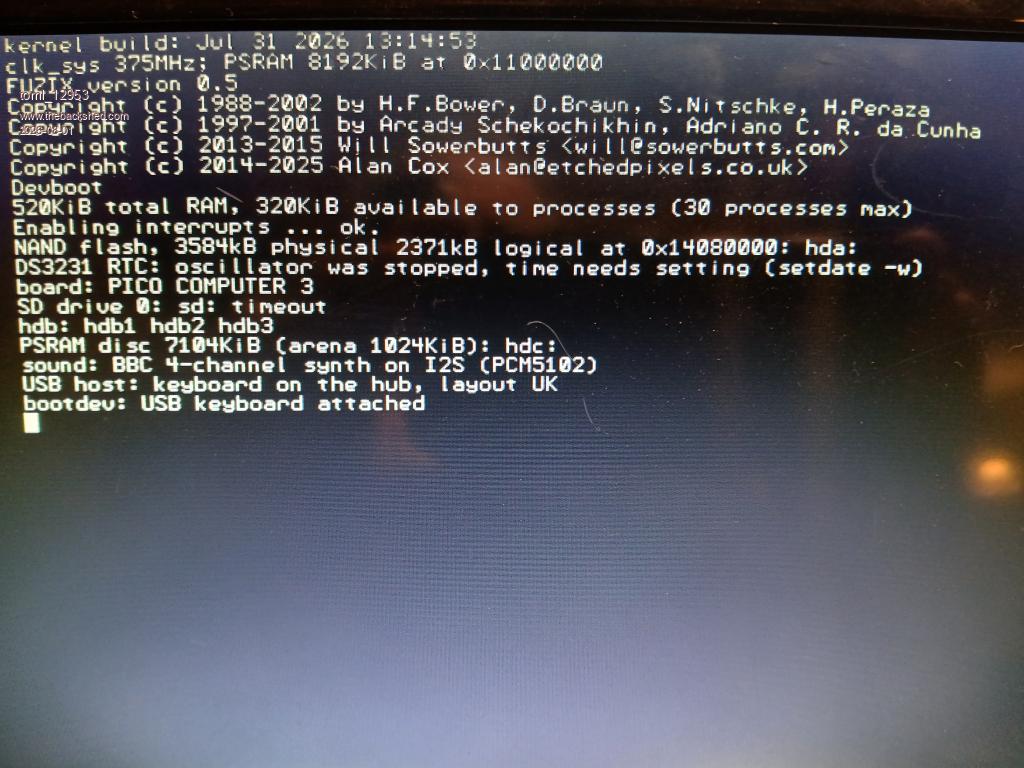 |
||||||
select the boot device which is hdb2. i.e. type hdb2 |
||||||
Now all I get is Starting /init then nothing. It's been over half an hour. Does a larger SD card take longer? I'm using a 1TB card imaged with your card image The first partition is formatted DOS16. |
||||||
Download and flash the new v0.4. Do the sdcard image first and insert in the PC3, then flash the new kernel. At the bootsel: prompt type hdb2<cr> That should get you to the login prompt - type root and you should be in. Remember to always shut the system down before turning off (shutdown). This is a unix system and the filesystem need to be closed properly. Probably easiest to work from teraterm first and then try the USB keyboard |
||||||
I have got V0.4 running and reproduced your test with solar_eclipse.bas, unfortunately Vi isn't working reliably, simply using the arrow keys to move around doesn't work. Also how are you getting files onto the SD card? I have put the card in a Ubuntu machine and it won't recognise the SD. |
||||||
Check the manual - FAT command |
||||||
I did the steps exactly. It still hangs at Starting /init. Maybe my Pico Computer 3 is bad. I gave the others away so I can't swap it out to check. bootdev: hdb2 hdb3 bootdev: c 7104KiB (arena 1024KiB): hdc: bootdev: C 4-channel synth on I2S (PCM5102) bootdev: keyboard on the hub, layout UK bootdev: hdb2 Mounting root fs (root_dev=18, ro): OK Starting /init Edited 2026-08-02 05:47 by toml_12953 |
||||||
sounds like you aren't creating a valid sd image, what are you using |
||||||
I tried both Raspberry Pi Imager and balenaEtcher I did make it work, however. Instead of the 1TB card, I tried a 256GB card and now have the login: prompt and can use FUZIX. You might want to include the way to exit BBCBASIC in your manual, though. rebooting causes all sorts of errors on the SD card. The way to cleanly exit BBCBASIC is *BYE I didn't see that in the FUZIX manual. Edited 2026-08-03 05:19 by toml_12953 |
||||||
Since Fuzix claims to be Unix-compatible, I assume the command for this is shutdown or shutdown now , just like in Linux, for example. And if you want to reboot immediately, the command is shutdown -r now (-r for "reboot"). bfwolf |
||||||
I have been trying fuzix v.4 on the Pico Computer 2 and when trying to use the c compiler I get an error message if I try the hello.c example in the documentation or the sieve.c example as "cc2: no PSRAM arena for 968704 bytes" There is a hello.bc stub created that is 3 lines long but that is all. Another oddity is that if I reset the board and fuzix boots, the USB keyboard is not found (Red led flashes, no green) unless I remove and reinsert the keyboard, even though it was working before the reset button was pressed. Is this a hardware issue with the USB HUB? Thanks Footnote added 2026-08-04 04:20 by okwatts okay tried on v.6 and compile issues have been fixed. I still have the problem with the USB keyboard that I must plug it in after boot (or replug it after reboot). |
||||||
| Page 2 of 3 |
||||||
 |
The Back Shed's forum code is written, and hosted, in Australia. |


