
| Menu | JAQForum Ver 26.09 |
| Menu | JAQForum Ver 26.09 |
Forum Index : Microcontroller and PC projects : Pico Computer 3: Keyboard edition
  Page 2 of 3 Page 2 of 3   |
||||||
Hi Peter, The best candidate would be the Raspberry Pi keyboard (since it can hold a Pi400/Pi500 board). Right ..?? Volhout |
||||||
AFAIK it only holds a hub, with 3 USB-A horizontal sockets and something to connect to the Pico. At least I think it does. :) Maybe I'm thinking of a different one. EDIT: I am. I was thinking of the original one. The RP400 and RP500 keyboards contain a special version of those MCUs. Whether that keyboard is available separately I've no idea. . Edited 2026-10-20 00:57 by Mixtel90 |
||||||
I already bought one because I thought it would work really well with the PicoMite (HDMI/USB), but there was a problem with the function keys: they were activated automatically, without pressing “Fn” That made it completely unusable. Or is there a setting in the OS to fix this? |
||||||
G'day, If anyone in Australia is considering getting a batch of these made, I would be interested in purchasing 1 unit. Many thanks to Peter for the design  Fitted with single height USB connectors it might squeeze into the RPI keyboard shell quite well. @ WOLFI, can you please post the model of the keyboard you are having trouble with, might help us figure out the problem. Regards, Lyle. |
||||||
The Sticker on the backside says: Model: RPI-KYB (German Layout) this one: https://www.berrybase.de/offizielle-raspberry-pi-tastatur-de-layout-inkl.-3-port-usb-hub-schwarz-grau It’s not a problem with the keyboard, it works perfectly on my Win-PC. Edited 2026-10-20 01:16 by Wölfi |
||||||
Have you used that keyboard before? |
||||||
Hi Wolfi, Yep that is the one I was looking at as well, AU/US version of the same. There was some discussion of the NUMLOCK being on during bootup of the PicoMite, I think this can be changed in OPTIONS, could this be what is causing the problem? IE: the numbers on the letter keys are active (J=1,K=2,L=3 etc) Try OPTION KEYBOARD GR,0,0,1,12 This should turn the NUMLOCK off. Might depend on the version you are running as well. Regards, Lyle. |
||||||
No chance it will fit in a raspberry pi keyboard. Apart from anything else it appears to be plastic welded shut. There was a mistake in the center coordinates I gave The correct location of the centres of the edge components are: Qw/ST 4 SD 19.7 USB1 43.1 USB2 65.7 Prog/USB switch 87.1 Prog-USB 99.3 Audio 113.2 Reset switch 123.8 Boot switch 134.2 HDMI 149.3 Power switch 165.4 USB-C 178.9 I/O 204.8 |
||||||
Thanks, I’ll try it soon, but unfortunately I’m short on time right now. |
||||||
This is the keyboard I'm thinking about using with a 3d printed box. The trackpad is fully operational in PC3 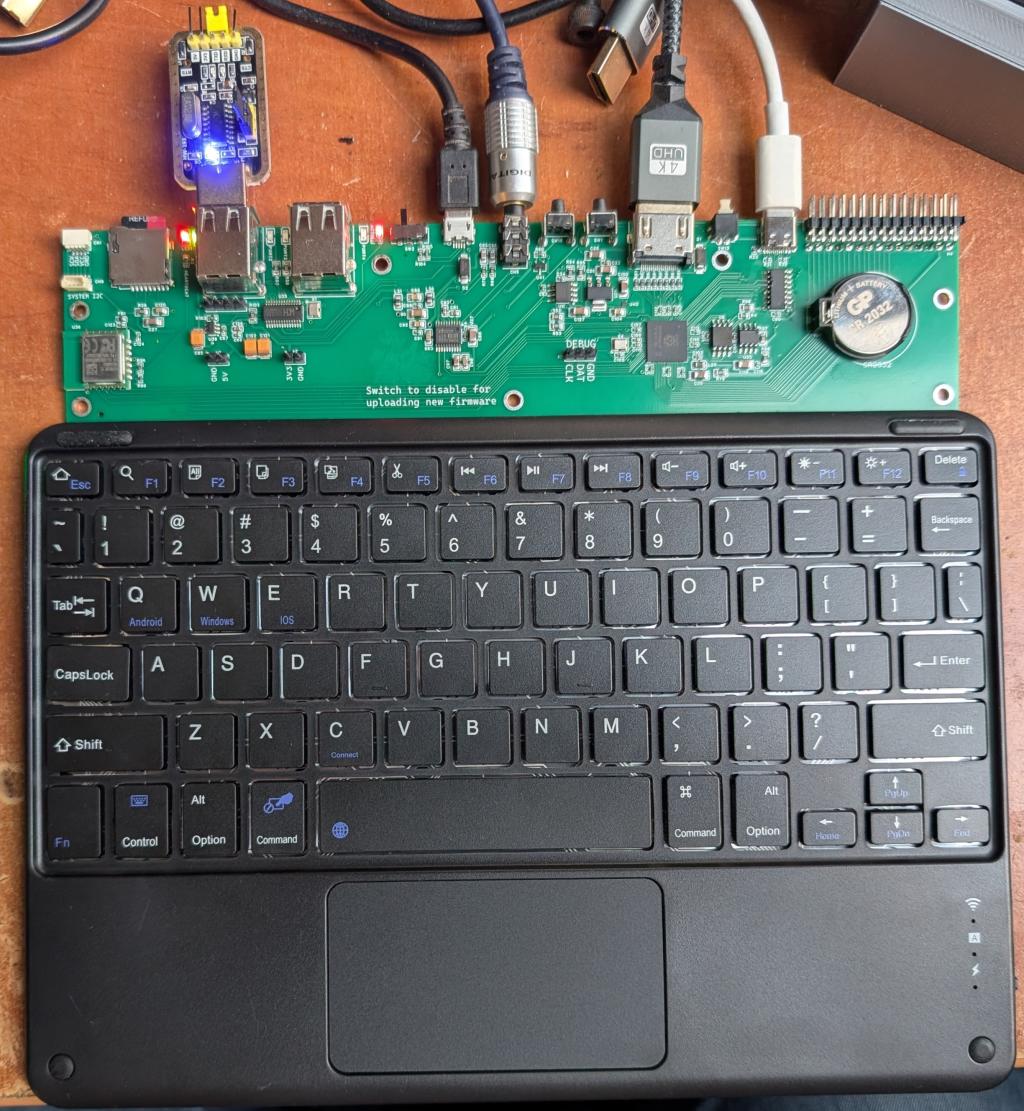 Edited 2026-10-20 02:17 by matherp |
||||||
Wolfi, My mistake, that was PS2 keyboard, try: OPTION KEYBOARD GR,0,0,250,200 When you get a chance, a laptop keyboard here does the same and the lack of a NUMLOCK LED makes it hard to figure out. Regards, Lyle. |
||||||
Is that a bluetooth dongle in the usb port? |
||||||
No, it is a USB/UART. The firmware supports them to create up to 4 additional serial ports |
||||||
Here is a dxf file for a back panel. I've laser cut this out of the plastic that has a coloured side and white body. If anyone want the Lightburn file then let me know. PicoComputer3linear.zip  Edited 2026-10-20 04:12 by matherp |
||||||
Hi Peter, just a quick off-topic question: what laser cutter do you have? I’m asking because I’m thinking of getting one myself.  |
||||||
It is a hack version, started off as a low power Ortur and then I added a very powerful Lasertree K40 head. |
||||||
Thanks, that information helps me with my search. OT OUT |
||||||
This one reminds me of a PCB I designed several years ago, to turn a cheap blue-and-white BT keyboard, into a serial keyboard using a MM2 chip and a custom PCB - you removed and hiffed the old BT PCB. Of course, this design squeezes everything into the one board, and is therefore very much similar to the ZX81, C-64 or Atari machines back in the 80's, where most of the connectors were on the back, and they all had PCB edge-connectors for connecting external stuff. Watching this thread with interest, and might order a few samples to play with, but before I do that, I will just wait and see if Peter discovers anything in the prototypes, that need changing, but the prototype ones seem to run fine, so there might not be anything to change.   |
||||||
G'day Grogster, As mentioned above, if you are looking to order a batch of these, can I put my name on 1, happy to pay a deposit if it helps. Regards, Lyle. |
||||||
Yeah, I will be ordering a test batch of five. I'll use one, I can reserve one for you, leaving three for anyone else in Australia or New Zealand who might want a board. Price yet to be determined, but prototype runs I usually just on-sell at cost-price plus postage. |
||||||
| Page 2 of 3 |
||||||
 |
The Back Shed's forum code is written, and hosted, in Australia. |


