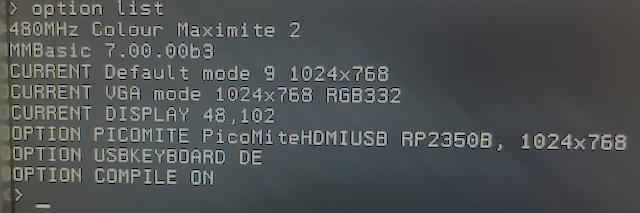
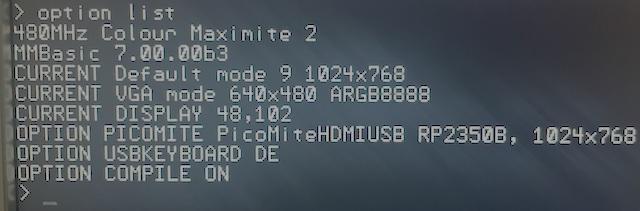
Thanks for the report - it shows a trap in how these options are entered.
What the two options doOPTION DEFAULT MODE sets the Colour Maximite 2's own display: the command prompt, the editor, the file manager, and Colour Maximite 2 programs.
OPTION PICOMITE is for running PicoMite programs. While it is set, every program that does not set a MODE starts in the PicoMite's MODE 1 - a two-colour mode - at the PicoMite resolution given in the option. That includes a one-liner like Print "Hello". When the program ends its display stays at the prompt (as on the PicoMite) until you use EDIT or FM, which use DEFAULT MODE again.
Why you got 640x480The resolution must follow a comma:
OPTION PICOMITE HDMI, 1024x768
Without the comma, OPTION PICOMITE HDMI 1024x768 is accepted without an error but the resolution is lost, and 640x480 is used. Please check OPTION LIST: the line should read
OPTION PICOMITE PicoMiteHDMIUSB RP2350B, 1024x768
If it says 640x480, enter the option again with the comma. Then programs, the prompt and the editor all stay at 1024x768.
If you are not running PicoMite programs, OPTION PICOMITE NONE puts everything back to the Colour Maximite 2's own modes.
In the next betaOPTION PICOMITE without a resolution uses the resolution of OPTION DEFAULT MODE (1024x768 with DEFAULT MODE 9), so the monitor keeps one resolution throughout.
A resolution without the comma gives the error "A comma is needed before the resolution".
The PicoMite's own OPTION RESOLUTION 1024x768 is accepted.
OPTION LIST shows the resolution in use as CURRENT PICOMITE resolution.