Posted: 03:36am 30 Aug 2024 Copy link to clipboard
Bryan1 Guru
Hi Phill thanks heaps mate that code tweak worked a treat and on doing several runs the average is 432 pulses to move 0.098" so the resolution is 0.00268" a step.
I will continue this in my cnc thread.
Regards Bryan
Posted: 09:14am 30 Aug 2024 Copy link to clipboard
PhenixRising Guru
My buddy has a CNC plasma and man, talk about a rapid ROI (return on investment). He fabricates log-grabbing attachments for JCB-type backhoes. He simply lists them on eBay. It's a sideline business but he pocketed £35K from it last year.
Now he has designed and built a log splitter and the market also looks good.
He has something like £15K into the CNC Plasma.
Anyway, he called me yesterday, totally puzzled and fearing a fault developing. During cutting, the PSU cooling fans only switch on occasionally but when standing still, the PSU fan is on full-time AND the stepper-driver fans now kick-in.
"How can this be right?"
Well I explained that stepper-motors receive the most current when standing still because there's no back EMF. If the motors were disabled, then you risk an axis being disturbed by some external force.
This doesn't sit right with him and so here was my opportunity to tell him about this development Kinda wish I hadn't because he's more excited than I expected and I am up to my ears
Anyway, there's my future test-bed. I'll start by driving free-standing motors and when happy, swap-out all three drives and motors. He's happy to spend the money because he just wants his machine to not consume power when standing still
Posted: 10:04am 30 Aug 2024 Copy link to clipboard
Volhout Guru
Phenix,
Most stepper motor drivers use PWM to control the coil current of the stepper motor. I am not sure if you can control the current limit of this particular stepper motor driver IC, but if you can, you could reduce the current when there is no activity. This will limit the heat build up in the coils, while maintaining the (even in microstepping) position. You will however loose torque. It is depening the application if that is acceptable. For a robot arm it is not acceptable to loose torque, but for a CNC machine in "waiting" position it might.
Volhout
Posted: 10:28am 30 Aug 2024 Copy link to clipboard
PhenixRising Guru
Sure but drop the torque and the machine is vulnerable to being knocked out of position and the controller will be totally unaware...next part becomes scrap.
With servo-motors, we have options: -Disable the motor completely and position continues to be updated via the encoder -Just let the motors hold position which typically requires milliamps (thanks to PID) -Let the motors hold position but with a user-defined dead-band:
Deadband=1mm (in encoder counts)
do If abs(command_position - encoder_position) > Deadband then Enable_motor_and_or_PID 'bring the motor back to command_position else Disable_motor_and_or_PID 'we are within the deadband so kill the power end if loop
Posted: 12:06pm 30 Aug 2024 Copy link to clipboard
Bryan1 Guru
Well guy's if you at my thread on my cnc you will see this is only a small one. Now when I did have it going it was rock solid in milling pcb's also I used to cut signs in red gum using it with a round cutter. OK I only took 0.5mm cuts but at no time did any axis wander.
For large machines yes servo's are the go but back in 2011 when I built this cnc I did have a few years prior building and re building to make it solid as.
Posted: 01:17pm 30 Aug 2024 Copy link to clipboard
PhenixRising Guru
When referencing another thread, it's always helpful to provide a link I had to search and it's in "Other Stuff". I never go there.
However, I see you just posted:
The same issue as my buddy's plasma. Yup
Posted: 10:56pm 30 Aug 2024 Copy link to clipboard
Bryan1 Guru
When I do get started on the code I will start a CMM2 CNC thread in this forum so you can find it mate
Yesterday arvo started on making the isolation board and as I do have 10 off 4n35's all of them are going on the perf board.
Now I have looked at that PIO code heaps of times and for the step movement I do think it's just a case of doing a pulse then have a count setup to control the distance traveled. But first baby steps and those limits and E-Stop need to be setup so the CMM2 can see and act when one is hit.
Posted: 02:50pm 09 Jul 2026 Copy link to clipboard
PhenixRising Guru
Hey Harm,
I have just set up a RP2040 to see if I can get pulse/dir but I can't make sense of it.
I had to change:
loop while a$="" 'exit when any key not r
to:
loop while a$<>"q" 'exit when any key not r
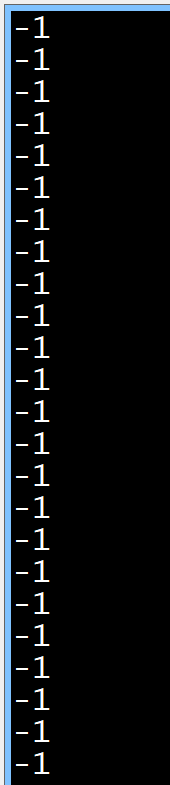
because it kept falling through but apart from that; how do I make it work? All I get is:
Posted: 02:58pm 09 Jul 2026 Copy link to clipboard
PhenixRising Guru
Forgot to mention that I want to output pulse/dir from the new stepper driver and see if the PIO gets the right counts.
Posted: 04:02pm 09 Jul 2026 Copy link to clipboard
Volhout Guru
Hi Phenix,
Did you swap step and dir? Are you running 6.03.00 or 6.02.01 ( official releases). There was an issue with 6.02.02 and 6.03.00 betas
Volhout
Posted: 04:03pm 09 Jul 2026 Copy link to clipboard
Volhout Guru
Hi Phenix,
Did you swap step and dir? Are you running 6.03.00 or 6.02.01 ( official releases). There was an issue with 6.02.02 and 6.03.00 betas
Volhout
Posted: 04:39pm 09 Jul 2026 Copy link to clipboard
PhenixRising Guru
OK, I'm now running 6.02.01 and I'm seeing something but the count doesn't make sense (yet).
I guess I don't understand that GP0 and GP1 are PIO inputs but the test code is addressing them as outputs
Posted: 04:56pm 09 Jul 2026 Copy link to clipboard
Volhout Guru
Top of the code contains a line that enables assembly, and a line that says use test signal. Set that line from 1 to 0.
Volhout Edited 2026-07-10 02:58 by Volhout
Posted: 07:48pm 09 Jul 2026 Copy link to clipboard
PhenixRising Guru
I'd already tried that but no difference.
Not sure what happened but I chopped it down and used GP14 and GP15 to simulate and it works BEAUTIFULLY
You have no idea how excited I am about this (big plans)
Many thanks, my friend
'step/dir_decoder_pico_PIO_version 4
setpin gp0,pio1 'the STEP signal setpin gp1,pio1 'the DIRECTION signal
'Generic defines f= 63e6 '63 MHz PIO frequency pio clear 1 dim dat%(4) 'array to store FIFO data
dim p%(7)=(&h4800c520a02020,&ha0290047a0290008,&h8000a0c1,0,0,0,0,0) pio program 1,p%()
'configure PIO 1 statemachine 0 (PIO 1 is free on PicoMiteVGA) p0=pio(pinctrl 0,0,0,gp0) 'gp0 is lowest IN pin (gp0,gp1) e0=pio(execctrl gp1,0,31) 'GP1=dir, wrap and wrap target s0=pio(shiftctrl 0,0,0,0,0,0) 'shift IN direction is left (the 5'th '0')
'initialize PIO 1 state machine 0 pio init machine 1,0,f,p0,e0,s0,0 'init machine @ start loop
'start the quadrature decoder PIO 1 statemachine 0 pio start 1,0
setpin gp14,dout setpin gp15,dout
'main MMBasic code ------------------------------------------------------------- do:loop while inkey$<>"" 'main loop
do a$=inkey$ 'just for control
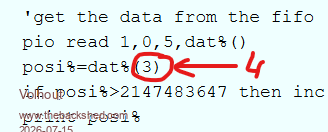
'get the data from the fifo pio read 1,0,5,dat%() 'read whole fifo posi%=dat%(3) 'last data in fifo if posi%>2147483647 then inc posi%,-4294967296 '2'th complement print posi% 'show position
if posi% >1000 then pin(gp15)=0 elseif posi% <-1000 then pin(gp15)=1 endif
'reset position (PIO X register) under control of keyboard if a$="r" then 'press r to zero position pio execute 1,0,&hA023 '= assembly "mov X, null" (zero the X register) a$="" end if
'set defined position in register X under control of the keyboard if a$="s" then input "desired count ";cnt% cnt%=cnt% and &hffffffff pio write 1,0,1,cnt% 'write the count cnt% in the fifo pio execute 1,0,&h8080 '= assemble "pull" (moves FIFO to OSR register) PIO execute 1,0,&hA027 '= assemble "mov X, OSR" moves the OSR value to X a$="" end if
loop while a$<>"q" 'exit when any key not r
end
Posted: 06:32am 10 Jul 2026 Copy link to clipboard
Volhout Guru
Hi Phenix,
I am glad you have it working. In hindsight, looking at the code, it could have been better. You can clearly see that it is a derivative from the quadrature decoder, acked together rather fast. I feel a bit ashame I did not make it better.
But now we know it works...
Thank you for debugging.
Volhout
Posted: 04:03pm 10 Jul 2026 Copy link to clipboard
PhenixRising Guru
PIO is wonderful
Incredibly capable BASIC interpreter with pretty much every low level function that I could ever ask for, PIO, CSubs and TBS knowledge-base.
Just mind blowing.
So many suckers out there, struggling for weeks on end with problems that we can solve in a heartbeat...They won't listen 🤬
Posted: 11:44am 15 Jul 2026 Copy link to clipboard
PhenixRising Guru
Bit of a problem with the FIFO or something.
The actual pulsing input stops but the real final count value is not in dat%().
It only shows the right value when input activity resumes.
For example, in my case, I am reading "81" (varies) but the value is at correct "0" somewhere in the PIO code.
I remember having a similar pipeline issue with the quadrature decode but because the motor was always alive and closed loop, the true value eventually shows up.
I was playing with it at stupid-o-clock and so I asked Gemini for suggestions. It was familiar with the issue but stated that I could directly access the true value. The command that it gave me wasn't recognised by MMBasic.
It was "PIO(register....)"
Then it suggested "draining the FIFO"
But that had a problem with "rxlevel"
Do a$ = Inkey$ 'just for control
'Check if there is any data in the FIFO (PIO 1, SM 0) rx_count% = Pio(rxlevel 1, 0)
If rx_count% > 0 Then 'Drain the entire FIFO buffer, keeping only the newest value For i% = 1 To rx_count% Pio Read 1, 0, 1, dat%() Next i%
posi% = dat%(0) 'dat%(0) holds the freshest value
'Convert to 32-bit signed 2's complement If posi% > 2147483647 Then posi% = posi% - 4294967296
Print posi% 'instantaneous position EndIf
Pause 100 'main loop interval Loop While a$ = ""
Posted: 11:49am 15 Jul 2026 Copy link to clipboard
Volhout Guru
Phenix,
Maybe this helps:
Volhout
Posted: 02:10pm 15 Jul 2026 Copy link to clipboard
PhenixRising Guru
Nah. Was one of the first things that I tried.
Posted: 02:20pm 15 Jul 2026 Copy link to clipboard
PhenixRising Guru
Don't go investigating on my behalf though, buddy because I've decided to pull the real time stuff off the Picomite and have it as a host to the Propeller P2.
On the P2, pulse/dir is a ready made mode for the "Smart pins" and so is quadrature decode. There is also filtering which I shouldn't need because I use differential line receivers but it's always an option
Page 3 of 4
The Back Shed's forum code is written, and hosted, in Australia.




 Kinda wish I hadn't because he's more excited than I expected and I am up to my ears