| Menu | JAQForum Ver 19.10.27 |
| Menu | JAQForum Ver 19.10.27 |
Forum Index : Microcontroller and PC projects : olimex
  Page 3 of 4 Page 3 of 4   |
||||||
But the Olimex isn't that simple. - You lose GP28 if you want stereo audio. - You are stuck with the most basic PWM audio. Quality is pretty poor. - Some of the GPIO pins are tied up on things that MMBasic doesn't support(e.g. all the extra SD card pins). - As there's no RTC you have to set the time every time you boot if you want time stamps on your files while developing. - The connectors are in awkward positions - there's no chance of putting one in a case unless it's on a carrier board - which may as well be the whole thing. I can see what you mean, it *looks* like an easy way in. It isn't really though, it's too restrictive. Many users will be put off by its limitations and will miss out on what the PicoMite can really do. A cheap breadboard and some breakout modules is far better. At least you can expand that and it'll probably be cheaper too. |
||||||
Well yes, it could be optimized :)) |
||||||
You can say that again... :) It's a good board, actually a *very* good board, but it's not an optimum fit for MMBasic. If you are programming in C/C++ or Python and you use the libraries for it to use it as it was designed then it will be excellent. Actually, the fact that you can run MMBasic on it at all is a credit to MMBasic's flexibility. PCB - JLCPCB, say £1 each but you have to get 5. DVI connector - Adafruit, say £3 I2S audio module - AE, say £2 CP2102 converter - AE, say £2 micro SD card module - AE, say £1 3.5mm jack socket - AE, say £1 RTC - AE, say £1.50 Headers M/F - AE, say £1 I've rounded all those prices up, so the total is probably less than £12.50 (there will be some postage though - free postage on AE if you buy 8 items). This has the capability to run MMBasic *properly* and has proper audio, a RTC and built-in USB-C power & console connection in case you want USB later. It can be all through-hole components. It still has no USB on board, but neither does the Olimex. A simple strip of pins will give you any remaining GPIO connections. If you wanted to you could add I2C pullups and bring the I2C out to pins too. It makes the Olimex look expensive. As the board can be anything up to 100mm x 100mm for the same price it's easy to make this fit the Hammond RM2015S case or, with a bit of a squeeze, the 1593 series. If you wanted to leave stuff off to have more GPIO available then that's easy enough, within reason. :) You don't gain a lot though. It actually takes more skill to lay this stuff out neatly on stripboard than it does to use a PCB. And you can build another four from that order of PCBs. [A bit of a rant] The only thing that this fails on is ready availability through a "shop". It's somehow "harder" to solder a few bits onto a nicely made PCB than it is to buy an inferior ready made board. Even if you can't solder at the moment, for less than £20 you can get a very, very good temperature controlled soldering iron from AE that will make this sort of thing easy. This may sound like exaggeration, but it's not. It's a skill that takes less than one afternoon to learn and will be useful for the rest of your life. For through-hole work on PCBs you don't even need completely steady hands if you use bits of Blu-tack to hold things in place while you solder. [/A bit of a rant] |
||||||
Agree! And one more afternoon for medium to large SMD parts. For SMD there are cheap practice kits with a PCB and an assortment of components. A cheap magnifier (an illuminated one or bright desk lamp) and solder-wick to remove solder bridges between IC pins will help. There are on-line tutorials to get you started. |
||||||
I love those little kits, especially the ones that do things like lighting up LEDs. :) I'm seriously considering getting a hot plate for SMD work. They look even more fun than hot air. :) SMD is fine, but I attempt to keep it to a minimum on many of my designs as I like to target them at constructors with limited abilities. In some cases, like full size SD cards and 3.5mm jack sockets, they are usually pretty easy to solder anyway. Usually, if you can solder at all, you can build my designs without much trouble. I am starting to use more SMD though, simply because I'm becoming a bit better at using it and I want to use my skills. :) My latest fish tank controller is all SMD for the mosfets and resistors (and there are quite a few of both on a fully populated board). |
||||||
I do all my soldering with this or similar $3.30USD Aliexpress soldering iron 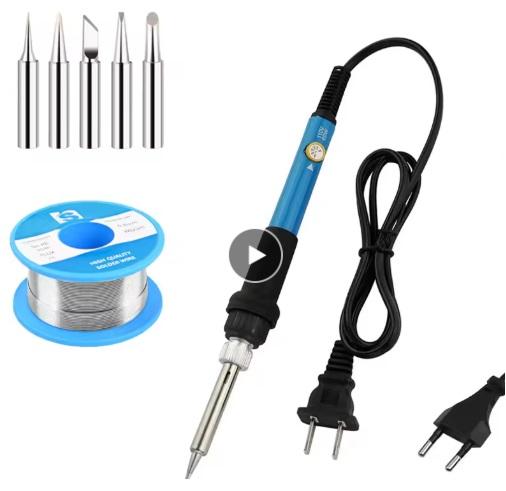 It's adequate. Tips are long-lasting. I just looked--I've placed 137 orders with JLCPCB since 2018 (including probably a dozen of Mick's designs). ~ Edited 2025-05-26 21:37 by lizby |
||||||
I agree but it's a discussion on high level and perspective. I worked so many years in all support levels and learned to see it from the view of the user. And learning to read and design a scheme is not something you learn within a day.. So I think this is still a nice board where the most difficult parts are done e.g. wiring of the HDMI. Soldering is as well not that easy even though I would say it is, but not everybody got enough practice especially not with SMD. But Mick and Phil..I do agree with your arguments! |
||||||
Soldering is 3/4 about overcoming fear. Firstly, the iron is *hot* (after all, it melts metal!) and we are brought up not to mess with hot things. Secondly there is the fear of doing something wrong and making a mess of it. The first is a natural fear but we can easily overcome it. The second requires practice. You get that practice only from actually doing it. Soldering isn't actually difficult. It's just a skill like sawing a piece of wood that, unless you try it, you'll never do it. Yes, you'll make a mess of it at first. The cut will be wobbly and you may even cut yourself. It's part of the learning process and that's why you practice. (TBH, I find soldering to be much easier than sawing in a straight line!). The beauty of assembling on a project PCB is that you don't need to be able to design anything. That's been done. As long as you can solder the correct components into the right holes it will almost certainly work first time. If you look back to Stan's post of the UEXT connector on the Olimex board, what does it tell you? Pin *functions* if you use C/C++ or Python libraries. It doesn't tell you which GPIO pins are used. To get that information, and be able to use those pins for other than their intended purpose, you need to be able to read the schematic or have someone else sort it out for you. I wouldn't call that beginner friendly. |
||||||
I started this post cos I found an olimex with 2350 with some waveshare devices that were the rage at the time on the forum and bought them but never used.,, stick to own vga and hdmi cos they work with defaults setup in the manual. Soldering is not easy as you get older, I got a cataract in one eye, surface mount and a hot air gun I haven't tried though youtube makes it look easy  The olimex wasn't made for mmbasic or the 2350 but it can be a quick way of using them just like an arduino uno and great cow basic but that didn't have vga only lcd but easier than soldering a pic board. I respect the kindness of the folk on the forum willing to share and help make their pcb designs for others. @dddns... it's up to you... how much you will use rpi pico... and mmbasic get olimex with problems but does work... or solder a board... or a solderless bread board. my vero board could be smaller if redesigned and smaller sd card reader and usb to ttl converter. the olimex I used headers with long pins so I can plug in molex wires if I want to add hardware. 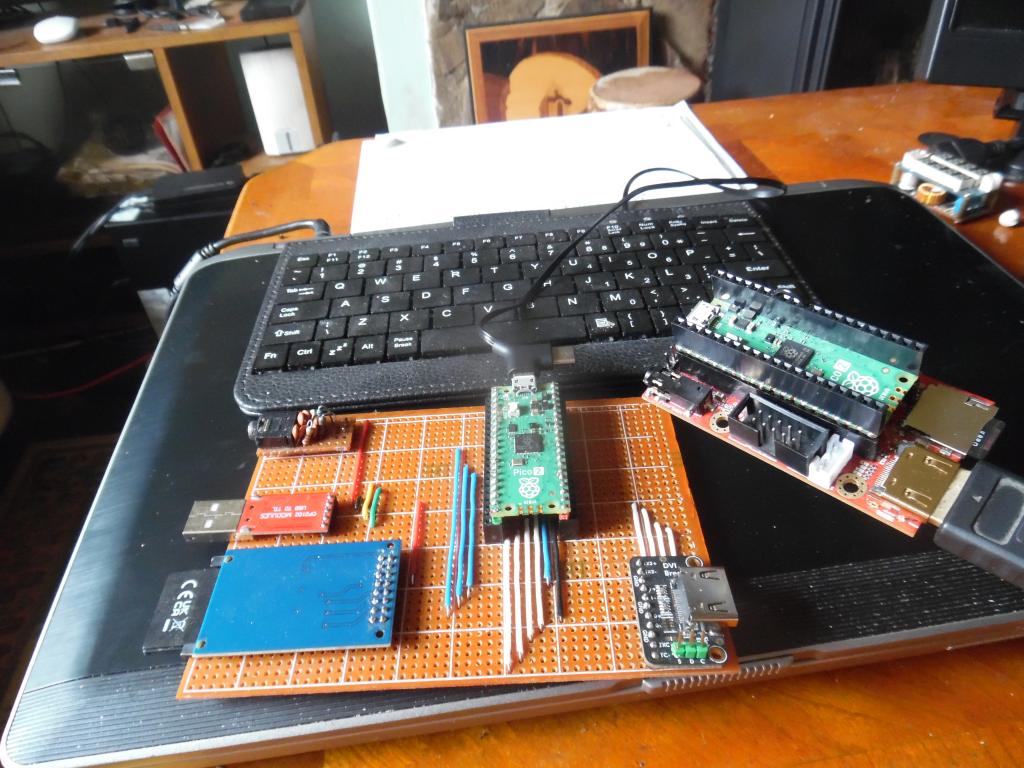 |
||||||
pins in use shows not much left but suppose for same on any pico aved 227 bytes > Time taken: 701mS RUN 1 GP0 OFF 2 GP1 OFF 4 GP2 OFF 5 GP3 OFF 6 GP4 Boot Reserved : SPI SYSTEM MISO 7 GP5 OFF 9 GP6 Boot Reserved : SPI SYSTEM CLK 10 GP7 Boot Reserved : SPI SYSTEM MOSI 11 GP8 Boot Reserved : KEYBOARD CLOCK 12 GP9 Boot Reserved : KEYBOARD DATA 14 GP10 OFF 15 GP11 OFF 16 GP12 Boot Reserved : HDMI 17 GP13 Boot Reserved : HDMI 19 GP14 Boot Reserved : HDMI 20 GP15 Boot Reserved : HDMI 21 GP16 Boot Reserved : HDMI 22 GP17 Boot Reserved : HDMI 24 GP18 Boot Reserved : HDMI 25 GP19 Boot Reserved : HDMI 26 GP20 OFF 27 GP21 OFF 29 GP22 Boot Reserved : SD CS 41 GP23 DOUT 42 GP24 DIN 43 GP25 HEARTBEAT 31 GP26 Boot Reserved : AUDIO L 32 GP27 Boot Reserved : AUDIO R 34 GP28 OFF > |
||||||
The following pins are unusable: GP28 The following pins are connected to unsupported pins on the HDMI socket: GP10 (I2C1A SDA_33) - goes to DVI I2C1A SDA_5 via level shifter GP11 (I2C1A SCL_33) - goes to DVI I2C1A SCL_5 via level shifter GP26 (DVI_CEC) - gets linked to GP28 to get stereo audio I thought they'd used other pins of the SD card, but they haven't on this board. Goodness knows why they fitted U3 at all. It appears to do nothing, although that may not have been the intention. They may just have screwed up on something. Might just be the circuit diagram that's wrong. |
||||||
> mode 3 > option list PicoMiteHDMI MMBasic RP2350A Edition V6.00.02RC24 OPTION FLASH SIZE 4194304 OPTION KEYBOARD UK OPTION RESOLUTION 640x480 @ 252000KHz OPTION HDMI PINS 1, 3, 7, 5 OPTION SDCARD GP22, GP6, GP7, GP4 OPTION AUDIO GP26,GP27', ON PWM CHANNEL 5 > note cpu speed but this would be same for normal pico hdmi? can olimex be 31599 or is it the new cpuspeed...be safe?? option list PicoMiteHDMI MMBasic USB RP2350A Edition V6.00.02b0 OPTION SERIAL CONSOLE COM2,GP8,GP9 OPTION AUTORUN ON OPTION FLASH SIZE 4194304 OPTION COLOURCODE ON OPTION KEYBOARD UK, 0, 0, 600, 150 OPTION CPUSPEED (KHz) 315000 OPTION DISPLAY 30, 53 OPTION SDCARD GP22, GP6, GP7, GP4 OPTION AUDIO GP0,GP1', ON PWM CHANNEL 0 > |
||||||
Have a look at V6.00.02RC03 where it is clearly described by Peter. Greetings, Jan. |
||||||
The Olimex board will run right at the max limit for MMBasic, but not with anything other than a LCD display connected to it. There's nothing on the board that limits the speed. The maximum limit is set by whatever display you are using and, in some cases, the resolution you are using. Yes, you can connect a LCD display to the Olimex board. Use the ordinary firmware, don't connect the HDMI pins and use those to drive the display. You can use a VGA display in the same way, just add resistors and a VGA connector. Why anyone would want to do either I've no idea. :) |
||||||
Thank you but I can not find V6.00.02RC03 |
||||||
get one that's earthed |
||||||
cheapest I found. ordered 2, same £3.40 postage they work https://thepihut.com/products/adafruit-dvi-breakout-board-for-hdmi-source-devices wire the pins, get 2350 pico 2 ready welded cos 40 pins is eye ache then solderless strip/bread board and your away... well a few wires but get the idea. veecad for vero useful. it could work with molex ribbon. just a quick way of trying mmbasic. Edited 2025-05-28 04:11 by stanleyella |
||||||
|
||||||
I bought a desolder pump which worked but then an email it was faulty. too cheap to bother, rewire to uk wiring? 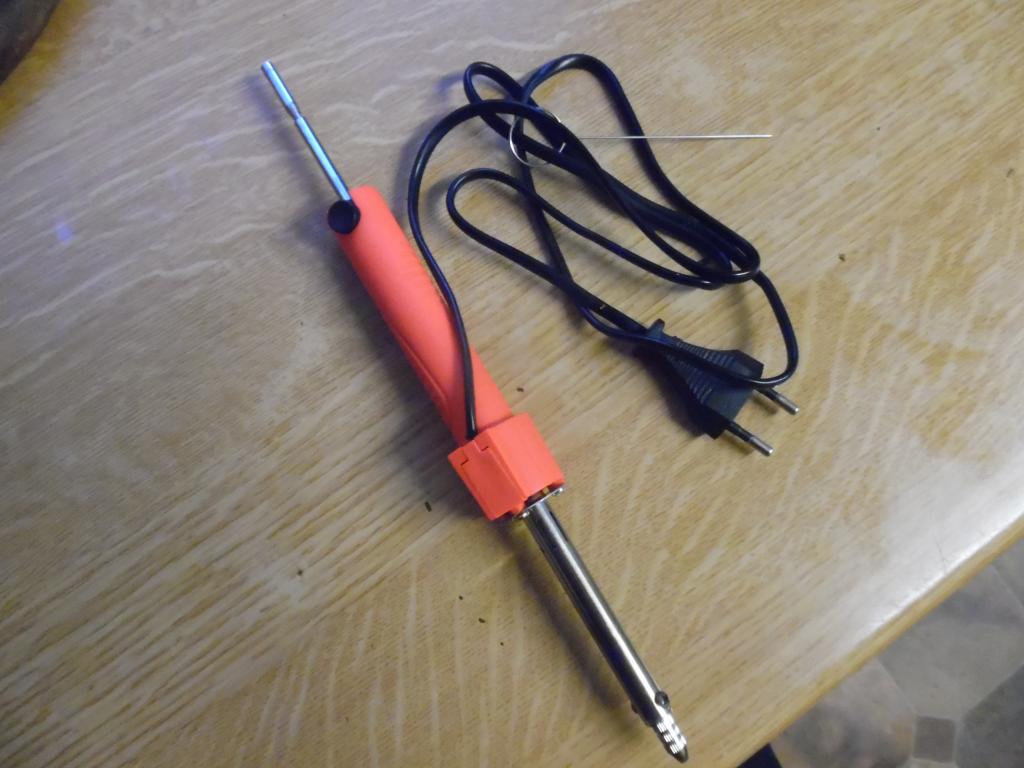 |
||||||
With no earth you don't know what's going on inside. If the mains-metalwork insulation breaks down it could, in some circumstances, kill you. The Chinese don't bother too much about such things. They sometime run an earth wire but don't bother connecting it. Sometimes the earth "wire" is only a piece of plastic with no conductor. I can only suggest that, if you are going to use 2-wire Chinese stuff, that you feed it via a sensitive RCD that will trip if there's an electrical fault. You can get some that plug into your mains socket and have a Test button on them. Fuse the plug at something as low as you can get, probably 3A. Probably 99 times out of a hundred things will be fine. It's that 100th time that's the problem. It can be a "once in a lifetime" event. :( This stuff generally doesn't comply with UK regs. Here all exposed metalwork has to be earthed unless the item is classed as "double insulated" and carries the appropriate marking. . Edited 2025-05-28 07:51 by Mixtel90 |
||||||
| Page 3 of 4 |
||||||
 |
The Back Shed's forum code is written, and hosted, in Australia. |