
| Menu | JAQForum Ver 19.10.27 |
| Menu | JAQForum Ver 19.10.27 |
Forum Index : Microcontroller and PC projects : Game*Mite and MMbasic 6.00.02 : the Game*Mite rocks...
  Page 3 of 3 Page 3 of 3 |
||||||
And here is Frogger for the Game*Mite. This is based on "PicoFrog_b9_2.bas" but the first 2 levels are playable. Successive levels are not yet finished. Anyway, it is fun to play. This is Martin Herhaus his work, patched by me for GameMite. Frogger (Martin.H) 47kbyte. Frogger.zip Start the game with A button. Quit at any time with SELECT. Volhout |
||||||
Attached is a smaller version of ChemiChaos for Game*Mite. The original sprite file also contained a bitmap font. Very nice for CMM2 screen resolutions, but it was not used for Game*Mite anyway. This shrunk the Sprite file. ChemiChaos (52kbyte total) 2026_02_17_ChemiChaos.zip Volhout P.S. Maybe I will replace "kingdom" with "ChemiChaos" in the RP2040 uf2 file. Personally I have no nostalgic memories of Kingdom. But I am open to different opinions. Especially Tom's opinion. It is his Game*Mite platform. Edited 2026-02-17 18:00 by Volhout |
||||||
For those of you who want to use the Game*Mite expansion connector to connect to external hardware (extra IO pins, thermal camera, sensors) the I2C bus can be used. Below is a version of the I2C bus scanner, to detect connected devices, for I2C bus on GP16/GP17. 'GM I2C scanner for port GP16/GP17 ' data buffer dim d%(3) ' Open channel SetPin gp16,gp17,I2C I2C open 100,100 ' draw GM screen cls text 160,10,"System I2C Address Scanner",CM,,,rgb(yellow) font 7 text 0,24," 0 1 2 3 4 5 6 7 8 9 A B C D E F" ' loop col/row For y=0 To 7 a$=Hex$(y,2)+": " For x=0 To 15 addr = y*16+x ' calc address I2C write addr, 0, 1, &H00 ' write zero to that adress (could corrupt) 'I2C read addr, 0, 2, d%() ' read data from address If MM.I2C=0 Then ' check for errors a$=a$+Hex$(addr,2)+" " ' found one! Else a$=a$+"-- " ' nothing here.. EndIf Next x text 0,36+y*12,a$ Next y END Nothing fancy, just a tool. 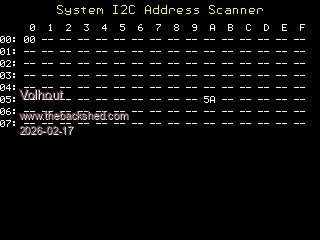 Volhout Edited 2026-02-17 21:30 by Volhout |
||||||
LIST SYSTEM I2C |
||||||
Hi Harm, I'm not much more than a lurker at the moment so you should do as you want. Best wishes, Tom |
||||||
Hi Harm, I have installed all the new games you have put up on my 2350, I also tried running them from the B: drive, just to see how easy that was and it worked fine except Snake which did not appear in the menu for B: ? I haven't investigated further yet. Will you eventually allow the Menu to scroll, or change page, I already have too many programs installed for them all to be on one menu page. Regards, Kevin. PS, I increased the number of MaxFileDirs to 14 and moved the menu up by 10, now snake appears, even though it's not at the bottom of the list? Edited 2026-02-18 01:57 by Bleep |
||||||
Hi Kevin, I have to think about that. Maybe page change is simplest. No idea why Snake would not show in B:, I'll try it myself. Hi Tom, Thanks for the reply. I am glad you are still "lurking". Volhout |
||||||
Hi Harm, See previous post, they must have crossed. What about 2 columns and allow the cursor to go off the top and bottom of the list to loop round, that is probably an easy doubling of titles, which will probably last a while. Regards Kevin Mod to create 2 Columns of 14, so 28 program names in menu, I've temporarily done this so I can try adding other programs. Change one constant and add a new one. Const MaxFileDirs = 28 Const Col1=14 Allow the menu highlight to scroll off top and bottom of list, looping round. If i = bUP Then If Highlight > 0 Then Highlight = Highlight - 1 Else Highlight=NbrDirs+NbrFiles-1 EndIf DrawScreen MakeSound 1 ElseIf i = bDOWN Then If Highlight < NbrDirs + NbrFiles - 1 Then Highlight = Highlight + 1 Else Highlight=0 EndIf Change Menu printing to allow 2 columns of 14 names. For i = 0 To NbrDirs - 1 If i<Col1 Then If i = Highlight Then Text 10, 40+i*12, " " + DirName$(i) + " <DIR> ", LT, 1, 1, cBack, cMain Else Text 10, 40+i*12, " " + DirName$(i) + " <DIR> ", LT, 1, 1, cMain, cBack EndIf EndIf If i>=Col1 Then If i = Highlight Then Text 160, 40+(i-Col1)*12, " " + DirName$(i) + " <DIR> ", LT, 1, 1, cBack, cMain Else Text 160, 40+(i-Col1)*12, " " + DirName$(i) + " <DIR> ", LT, 1, 1, cMain, cBack EndIf EndIf Next i For j = 0 To NbrFiles - 1 If j<Col1 Then If j + i = Highlight Then Text 10, 40+(i + j)*12, " " + Left$(FileName$(j), Len(FileName$(j))-4) + " ", LT, 1, 1, cBack, cMain Else Text 10, 40+(i + j)*12, " " + Left$(FileName$(j), Len(FileName$(j))-4) + " ", LT, 1, 1, cMain, cBack EndIf EndIf If j>=Col1 Then If j + i = Highlight Then Text 160, 40+(i-Col1 + j)*12, " " + Left$(FileName$(j), Len(FileName$(j))-4) + " ", LT, 1, 1, cBack, cMain Else Text 160, 40+(i-Col1 + j)*12, " " + Left$(FileName$(j), Len(FileName$(j))-4) + " ", LT, 1, 1, cMain, cBack EndIf EndIf Next j Edited 2026-02-19 04:36 by Bleep |
||||||
Hi Kevin, Please try this alternative. startup2.zip It uses the same single list and allows for up to 80 files/folders. And this is pure arbitrary. If you want 120, fine. Note1: it lists only folders that contain an executable (.BAS). Note2: watchdog is still off (so I can debug). Volhout Edited 2026-02-19 20:34 by Volhout |
||||||
Hi Harm, Yes that works fine, though could I request the following mod, so that the highlight can scroll off the top of the list, down to the bottom, and the same when scrolling off the bottom of the list, back to the top? Thamks Kevin. If i = bUP Then If Highlight > 0 Then Highlight = Highlight - 1 Else Highlight = NbrDirs+NbrFiles-1 EndIf DrawScreen MakeSound 1 ElseIf i = bDOWN Then If Highlight < NbrDirs + NbrFiles - 1 Then Highlight = Highlight + 1 Else Highlight = 0 EndIf DrawScreen MakeSound 1 |
||||||
Hi Kevin, That works.. Thanks I also started using the framebuffer, since I noticed screen update wasn't flawless. Disadvantage: The GameMite text top screen changed from RGB565 to RGB121. But that is a small drawback. The other colors where not affected. startup4.zip Volhout Edited 2026-02-20 06:29 by Volhout |
||||||
@Volhout, Here is the 15 puzzle game and some images for it as we discussed. I hope it will work on the Game*Mite without too much trouble. There is no pathname for the images so I know that is something to fix. If and when it works you can make your own images, they must be 192x192 pixel PNG files. GM15P_gamemite_.zip 15Pimages.zip Thanks for looking at it for me. Bill |
||||||
Hi Bill, I will look into it, another change I see is that rp2040 cannot do png. Maybe jpg or bmp can be used. After converting to JPG the GameMite (RP2040) gives a "out of heap" error. Which can be explained by the fact that you are putting the jpg on screen, and read back from the screen to create 16 tiles. As such a good idea. But the screen is RGB888 (24 bits per pixel). So a 192x192 image consumes 110 kbyte. Together with 29k variables, and 28k fixed vars that exceeds the 155k heap. I may have to re-write the game to work with vectors from the original JPG file, and then copy parts of the jpg file directly to screen. I am happy Peter implemented that feature, that we can (as with BMP) copy sections to arbitrary locations on screen. Alternatively I can look into string usage. Sometimes strings are sized 255 chars, but are used for single character only. Depending how many you use. But I need to gain around 10kbyte heap. So it will be a serious redesign. Volhout EDIT: Houray => The game runs on RP2040, I changed the memory usage for the DIM imageFiles$(99) to DIM imageFiles$(80) length 30 Edited 2026-02-22 01:36 by Volhout |
||||||
That's great! Thanks Harm. 15P02.zip I have converted all of the images to jpg. That's probably a better choice anyway because they are more compact and still look good. There are some images that are redundant, they are just there to increase to number of files to test the games menu. I thought it would be fun to put the image of a grand kid on it and get them to unscramble it. Can you please tell me what else you had to change? I'm working on another one and maybe I should wait until I have a working Game*Mite of my own. Thanks again Bill EDIT: Replaced the jpg files there are now no redundant images. Edited 2026-02-22 11:16 by Turbo46 |
||||||
Hi Bill, I must say, after playing it a bit, it is a fun game. And you have taken a lot of care to make it work well, and the code looks very good. I could easily find my way to make the few adaptations I required. Compliments. The only thing I am not yet sure about is the key used to select the image. And this is my own doing, and part Game*Mite specifics. In all Game*Mite games, when you are running the game, and want to quit, you press SELECT. But to "browse" to the game in the menu or file manager you also press select to start it (select it). So I browse to 15P using arrow keys and SELECT, then in the game I select the picture with A/START ? Feels like that would need to be SELECT. But then..next is a move in the puzzle, and when you accidentally press select, you leave the game. Easy (it happened to me already) to accidentally leave the game with an almost solved puzzle,.....:-(. So the issue is probably that in the menu and filemanager, we need to start using START, in stead of SELECT..? I have not made a conclusion on this. Do not want to divert from GM original to much. Anyway, I think I summed up all the changes I made so far. The Game is running. It returns to menu. Minor changes. The JPG and memory usage. Here is my working zip. 15P_gamemite_volhout.zip Volhout |
||||||
Thanks so much Harm,  If I have made errors in the allocation of the buttons please feel free to make them more standard. I trust your judgement. Bill |
||||||
All, After much testing, and I am sure I did not catch everything, here is my first Game*Mite image, This image is for RP2040 only. RP2350 will follow after few weeks. Put below uf2 file on your RP2040 Game*Mite, and you have the latest games on your Game*Mite. - new 6.0300 MIN firmware - Geoff's PicoGame menu (use A and B to chang to SD card/internal memory) - experimental "shooting gameg". - Peters Breakout - Vegipete's Chemi Chaos - William Leu's 2048 - Flappy Bird gm2040.zip When you have access to an SD card, put below ZIP on that card (in the root directory). When running Game*Mite, presse B in the menu, and select 1 of the 3 extra games (Petscii Robots, Gems&Rocks, Stoned) GameMite.zip The next post will explain about the new game Stoned Volhout |
||||||
Stoned A new game for Game*Mite only. See previous post how to get it. This is a port of the merge game "bejeweled". You have to bring together 3 or more identical stones in a row or column. You move around using the D-pad. A selects a stone to move. B provides a hint (there are only 10 allowed). SELECT brings up the menu, START starts the game. You have 5 minutes to get the highest score and beat my 2900... Note point per stone are progressive. A row of 5 scores far more than 2 rows of 3. 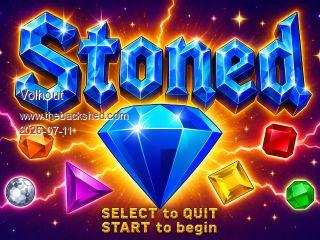 Happy gaming Volhout P.S. this game has no animations, it put's everything graphics directly on the LCD, so the game could be developed in high color depth. It looks great. P.P.S. all graphic elements where developed in higher resolution, and scaled down. So it is possible to make a version that uses high colordepth on HDMI, and higher resolution. But for that to happen, I first need an HDMI setup. Edited 2026-07-11 05:54 by Volhout |
||||||
| Page 3 of 3 |
||||||
 |
The Back Shed's forum code is written, and hosted, in Australia. |


