
| Menu | JAQForum Ver 19.10.27 |
| Menu | JAQForum Ver 19.10.27 |
Forum Index : Microcontroller and PC projects : PicoMite V6.02.01 release candidates
  Page 3 of 8 Page 3 of 8   |
||||||
Nope. What I did do in one of the betas is change some flash and spi ram timings which makes higher clock speeds more stable. |
||||||
@Volhout, do you realy mean AM or rather FM? Can't imagine how to demod AM with a oneshot. Could imagine to use the oneshot as pulse counting discriminator for FM though. |
||||||
Assume a burst of pulsen represents a logic 1 Set oneshot to a time longer than a single pulse. A retriggerable oneshot will output the envelope of the burst. Volhout |
||||||
Now I upgraded to BIOS 1.6 and MM.INFO(BIOS) returns 0.0. With BIOS 1.5 it returned with the right version number. What can be werong? Thx! |
||||||
No idea, definitely works for me - tested with RC2 |
||||||
The problem was real, but now solved by Ernst. The updated bios can download. Thanks Ernst. |
||||||
V6.02.01RC3 PicoMiteV6.02.01RC3.zip All versions: Major rework of PLAY TONE and PLAY SOUND to reduce the overhead in the interrupt routine. Shouldn't make any difference to the user but..... RP2350 only: mm.info(psram size) - returns the amount of PSRAM in the system - static value TILEMAP command and function implemented TILEMAP_User_Manual.pdf Test program - press any key between tests. In tests 17 and 18 move the man with the arrow keys. Should work on HDMI and VGA versions. Will need a framebuffer setting up and framebuffer copy to work on PicoMite (untested) NB: the design test/goal for this code was "you could write a complete implementation of PacMan using this", not that I have done it though  '============================================= ' TILEMAP Test Program ' ' Tests all TILEMAP commands and functions. ' Generates a tileset procedurally and saves ' it as a BMP, then loads it into flash. ' Map data is defined in DATA statements. ' ' Requires: RGB121 framebuffer, SD card '============================================= OPTION EXPLICIT OPTION BASE 0 MODE 2 CONST TILE_W = 16 CONST TILE_H = 16 CONST TILES_PER_ROW = 8 CONST MAP_COLS = 40 ' 40 x 20 = 640 x 320 pixel world CONST MAP_ROWS = 20 CONST SCREEN_W = 320 CONST SCREEN_H = 240 ' ---- Tile index constants ---- CONST T_EMPTY = 0 CONST T_GRASS = 1 CONST T_BRICK = 2 CONST T_STONE = 3 CONST T_COIN = 4 CONST T_SKY = 5 CONST T_DIRT = 6 CONST T_FIGURE = 7 CONST T_ENEMY = 8 ' ---- Attribute bit constants ---- CONST A_SOLID = &b0001 CONST A_COLLECT = &b0010 ' ---- RGB121 colours ---- CONST C_BLACK = RGB(0,0,0) CONST C_GREEN = RGB(0,255,0) CONST C_BROWN = RGB(255,255,0) CONST C_RED = RGB(255,0,0) CONST C_YELLOW = RGB(255,255,0) CONST C_COBALT = RGB(0,0,255) CONST C_GREY = RGB(128,128,128) CONST C_WHITE = RGB(255,255,255) CONST C_MYRTLE = RGB(0,128,0) ' ============================================ ' TEST 1: Generate tileset BMP ' ============================================ PRINT "Test 1: Generating tileset BMP..." GenerateTileset PRINT " PASS: tileset.bmp created" ' ============================================ ' TEST 2: Load tileset into flash ' ============================================ PRINT "Test 2: Loading tileset into flash..." FLASH LOAD IMAGE 1, "tileset.bmp",O PRINT " PASS: Flash slot 1 loaded" ' ============================================ ' TEST 3: Create tilemap from DATA ' ============================================ PRINT "Test 3: Creating tilemap from DATA..." TILEMAP CREATE mapdata, 1, 1, TILE_W, TILE_H, TILES_PER_ROW, MAP_COLS, MAP_ROWS PRINT " PASS: Tilemap 1 created" ' ============================================ ' TEST 4: Query map dimensions ' ============================================ PRINT "Test 4: Querying dimensions..." IF TILEMAP(COLS 1) <> MAP_COLS THEN PRINT " FAIL: COLS = "; TILEMAP(COLS 1); " expected "; MAP_COLS ELSE PRINT " PASS: COLS = "; TILEMAP(COLS 1) END IF IF TILEMAP(ROWS 1) <> MAP_ROWS THEN PRINT " FAIL: ROWS = "; TILEMAP(ROWS 1); " expected "; MAP_ROWS ELSE PRINT " PASS: ROWS = "; TILEMAP(ROWS 1) END IF ' ============================================ ' TEST 5: TILEMAP TILE query ' ============================================ PRINT "Test 5: TILE query..." DIM t t = TILEMAP(TILE 1, 8, 12 * TILE_H + 4) IF t <> T_GRASS THEN PRINT " FAIL: Expected T_GRASS("; T_GRASS; ") got "; t ELSE PRINT " PASS: TILE at ground = "; t END IF ' Empty space t = TILEMAP(TILE 1, 8, 2 * TILE_H + 4) IF t <> T_EMPTY THEN PRINT " FAIL: Expected T_EMPTY(0) got "; t ELSE PRINT " PASS: TILE at sky = "; t; " (empty)" END IF ' ============================================ ' TEST 6: TILEMAP SET ' ============================================ PRINT "Test 6: TILEMAP SET..." TILEMAP SET 1, 5, 5, T_COIN t = TILEMAP(TILE 1, 5 * TILE_W + 1, 5 * TILE_H + 1) IF t <> T_COIN THEN PRINT " FAIL: SET/TILE mismatch: got "; t ELSE PRINT " PASS: SET then TILE = "; t END IF ' Clear it back TILEMAP SET 1, 5, 5, T_EMPTY ' ============================================ ' TEST 7: TILEMAP COLLISION (no mask) ' ============================================ PRINT "Test 7: COLLISION detection..." DIM hit hit = TILEMAP(COLLISION 1, 32, 12 * TILE_H - 4, 14, 8) IF hit <> T_GRASS THEN PRINT " FAIL: Expected T_GRASS collision, got "; hit ELSE PRINT " PASS: Ground collision = "; hit END IF ' Test no collision in empty space hit = TILEMAP(COLLISION 1, 32, 2 * TILE_H, 14, 8) IF hit <> 0 THEN PRINT " FAIL: Expected no collision, got "; hit ELSE PRINT " PASS: Empty space collision = 0" END IF ' ============================================ ' TEST 8: TILEMAP ATTR and attribute queries ' ============================================ PRINT "Test 8: TILEMAP ATTR..." TILEMAP ATTR tileattrs, 1, 6 ' Check attributes DIM a a = TILEMAP(ATTR 1, T_GRASS) IF (a AND A_SOLID) = 0 THEN PRINT " FAIL: Grass should be solid" ELSE PRINT " PASS: Grass attr = "; a; " (solid)" END IF a = TILEMAP(ATTR 1, T_COIN) IF (a AND A_COLLECT) = 0 THEN PRINT " FAIL: Coin should be collectible" ELSE PRINT " PASS: Coin attr = "; a; " (collectible)" END IF ' ============================================ ' TEST 9: COLLISION with attribute mask ' ============================================ PRINT "Test 9: COLLISION with mask..." ' Coin at (7,7) - test collision with COLLECT mask hit = TILEMAP(COLLISION 1, 7 * TILE_W, 7 * TILE_H, 14, 14, A_COLLECT) IF hit <> T_COIN THEN PRINT " FAIL: Expected coin collision, got "; hit ELSE PRINT " PASS: Collectible collision = "; hit END IF ' Same area with SOLID mask should miss the coin hit = TILEMAP(COLLISION 1, 7 * TILE_W, 7 * TILE_H, 14, 14, A_SOLID) IF hit <> 0 THEN PRINT " FAIL: Expected no solid collision at coin, got "; hit ELSE PRINT " PASS: Solid collision at coin = 0 (correct)" END IF ' ============================================ ' TEST 10: TILEMAP VIEW and viewport queries ' ============================================ PRINT "Test 10: VIEW command..." TILEMAP VIEW 1, 100, 50 IF TILEMAP(VIEWX 1) <> 100 OR TILEMAP(VIEWY 1) <> 50 THEN PRINT " FAIL: VIEW position wrong" ELSE PRINT " PASS: VIEWX="; TILEMAP(VIEWX 1); " VIEWY="; TILEMAP(VIEWY 1) END IF ' ============================================ ' TEST 11: TILEMAP DRAW (visual) ' ============================================ PRINT "Test 11: Drawing tilemap at origin..." FRAMEBUFFER CREATE FRAMEBUFFER WRITE F CLS C_COBALT TILEMAP DRAW 1, F, 0, 0, 0, 0, SCREEN_W, SCREEN_H FRAMEBUFFER COPY F, N DO: LOOP UNTIL INKEY$<>"" PRINT " PASS: Tilemap rendered (check display)" ' ============================================ ' TEST 12: Smooth scrolling demo ' ============================================ PRINT "Test 12: Smooth scroll demo (5 seconds)..." DIM camX, camY, startTime, maxX, maxY camX = 0 : camY = 0 startTime = TIMER maxX = MAP_COLS * TILE_W - SCREEN_W maxY = MAP_ROWS * TILE_H - SCREEN_H DO WHILE TIMER - startTime < 5000 FRAMEBUFFER WRITE F CLS C_COBALT TILEMAP DRAW 1, F, camX, camY, 0, 0, SCREEN_W, SCREEN_H LINE SCREEN_W\2 - 4, SCREEN_H\2, SCREEN_W\2 + 4, SCREEN_H\2, 1, C_WHITE LINE SCREEN_W\2, SCREEN_H\2 - 4, SCREEN_W\2, SCREEN_H\2 + 4, 1, C_WHITE FRAMEBUFFER COPY F, N camX = camX + 1 camY = camY + 1 IF camX > maxX THEN camX = maxX IF camY > maxY THEN camY = maxY LOOP PRINT " PASS: Scroll demo complete" DO: LOOP UNTIL INKEY$<>"" ' ============================================ ' TEST 13: TILEMAP SCROLL command ' ============================================ PRINT "Test 13: SCROLL command..." TILEMAP VIEW 1, 0, 0 TILEMAP SCROLL 1, 50, 30 IF TILEMAP(VIEWX 1) <> 50 OR TILEMAP(VIEWY 1) <> 30 THEN PRINT " FAIL: SCROLL position wrong" ELSE PRINT " PASS: After SCROLL: VIEWX="; TILEMAP(VIEWX 1); " VIEWY="; TILEMAP(VIEWY 1) END IF TILEMAP VIEW 1, 0, 0 TILEMAP SCROLL 1, -100, -100 IF TILEMAP(VIEWX 1) <> 0 OR TILEMAP(VIEWY 1) <> 0 THEN PRINT " FAIL: SCROLL underflow clamp failed" ELSE PRINT " PASS: SCROLL clamps at 0,0" END IF DO: LOOP UNTIL INKEY$<>"" ' ============================================ ' TEST 14: Transparency test ' ============================================ PRINT "Test 14: Transparency rendering..." FRAMEBUFFER WRITE F CLS C_RED TILEMAP DRAW 1, F, 0, 0, 0, 0, SCREEN_W, SCREEN_H, 0 FRAMEBUFFER COPY F, N DO: LOOP UNTIL INKEY$<>"" PRINT " PASS: Transparency rendered (black pixels show red background)" ' ============================================ ' TEST 15: Coin collection demo ' ============================================ PRINT "Test 15: Coin collection demo..." FRAMEBUFFER WRITE F CLS C_COBALT TILEMAP DRAW 1, F, 0, 0, 0, 0, SCREEN_W, SCREEN_H FRAMEBUFFER COPY F, N PAUSE 500 DIM coin_col%(4) = (7, 17, 19, 27, 28) DIM coin_row%(4) = (7, 4, 4, 6, 6) DIM i FOR i = 0 TO 4 PAUSE 800 TILEMAP SET 1, coin_col%(i), coin_row%(i), T_EMPTY FRAMEBUFFER WRITE F CLS C_COBALT TILEMAP DRAW 1, F, 0, 0, 0, 0, SCREEN_W, SCREEN_H FRAMEBUFFER COPY F, N NEXT i PRINT " PASS: All 5 coins collected" DO: LOOP UNTIL INKEY$<>"" ' ============================================ ' TEST 16: Multiple tilemaps (second map from DATA) ' ============================================ PRINT "Test 16: Second tilemap from DATA..." TILEMAP CREATE map2data, 2, 1, TILE_W, TILE_H, TILES_PER_ROW, 20, 10 IF TILEMAP(COLS 2) = 20 AND TILEMAP(ROWS 2) = 10 THEN PRINT " PASS: Tilemap 2 created (20x10)" ELSE PRINT " FAIL: Tilemap 2 dimensions wrong" END IF TILEMAP DESTROY 2 PRINT " PASS: Tilemap 2 destroyed" DO: LOOP UNTIL INKEY$<>"" ' ============================================ ' TEST 17: Figure overlay scrolling over base map ' ============================================ PRINT "Test 17: Figure overlay demo (arrow keys, Q=quit)..." ' Create a 1x1 overlay containing just the figure tile TILEMAP CREATE figmap, 2, 1, TILE_W, TILE_H, TILES_PER_ROW, 1, 1 TILEMAP VIEW 1, 0, 0 DIM fx, fy, k$ fx = SCREEN_W \ 2 - TILE_W \ 2 ' pixel position on screen fy = SCREEN_H \ 2 - TILE_H \ 2 camX = 0 DO ' Draw base map scrolling, then figure on top with transparency FRAMEBUFFER WRITE F CLS C_COBALT TILEMAP DRAW 1, F, camX, 0, 0, 0, SCREEN_W, SCREEN_H TILEMAP DRAW 2, F, 0, 0, fx, fy, TILE_W, TILE_H, 0 FRAMEBUFFER COPY F, N k$ = INKEY$ IF k$ = CHR$(128) AND fy > 0 THEN fy = fy - 2 IF k$ = CHR$(129) AND fy < SCREEN_H - TILE_H THEN fy = fy + 2 IF k$ = CHR$(130) AND fx > 0 THEN fx = fx - 2 IF k$ = CHR$(131) AND fx < SCREEN_W - TILE_W THEN fx = fx + 2 ' Scroll the base map slowly camX = camX + 1 IF camX > MAP_COLS * TILE_W - SCREEN_W THEN camX = 0 LOOP UNTIL UCASE$(k$) = "Q" TILEMAP DESTROY 2 PRINT " PASS: Figure overlay demo complete" DO: LOOP UNTIL INKEY$<>"" ' ============================================ ' TEST 18: Sprite system - hero + enemies ' ============================================ PRINT "Test 18: Sprite demo (arrows move, Q=quit)..." ' Hero = sprite 1 (figure tile 7), 3 enemies = sprites 2-4 (coin tile 4) TILEMAP SPRITE CREATE 1, 1, T_FIGURE, SCREEN_W\2, SCREEN_H\2 - 32 TILEMAP SPRITE CREATE 2, 1, T_ENEMY, 40, 40 TILEMAP SPRITE CREATE 3, 1, T_ENEMY, 200, 60 TILEMAP SPRITE CREATE 4, 1, T_ENEMY, 120, 100 ' Query functions PRINT " Sprite 1 X="; TILEMAP(SPRITE X 1); " Y="; TILEMAP(SPRITE Y 1) PRINT " Sprite 1 tile="; TILEMAP(SPRITE TILE 1) PRINT " Sprite 1 W="; TILEMAP(SPRITE W 1); " H="; TILEMAP(SPRITE H 1) ' Enemy movement directions DIM dx(4), dy(4), anim_frame dx(2) = 1 : dy(2) = 1 dx(3) = -1 : dy(3) = 1 dx(4) = 1 : dy(4) = -1 anim_frame = 0 TILEMAP VIEW 1, 0, 0 DIM hx, hy, ex, ey hx = TILEMAP(SPRITE X 1) hy = TILEMAP(SPRITE Y 1) DO FRAMEBUFFER WRITE F CLS C_COBALT ' Draw the base tilemap TILEMAP DRAW 1, F, 0, 0, 0, 0, SCREEN_W, SCREEN_H ' Draw all sprites on top with transparency (colour 0 = black) TILEMAP SPRITE DRAW F, 0 FRAMEBUFFER COPY F, N k$ = INKEY$ IF k$ = CHR$(128) AND hy > 0 THEN IF TILEMAP(COLLISION 1, hx, hy - 2, TILE_W, TILE_H, A_SOLID) = 0 THEN hy = hy - 2 END IF IF k$ = CHR$(129) AND hy < SCREEN_H - TILE_H THEN IF TILEMAP(COLLISION 1, hx, hy + 2, TILE_W, TILE_H, A_SOLID) = 0 THEN hy = hy + 2 END IF IF k$ = CHR$(130) AND hx > 0 THEN IF TILEMAP(COLLISION 1, hx - 2, hy, TILE_W, TILE_H, A_SOLID) = 0 THEN hx = hx - 2 END IF IF k$ = CHR$(131) AND hx < SCREEN_W - TILE_W THEN IF TILEMAP(COLLISION 1, hx + 2, hy, TILE_W, TILE_H, A_SOLID) = 0 THEN hx = hx + 2 END IF TILEMAP SPRITE MOVE 1, hx, hy ' Bounce enemies off screen edges FOR i = 2 TO 4 ex = TILEMAP(SPRITE X i) + dx(i) ey = TILEMAP(SPRITE Y i) + dy(i) IF ex <= 0 OR ex >= SCREEN_W - TILE_W THEN dx(i) = -dx(i) : ex = ex + dx(i) * 2 IF ey <= 0 OR ey >= SCREEN_H - TILE_H THEN dy(i) = -dy(i) : ey = ey + dy(i) * 2 TILEMAP SPRITE MOVE i, ex, ey ' Check collision with hero IF TILEMAP(SPRITE HIT 1, i) THEN PRINT " HIT: Sprite 1 collided with sprite "; i END IF NEXT i ' Animate enemies: toggle tile between coin(4) and brick(2) every 30 frames anim_frame = anim_frame + 1 IF anim_frame MOD 30 = 0 THEN FOR i = 2 TO 4 IF TILEMAP(SPRITE TILE i) = T_ENEMY THEN TILEMAP SPRITE SET i, T_COIN ELSE TILEMAP SPRITE SET i, T_ENEMY END IF NEXT i END IF LOOP UNTIL UCASE$(k$) = "Q" TILEMAP SPRITE DESTROY 1 TILEMAP SPRITE DESTROY 2 TILEMAP SPRITE DESTROY 3 TILEMAP SPRITE DESTROY 4 PRINT " PASS: Sprite demo complete" DO: LOOP UNTIL INKEY$<>"" ' ============================================ ' Cleanup ' ============================================ TILEMAP CLOSE FRAMEBUFFER CLOSE PRINT "All tests complete." END ' ============================================ ' SUBROUTINES ' ============================================ SUB GenerateTileset LOCAL x, y, tx, ty CLS ' Tile 1: Grass (green top, brown bottom) tx = 0 : ty = 0 BOX tx, ty, TILE_W, TILE_H\2, 0, C_GREEN, C_GREEN BOX tx, ty + TILE_H\2, TILE_W, TILE_H\2, 0, C_BROWN, C_BROWN PIXEL tx+2, ty+1, C_MYRTLE PIXEL tx+7, ty+2, C_MYRTLE PIXEL tx+12, ty+0, C_MYRTLE ' Tile 2: Brick (red with dark lines) tx = TILE_W : ty = 0 BOX tx, ty, TILE_W, TILE_H, 0, C_RED, C_RED LINE tx, ty+4, tx+15, ty+4, 1, C_GREY LINE tx, ty+8, tx+15, ty+8, 1, C_GREY LINE tx, ty+12, tx+15, ty+12, 1, C_GREY LINE tx+4, ty, tx+4, ty+4, 1, C_GREY LINE tx+12, ty+4, tx+12, ty+8, 1, C_GREY LINE tx+4, ty+8, tx+4, ty+12, 1, C_GREY ' Tile 3: Stone (grey block) tx = TILE_W * 2 : ty = 0 BOX tx, ty, TILE_W, TILE_H, 0, C_GREY, C_GREY BOX tx+1, ty+1, TILE_W-2, TILE_H-2, 1, C_WHITE ' Tile 4: Coin (yellow diamond on black) tx = TILE_W * 3 : ty = 0 BOX tx, ty, TILE_W, TILE_H, 0, C_BLACK, C_BLACK BOX tx+4, ty+4, 8, 8, 0, C_YELLOW, C_YELLOW ' Tile 5: Sky (solid blue) tx = TILE_W * 4 : ty = 0 BOX tx, ty, TILE_W, TILE_H, 0, C_COBALT, C_COBALT ' Tile 6: Dirt (brown) tx = TILE_W * 5 : ty = 0 BOX tx, ty, TILE_W, TILE_H, 0, C_BROWN, C_BROWN ' Tile 7: Figure (white stick figure on black) tx = TILE_W * 6 : ty = 0 BOX tx, ty, TILE_W, TILE_H, 0, C_BLACK, C_BLACK ' Head CIRCLE tx+8, ty+3, 2, 1, ,, C_WHITE ' Body LINE tx+8, ty+5, tx+8, ty+10, 1, C_WHITE ' Arms LINE tx+5, ty+7, tx+11, ty+7, 1, C_WHITE ' Legs LINE tx+8, ty+10, tx+5, ty+14, 1, C_WHITE LINE tx+8, ty+10, tx+11, ty+14, 1, C_WHITE ' Tile 8: Enemy (red X on black) tx = TILE_W * 7 : ty = 0 BOX tx, ty, TILE_W, TILE_H, 0, C_BLACK, C_BLACK LINE tx+2, ty+2, tx+13, ty+13, 1, C_RED LINE tx+13, ty+2, tx+2, ty+13, 1, C_RED LINE tx+3, ty+2, tx+14, ty+13, 1, C_RED LINE tx+14, ty+2, tx+3, ty+13, 1, C_RED SAVE IMAGE "tileset.bmp", 0, 0, TILES_PER_ROW * TILE_W, 4 * TILE_H END SUB ' ============================================ ' MAP DATA (40 cols x 20 rows = 800 values) ' Row by row, left to right ' ============================================ mapdata: ' Row 0: empty DATA 0,0,0,0,0,0,0,0,0,0,0,0,0,0,0,0,0,0,0,0,0,0,0,0,0,0,0,0,0,0,0,0,0,0,0,0,0,0,0,0 ' Row 1: empty DATA 0,0,0,0,0,0,0,0,0,0,0,0,0,0,0,0,0,0,0,0,0,0,0,0,0,0,0,0,0,0,0,0,0,0,0,0,0,0,0,0 ' Row 2: empty DATA 0,0,0,0,0,0,0,0,0,0,0,0,0,0,0,0,0,0,0,0,0,0,0,0,0,0,0,0,0,0,0,0,0,0,0,0,0,0,0,0 ' Row 3: empty DATA 0,0,0,0,0,0,0,0,0,0,0,0,0,0,0,0,0,0,0,0,0,0,0,0,0,0,0,0,0,0,0,0,0,0,0,0,0,0,0,0 ' Row 4: coins above high platform DATA 0,0,0,0,0,0,0,0,0,0,0,0,0,0,0,0,0,4,0,4,0,0,0,0,0,0,0,0,0,0,0,0,0,0,0,0,0,0,0,0 ' Row 5: high brick platform (cols 15-20) DATA 0,0,0,0,0,0,0,0,0,0,0,0,0,0,0,2,2,2,2,2,2,0,0,0,0,0,0,0,0,0,0,0,0,0,0,0,0,0,0,0 ' Row 6: coins above stone platform DATA 0,0,0,0,0,0,0,0,0,0,0,0,0,0,0,0,0,0,0,0,0,0,0,0,0,0,0,4,4,0,0,0,0,0,0,0,0,0,0,0 ' Row 7: stone platform (cols 25-30), coin above low platform, wall starts DATA 0,0,0,0,0,0,0,4,0,0,0,0,3,0,0,0,0,0,0,0,0,0,0,0,0,3,3,3,3,3,3,0,0,0,0,0,0,0,0,0 ' Row 8: low brick platform (cols 5-9), wall DATA 0,0,0,0,0,2,2,2,2,2,0,0,3,0,0,0,0,0,0,0,0,0,0,0,0,0,0,0,0,0,0,0,0,0,0,0,0,0,0,0 ' Row 9: staircase step 3, wall DATA 0,0,0,0,0,0,0,0,0,0,2,0,3,0,0,0,0,0,0,0,0,0,0,0,0,0,0,0,0,0,0,0,0,0,0,0,0,0,0,0 ' Row 10: staircase steps 2-3, wall DATA 0,0,0,0,0,0,0,0,0,2,2,0,3,0,0,0,0,0,0,0,0,0,0,0,0,0,0,0,0,0,0,0,0,0,0,0,0,0,0,0 ' Row 11: staircase steps 1-3, wall DATA 0,0,0,0,0,0,0,0,2,2,2,0,3,0,0,0,0,0,0,0,0,0,0,0,0,0,0,0,0,0,0,0,0,0,0,0,0,0,0,0 ' Row 12: ground (grass), with pit at 18-20 DATA 1,1,1,1,1,1,1,1,1,1,1,1,1,1,1,1,1,1,0,0,0,1,1,1,1,1,1,1,1,1,1,1,1,1,1,1,1,1,1,1 ' Row 13: underground (dirt), pit gap DATA 6,6,6,6,6,6,6,6,6,6,6,6,6,6,6,6,6,6,0,0,0,6,6,6,6,6,6,6,6,6,6,6,6,6,6,6,6,6,6,6 ' Row 14: underground DATA 6,6,6,6,6,6,6,6,6,6,6,6,6,6,6,6,6,6,0,0,0,6,6,6,6,6,6,6,6,6,6,6,6,6,6,6,6,6,6,6 ' Row 15: underground DATA 6,6,6,6,6,6,6,6,6,6,6,6,6,6,6,6,6,6,0,0,0,6,6,6,6,6,6,6,6,6,6,6,6,6,6,6,6,6,6,6 ' Row 16: underground DATA 6,6,6,6,6,6,6,6,6,6,6,6,6,6,6,6,6,6,0,0,0,6,6,6,6,6,6,6,6,6,6,6,6,6,6,6,6,6,6,6 ' Row 17: underground DATA 6,6,6,6,6,6,6,6,6,6,6,6,6,6,6,6,6,6,0,0,0,6,6,6,6,6,6,6,6,6,6,6,6,6,6,6,6,6,6,6 ' Row 18: underground DATA 6,6,6,6,6,6,6,6,6,6,6,6,6,6,6,6,6,6,0,0,0,6,6,6,6,6,6,6,6,6,6,6,6,6,6,6,6,6,6,6 ' Row 19: underground DATA 6,6,6,6,6,6,6,6,6,6,6,6,6,6,6,6,6,6,0,0,0,6,6,6,6,6,6,6,6,6,6,6,6,6,6,6,6,6,6,6 ' ============================================ ' TILE ATTRIBUTES (6 tile types) ' Index 1=grass, 2=brick, 3=stone, 4=coin, 5=sky, 6=dirt ' A_SOLID=1, A_COLLECT=2 ' ============================================ tileattrs: DATA 1 ' tile 1: grass - solid DATA 1 ' tile 2: brick - solid DATA 1 ' tile 3: stone - solid DATA 2 ' tile 4: coin - collectible DATA 0 ' tile 5: sky - passable DATA 1 ' tile 6: dirt - solid ' ============================================ ' SECOND MAP DATA (20 cols x 10 rows = 200 values) ' Just a ground row at the bottom ' ============================================ map2data: DATA 0,0,0,0,0,0,0,0,0,0,0,0,0,0,0,0,0,0,0,0 DATA 0,0,0,0,0,0,0,0,0,0,0,0,0,0,0,0,0,0,0,0 DATA 0,0,0,0,0,0,0,0,0,0,0,0,0,0,0,0,0,0,0,0 DATA 0,0,0,0,0,0,0,0,0,0,0,0,0,0,0,0,0,0,0,0 DATA 0,0,0,0,0,0,0,0,0,0,0,0,0,0,0,0,0,0,0,0 DATA 0,0,0,0,0,0,0,0,0,0,0,0,0,0,0,0,0,0,0,0 DATA 0,0,0,0,0,0,0,0,0,0,0,0,0,0,0,0,0,0,0,0 DATA 0,0,0,0,0,0,0,0,0,0,0,0,0,0,0,0,0,0,0,0 DATA 0,0,0,0,0,0,0,0,0,0,0,0,0,0,0,0,0,0,0,0 DATA 3,3,3,3,3,3,3,3,3,3,3,3,3,3,3,3,3,3,3,3 ' ============================================ ' FIGURE OVERLAY MAP (1x1 - just the figure tile) ' Positioned at pixel coordinates via TILEMAP DRAW ' ============================================ figmap: DATA 7 Edited 2026-03-10 05:49 by matherp |
||||||
Tested the TILEMAP Test Program: 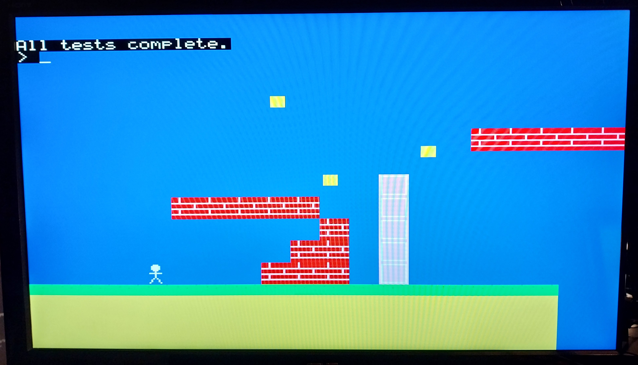 > option list PicoMiteHDMI MMBasic USB RP2350A Edition V6.02.01RC3 OPTION SERIAL CONSOLE COM2,GP8,GP9 OPTION SYSTEM I2C GP10,GP11 OPTION FLASH SIZE 4194304 OPTION COLOURCODE ON OPTION MOUSE SENSITIVITY 1.0000 OPTION KEYBOARD US OPTION RESOLUTION 640x480 @ 252000KHz OPTION SDCARD GP5, GP6, GP4, GP3 OPTION RTC AUTO ENABLE  /Peter63 /Peter63 |
||||||
Hi Peter, Either I am using Blit Framebuffer wrong, or there is a problem with it, when using the higher colour modes, 4 and 5. If you run the attached, in Mode 2 or 3 it works as I think it should, if you try 4 or 5 strange things start to happen. This seems to be at any resolution, on a HDMIUSBI2S, RC3, but I was using RC1 previously, so I checked the latest. nixie (2).zip Regards Kevin. Edited 2026-03-12 03:47 by Bleep |
||||||
BLIT FRAMEBUFFER for VGA and HDMI currently only supports RGB121 - should give an error. I might try and add the extra functionality before the release but no promises |
||||||
V6.02.01RC4 PicoMiteV6.02.01RC4.zip Increase in heap and program size for RP2040 VGA versions to 108Kb from 104 KEYDOWN function now supports PS2 keyboards. This should therefore become the preferred function for interrogating locally connected keyboards BLIT FRAMEBUFFER now supports modes 4 and 5 for HDMI version |
||||||
Isn't there a problem with KEYDOWN for game input in that it respects the user's keyboard language settings whereas ON PS2 and MM.INFO(PS2) will work off the physical position of the keys rather than what was printed on them ? i.e. you could read WASD as those keys on the right side of the keyboard in an upside down T and not then get screwed by the French keyboard where the keys in the same position are ZQSD ? Best wishes, Tom Edited 2026-03-12 19:41 by thwill |
||||||
Yes but the upside is you can do things like diagonal moves by seeing up-arrow and right arrow pressed at the same time |
||||||
Fair enough, there is extra work to handle that using PS2, you have to maintain a map of what keys are up/down and update it from ON PS2: https://github.com/thwill1000/mmbasic-sptools/blob/master/src/splib/ctrl.inc. Best wishes, Tom |
||||||
The key point though is it makes using either USB or PS2 transparent so no conditional code needed |
||||||
Ack. Perhaps a temporary option to switch keyboard to UK layout (or some other agreed standard) ... perhaps an option that only affects KEYDOWN ? YMMV, what you've done already is more than workable. Thanks, Tom |
||||||
Peter, You have changed the behavior of "ON PS2 yoursub" in RC4. Not Happy. Volhout |
||||||
Not by design, what has changed? |
||||||
Peter, I investigated the problem, and fixed it in the application. RC2 and RC4 behave the same now. Up to RC2 consistently gave a key down as first response, RC4 also occasionally gave a key-up as first response. Since I am looking for an action from the player, I was looking for a key-down. In the end it was my coding flaw, but it looked like a behavior difference between RC2 and RC4. I can assure you that RC4 can be re-programmed in an RP2040 at least 10x...;-). Fixed that in the application (rocks16_bf). FYI: this is the core of the code I used to determine if the player would like to use the PS2 keyboard as a controller. In the loop I also test for NES controller. I relocated the ON PS2 0 from the sub to main (so the sub wil be called until there is a key-down). con$="" On ps2 ps2_found 'set up PS2 detect Print "press any key on PS2 keyboard" Do : Loop While con$="" Print con$+" keyboard detected" On ps2 0 'disable the interrupt for now End Sub ps2_found If MM.Info(ps2)<1000 Then con$="PS2" 'only at a new key down press 'On ps2 0 'disable the interrupt for now End Sub Volhout Edited 2026-03-12 21:38 by Volhout |
||||||
Harm have a play with the breakout game just posted a variant for the Game*Mite. Needs a rp23560 Game*Mite of course. |
||||||
| Page 3 of 8 |
||||||
 |
The Back Shed's forum code is written, and hosted, in Australia. |


