Posted: 01:20pm 01 Sep 2023 Copy link to clipboard
Mixtel90 Guru
Watch the resistance of the GND connection on the SSD1963. The backlight current can "lift" the GND rail unless you make it really low resistance and that messes up the data signals. Ideally you should have a heavy track or wire back to the incoming 5V capacitor, with a separate GND line to the controller (F4 / Pico) from the same point.
Posted: 07:53pm 01 Sep 2023 Copy link to clipboard
palcal Guru
Board arrived and programmed OK. LCD panel configured OK ILI341, but touch will not configure I use 'OPTION TOUCH PB12 ,PC5 ' and I get an error, Pin 0,PA-1 is invalid What is my problem.
Edit.... I loaded the latest version of the software and with the defaults the panel tested ok but touch was reversed right to left on the lcdpanel, so I disabled the options and entered them again. OPTION LCDPANEL ILI931, L, PE0, PD6, PC4 and all I get is a white screen. Also how do I get the default options back, when I repower the board the defaults are not there. Edited 2023-09-02 07:07 by palcal
Posted: 09:41pm 01 Sep 2023 Copy link to clipboard
matherp Guru
Option reset
then GUI cqalibrate
should sort it for you based on your post
Posted: 11:09pm 01 Sep 2023 Copy link to clipboard
palcal Guru
Thanks Peter, that fixed it.
Posted: 06:32am 03 Sep 2023 Copy link to clipboard
andreas Senior Member
ARMmite MMBasic Version 5.07.02b1
Copyright 2011-2023 Geoff Graham
Copyright 2016-2023 Peter Mather
> ARMmite MMBasic > list Print Time$,MM.Ver > run 08:25:59 5.070201 08:25:59 5.070201 > new Error : Flash write fail > new Error : SPI1 Already open > new Error : SPI1 Already open
-andreas
Posted: 07:52am 03 Sep 2023 Copy link to clipboard
disco4now Guru
Anymore info. Has the board worked before on previous version of MMBasic? What does OPTION LIST produce? Anything in the Library ? Library List Have you tried a reset of MMBasic i.e. K1 held down while powering up.
Regards Gerry
Posted: 08:07am 03 Sep 2023 Copy link to clipboard
phil99 Guru
As noted previously that step is mandatory after updating the firmware or odd things may happen.
Posted: 08:26am 03 Sep 2023 Copy link to clipboard
disco4now Guru
OK I think this is what is happening. I see you have a new board that was started with an older version of MMBasic, i.e. pre Library.
OPTION PROG_FLASH_SIZE did not exist in that version. The options are saved in backup RAM and are not deleted when new firmware is loaded. The new firmware reads OPTION PROG_FLASH_SIZE to see if a Library exists, it gets it where its expected to be and the value is rubbish, but does say a library exists at this rubbish address.
A NEW command will always Append the Library after it clears the program as a NEW does not get rid of the Library. It will open SPI1 to read the library from the Windbond flash and saves to the internal Flash at the specified (rubbish) address. This attempt to write at a bad address results in the Error : Flash write fail. So the append never completes and SPI1 is not closed, hence subsequent NEW commands can't even get past trying to access the Windbond. In Beta2 I will close SPI1 before it attempts the Append so you will always continue to get the Error : Flash write fail.
RESETTING MMBASIC DON'T FORGET HOW TO DO THIS - It will save you when you think all is lost!!!
MMBasic can be reset to its original configuration using the following method: Holding KEY 1 down, while applying power (or pressing the RST button). Using the RST in lieu of applying power does not always seem to work so applying power needs to be used if RST does not seem to be doing it. You can connect ground to PE3 pin if you find it difficult to hold the small button down. This will result in the program memory , saved variables and Library being completely erased and all options (security PIN, console baud rate, etc.) will be reset to their initial defaults. This includes setting the console to the USB. A following Key 0 down with a RST (or power up) will switch to the Serial Console if you are not using USB console.
You will need to Reset MMBasic after you upgrade to the new firmware as commands have changed and updating the firmware will not explicitly delete the program memory or reset the Options .
I have many times thought I have killed an Armmite F4 and resetting MMBasic fixed it.. Edited 2023-09-03 18:29 by disco4now
Posted: 08:55am 03 Sep 2023 Copy link to clipboard
matherp Guru
Gerry
In the MMX code I'm thinking of getting rid of the buffered display drivers and implementing the framebuffer concept from the PicoMite. This is more powerful, improves compatibility, and with parallel displays things like framebuffer copy will be extremely fast. I haven't decided whether to make the framebuffer RGB232 or RGB121. For the MMX and ArmmiteH7 RGB232 is doable but the F4 would need 121 to allow the most flexibility.
Thoughts? Edited 2023-09-03 18:55 by matherp
Posted: 09:34am 03 Sep 2023 Copy link to clipboard
TassyJim Guru
Yes please.
Jim
Posted: 10:58am 03 Sep 2023 Copy link to clipboard
disco4now Guru
OK I have just read about FRAMEBUFFER and think I understand them. On the F4 the frame buffer would come off the MMBASIC 128K of ram.i.e. 38400 bytes for each frame buffer on a 320x240 display(I think this is how the Picomites work?). The F4 is pretty full as far as flash for the firmware goes so depending on size something else might have to make way.
Posted: 03:39pm 03 Sep 2023 Copy link to clipboard
andreas Senior Member
I think I had a jumper missing between BT1 and GND. I looked at the picture in the handbook page 14. There are two jumpers dragging BT0 & BT1 to GND. I had only one jumper between BT0 and GND.
Now it seems to work.
To answer your questions: - yes it worked before with 5.0701 - OPTION LIST is standard
empty library no K1 key during boot (I didn't know that this is required)
-andreas
Posted: 03:07pm 04 Sep 2023 Copy link to clipboard
TrevorH Senior Member
JohnS said
Have you got an SSD1963 TFT board to hook up and test to see if your board does same as mine with touch enabled? The problem I have is that enabling touch seems to disable writing to the TFT although TFT is still enabled. I wonder if there is something else different with the board other than the pinout difference.
Trevor
Posted: 05:05pm 04 Sep 2023 Copy link to clipboard
JohnS Guru
It's ILI9341
John
Posted: 08:34pm 04 Sep 2023 Copy link to clipboard
andreas Senior Member
Hello,
I missed the TURTLE Graphics in ARMmite F4, so I wrote a tiny library:
> list "turtle-library.bas" ' turtle library ' (c) 2023 Andreas Mueller, Gerolsbach (AMI), version 1.3
Dim gx,gy,pen,farbe,heading As integer
Sub turtle_reset gx=0 gy=0 pen=0 heading=0 farbe=RGB(black) AND &hFFFFFFFFFFFEFEFE End Sub
Sub turtle_pen_up pen=0 End Sub
Sub turtle_pen_down pen=1 End Sub
Sub turtle_move(x,y) If pen=1 Then Line gx,gy,x,y,,farbe EndIf gx = x gy = y End Sub
Sub turtle_pen_colour(c) farbe = c AND &hFFFFFFFFFFFEFEFE End Sub
Sub turtle_heading(h) heading = h End Sub
Sub turtle_forward(f) phi = Pi*(heading+270)/180 If pen=1 Then Line gx,gy,gx+f*Cos(phi),gy+f*Sin(phi),,farbe EndIf gx=gx+f*Cos(phi) gy=gy+f*Sin(phi) End Sub
Posted: 11:43pm 04 Sep 2023 Copy link to clipboard
disco4now Guru
I have an SSD1963 on the old board. It works with Touch, but SDCard stops working when backlight is above 1% . Also the performance of GUI TEST TOUCH varies quite a bit depending on the setting of Backlight at 100% is all over the place. I am in the process of giving the the SSD1963 its own 3.3v regulator to see if its power/noise related. I am suspicious the 5" SSD1963 might be marginal running off the 3.3v from the board itself.
Gerry
Posted: 02:12am 05 Sep 2023 Copy link to clipboard
ice2642 Regular Member
Hello,
I wold like to know if is it possible to connect one esp32 running fabGL by i2c to one demo board like this STM32xxx running mmbasic to be used like a graphics chip/card for VGA output?
Best regards,
Posted: 06:17am 05 Sep 2023 Copy link to clipboard
Volhout Guru
There is technically no objection, but the software does not exist. So you will have to write it yourself.
Using I2C to transfer ASCII data is perfectly possible. If you want the VGA display to show graphics, you will need to transfer pixel data. That may be slow on the I2C bus.
Volhout
Posted: 06:23am 05 Sep 2023 Copy link to clipboard
Volhout Guru
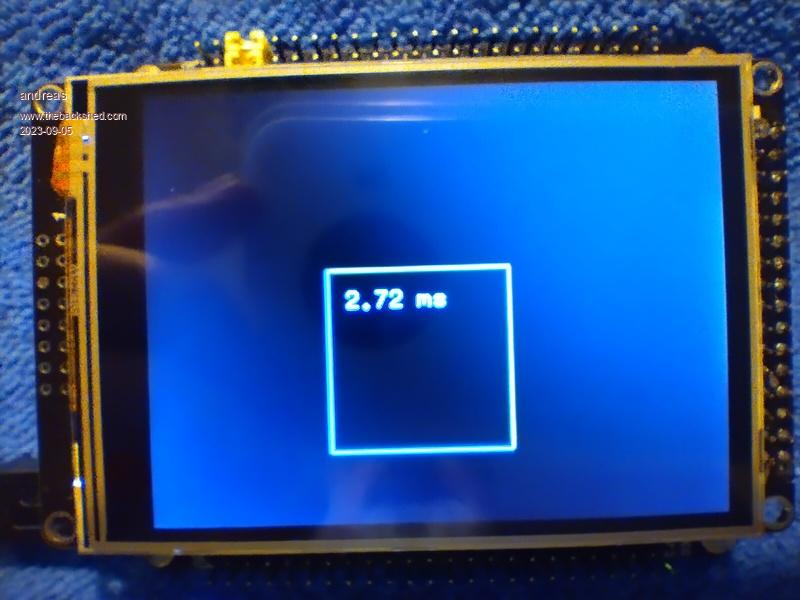
That is not bad at all !! 2.7ms for 13 function calls that also include some graphics. Thanks Andreas !
Posted: 09:49am 05 Sep 2023 Copy link to clipboard
TrevorH Senior Member
Hi, Gerry thanks for coming back to me, I will do the same and test but watching the voltages it all "looks" OK, so could it be noise, will report back after having a play.
Trevor
Page 4 of 7
The Back Shed's forum code is written, and hosted, in Australia.