
| Menu | JAQForum Ver 19.10.27 |
| Menu | JAQForum Ver 19.10.27 |
Forum Index : Microcontroller and PC projects : PIO-Prog for Hub75 display
  Page 4 of 8 Page 4 of 8   |
||||||
I've ordered one of these. Yao Cai Xing Official Store It's a P2 128x64LED 256x128mm Hub75 1/32 display for £18 free delivery. See what turns up? |
||||||
It's the official store, so a dog collar and a fake remote that says (in the Chinese-only instructions) that it's for a compact cow milking machine. Probably. ;) |
||||||
Hi together, my last Bitmap-Userdriver for the Hub-display has problems with different fonts and "scale". I changed that in this version Hub75User128x64.zip I don't know if this is the quickest solution, but maybe someone would like to take a look at it. 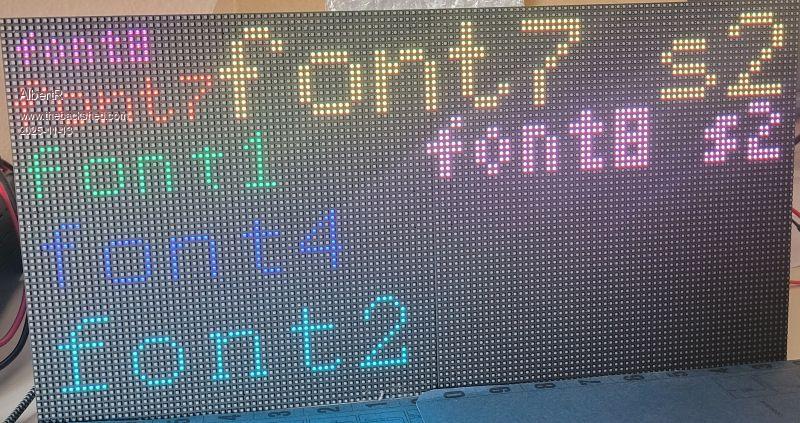 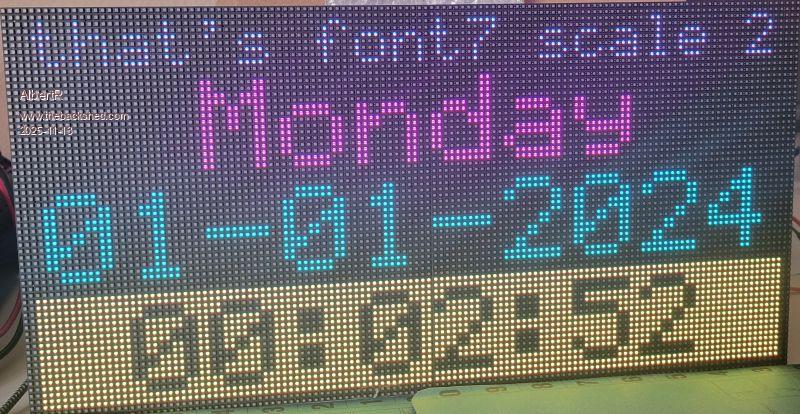 If someone want to use my PIO-Program for the Hub75, I have noticed that the output no longer works with version RC11. For testing purposes, only use b14 up to RC10. Regards Albert |
||||||
Thanks Albert, when my new panel arrives and I locate a spare 2350 Pico I'll attempt wiring it up and testing. :-) Looking at your code, it looks like you have managed to use the standard screen frame buffer, set to the appropriate resolution, (128x64 in this case) so all standard graphics commands that would appear on the screen should work, is that correct? Is there still a limitation on the firmware version, or did you or Peter resolve that? Thanks Kevin. Edited 2025-11-14 04:42 by Bleep |
||||||
Hi Kevin, no, unfortunately I haven't figured that out. I'm using the option to implement a display driver in Basic. Here is the thread from Peter for this MM-all: Display drivers in Basic Unfortunately, PIO is still experiencing issues with the firmware. It appears to be related to the ring buffer. There has also been a change here. If you configure the DMA TX transfer to “auto restart,” it will initially function with most displays. Then it's like my first approach and requires a few dummy bytes at the end of the data. A few changes need to be made for that. 'for save displaydata(ringbuffer) Dim integer Pack(2049) 'uncomment ringbuffer 'PIO make ring buffer Pack,4096*2*2 '64 x 64 x 2 in bytes by 16bit/color(2) Sub StartHub75Pio() PIO dma tx 1,0,2049*2,Pack(),,,2049*2 '32 bit transfers auto restart End Sub greetings Albert Edited 2025-11-14 18:01 by AlbertR |
||||||
Hi Albert, There are constraints for the ring buffer. It must be sized as a power of 2 (i.e. 2048, not 2049) and it must be at a 16k boundary in memory. For this to true, you must define the ring buffer as the first memory allocation. Do not DIM any array before it, since that will shift the start address of the ring buffer. Also the array is only DIM'ed without size.  Please find attached code where MMBasic streams data using a ring buffer into PIO, where PIO parallel outputs the data to a ladder DAC. sin_gen_test_pkd.zip But since Peter worked on his MMbasic VGA implementation recently, there may be another option. Peter has implemented automatic restarting DMA's into the PIO FIFO in V6.01.00rc12. That may be an even better way to do this, since you are outputting data only, and it could work with arbitrary array sizes. However, I did not test it. Look at Peters VGA code in the "an alternate way to make VGA" thread. Volhout P.S. when this code was written, there was a constraint on the maximum number of loops the ring buffer could make (the value &hffffffffffffffff). In current MMbasic you can set that value to 0, and it will loop forever. Edited 2025-11-14 18:21 by Volhout |
||||||
Hi Volhout, thanks for the comment. But since RC12 the ringbuffer did not longer works with my PIO-prog. For a solution I comment the ringbuffer out and go back to the version with dummy-bytes at the end of the array. They are needed to delaying the end of PIO-stop. The ringbuffer is not in use in the workaround. Albert |
||||||
Is that a bug in RC12 (& does Peter know, if so)? John |
||||||
Hi John, I am not an experienced PIO programmer, so I initially wrote “in my program”. I would not want to say that it is a bug. Perhaps someone with experience would like to check it. I can't say if Peter knows it. He read the comment in this thread that the graphic output of lines with a thickness of 1 does not work and he correct it with the last RC. Thanks for that. Albert Edited 2025-11-14 19:23 by AlbertR |
||||||
Hi Peter, I think I have found an other bug of the Userdisplay-driver in Basic The picture show the problem, Roundes Boxes work in Outline perfect but fails in filling, with Polygons it is reversed. 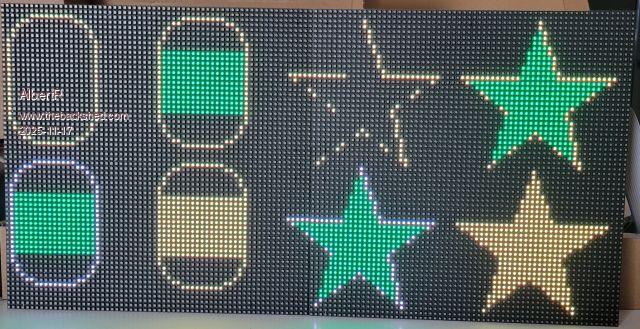 Regards Albert |
||||||
Please try RC14 and report |
||||||
Hi Peter, I tried it with RC14, the same result. All other draw-functions for the "Userdisplay" works perfect as you can see in the video. UserRboxPolygonTest_.zip Regards, Albert Edited 2025-11-17 23:02 by AlbertR |
||||||
What exact firmware version are you using? RP2040/2350 PicoMite vga etc Edited 2025-11-18 02:00 by matherp |
||||||
It is the PicoMiteRP2350V6.01.00RC14 Regards Albert |
||||||
I suspect your drawrectangle routine isn't sorting the coordinates Sub mm.user_rectangle x1,y1,x2,y2,col local integer t If x2<=x1 Then t=x1 x1=x2 x2=t EndIf If y2<=y1 Then t=y1 y1=y2 y2=t EndIf The other bug will be fixed in RC15 |
||||||
Hi Peter, that helped, thanks. Polygon and RBox work now. Sorry, my mistake. Greetings Albert |
||||||
Hi Albert, Looks like my 128x64 HUB75 display panel will arrive in the next couple of days, it's past customs. Would you be able to post a complete, sample program to drive it for testing, maybe the one in your video above? or any other you think is suitable? Do I need a 2350 for this size panel, because of the memory required? Thanks Kevin. |
||||||
Hi Kevin, here my last sample/test program for the user-display-functions. It knows CLS ,PIXEL, LINE, BOX, RBOX, CIRCLE, TEXT, GUI BITMAP, POLYGON and ARC I hope I did not forget one. Hub75User128x64.zip this time no video At the moment, you need a 2350 for 128x64. I may change that in the future. Possible with only 64 colors(RGB222). It looks like nobody wants 4096(RGB444). There is still the problem with the DMA TX-ringbuffer, but the appended programm should work with your display. Regards Albert |
||||||
@ Peter, I found something after all. If I want to use "Transparent Text"(-1 for the background colour) for the UserDisplay, I allways got an "Error : Invalid syntax", for Gui Bitmap and Text. If you have some time, could you check the PIO DMA TX ring-buffer function? It worked perfectly until RC10. Now I have to use “Auto restart” and a few dummy bytes. This works for most displays, but not all. Regards Albert |
||||||
You can't use transparent text for user drivers . show me the command you are using |
||||||
| Page 4 of 8 |
||||||
 |
The Back Shed's forum code is written, and hosted, in Australia. |


