Posted: 10:36am 25 Nov 2025 Copy link to clipboard
robert.rozee Guru
a mistake?! never!!
user@HP-stream11-392758:~$ user@HP-stream11-392758:~$ user@HP-stream11-392758:~$ sudo deluser $USER dialout Removing user `user' from group `dialout' ... Done. user@HP-stream11-392758:~$ sudo adduser $USER dialout Adding user `user' to group `dialout' ... Adding user user to group dialout Done. user@HP-stream11-392758:~$ user@HP-stream11-392758:~$
the above was done on a machine running Linux Mint 19.3 Tricia x86_64, XFCE. just confirmed that it also works on a machine running 22.2.
HOWEVER, it looks like debian may have a completely different command, also called adduser, that does something completely different to what it does on non-debian systems. i may need to research this in mode detail!
ADDENDUM: the adduser man page for debian seems to indicate that there is no difference - adduser should behave exactly the same as it does on non-debian systems. there is, however, also a command called useradd, but i can't make it produce the error message Bryan was seeing. i am perplexed...
cheers, rob :-) Edited 2025-11-25 20:52 by robert.rozee
Posted: 11:44am 25 Nov 2025 Copy link to clipboard
JohnS Guru
If MX (or Zorin) has a GUI way to do it, great.
I don't happen to use MX (or Zorin) but anything that works is good.
I think deluser is distro-specific.
John
Posted: 09:52pm 25 Nov 2025 Copy link to clipboard
KeepIS Guru
MX 25 has a GUI for almost everything. It displays a CheckBox list of every system group with the currently assigned user groups ticked. Select the group you need to add and press Apply. If the relevant system cannot be stopped and restarted to apply the change then MX usually indicates either a Logout or Restart is required.
Posted: 10:30pm 25 Nov 2025 Copy link to clipboard
JohnS Guru
Good - so should be easy to add appropriate permission for serial device, probably dialout group.
John
Posted: 10:39pm 25 Nov 2025 Copy link to clipboard
KeepIS Guru
I checked these when I first had the Arduino IDE-2 install and had it throw a permission denied error, however the required groups were already allocated correctly.
I think this was for the USBasp device though, the USB port worked correctly first go.
Posted: 10:57pm 25 Nov 2025 Copy link to clipboard
Revlac Guru
@Mike, Thats great thanks for sharing, I have been looking at MX 25 for older hardwear either Fluxbox or XFCE
The GUI check box list for assigned user groups.....This is good I did think this should have been done years ago.
The only windows program I need and don't have on Linux yet, is UltiMaker Cura for the 3D Printer, its available in AppImage but failed to download more than half even from GitHub will try again perhaps next year.
Posted: 11:10pm 25 Nov 2025 Copy link to clipboard
JohnS Guru
usbasp appeared as /dev/ttyUSB0 for me, if that helps.
Then avrdude "just worked".
John
Posted: 11:28pm 25 Nov 2025 Copy link to clipboard
KeepIS Guru
I'm sure some of the earlier distros also have these GUI interfaces, but MX is another community driven distro and like Mint, they have an enthusiastic group involved, I was attracted to the latest Linux Kernel release with latest drivers associated with it.
The only thing you may have trouble with is getting MMEdit to run, I haven't gone fully into it, but it still complains about missing Libraries, even though they have been fully installed, so likely some permission based problems with Snandboxing and security in these newer releases, some linux distros will allow you to specify no-snandbox when attempting to run with sudo (just to see if it will run and access the Lib files) but MX 25 will explicitly tell you NO! not allowed.
I followed the install info from Jim and still nothing, worked in Zorin though.
BTW the Arduino package is the 64bit IDE V2 Appimage from the Adruino website, runs perfectly.
Posted: 11:49pm 25 Nov 2025 Copy link to clipboard
KeepIS Guru
Thats interesting, in most distros when you search for how to get USBasp device working, it's never assigned as tty port.
This is how mine is listed on different distros that I tried.
Bus 001 Device 010: ID 16c0:05dc Van Ooijen Technische Informatica shared ID for use with libusb
The Bus and Device ID will be different, in each installation but with this info: Using above info 001 Device 010:
ls -al /dev/bus/usb/001/010 returns: crw-rw-r-- 1 root root 189, 9 Nov 18 10:46 /dev/bus/usb/001/010
If no access then: sudo chmod 666 /dev/bus/usb/001/010, will give you temporary access.
But you really need to a create a udev rule in 99-USBasp.rules in /etc/udev/rules.d/.
In the Arduino IDE you just select USBasp as the Programmer, no port assignment is needed, as there is none.
The Pic32 programmer is of course different and does have a port assignment. . Edited 2025-11-26 12:50 by KeepIS
Posted: 01:11am 27 Nov 2025 Copy link to clipboard
KeepIS Guru
Just tried tried the Aldi "Premium Mechanical Keyboard". USB, RF and Bluetooth, key Cap extractor, very heavy, great key feel and nice mechanical click sound, 1.2 Display MAC - Win switch, rechargeable battery, all kinds of back-lighting around the keys options (Keys not backlit) and fully configurable via web interface and some menu options via the 1.2" screen. Black or Nude Brown, love the look of the N-Brown.
Anyhow, I really like it. A bit expensive, but it's Christmas so I gave myself a present. All connection types work in Linux, I'm using 2.4G RF ATM.
In Linux I could connect to the BAUHN site (cn), it finds the Keyboard via USB and Wireless connections, but clicking the found connection to change settings page does nothing, tried a few browsers and no go, although the only setting I am interested is to Sync the 1.2" Keyboard screen displayed time to the PC time.
Look Away now! Windows, using the same browser and settings, worked fine and I synced (I assume it has an onboard clock as it's a manual time/date set really, and I was done, I will have to look further into Linux when I get some time.
Note: The keyboard has a MAC - WIN switch.
FYI I can open my WinVM in Linux and connect to the New Keyboard via the Web interface and adjust all settings and key configurations. . Edited 2025-11-27 16:29 by KeepIS
Posted: 11:17pm 04 Dec 2025 Copy link to clipboard
KeepIS Guru
I decided to get a new Computer to replace my older unit, likely the last PC I will purchase, it's currently in transit.
What forced me to jump so quickly was the skyrocketing prices of Memory, SSDs and GPUs, and the rumoured announcement by some manufactures of Memory, GPU and SSD apparently changing to supplying AI systems advancement only, basically leaving the consumer market with a trickle of leftovers and scraps.
The almost unlimited money from AI systems demand is depleting the current supply chain and driving prices, this will impact many new motherboard releases as well, already reported due to the current shortage, but adding to this could be another steep rise in prices from some manufactures leaving the consumer market
EDIT: Quote by some builders, "We Are Doomed, we need John Connor." and "This niche little hobby of ours is slipping away" . Edited 2025-12-05 10:35 by KeepIS
Posted: 04:11am 29 Jan 2026 Copy link to clipboard
KeepIS Guru
I've been looking at packet data requests in Linux, initally I wanted to check the test Windows VMs that I occassionally play around with, just to check they were not calling home (MS).
There were still a few requests, more from the Windows10 VM than the Win11 VM, both VMs had all Telemetry and bloat removed.
The Firewall and monitor that I use showed these kinds of requests over the network:
I blocked them all, the Windows VMs worked perfectly, however Win10VM took around 10 seconds to log on, Win11 was instant.
These events were never ending until I blocked them, network outgoing data has vitrually stopped unless I have a specific app using the network.
I then tested some Linux apps, Spotify - OMG - you would think that Google owned Spotify! The network activity to Google was insane, I blocked all google coms from Spotify and Spotify works perfectly - WT!.
That explains why everything I added to my Favourites in Spotify (win version) showed up in Google suggestions when I once used Windows and then logged into a Google account on the Smart TV under.
After blocking them, once again my outgoing traffic dropped markedly.
Running Thunderbird (Linux) just hovering over an email element item (even on an email with "Remote content" blocked) displays the link address in the bottom info bar, that is enough to cause a click tracking output to tracking site.
Blocked those, all good.
I'm in the "slow" process of changing my email account from Gmail to an secure client and will no longer need a Google login.
With a single click, I can watch in real time all or selected Net traffic for anything strange activity.
I'm sick of having my Internet searches being logged, yes I'm running Linux, have secure Browsers and have them locked down, but searches are an issue, then I found SearXNG
SearXNG may not offer you as personalised results as Google, but it doesn't generate a profile about you. SearXNG doesn't care about what you search for, never shares anything with a third-party, and can’t be used to compromise you. SearXNG is free software; the code is 100% open, and everyone is welcome to make it better.
But as suggested this is what I did:
If you do care about privacy or otherwise believe in digital freedom, make SearXNG your default search engine AND run it on your own server!
So a contained server is created in my Linux Home directory and I simply point my home page setting in any Browser I use to my local SearXNG server address.
Brilliant! All search requests and results are now sent and returned on my local server, nothing interferes with the normal Browser web pages everything is isolated and contained. It has run faultlessly.
Apparently the only thing "they" can possibly gleam from any search is an IP address, but a small Tor mod allows the search request/results to be returned via a spoofed IP, I didn't include that as I have other measures that eliminate it.
At least my searches may be harder to target now . Edited 2026-01-29 14:35 by KeepIS
Posted: 10:11pm 29 Jan 2026 Copy link to clipboard
Daren Newbie
I’m done with Windows now too, I didn’t mind W7 (and XP and 98 before) I never really did like W10 with all the pre-installed bloatware and departure from a user centric to consumer centric philosophy, I had to make tons of tweaks in the registry and patch things to get it eventually working how I wanted it to work. I hated the fact that for reasons only known to MS, Windows got to decide when I could actually use my computer after turning it on to do a task, because it wanted to update something, my tolerance for such BS is non existent. So no way will I use W11 or any other future MS operating system ever again, because I don’t see any of these things changing and of course all the other BS MS are up to. I think MS only got to where it got because of shady and monopolistic practices, and I only use their operating systems because in many cases there was no other option, I feel similar about Apple too, I won’t be buying any future Apple products either. If products I am considering purchasing in the future rely on MS or Apple operating systems for core functionality then I will simply look for alternatives that do not.
I am currently using a raspberry pi as my daily computer for basic tasks, it seems to be doing the job as well and in some cases better than my W10 machine, but without all the hassle. Of course for more specialised stuff or cpu intensive tasks I will have to use a more powerful linux machine, for my legacy gear which requires windows I will keep my W10 machine, and I also have a W7 laptop and a few XP laptops for certain jobs.
I admit it did warm my heart to learn that MS shares have been taking a dive for the last 3 months, long may it continue.
Posted: 04:29am 30 Jan 2026 Copy link to clipboard
KeepIS Guru
I should have done it a few years ago, but I've stuck with Linux for the past 2 months and I'm finally comfortable with the Distro that I chose.
No matter which recently released Distro I try, they are basically the same in everyday use to me.
I focused on a light stable Desktop with stable timely updates to the Kernel, desktop tools and environment for the selected Distro.
In reality, I'm not taking any notice of what is happening to Windows, or any other time wasting nonsense / total crap that's getting posted on YouTube etc.
To me, Windows is a failed spyware riddled OS, based on the idea that "You will have what MS give you, and YOU WILL be happy".
The erosion of free speech, especially online, means it's up to each of us to take personal responsibility, to the best of our ability, to protect our communications and personal data, or at least reduce the bleeding of it if possible.
In the end it may be a lost cause, perhaps we can delay the monitoring effects in our own situation, but at the very least I-we have tried.
For anyone interested, this is a brief outline of a local SearXNG search environment in my previous post:
SearXNG is a meta search engine, it asks other engines for results, cleans them, merges them, and shows them to you.
When running locally, the browser never talks directly to Google, Bing or DuckDuckGo etc, it talks only to SearXNG on localhost, and SearXNG then talks to external engines.
External engines never see your browser, your cookies, your profile or your history.
This changes the tracking model completely, you are no longer the product, you are again the user.
Base Requirements: On a minimal distributions some Python dependencies must be compiled. Before installing SearXNG you need a working build environment.
.
Posted: 04:18pm 30 Jan 2026 Copy link to clipboard
Daren Newbie
I feel the same way, I should have done it years ago, I think for me the path of least resistance played a part, Linux can be a bit difficult for a newcomer to adapt to, but fack it. If it means having more of a say in what and what isn’t on my computer and rejecting corporate BS in the process, then the benefits outweigh some of the inconvenience and compromises wrt compatibility with external equipment, but I think for most of those I will either find solutions or manage without them.
Posted: 01:25am 31 Jan 2026 Copy link to clipboard
KeepIS Guru
Apparently, reading forum postings, hardware updates are really increasing lately, I've had a lot of updates to the Kernel and Distro tool set lately, some to give enhanced support for the latest (2025) Intel Core Ultra chip sets, one of which I'm using in the Mini PC.
I was also lucky in that in my early research of Linux, prior to dumping windows, I found emerging warnings about Memory / SSD / M2 prices could be about to go ballistic.
I was going wait for a while before upgrading, but instead I grabbed the new mini PC I was looking at, with a couple of 2TB M2.x and 32GB of DDR5, and grabbed a 2TB SSD before the shi# hit the fan.
I don't do any gaming, so that's more than I need, within 2 weeks of placing the order, the prices had nearly doubled, SSD's and the M2 stock levels reduced even more, over the past 2 months I've watched prices increase again and again.
I've spent a lot of time getting a better understanding of the Linux Kernel and the history of the various Distributions/forks, along with the different desktop GUI environments.
I have written some nice GUI Bash scripts that replace some old Windows GUI apps for the Programming hardware I have.
I actually found the hardware setup easier under Linux when compared to Windows, for the same hardware. That was once I got comfortable with the terminal though, and the real Linux File construct, everything makes sense now.
Posted: 02:06am 31 Jan 2026 Copy link to clipboard
robert.rozee Guru
are you by any chance able to post some screenshots and code for these bash scripts? to date i've used zenity to add very primitive/clunky GUI dialogs to bash scripts, but not managed much more. instead, most of my programming is done in lazarus/FPC, which unfortunately does produce enormous binaries when creating GUI applications.
cheers, rob :-)
Posted: 05:53am 31 Jan 2026 Copy link to clipboard
KeepIS Guru
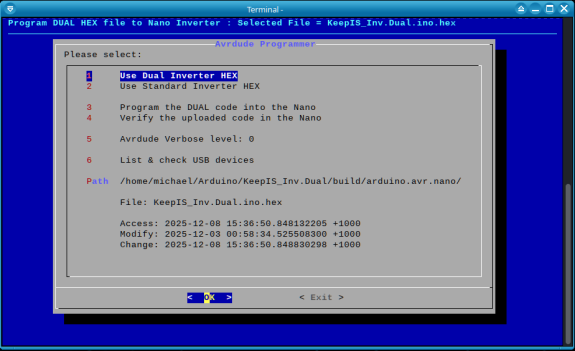
Hi rob, I use a bash GUI package called dialog. It comes pre installed in a lot of distros. I tested Ubuntu and it was missing, about 10 seconds to install with atp.
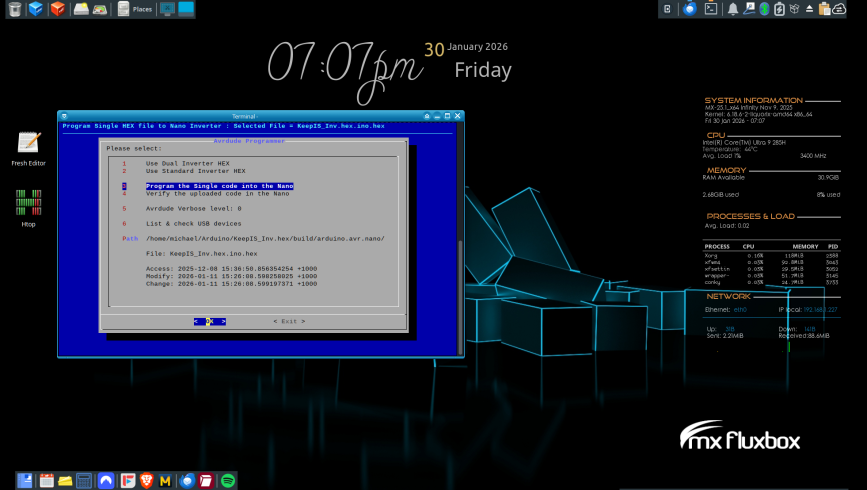
This script is used to program the Nano via an USBasp programmer using avrdude, it has a launcher in my Main menu under my Programming TAB.
Obviously there are many ways to make this better, but it works perfectly for me, and for a script that's all that matters at the moment, the avrdude programming state and progress are shown in the same terminal running the script, once avrdude terminates it returns to the GUI Menu.
Mouse and keyboard all select correctly.
From memory there were quite a few demo scripts included with the install.
Description: Displays user-friendly dialog boxes from shell scripts This application provides a method of displaying several different types of dialog boxes from shell scripts. his allows a developer of a script to interact with the user in a much friendlier manner.
The following types of boxes are at your disposal: yes/no Typical query style box with "Yes" and "No" answer buttons menu A scrolling list of menu choices with single entry selection input Query style box with text entry field message Similar to the yes/no box, but with only an "Ok" button text A scrollable text box that works like a simple file viewer info A message display that allows asynchronous script execution checklist Similar to the menu box, but allowing multiple selections radiolist Checklist style box allowing single selections gauge Typical "progress report" style box tail Allows viewing the end of files (tail) that auto updates background tail Similar to tail but runs in the background. editbox Allows editing an existing file
case $exit_status in $DIALOG_CANCEL) clear exit ;; $DIALOG_ESC) clear echo "Program aborted." >&2 exit 1 ;; esac
case $selection in 1 ) clear filePath="$DualPath" avrFile="$avrDual" HexSelect="DUAL" ;; 2 ) clear filePath="$SingPath" avrFile="$avrSing" HexSelect="Single" ;; 3 ) clear if [ -e $filePath$avrFile ] ; then $avrCmd -N -c usbasp -p m328P -P usb -b 57600 -F $vbl -V -U flash:w:$filePath$avrFile:i read xx fi ;; 4 ) clear if [ -e $filePath$avrFile ] ; then $avrCmd -N -c usbasp -p m328P -P usb -b 57600 -F $vbl -U flash:v:$filePath$avrFile:i read xx fi ;; 5 ) case $vblcnt in 0 ) vbl="-v" vblcnt=1 ;; 1 ) vbl="-v -v" vblcnt=2 ;; 2 ) vbl=" " vblcnt=0 ;; esac ;; 6 ) clear echo "Checking VanOoijen USBasp programmer in USB list:" echo "" lsusb | grep "Van Ooijen" echo"" echo "ID 16c0:05dc should be shown above, if bank then USBasp device not found or not plugged in." echo "" echo "Listing all USB devices:" echo "" lsusb echo "" echo "!!!! Unplug the USB programmer, wait a few seconds then plug it back in." echo "" echo "Press any key to continue." read xx echo "Checking connected USB devices:" echo "" sudo dmesg | tail -f | grep USB echo "" echo "The Output above should show something like the following:" echo "" echo "[4895.789204] usb 3-1.3: new low-speed USB device number 16 using xhci_hcd" echo "[4895.904154] usb 3-1.3: New USB device found, idVendor=16c0, idProduct=05dc, bcdDevice= 1.02" echo "[4895.904166] usb 3-1.3: New USB device strings: Mfr=1, Product=2, SerialNumber=0" echo "[4895.904169] usb 3-1.3: Product: USBasp" echo "" echo "Any Key to continue" read xx esac done
. Edited 2026-01-31 19:28 by KeepIS
Posted: 08:07pm 31 Jan 2026 Copy link to clipboard
lew247 Guru
I said I'd never move from Windows at all I've stuck with it from the DOS days, and still some of the dos commands do things easier than windows
I installed Windows from 3 upwards and while people moaned about it, I stuck with it, got it running the way I wanted and sorted problems by using Google and others who had similar problems
no AI then*
Windows 11 I had working for over a year, no real problems, it did what was needed What I didn't like was how "slow" it could be and the constant updates and nag screens and the Constant adverts
It was the adverts that did it for me
I did research, got Zorin 18 paid for the Pro version (not needed but I wanted to) Installed it never having used Linux before
It has several desktop looks so I have one that "looks" similar to Windows, I have a file explorer that looks and acts like the Windows version I have not come across any problems that I have no been able to solve easily by asking Gemini or ChatGpt and I don't use Windows anymore now
I did have to install Virtualbox so I could run Windows in it, ONLY because one of the ham radio applications will not run under Linux, not with Wine or Bottles
No adverts at all on the OS, no adverts on the browser I just changed the dns to use adblock.dns.mullvad.net Just to block ads and trackers, works great* I do not need adblock in browsers or anything and no VPN needed.
I can honestly say while my "mind" misses Windows, as I've been used to it and DOS for over 30 years now, I can't see myself going back to it
Yes it's easier if you just want to install it and no nothing else, BUT you have those bloody ads., constant updates, lots of fixes to do to stop it crashing or hanging at times, but once you get them sorted its great
Will I go back to Windows? Probably not, I have no intention to at the moment, this works great
I am at the moment syncing my Onedrive folder to this machine, took me a bit of instruction from AI to figure out how to do it as I CBA to read manuals.
Edit: The only reason I started on my Linux journey was actually this thread Edited 2026-02-01 06:08 by lew247
Posted: 11:11pm 31 Jan 2026 Copy link to clipboard
KeepIS Guru
Thanks for sharing the journey, btw I've been a full-call advanced Amateur (HAM) for over 50 years, not doing much these days, so many other tasks, hobbies and life challenges keeping me busy, and so little time.
I liked Windows and never really had a problems with any version, even Win-11 was fine, it had always been rock solid on my hardware, and I knew most of the instability issues were often not Windows itself.
However there has been a massive change, especially over the past few years, that was when I locked down the OS system so that it could not upgrade or offer a core/system change, only security patches were offered for install.
The telemetry and blatant personal data leakage became so insidious and threatening, that I had finally had enough of trying to block it, so I removed the P.O.S
FYI. The desktop screen capture of "Monitor 1" that I posted, shows mx fluxbox on the image, but that is a desktop image from an older version of MX fluxbox, I really liked the image "as is" so I used it.
I'm using MX-25.1_x64 Infinity ahs (advanced hardware support) which has now upgraded to the latest stable release Kernel, just below the latest release candidate.
The Linux desktop numbers are only small, but they are increasing a lot faster now, hopefully for the better BUT you never know what evil is planning, and it is. . Edited 2026-02-01 09:13 by KeepIS
Page 5 of 7
The Back Shed's forum code is written, and hosted, in Australia.