
| Menu | JAQForum Ver 19.10.27 |
| Menu | JAQForum Ver 19.10.27 |
Forum Index : Microcontroller and PC projects : PicoMite V6.02.01 release candidates
  Page 5 of 8 Page 5 of 8   |
||||||
Lyle, what version are you running? I've made a change to homing for you to test. |
||||||
G'day Peter, Thanks for looking in to it, much appreciated. Running PicoMiteRP2350 standard edition. Regards, Lyle. |
||||||
|
||||||
Hi Peter, I am using a ST7796S on a USB RP2350A Edition V6.02.01RC6. I am loading a jpg to the screen. 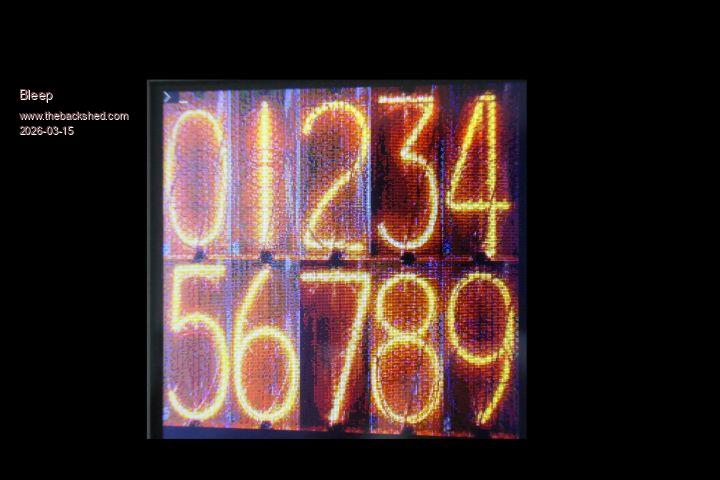 I then Blit Read each digit, I then Blit Write the digits to create a nixie display, but what I get back is 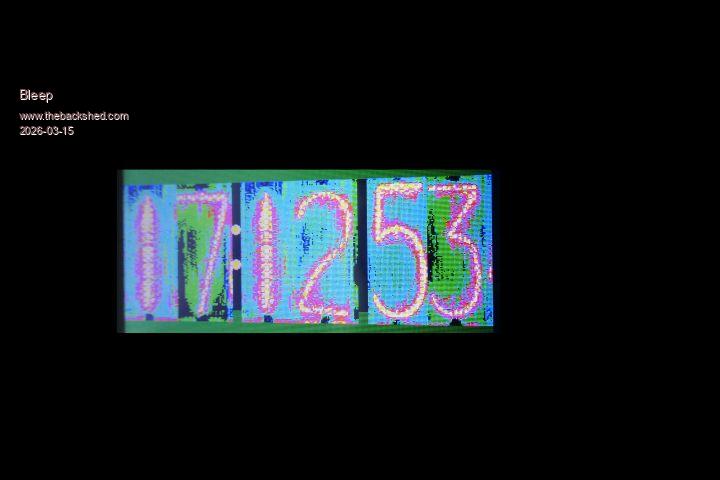 I was told, maybe wrongly, that Blit Read preserves the colur depth? the manual says RGB888. I have also tried the dithered load, for 255 colours, I get different, but similar results. I think I have bridged D1 and J1, it's now difficult to check :-( would I get colour distortion like this if I hadn't? Or is this something that should work? Regards Kevin. |
||||||
The question has probably been asked before ... is there a method to suppress the NTP messages like ntp address 192.168.0.254 got ntp response: 14/03/2026 20:40:18 option web messages off doesn't do the trick ... |
||||||
Kevin Just tested a st7796S and it works fine. Try this. GUI TEST LCD PANEL ctrl-C blit read 1,0,0,mm.hres\2,mm.vres\2 blit write 1,mm.hres\2,mm.vres\2 If you post the jpg and your code I can test with that as well Edited 2026-03-15 05:56 by matherp |
||||||
Hi Peter, doing the test you suggest I get the following, so the colours have changed. 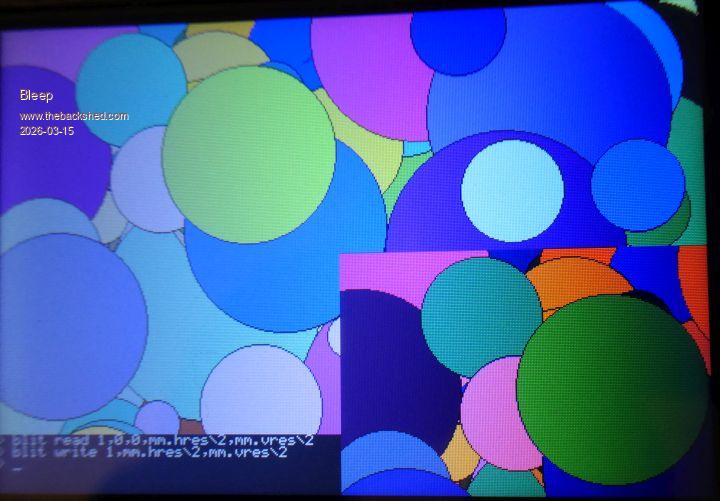 One subtilty with my set up, is I am using the LCD on it's own SPI, I did this to get the maximum speed out of the disply. OPTION SERIAL CONSOLE COM2,GP8,GP9 OPTION SYSTEM SPI GP18,GP19,GP16 OPTION LCD SPI GP26,GP27,GP28 OPTION SYSTEM I2C GP20,GP21 OPTION FLASH SIZE 4194304 OPTION COLOURCODE ON OPTION KEYBOARD ES, 0, 0, 170, 100 OPTION CPUSPEED (KHz) 378000 OPTION LCDPANEL CONSOLE 7,,, 50 OPTION DISPLAY 40, 80 OPTION LCDPANEL ST7796S, LANDSCAPE,GP12,GP13,GP14,GP15 OPTION LCD BACKLIGHT 50 OPTION TOUCH GP17,GP7 GUI CALIBRATE 0, 3944, 3891, -1289, -857 OPTION SDCARD GP22 OPTION KEYBOARD REPEAT 170,100 OPTION AUDIO GP10,GP11', ON PWM CHANNEL 5 OPTION RTC AUTO ENABLE OPTION MODBUFF ENABLE 200 OPTION DEFAULT FONT 7, 1 Could this be causing a problem? Files you requested. nixie (2).zip This is very much a cobbled together piece of code, just for testing. As a complete asside, I have been finding, that the OPTION LCD CONSOLE keeps loosing the 'Noscroll" paramater, (as above), I always put it in for this screen, but after some time, it vanishes? Regards Kevin. |
||||||
Blit appears to get the colours right with ST7796S on SYSTEM SPI. Clear And the output.Option base 0 Dim a$(2) = (" Blues"," Greens"," Reds") Dim integer b, c, d, n For b=0 To 2 n=0 For c=0To 255 d=c<<b*8 Line 9+c,50*b,9+c,50*b+50,1,d If d=Pixel(9+c,60*b) Then Inc n Next Print n;a$(b) Next Blit read 1,0,0,MM.HRES\2+20,MM.VRES\2 Blit write 1,MM.HRES\3,MM.VRES\2 Pause 500 Print "...And after BLIT" For b=0 To 2 n=0 For c=0To 255 d=c<<b*8 If d=Pixel(9+c+MM.HRES\3, 60*b+MM.VRES\2) Then Inc n Next Print n;a$(b) Next Blit write 1,0,0 Print "...And after BLIT back to the origin" For b=0 To 2 n=0 For c=0To 255 d=c<<b*8 If d=Pixel(9+c, 60*b) Then Inc n Next Print n;a$(b) Next CLS Blit write 1,0,0 Print "...And after CLS then BLIT back to the origin" For b=0 To 2 n=0 For c=0To 255 d=c<<b*8 If d=Pixel(9+c, 60*b) Then Inc n Next Print n;a$(b) Next End 32 Blues 64 Greens 32 Reds ...And after BLIT 32 Blues 63 Greens 32 Reds ...And after BLIT back to the origin 32 Blues 64 Greens 32 Reds ...And after CLS then BLIT back to the origin 32 Blues 63 Greens 32 Reds > option list PicoMite MMBasic RP2040 V6.02.01b7 OPTION SYSTEM SPI GP18,GP19,GP20 OPTION SYSTEM I2C GP14,GP15 OPTION FLASH SIZE 16777216 OPTION COLOURCODE ON OPTION PICO OFF OPTION CPUSPEED (KHz) 378000 OPTION DISPLAY 55, 133 OPTION LCDPANEL ST7796S, RLANDSCAPE,GP25,GP17,GP16,GP24 OPTION TOUCH GP21,GP23 GUI CALIBRATE 0, 235, 70, 1301, 841 OPTION SDCARD GP22 Edited 2026-03-15 08:33 by phil99 |
||||||
phil99 Please test with the latest RC otherwise the result is meaningless. Kevin. Your program works perfectly with RC6 and a genuine ST7796S. Edited 2026-03-15 08:35 by matherp |
||||||
There was a mistake in my test. While you were posting I repaired it and edited my previous post. Blit works properly on System SPI. |
||||||
Yes: if the display has a touch controller because its CS isn't being held high |
||||||
Perhaps try a pullup on LCD_DO - MISO - GP28 (3k3 to 10k) and perhaps on T_CS - GP17, though I expected Option Touch to have done the trick there. A command line colour counter without BLIT to determine if the issue is related to LCD_DO - MISO - GP28. > clear : dim a$(2)=(" Blues"," Greens"," Reds") : dim integer b, c, n Make sure the second line isn't wrapped on to the next line.> for b=0 to 2:n=0:for c=0 to 255:pixel 9,9,c<<b*8:if pixel(9,9)=c<<b*8 then:inc n:endif:next:?n;a$(b):next 32 Blues 64 Greens 32 Reds > OPTION DISPLAY 55, 120 or more works for me. If you are using the LCD as console you may need OPTION LCDPANEL NOCONSOLE first. This and previous code tested on RC6. Edited 2026-03-15 13:55 by phil99 |
||||||
Hi Peter, Thanks for your help, putting the LCD on the System SPI now works correctly, unnoticable speed diffence, but maybe that would change if I was streaming music or similar from a SD? Might be worth mentioning in the manual, that using the dedicated LCD SPI, with touch, might cause subtle problems with reading this display? While doing the hardware change, I was able to check that I have bridged D1 and J1. Thanks again. Regards Kevin. Edited 2026-03-15 22:03 by Bleep |
||||||
There is no speed advantage to using LCD SPI. It is specifically needed for the buffered drivers which update the display using the second processor and therefore need a dedicated SPI channel. This is where you would see a speed difference when also using SD. But, without a buffered driver, you are single threaded on core 1 so you would be waiting for SPI whichever channel. |
||||||
Hi Peter, I've ported BLIT RESIZE to MMB4L (thanks) and have a couple of observations for you: 1. I think you can hoist calculation of x_step and x_fp out of the for (int y = ...) loop. 2. Would it not make sense to allow the source of a BLIT RESIZE to be one of the blit buffers ? In general the BLIT commands are a bit of a hodge-podge, some operate on BLIT buffers and some only operate on N, F and L. Best wishes, Tom |
||||||
One more little tweak which will be in the 6.02.01 firmware for the RP2350 https://youtu.be/9he7CwQp7rU Hidden line removal in a wireframe 3D model is more complex because the model only contains edges and vertices, not faces. The system must determine which parts of each line are hidden behind other lines or surfaces when viewed from a certain angle. This often requires calculating many intersections between lines and surfaces and sometimes splitting lines into visible and invisible segments, which is computationally complicated. In contrast, hidden face removal using backface culling with a solid model is simpler. Each surface (face) has a normal vector that shows which direction it faces. By comparing this normal with the viewer’s direction, the system can quickly determine whether the entire face is pointing away from the viewer. If it is, the face can simply be ignored (culled) without further calculations. In summary: Wireframe hidden line removal: Must check visibility of many line segments and handle partial visibility → complex. Solid model backface culling: Quickly discard whole faces based on their orientation to the viewer → much simpler. |
||||||
What about using the b parameter in a framebuffer copy? if possible, I use that quite a lot? |
||||||
"What about using the b parameter in a framebuffer copy? if possible, I use that quite a lot? " Runs on the second processor but blocks any SDcard or touch access while it is running |
||||||
Peter, Yesterday I tested rc6 on a variety of programs, and there is one that refuses to work. PicoFrog (attached). Up to rc2 this program runs flawless, at rc4 and rc6 the sound is interrupted, the game is slow, and the game freezes now and then. There is however no fault (error) message. RAM usage seems normal (memory). So I have no idea what causes it. But it changed between rc2 and rc4. This happens on RP2040 VGA running on VGA design 2. But also on Game*Mite with RP2350. So it is probably in all versions. picofrog6_b9_2.zip Volhout Edited 2026-03-16 17:44 by Volhout |
||||||
This because of a change in PLAY SOUND to move calculation of the tones out of the H/W interrupt routine. The code in frogger is massively cpu intensive in the way it issues a sound command every 4mSec. I've shortened the sound pre-buffering that should fix this but it means the firmware is doing more work. Attached RP2350 version to try. PicoMite.zip |
||||||
| Page 5 of 8 |
||||||
 |
The Back Shed's forum code is written, and hosted, in Australia. |


