
| Menu | JAQForum Ver 19.10.27 |
| Menu | JAQForum Ver 19.10.27 |
Forum Index : Microcontroller and PC projects : PicoMite V6.02.01 release candidates
  Page 6 of 8 Page 6 of 8   |
||||||
Hi Peter, That works on 2350 Game*Mite. Anything specific I should test for additionally? Volhout |
||||||
|
||||||
Peter, Is it possible to get a VGA version. I have not HW to test the normal version until tonight. Volhout |
||||||
|
||||||
 Volhout |
||||||
G'day Peter, Thanks for the modifications to the stepper commands, have now had a chance for some further testing and have observed the following: X axis uses 4 step homing every time so far. Y axis uses 2 step homing ~95% and works fine, then ~5% uses 4 step homing and fails, doesn't move far enought to clear the limit switch. Can you clarify if this is correct, the X/Y axis are quite different on this machine: X axis is 166.667 steps/mm 150mm/min max Y axis is 400 steps/mm, 600mm/min max Would this make them home differently? This could also be an effect of contact bounce or noise. Would you also consider the possibility of reversing the order of the G28 command, Z-Y-X, this ensures the Z axis is clear before any other moves. This can be accomplished using 3 G28 commands but is a trap for the unwary. Regards, Lyle. |
||||||
Lyle, please try this: PicoMite.zip Stepper_Reference.pdf Fixes G28 axis order, fixes homing to use mm backoff rather than steps, adds parameter to stepper axis to specify backoff distance - see manual Defaults applied by axis initializer: enable_pin: not used (0xFF) stepper.c:2813 dir_invert: 0 / false stepper.c:2829 steps_per_mm: 200.0 stepper.c:2814 max_velocity (internal): 100.0 mm/s stepper.c:2815 max_velocity equivalent in AXIS units: 6000 mm/min (because AXIS input is mm/min and gets divided by 60) stepper.c:3684 max_accel: 500.0 mm/s^2 stepper.c:2816 home_backoff_mm: 3.0 mm |
||||||
Thanks Peter, Will test this in the morning and report back. Regards, Lyle. |
||||||
G'day Peter, Getting closer Testing this morning has shown: G28 now respects the "backoff" parameter in the axis definition, but only on the first reversing phase of homing. X axis is still first, regardless of order ie: G28 X1 Y1 = G28 Y1 X1 X axis always uses 4 phase homing Y axis uses 2 phase homing ~95% and then 4 phase ~5%, however it did clear the limit switch this time. Still trying to determine a pattern for the Y axis changing, will investigate further. Do you consider the 4 phase homing procedure is really necessary, I have not seen it used on anything but the largest machines where the sheer momentum is a problem. Coming up to the switch at ~50% (or limit to ~10mm/s), pause for ~250ms and reversing at ~5% (~1mm/s) appears to be the usual routine. Would it be possible to post / PM a copy of the latest stepper.c file?, the ZIP from GITHUB hasn't changed since a first download several days ago, assuming I'm looking in the right place. It may help to understand the actions of the hardware if I can "try" reading the software driving it. Thanks again. Regards, Lyle. |
||||||
Lyle The order is always z,x,y in the new firmware. I don't think gcode has the concept of parameter ordering. What happens if you just use G28, no parameters? This is the firmware you are running stepper.zip I've updated the software to be 2 phase only so test this PicoMite.zip New firmware stepper.zip Edited 2026-03-17 18:27 by matherp |
||||||
G'day Peter, Thanks for the update and the stepper.c files, this has cleared up some confusion. The new 2 phase G28 procedure has been rock solid in testing so far, excellent Unsure if the limit switch debounce routine has contributed but it certainly can't hurt, I wonder if this was the problem with the Y axis all along, although it was very consistent.Using G28 with no parameters causes an error, this is correct if my interpretation of the code is correct. I had expected the G28 axis order to be Z-Y-X. As you mention, in stepper.c it is Z-X-Y, this machine does not use Z so not seeing a change in order is correct, my mistake. Being able to use G-Code with MMBasic + PicoMite has allowed this machine to be independant of a PC, with the direction of MS/Windows these days and the gradual failure of many of my 98/XP/WIN7 machines, I think a few other machines in the workshop will go this way. Workload depending I will do some further testing on this machine and hopefully hook the PicoMite up to the 3 axis CNC for some testing on it as well. Many thanks for the effort you put into this, going through stepper.c has shown the complexity behind what seems quite simple on the surface. Regards, Lyle. |
||||||
Lyle Please could you test this. Should now home all configured axes with G28 (no parameters) PicoMite.zip |
||||||
Peter, Could you please undo the changes in RC4/RC6, where calculations where taken out of the HW interrupt. The earlier versions had a nice soft transition to the next sinewave. rc6 does not have that anymore. This is a varying frequency tone on rc2, using Frank 's program. Nice sine waves with smooth varying tones. Do Play volume 100,100 For z=1 To 4 For n=980 To 1020 Play tone n,n Pause 2 Next For n=1020 To 980 Step -1 Play tone n,n Pause 2 Next Next z Play volume 0,0 'Play stop Pause 200 Loop RC2 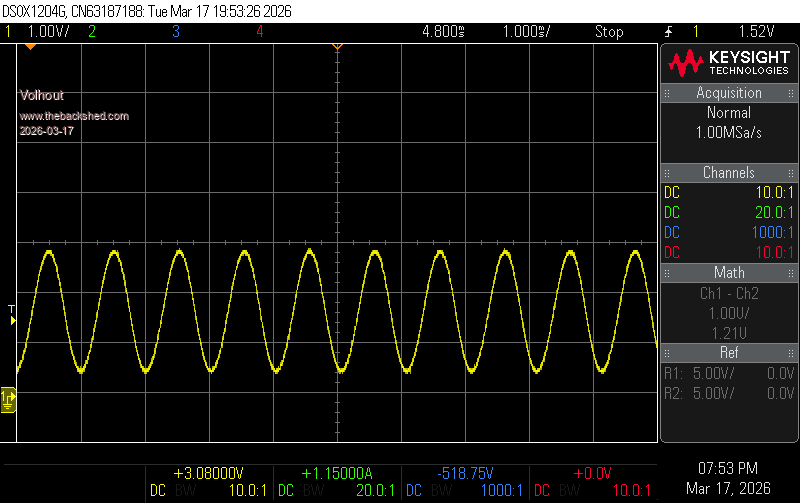 This is the signal of the same program running rc6 (the improved version you fixed for frogger). RC6 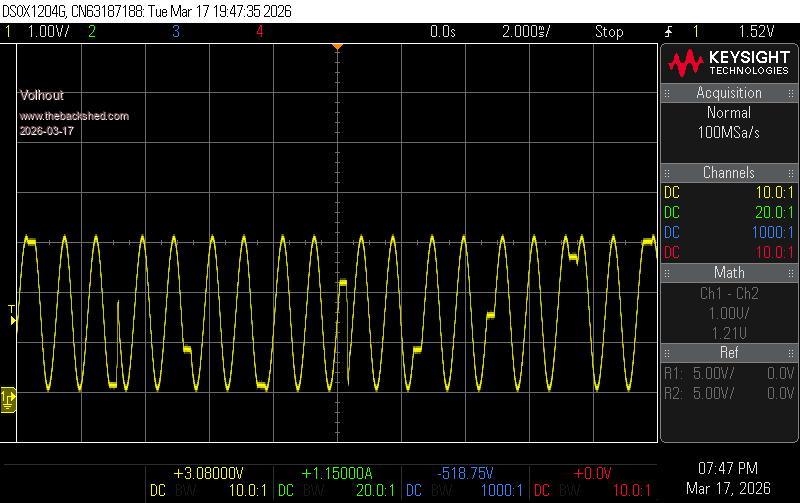 The change is definitely a step back. Please undo this change. Volhout Edited 2026-03-17 22:38 by Volhout |
||||||
No: I'll fix the new code - there was a reason for the change! What version do you want to test? Edited 2026-03-17 22:44 by matherp |
||||||
Hi Peter, RP2040 microcontroller version, or RP2040 VGA version. Volhout Edited 2026-03-17 22:56 by Volhout |
||||||
Hi Peter, Tested latest version and can confirm: G28 (no parameters) - homes all configured axis G28 x or G28 x1 - homes specified axis only G28 x y or G28 x1 y1 - homes x and y axis Also: G0, G1, G2, G3, G4, M3, M5 tested and working ok so far on a 2 axis machine. Tests for G90, G91, G92 to follow. A further suggestion might be an E-stop input for the system, once G28 is running there appears to be no way to stop it except a reset / power cycle unless it times out. CTRL-C doesn't work either, at least from the terminal. Just an idea. This is looking very useful, thanks again. Regards, Lyle. |
||||||
|
||||||
Peter, Does not work, the program stops at the first update of PLAY TONE. One sinewave is shown, then nothing after. Volhout |
||||||
|
||||||
Hi Peter, That was confusing... the previous was a microcontroller binary, this is a VGA binary. Getting closer, there are no irregular transitions between the sine wave changes. But the VOLUME 0,0 is very abrupt, not as smooth as in rc2. 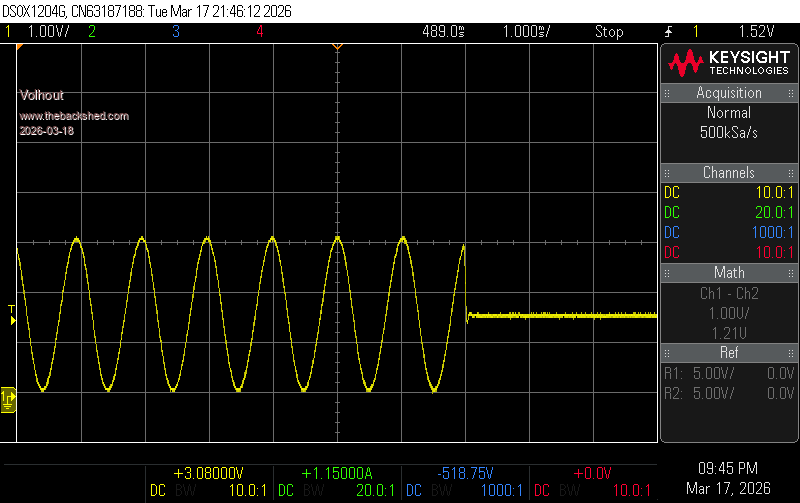 Volhout |
||||||
| Page 6 of 8 |
||||||
 |
The Back Shed's forum code is written, and hosted, in Australia. |


