
| Menu | JAQForum Ver 26.09 |
| Menu | JAQForum Ver 26.09 |
Forum Index : Microcontroller and PC projects : PicoMite V7.00.00b8 and release candidates
  Page 6 of 7 Page 6 of 7   |
||||||
G'day Peter / Phil, I am seeing the same symptoms on the PicoMiteHDMIBTH V7.00.00RC3 as Phil. As suggested, removing the CDC device and unplug / plug in the USB drive restores normal operation. The copy then transfers as normal. After a successful transfer the HELP.txt file is all there but will only list to "FRAME" directly, however HELP ZMODEM* works so it must be a limitation of the list command. (598559 bytes) Regards, Lyle. |
||||||
Thanks for the confirmation Lyle, I can also confirm exactly same. Regards Phil |
||||||
Peter, just trying to get both, the internal clock and the RTC clock as close as possible to NTP time. When setting OPTION MILLISECONDS ON it seems that the millisecond counter is never set to 0 when updating the time. The manual says: "The milliseconds counter is set to zero whenever the time is updated using the TIME command, WEB NTP command or RTC GETTIME command." Whatever I use to set the time, the milliseconds counter always just seems to count up continuously. Can be confirmed by measuring the elapsed time for the time-setting command and adding the milliseconds to the start value. Environment: PicoMitePC3 MMBasic USB RP2350B Edition V7.00.00RC3 Gerald |
||||||
I'm modifying the code so that web ntp will set the accurate milliseconds - the information is in the ntp packet. RTC AUTO will then only update every 24 hours after the last web ntp. This should give clock accuracy to within 10 or so milliseconds |
||||||
Thanks Peter, the ntp solution sounds great. But it also concerns TIME$="..." here the millisecond is also not reset. TBH, I found no function that actually resets milliseconds. Gerald |
||||||
All will now reset it to zero except ntp which will set it correctly |
||||||
Does anyone know a way (without relying on 'ON ERROR') to check for the existence of C: drive? There is a command: MM.INFO$(SDCARD) for the B: drive...I couldn't find anything similar for C: ?Also a possible bug, on a fresh boot with no USB drive plugged in, I get an unexpected result ?MM.INFO(EXISTS DIR "C:/") 1 (PC2 version 7 RC3 latest) Regards Phil PS When plugging and unplugging USB drives, the following messages are displayed, so I'm guessing there might be a way to 'know' it somehow > USB Flash Drive Connected (addr 2) Regards Phil> USB Flash Drive Disconnected Edited 2026-10-24 16:21 by flip |
||||||
V7.00.00RC5 is now available on https://github.com/UKTailwind/PicoMite/releases/tag/PicoMite-V7.00.00RC5 RC5 is RC3 with another round of reports answered, most of them found while porting V7 to the Colour Maximite 2; One change can alter what an existing program computes: a minus sign in front of a value now applies after the powers that follow it, so -2^2 is -4, as in mathematics (write (-2)^2 for the old result; see Changed since RC3: -2^2 is -4), MATH RANDOMIZE now seeds the standard Mersenne Twister, so a given seed gives other numbers than before. A PS/2 keyboard's Print Screen key saves the screen. Ctrl-\ saves the display wherever Print Screen does (the command prompt, the editor and the file manager), from any keyboard or terminal. It is the byte &H1C, which a serial or telnet terminal can send where it has no Print Screen key. OPTION PRINTSCREEN ON lets a running program's user save the display too: Print Screen or Ctrl-\ saves it after the statement that is running when the key arrives, or at once during PAUSE and INPUT. While it is on, the program never receives those two keys (INKEY$ and INPUT do not see them). It is a temporary option for the program to set: it is off at every RUN and when the program ends, and OPTION PRINTSCREEN OFF turns it off. MM.ERRNO and MM.ERRMSG$ are kept. Not on the PicoMiteRP2040MIN. A program with a /* or */ that is not followed by a space or the end of the line (a /***** banner for example), that is not the first thing on its line (IF x THEN /*, after a colon or a label), or a /* inside a SUB or FUNCTION, is now refused when it is loaded, as the manual has always required. I2C READ, SPI READ and ONEWIRE READ (and their second-channel and slave forms) receive into a structure member, as on the CMM2: a string member, up to its own LENGTH, or a number, alone or in a list (SPI READ 2, r.v, r.f). A whole structure, or a member of an element of a structure array given alone, is still refused. Not on the PicoMiteRP2040MIN, which has no structures. The sprite commands are mended throughout: the collisions found after SPRITE MOVE, SPRITE SWAP, SPRITE WRITE and SHOW SAFE of a sprite that is showing, SPRITE COPY, SPRITE LOAD, SPRITE LOADBMP and SPRITE(B). Compiled programs (OPTION COMPILE ON) no longer differ from the interpreter in seven places. An ON ERROR set inside an interrupt routine no longer leaks into the main program, a SUB or FUNCTION that stopped with an error can be called again at the prompt, and CONTINUE after a break inside a SUB keeps its local variables. A BMP file that cannot be read no longer leaks memory or leaves its file or buffer in use. Smaller faults in MATH, ARRAY, STR2BIN, FORMAT$, LINE PLOT and the WebMite's TCP server and telnet are mended On the USB host builds a file copied from the USB flash drive while a USB serial adapter is plugged in is no longer damaged, and a low-speed mouse plugged into a keyboard's own hub no longer stops every USB device WEB NTP sets the clock to within a few milliseconds, and OPTION RTC AUTO reads the RTC once a day, so its whole seconds no longer overwrite a time set from the network. In MODE 1 the tile colours stay right through transparent text, BLIT and, on HDMI, FRAMEBUFFER LAYER. On the PicoMiteHDMIWEB, PicoMiteHDMIBTH and PicoMitePC3, ADC RUN no longer shares a DMA channel with the radio. MM.INFO$(USBDRIVE) gives the state of the C: drive as MM.INFO$(SDCARD) gives B:'s: "Ready" when a USB drive is plugged in and mounts, "Not present" when none is, and "Not Configured" on the builds that have no C: drive. Like SDCARD it never stops with an error, so a program can test it before it uses C:. |
||||||
So Ctrl-\ should do a print screen when a program is not running? That doesn't work on PicoCalc. \ is printed but nothing happens. |
||||||
Probably the PicoCalc keyboard firmware doesn't generate the correct code 0x1C |
||||||
G'day Peter, The Print Screen function is a welcome addition and will be a great help while debugging, I wonder if you would also consider the following as a debugging tool in a future build: The ability to re-direct the text output from the list and status commands to a COM port or open file, IE: Stepper status Bluetooth Status Option list List pins Files A thought would be to add a switch to the EXECUTE command or similar to make it work for that command only. I do not believe this is currently possible and a recent thread by PilotPirx has jogged the memory. As usual I have no idea how easy or mind bendingly complicated this could be. I have once again tested RC5 with the following setup and all working simultaneously: Modified "PUMP_DEMO" program running Multi-touch HDMI monitor On screen keyboard Music playing from USB stick to bluetooth speaker USB Wireless keyboard / mouse combo Bluetooth keyboard / mouse combo Bluetooth serial USB-CDC looped back Tera-Term serial console And so far so good  Is it normal for the RTC to be reset to 10:00 01/01/2000 on a firmware update even if it has a valid datetime set? Next test is Bluetooth + Stepper System when time allows. Thanks again for the time put in to what is an amazing system  Regards, Lyle. |
||||||
Hello Peter, Currently the picomite can send Sony IR protocol commands only. Is it possible to add sending of NEC protokoll commands too ?This would be great because the protocol is very common, transfers 8 bit data and allows also Integration of classic infrared devices into e.g. a smart home etc. which cannot be controlled via control network functions, such as televisions, air conditioners, fans, projectors or timers etc. Maybe in a next version of MMBasic:… Greetings Arne |
||||||
There are links to Subs for various IR protocols on FotS, including NECsend. Edit. Also see: PicoMite_Supplementary_Manuals-7.00.00RC3\BITSTREAM_User_Manual.pdf Example 2: NEC IR Protocol with AND Logic Edited 2026-10-25 18:12 by phil99 |
||||||
Peter, Thanks for the new features! A couple of things with USB on PC2 with RC5 1) Minor (Petty) issue. > ?MM.INFO$(USBDRIVE) Note the 2 prompts(also in screenshot below). It's a bit slow to respond after pressing Enter (could be because of checking the drive?)...reported just in case it hints at another problem.Not Present > > 2) A problem I have with Touch I suspect may have always been there, and could be in my setup - I have the 7" 1024x600 Touch module. Until RC5 It did 2 connects with a single disconnect in between...I didn't report it as net effect was no problem. With RC5 it does 2 disconnects, rendering Touch inoperable as follows(Using the AMAZING PrintScreen feature!!): 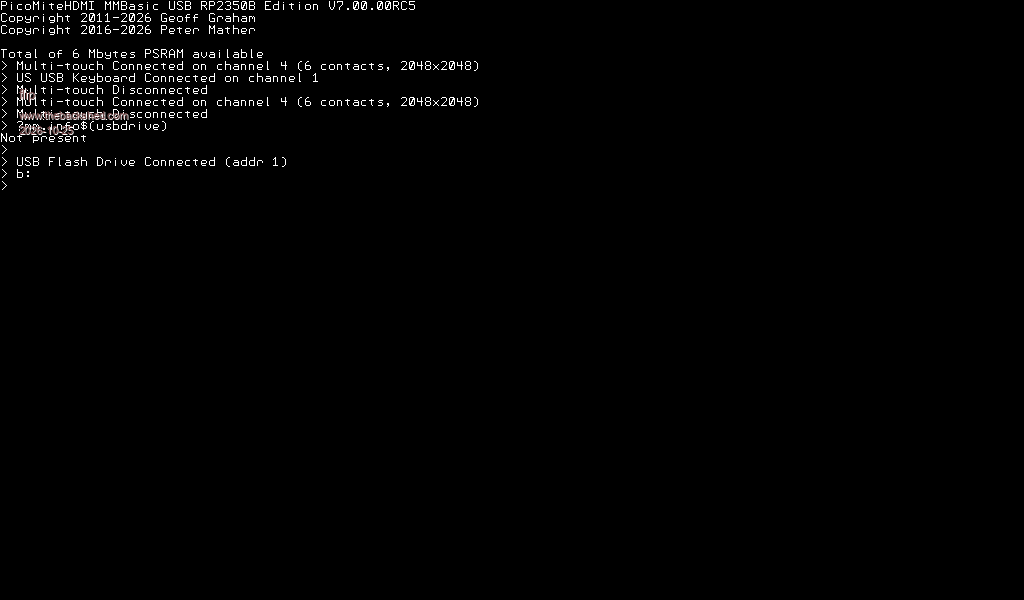 (only tiny issue is that the forum doesn't accept bitmap so had to convert to PNG)...this is very minor. (only tiny issue is that the forum doesn't accept bitmap so had to convert to PNG)...this is very minor.Overall I am continually amazed ... thanks Peter Regards Phil |
||||||
On many non-US/UK keyboards, Ctrl-\ is an "unfortunate" combination. For instance, on a German (DE) keyboard, the '\' character can only be accessed by pressing Alt Gr in combination with the 'ß' key. This key is located at the top right, next to the '0' key. It might be possible to send the Ctrl-\ key combination (byte &H1C) as a "soft key" or macro using certain terminal programs, such as TeraTerm (could someone explain how to do that?), but this wouldn't help when using a German keyboard connected directly to a PicoMite via PS/2 or USB. Given this, Ctrl-P might actually be a better and more intuitive choice — especially since this combination is now very commonly used to trigger the print function or the print menu. Regards, bfwolf. |
||||||
PicoMitePC3 test build: saving the screen as PNG PicoMitePC3V7.00.00RC5.zip This build adds PNG as an alternative to BMP for saving the screen. SAVE PNG SAVE PNG file$ [, x, y, w, h] Saves the screen, or the area x, y, w, h, as a PNG file. The arguments are the same as SAVE IMAGE, except that the width can be any number of pixels. ".PNG" is added if the name has no extension. The file is always a standard true colour (8-bit RGB) PNG, compressed, so it is much smaller than a BMP: 640x480 test screen, 16 colours: BMP 154 KB, PNG 12 KB 640x480 screen of text: PNG about 25 KB (a 24-bit BMP of 640x480 is 900 KB) It takes a little longer than SAVE IMAGE: about 0.6 s against 0.4 s for 640x480 to the SD card. In the 16-colour modes the colours saved are the ones on the screen, including any MAP changes, and a framebuffer layer is included as you see it. Print Screen can save PNG OPTION PRINTSCREEN FORMAT PNG OPTION PRINTSCREEN FORMAT BMP The Print Screen key and Ctrl-\ save the screen as a BMP by default. OPTION PRINTSCREEN FORMAT PNG switches them to PNG. It is a permanent option: it survives a restart, shows in OPTION LIST and is kept by OPTION DISK SAVE. New screenshot names Screenshots are now named from the date and time instead of a number, for example B:/SCREEN_20261025_102910.PNG (on the SD card if there is one, otherwise A:). If the name is already taken, _1, _2 and so on are added rather than overwriting the file. If the clock is not set (RTC or network time), the date starts again at every power-up. Also in this build SAVE IMAGE, SAVE PNG and Print Screen now keep USB, audio and the keyboards serviced while the file is written. Before, a long save could drop a USB device such as a touch controller. Please report - any PNG that will not open, or does not look like the screen (say which MODE, and whether MAP or a framebuffer layer was in use) - save times or file sizes that look out of line - anything odd with Print Screen or Ctrl-\ |
||||||
I know it is a fact of the Picocalc keyboard firmware but, there is no code 1Ch assigned to any keyboard combination. Maybe can use an other combination (CTRL-P = 10h for example). G@bor |
||||||
PicoCalc solved - in the next release ctrl-P is already used in the editor for a locally attached keyboard you can also use the PrtScrn button For German keyboard connected to teraterm etc then the key presses for \ with ctrl held down should also work |
||||||
On German keyboards, the key that corresponds to the '\' key on US/UK keyboards is the '+' key. Does this mean that one must press Ctrl-+ to trigger 'Print Screen' — given that the scan code is what gets evaluated? I suppose that the '+' key on German keyboards generates the same scan code as the '\' key on US/UK keyboards, right? |
||||||
I'm having trouble with an RP2040-PICO-PC. I flashed "PicoMiteHDMIUSBV7.00.00RC5.uf2" and typed "option reset olimexusb" blindly using the USB keyboard. It had always worked before. Now I'm not getting any picture via HDMI.  Has anything changed? I haven't made any changes to the hardware, and it was working fine until the update. Frank |
||||||
| Page 6 of 7 |
||||||
 |
The Back Shed's forum code is written, and hosted, in Australia. |


