
| Menu | JAQForum Ver 19.10.27 |
| Menu | JAQForum Ver 19.10.27 |
Forum Index : Microcontroller and PC projects : PicoMite V6.02.01 release candidates
  Page 7 of 8 Page 7 of 8   |
||||||
|
||||||
Lyle I've added a H/W estop as requested (See the INIT command in manual). I've also tightened up some validation. Please could you test this PICORP2350 version. Thanks PicoMite.zip Stepper_Reference.pdf |
||||||
G'day Peter, New version loaded but no luck getting the E-Stop pin parameter to work. > run [8] Stepper init 0.05,16,GP11 Error : Syntax: STEPPER INIT [arc_tolerance] [,buffer_size] [,estop_pin > Works OK with: Stepper INIT Stepper INIT 0.05,16 Just to clarify, the E-Stop input is active low, does this mean: A: The machine will stop when the input is low? B: The input has to be low for the machine to run? Whilst B is strictly correct for an E-Stop input, most systems like this use A to save headaches when getting things setup. Thankfully the switch has spare NO and NC so either way will work. Regards, Lyle. |
||||||
While you are awaiting the correct answer, an active low interrupt is usually triggered on a falling edge. Perhaps you could try SetPin GP11, DIN before Stepper INIT 0.05, 16, GP11 |
||||||
H/W emergency stop should *never ever* depend on any sort of firmware or software to be running. The processor might be smoking and it's GPIO pins melted because both the supply and IO regulators failed. It does happen. You can have a firmware/software *interlock* to prevent things from happening, but not Estop. Someone might be losing their scalp because their hair is wrapped round a motor shaft. It might seem a bit overkill if the machine is only an x-y plotter or cardboard robot arm, but it's a far better way to think about it than assuming that Estop is simply an ordinary signal. |
||||||
Volume down is very smooth !! rc2 volume down worked by changing at the first zero crossing, but this is also possible. 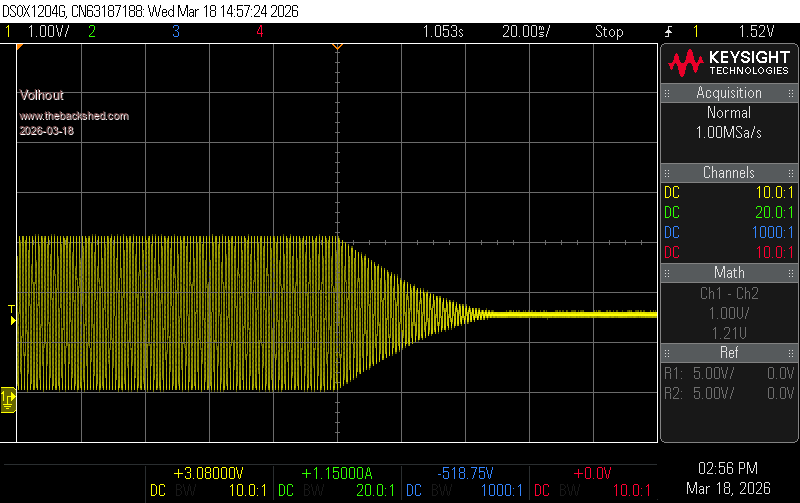 New bug found in Flappy Bird on RP2040 VGA (the tested image). I did not try to go back to find where the change was made. In Flappy bird the top half of the screen is flashing during gameplay. I tried to stop the game, and create a screenshot, but stopping the game hides the problem. So you will have to run it to experience it. This is on an LCD VGA monitor. For convenience I zipped Flappy Bird up. This is on VGA RP2040 (reference design 2). flappyVGA.zip Volhout |
||||||
Lyle The pin is pulled up and should be pulled to gnd to stop. Please try the attahced which should fix the parsing bug PicoMite.zip Harm Will look |
||||||
Possible (older) bug:  https://www.thebackshed.com/forum/ViewTopic.php?PID=252497#252497#252497 bfwolf |
||||||
Demo code with explanation please. Harm, the bug was introduced when I added support for modes 4 and 5 and screen widths <>320 when in 4-bit modes to SPRITE SCROLL. I need to re-engineer this but it will need testing and needs doing as it was legacy code that was never updated when HDMI was introduced. |
||||||
Hi Peter, The E-Stop input parameter now works and the system stops when the input is driven low. There may be an issue with the sequencing of the E-Stop messaging: > stepper gc g28 Homing axes... Error : Hardware E-STOP active E-Stop LOW - Machine stopped > E-Stop HIGH > stepper gc g28 Hardware E-STOP trip - emergency stop Clear E-STOP switch, re-home (G28), then STEPPER RUN > stepper gc g28 Machine will now run > stepper gc g2 x0 y0 i0 j10 f100 E-Stop LOW - machine stopped > E-Stop HIGH > stepper gc g28 Hardware E-STOP trip - emergency stop Clear E-STOP switch, re-home (G28), then STEPPER RUN > stepper gc g28 Machine will now run It looks like the "Hardware E-STOP trip" message is buffered until the next GCode command is received. I am initialising the system within a program and then typing each command at the prompt, if this makes a difference. Phill, Thanks for the thought, gave that a try but no joy. Mick, As you mention, this should NOT be the primary method of stopping the machine, this input should just let the software know the E-Stop has been pressed so it can return to a safe or known state. In some cases this is safer than cutting power to the controller, depends a lot on the application. If I had $10 for every "discussion" I've had over E-Stop systems over the years I'd have retired years ago. Regards, Lyle. |
||||||
See this new thread "PicoMite BASIC STRUCTs" of member Mark https://www.thebackshed.com/forum/ViewTopic.php?PID=252497#252497 He has several examples.. Looks like he meanwhile found some other oddities. Regards, bfwolf |
||||||
V6.02.01RC7 PicoMiteV6.02.01RC7.zip Consolidates various bug fixes/additional features since RC6 Various improvements to the stepper commands Stepper_Reference.pdf Fixes various bugs in PLAY TONE and PLAY SOUND introduced in RC5 Fixes two bugs in stuctures Fixes bugs in SPRITE SCROLL introduced in RC4 Implements wireframe hidden line removal as an option in DRAW3D 3D_Graphics_User_Manual.pdf |
||||||
Peter, RP2040 VGA version is much slower in drawing to screen. Around 10% in petscii robots, but 20% in logic analyzer (many LINE commands, screen refresh rate from 125ms to 149ms)). Volhout Edited 2026-03-19 01:10 by Volhout |
||||||
Please provide a simple benchmark I can use to test. Slower than what version? Nothing has changed in any of that code. Edited 2026-03-19 01:22 by matherp |
||||||
Peter, I will work on a comprehensive test. The overview is as follows: Logic analyzer (LA_25.bas) screen update time MMBasic LA_25 Screen Update 5.09.00 262ms 6.00.01 125ms 6.00.02 121ms 6.01.00 118ms 6.02.00 130ms 6.02.01 rc2 140ms 6.02.01 rc7 149ms 6.01.00 is the fastest one, and above ratio also reflects in the frame rate of petscii robots. With 6.01.00 it hardly ever exceed 100ms (10fps), on rc7 it is around 120-130 ms (8 fps). But these frame rates jitter a lot depending what happens on screen (robots/animations). The logic analyzer is "static" and it is easier to give accurate numbers. Regards, Volhout Edited 2026-03-19 02:00 by Volhout |
||||||
What clock speed are you running? Please post la_25. I only have 24_2 Edited 2026-03-19 02:25 by matherp |
||||||
|
||||||
Traveling atm, Later tonight. But since la and petscii are very different in graphics, maybe it is generic speed. Clock in all cases 252mhz Volhout |
||||||
LA_25 Only difference with LA_24_2 is when framebuffer is defined. LA_25.zip Volhout P.S. as above suggested, maybe a simple benchmark will also show the difference. - Petscii has lots of underlying calculations, and blit from flash. - LA time indication is for the display only (sampling is excluded since dependent on sample rate) and determined by line draw from array data. So completely different, but showing a similar 20-25% difference from 6.01.00 |
||||||
I'm back to 123.7mSec for LA_24_2 with the version just posted Update: now down to 119.8 PicoMiteVGA.zip Edited 2026-03-19 06:06 by matherp |
||||||
| Page 7 of 8 |
||||||
 |
The Back Shed's forum code is written, and hosted, in Australia. |


