Notice. New forum software under development. It's going to miss a few functions and look a bit ugly for a while, but I'm working on it full time now as the old forum was too unstable. Couple days, all good. If you notice any issues, please contact me.
Bryan1 Guru Joined: 22/02/2006 Location: AustraliaPosts: 2297
Posted: 12:23am 27 Feb 2026
Copy link to clipboard
Print this post
Ok took one side of the AC off and put my DMM on AC voltage, connected the power supply and the green led on the power goes out also the other fluke scope meter was only showing milli volts so the short is on the power board.
KeepIS Guru Joined: 13/10/2014 Location: AustraliaPosts: 2286
Posted: 02:08am 27 Feb 2026
Copy link to clipboard
Print this post
I hate to NAG:
I know we have been over this, but since damage was caused last time: I hope you have that power supply limited to less than 1A and "slowly increase the voltage" each time, [OR] put a resistor 30 to 60 ohm, 5 watt, in-line when testing - AND discharge the caps with the same 47ohm resistor each time.
As you have the caps connected, soldered, if/when the voltage gets to your system voltage, any mistake or slip up, and the caps (just the CAPS) can/will blow your FETS. NANO:Inverter V 8.4ks - Linux AvrDude GUI script V4.1
Revlac Guru Joined: 31/12/2016 Location: AustraliaPosts: 1309
Posted: 02:33am 27 Feb 2026
Copy link to clipboard
Print this post
Also agree with comment above.
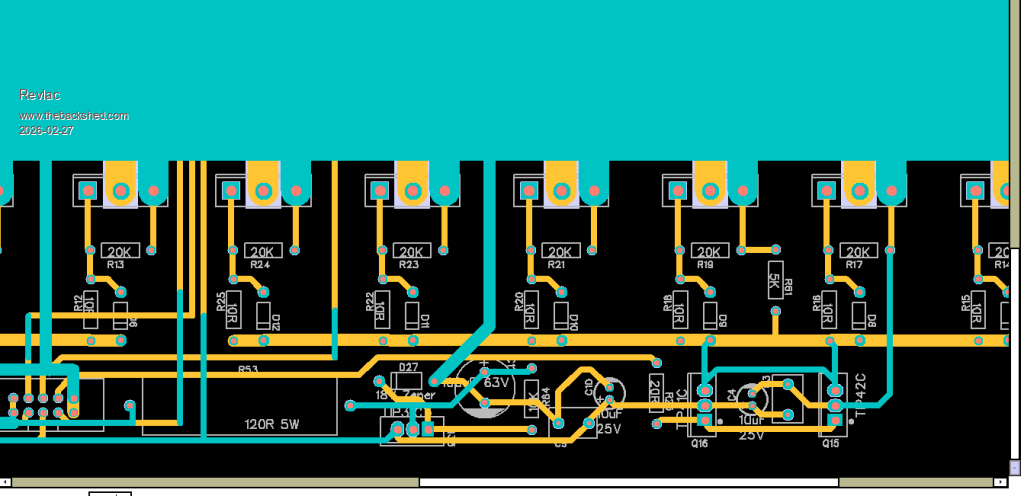
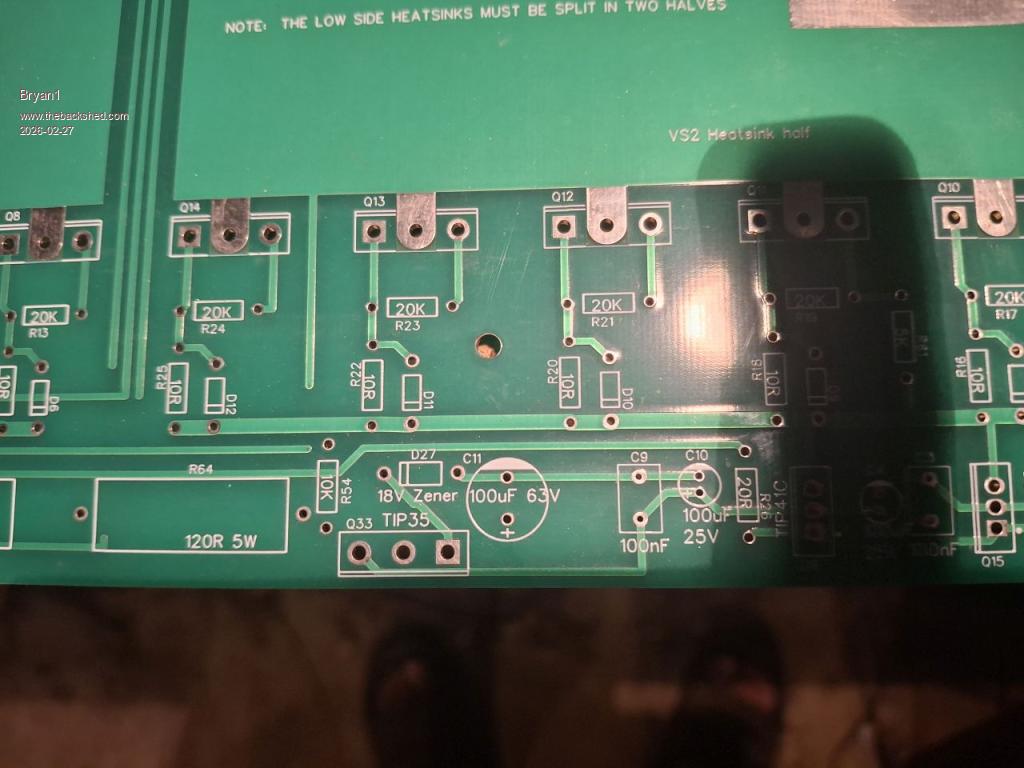
Brian, did you (or someone else) see the last Gerber PCB mad board file, there might have been some changes to the power board Depending on which board you have, the latest has a 10K on Pin 1 of the TIP35C, as well as the 18v Zener, my board has not got the 10K, not sure if there was anything else, or if that is correct?
Don't want to create any confusion, but worth checking solder joints around the TIP41 and 42C just to be sure.Cheers Aaron Off The Grid
Bryan1 Guru Joined: 22/02/2006 Location: AustraliaPosts: 2297
Posted: 02:58am 27 Feb 2026
Copy link to clipboard
Print this post
Hi Aaron I do have that latest board but that 100uf cap is around the other way
Now Keepis I always use that 60 ohm 120 watt bank of resistors and have a voltage meter attached also with the programmable power supply shows the current draw and on charging 400mA was the highest current until the caps got to 20 volts then the current draw dropped to 50mA.
KeepIS Guru Joined: 13/10/2014 Location: AustraliaPosts: 2286
Posted: 03:38am 27 Feb 2026
Copy link to clipboard
Print this post
Both boards look right with respect to the CAP, different tracks, unless I'm blind.
Brian, thats good that you are still using the resistors
BUT
if the voltage gets to 20V, then the resistor and the current limit mean NOTHING!
If you were to make a slip up when measuring components OR plugging in or disconnecting the Ribbon cable to the power board, Then the Charged caps, of the value you have, could deliver over a 1000A pulse to the FETS. . Edited 2026-02-27 13:38 by KeepISNANO:Inverter V 8.4ks - Linux AvrDude GUI script V4.1
Bryan1 Guru Joined: 22/02/2006 Location: AustraliaPosts: 2297
Posted: 03:47am 27 Feb 2026
Copy link to clipboard
Print this post
Keepis one time I took the ribbon cable it did spark now I don't know whether this is any good but I measured in relation to the gate the resistance.
Gate to centre pin 1.035 Mohm Gate to other pin 1.946Kohm
Trying a few fets they all show the same value too.
KeepIS Guru Joined: 13/10/2014 Location: AustraliaPosts: 2286
Posted: 05:35am 27 Feb 2026
Copy link to clipboard
Print this post
If the power board "unplugged" from the Controller, comes up to the supply rail via the resistors, then the problem is either the controller board is not outputting the correct signals, a wiring error in the ribbon cable, or an error in the FET drivers.NANO:Inverter V 8.4ks - Linux AvrDude GUI script V4.1
Bryan1 Guru Joined: 22/02/2006 Location: AustraliaPosts: 2297
Posted: 06:00am 27 Feb 2026
Copy link to clipboard
Print this post
Keepis if it does come down to a ribbon cable I made then I better get one made as my attempts were maybe too heavy handed.
Now the control board was remade with all new components and I did get extra fet driver chips.
The power board does come up to VBAT or just below it and the green led on the board does light up.
Tomorrow I will hookup my scope and do the tests to see what signals are coming from the ribbon cable where TinyT gave all the hookup details on a previous page.
When I got Roger to solder on those heavy wires we did look over the board and found no errors.
Now the fact with the ribbon cable not connected the LCD is showing the inverter is on and the TOR and HS temps are reading OK and changing with the temps.
As far as the wrong code only Poida can answer that question as I am using the codes he sent me. But the LCD serial code didn't work where the LCD from my MTTP project worked so the control board is working but the BV is showing 0.0.
The VBat connection on the control board was left blank as last time it vaporized so that maybe the reason the BV is showing zero. Edited 2026-02-27 16:06 by Bryan1
KeepIS Guru Joined: 13/10/2014 Location: AustraliaPosts: 2286
Posted: 06:25am 27 Feb 2026
Copy link to clipboard
Print this post
Yes likely, if you are worried, put a 1K resistor in series with the VBat connection to the board, it might read slightly off, but at least you can test it correctly. NANO:Inverter V 8.4ks - Linux AvrDude GUI script V4.1
Bryan1 Guru Joined: 22/02/2006 Location: AustraliaPosts: 2297
Posted: 06:45am 27 Feb 2026
Copy link to clipboard
Print this post
Good suggestion mate now as I left the breadboard connector off the VBat + connection from that rear VBat I made I could easily make a cable with that 1K resistor and plug it into the VBat pin on the 10 pin connector.
tinyt Guru Joined: 12/11/2017 Location: United StatesPosts: 564
Posted: 02:18pm 27 Feb 2026
Copy link to clipboard
Print this post
Make sure that the power board is good before you plug the 10-pin connector from the brainboard.
On the power board, double check orientation of the electrolytic capacitors, diodes, and transistors. Make sure the TIP41's and the TIP42's are in their right places with correct orientation. You can do a rough shorted check on the installed mosfets using an ohmmeter.
I assume the TIP35 is an 18-volt linear regulator if D27 is an 18 volt zener. Is it outputting regulated 18 volts if the input voltage is 20 volts or higher?
Bryan1 Guru Joined: 22/02/2006 Location: AustraliaPosts: 2297
Posted: 11:37pm 28 Feb 2026
Copy link to clipboard
Print this post
Ok with this wet weather got the noise of my genset going to charge the shed battery.
Anyway powered up the controller board and measured 17.8 volts on the 18V zener, now when the ohm meter is used the Vbat + and VBat - are shorted out. Doing an ohm check on a few fets shows the gate is isolated and the source and drain pins are a dead short, so would this mean the fets are gone?
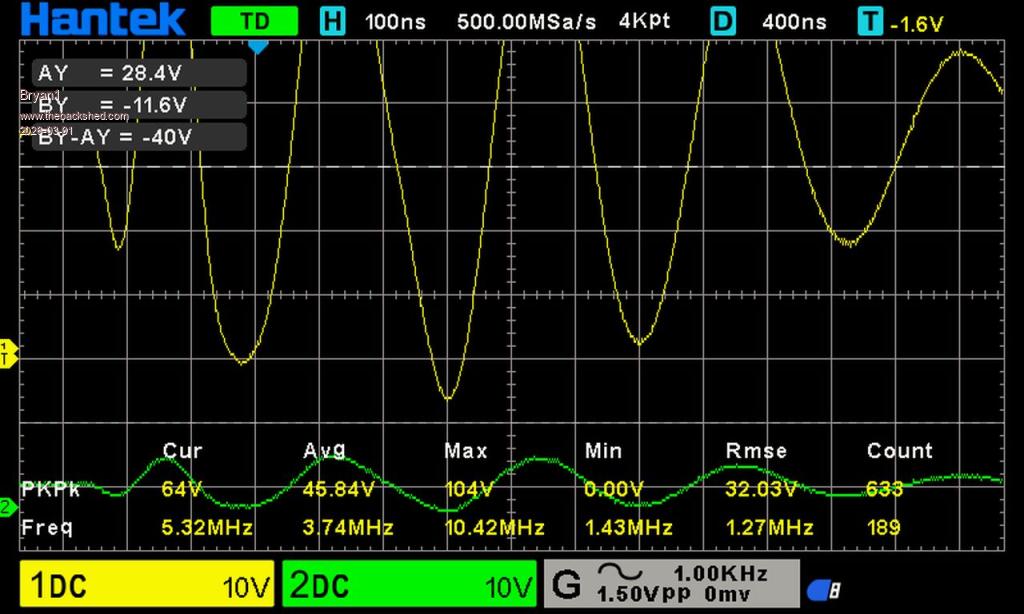
Anyway setup the scope and got a pic of the L01 and L02 first test
Regards Bryan
Godoh Guru Joined: 26/09/2020 Location: AustraliaPosts: 714
Posted: 01:24am 01 Mar 2026
Copy link to clipboard
Print this post
Hi Bryan, is the FETs show short on an ohm meter they are most likely dead. I would suggest removing one that shows the short and checking it off the board. That will rule out other components being shorted. Good luck Pete
Bryan1 Guru Joined: 22/02/2006 Location: AustraliaPosts: 2297
Posted: 02:54am 01 Mar 2026
Copy link to clipboard
Print this post
Well I had to to get and get some fuel for the gensets as this seems like the first time they have run since last winter and had a bit of a think about this.
Got home and checked a new fet and this time didn't have the ohm meter on beep now between the source and drain it around 90K ohms on the new one and on testing the front bank of fets they all show around the ohms as the new one so I don't think the fets are gone.
Now this morning I did notice some metal shavings on the front of the power board so when later this arvo I'll give the board a blast of compressed air and check again.
Regards Bryan
Edit just gave the power board a blast of compressed air and tried again where I limited the current to 200mA @24 volts. With the ribbon cable connected the voltage is 0.1V and the full 200mA is used. Take the ribbon cable off and the voltage when rising didn't even take 150mA.
Now I have put the ohm meter on the Vbat+ and Vbat - pins and the ohms starting around 90 ohm and has risen to 600ohm over about a minute and is slowly rising. Edited 2026-03-01 13:41 by Bryan1
KeepIS Guru Joined: 13/10/2014 Location: AustraliaPosts: 2286
Posted: 04:23am 01 Mar 2026
Copy link to clipboard
Print this post
It look like the FETS are being turned on hard, so incorrect drive signals for a number of reasons, or a power board problem somewhere ????
Bryan1 Guru Joined: 22/02/2006 Location: AustraliaPosts: 2297
Posted: 04:58am 01 Mar 2026
Copy link to clipboard
Print this post
TinyT I put a 10 connector on the end of the ribbon cable where VS1 and VS2 were connected to the ground on the connector.
Now decided to reprogram the nano and this is the output from avrdude for me each time
sudo avrdude -v -c usbasp -p m328P -F -v -U flash:w:/home/Bryan/Documents/inverter.hex:i Avrdude version 8.1 Copyright see https://github.com/avrdudes/avrdude/blob/main/AUTHORS
System wide configuration file is /home/Bryan/Documents/avrdude.conf User configuration file /root/.avrduderc does not exist
Using port : usb Using programmer : usbasp Seen device from vendor >www.fischl.de< Seen product >USBasp< AVR part : ATmega328P Programming modes : SPM, ISP, HVPP, debugWIRE
Programmer type : usbasp Description : USBasp ISP and TPI programmer Auto set sck period Error usbasp_spi_set_sck_period() usbasp.c 1031: cannot set sck period; please check for usbasp firmware update
AVR device initialized and ready to accept instructions Reading | ################################################## | 100% 0.00 s Device signature = 1E 95 16 (ATmega328PB) Warning main() main.c 1781: expected signature for ATmega328P is 1E 95 0F Auto-erasing chip as flash memory needs programming (-U flash:w:...) specify the -D option to disable this feature Auto set sck period Error usbasp_spi_set_sck_period() usbasp.c 1031: cannot set sck period; please check for usbasp firmware update Erased chip Reading 10214 bytes for flash from input file inverter.hex in 2 sections of [0, 0x7f9d]: 81 pages and 154 pad bytes Writing 10214 bytes to flash Writing | ################################################## | 100% 6.39 s Reading | ################################################## | 100% 5.27 s 10214 bytes of flash verified
Avrdude done. Thank you.
It's that error usbasp spi set_sck period that may not be programming the nano Edited 2026-03-01 14:58 by Bryan1
KeepIS Guru Joined: 13/10/2014 Location: AustraliaPosts: 2286
Posted: 05:09am 01 Mar 2026
Copy link to clipboard
Print this post
Yes that is fine, but verbose output is set to -v -v
If you are using my GUI, the command line in the setting file must have the lower case -v removed.
You then set the desired level of info by changing the Verbose: current = 0, in the GUI, 0 is all you need once you have everything working.
-p m328P -F -v -U ^ | remove This one
That is not a problem FYI: You can upload a new version of firmware into the Programmer, I did the other day, it fixes those error messages.

 Notice. New forum software under development. It's going to miss a few functions and look a bit ugly for a while, but I'm working on it full time now as the old forum was too unstable. Couple days, all good. If you notice any issues, please contact me.


 Print this post


 now between the source and drain it around 90K ohms on the new one and on testing the front bank of fets they all show around the ohms as the new one so I don't think the fets are gone.

