
| Menu | JAQForum Ver 19.10.27 |
| Menu | JAQForum Ver 19.10.27 |
Forum Index : Microcontroller and PC projects : PicoMite 6.03.00 betas
  Page 6 of 6 Page 6 of 6 |
||||||
With empty memory or with program after > list PRESS ANY KEY ... PicoMite MMBasic RP2040 V6.03.00B5 Copyright 2011-2026 Geoff Graham Copyright 2016-2026 Peter Mather > option list PicoMite MMBasic RP2040 V6.03.00B5 OPTION SYSTEM I2C GP20,GP21 OPTION COLOR CODE ON OPTION HEARTBEAT OFF OPTION PICO OFF OPTION CPU SPEED (KHz) 200000 OPTION DISPLAY 50, 100 OPTION SDCARD GP19, GP10, GP11, GP12 OPTION F1 help OPTION F7 list pins OPTION F8 list system i2c OPTION F9 fm > list PRESS ANY KEY ... > EDIT is working better and better and also a huge improvement with the F12 key. I use a comment one line before a SUB routine, but that can be fixed in the code. An empty line would also be handy after END SUB, before DO, and after LOOP, or including the F12 in OPTION, but including a ' character in the code works fine too. Jan. |
||||||
Peter, An update on commandline wrapping. I looked at the source and can see your fixes and they seem to be in B5. I can see the ESC[?7h coming back when the editor exits. (MMCC in monitor mode) but it does not seem to restore scrolling. If I do Print Chr$(27)+"[?7h" at command line it is restored and wrapping is OK. In the code the ESC[?7h is between a few other ESC sequences I wonder if is not being acted on for some reason. When not working and you type past the end of the line in the console it doesn't go to the next line. Do you see this after exiting the editor. Does anyone else? I tried Teraterm directly connected and also via MMCC. Gerry P.S. Putty and GFXTerm seem OK. So looks like only TeraTerm , is it just for me? Edited 2026-05-05 10:21 by disco4now Footnote added 2026-05-05 15:02 by disco4now See here for suggested fix. |
||||||
Repeated Rob's test (for i=1 to 200 : ? i; : pause 200 : next i on b4, TeraTerm 5.2) this morning and wrapping worked. Opened the editor then saved. Wrapping no longer working, applied your Print Chr$(27)+"[?7h" at the command line and wrapping is OK again. So not just you. |
||||||
jepp, wrapping ? using WebMite MMBasic RP2350A Edition V6.03.00B5 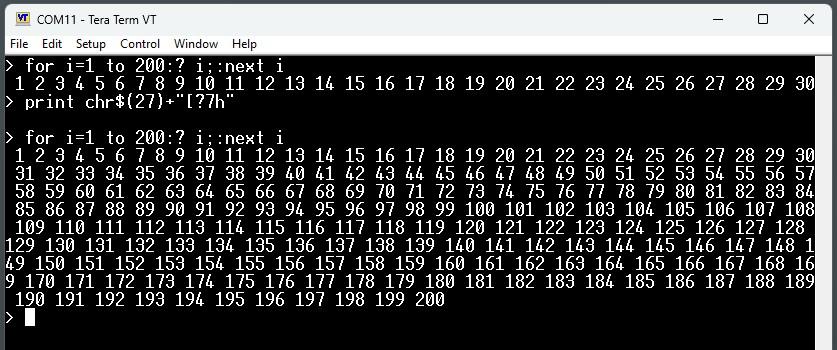 /Peter63 |
||||||
Hi Phil, Its known to not wrap after EDIT in B4 but checking if fixed in B5. |
||||||
Line wrap ok after b5 update. No line wrap when running from saved program or at command prompt. Print Chr$(27)+"[?7h" restores it for both, until the next edit. > update firmware PicoMite MMBasic RP2040 V6.03.00B5 Copyright 2011-2026 Geoff Graham Copyright 2016-2026 Peter Mather Firmware updated Formatting the A: drive > option list PicoMite MMBasic RP2040 V6.03.00B5 OPTION COLOURCODE ON OPTION CPUSPEED (KHz) 200000 > LIST > > for i=1 to 200 : ? i; : pause 200 : next i 1 2 3 4 5 6 7 8 9 10 11 12 13 14 15 16 17 18 19 20 21 22 23 24 25 26 27 28 29 30 31 32 33 34 35 36 37 38 39 40 41 42 43 44 45 46 47 48 49 50 51 52 53 54 55 56 57 58 59 60 61 62 63 64 65 66 67 68 69 70 71 72 73 74 75 76 77 78 79 80 81 82 83 84 85 86 87 88 89 90 91 92 93 94 95 96 97 98 99 100 101 102 103 104 105 106 107 108 109 110 111 112 113 114 115 116 117 118 119 120 121 122 123 124 125 126 127 128 129 130 131 132 133 134 135 136 137 138 139 140 141 142 143 144 145 146 147 148 149 150 151 152 153 154 155 156 157 158 159 160 161 162 163 164 165 166 167 168 169 170 171 172 173 174 175 176 177 178 179 180 181 182 183 184 185 186 187 188 189 190 191 192 193 194 195 196 197 198 199 200 > > EDIT for i=1 to 200 : ? i; : pause 200 : next i F1:Save F2:Run F3:Find F4:Mark F5:Paste F7:Repl F7/8:Rpl/r F L:2 C:1 INS Saved 48 bytes > RUN 1 2 3 4 5 6 7 8 9 10 11 12 13 14 15 16 17 18 19 20 21 22 23 24 25 26 27 28 29 30 31 32 33 34 35 36 37 38 39 40 41 42 43 44 45 46 47 48 49 50 51 52 53 0 > > for i=1 to 200 : ? i; : pause 200 : next i 1 2 3 4 5 6 7 8 9 10 11 12 13 14 15 16 17 18 19 20 21 22 23 24 25 26 27 28 29 30 31 32 33 34 35 36 37 38 39 40 41 42 43 44 45 46 47 48 49 50 51 52 53 0 > LIST For i=1 To 200 : Print i; : Pause 200 : Next i > > Print Chr$(27)+"[?7h" > for i=1 to 200 : ? i; : pause 200 : next i 1 2 3 4 5 6 7 8 9 10 11 12 13 14 15 16 17 18 19 20 21 22 23 24 25 26 27 28 29 30 31 32 33 34 35 36 37 38 39 40 41 42 43 44 45 46 47 48 49 50 51 52 53 54 55 56 57 58 59 60 61 62 63 64 65 66 67 68 69 70 71 72 73 74 75 76 77 78 79 80 81 82 83 84 85 86 87 88 89 90 91 92 93 94 95 96 97 98 99 100 101 102 103 104 105 106 107 108 109 110 111 112 113 114 115 116 117 118 119 120 121 122 123 124 125 126 127 128 129 130 131 132 133 134 135 136 137 138 139 140 141 142 143 144 145 146 147 148 149 150 151 152 153 154 155 156 157 158 159 160 161 162 163 164 165 166 167 168 169 170 171 172 173 174 175 176 177 178 179 180 181 182 183 184 185 186 187 188 189 190 191 192 193 194 195 196 197 198 199 200 > RUN 1 2 3 4 5 6 7 8 9 10 11 12 13 14 15 16 17 18 19 20 21 22 23 24 25 26 27 28 29 30 31 32 33 34 35 36 37 38 39 40 41 42 43 44 45 46 47 48 49 50 51 52 53 54 55 56 57 58 59 60 61 62 63 64 65 66 67 68 69 70 71 72 73 74 75 76 77 78 79 80 81 82 83 84 85 86 87 88 89 90 91 92 93 94 95 96 97 98 99 100 101 102 103 104 105 106 107 108 109 110 111 112 113 114 115 116 117 118 119 120 121 122 123 124 125 126 127 128 129 130 131 132 133 134 135 136 137 138 139 140 141 142 143 144 145 146 147 148 149 150 151 152 153 154 155 156 157 158 159 160 161 162 163 164 165 166 167 168 169 170 171 172 173 174 175 176 177 178 179 180 181 182 183 184 185 186 187 188 189 190 191 192 193 194 195 196 197 198 199 200 > > for i=1 to 200 : ? i; : pause 200 : next i 1 2 3 4 5 6 7 8 9 10 11 12 13 14 15 16 17 18 19 20 21 22 23 24 25 26 27 28 29 30 31 32 33 34 35 36 37 38 39 40 41 42 43 44 45 46 47 48 49 50 51 52 53 54 55 56 57 58 59 60 61 62 63 64 65 66 67 68 69 70 71 72 73 74 75 76 77 78 79 80 81 82 83 84 85 86 87 88 89 90 91 92 93 94 95 96 97 98 99 100 101 102 103 104 105 106 107 108 109 110 111 112 113 114 115 116 117 118 119 120 121 122 123 124 125 126 127 128 129 130 131 132 133 134 135 136 137 138 139 140 141 142 143 144 145 146 147 148 149 150 151 152 153 154 155 156 157 158 159 160 161 162 163 164 165 166 167 168 169 170 171 172 173 174 175 176 177 178 179 180 181 182 183 184 185 186 187 188 189 190 191 192 193 194 195 196 197 198 199 200 > Adding the fix to the first line of the program restores line wrap when RUN or at command prompt. > LIST Print Chr$(27)+"[?7h" For i=1 To 200 : Print i; : Pause 200 : Next i > Another quirk, LIST prints PRESS ANY KEY always, even for a 1 line or 0 line program. > list Print Chr$(27)+"[?7h" For i=1 To 200 : Print i; : Pause 200 : Next i PRESS ANY KEY ... Line wrap doesn't work in MMCC v5.3.2 at all. The fix doesn't work in MMCC. Edited 2026-05-05 14:19 by phil99 |
||||||
Well that was interesting just upgraded the firmware to B5 and the LCD booted up in serial mode PicoMite MMBasic RP2350B V6.03.00B5 Copyright 2011-2026 Geoff Graham Copyright 2016-2026 Peter Mather Firmware updated > option list PicoMite MMBasic RP2350B V6.03.00B5 OPTION SYSTEM SPI GP2,GP3,GP4 OPTION FLASH SIZE 16777216 OPTION COLOURCODE ON OPTION PICO OFF OPTION CPUSPEED (KHz) 200000 OPTION LCDPANEL CONSOLE OPTION DISPLAY 26, 60 OPTION LCDPANEL ILI9488, LANDSCAPE,GP5,GP6,GP7,GP1 OPTION GUI CONTROLS 75 OPTION TOUCH GP10,GP11 GUI CALIBRATE 0, 3944, 3813, -1288, -876 OPTION SDCARD GP12 Well that sure did save having to put all the options back in or should I have done a clear flash first? Also just tried run and sure enough my program loaded Edited 2026-05-05 14:54 by Bryan1 |
||||||
Peter, I think the restore autowrap on Teraterm is a bit sensitive to where it is placed. If it is placed after the VT100 clear screen it seems to work. If before it does not do its thing. This MMBasic Restores line wrap only if the restore autowrap is last. 'Sequence to restore teraterm 'Restore Wrap needs to follow the VT100 clear and Home Print Chr$(27)+"[?1000l" 'no mouse report 'Print Chr$(27)+"[?7h" ' restore wrap Print Chr$(27)+"8"+Chr$(27)+"[2J"+Chr$(27)+"[H" 'Vt100 clear screen home Print Chr$(27)+"[?7h" I have not compiled or tested but this should be the fix in the source.i.e. just swap the oreder of the lines. PrintString("\033[?1000l"); // Tera Term turn off mouse click report in vt200 PrintString("\0338\033[2J\033[H"); // vt100 clear screen and home cursor PrintString("\033[?7h"); // restore autowrap after the VT100 Clear Gerry Edited 2026-05-05 15:07 by disco4now |
||||||
Thinking about what VT100 was originally intended for, restoring auto-wrap after CLS seems to make sense to me. There would be no point in restoring it when the print head was part way across the paper or half way down it. The only sensible place is at the start of the next sheet. CLS for a VDU seems to be a derivation of this behaviour so I suppose it figures that it should work in the same way. Attempting to restore auto-wrap at any other time shouldn't really be done. :) |
||||||
| Page 6 of 6 |
||||||
 |
The Back Shed's forum code is written, and hosted, in Australia. |


